Welcome Guest ( Log In | Register )

Outline · [ Standard ] · Linear+

 Experts, QHD 2560 x 1440 Worth It for 24" Monitor?

views
     
TSDwango
post Apr 3 2021, 01:12 PM, updated 5y ago

Casual
***
Junior Member
491 posts

Joined: Oct 2012
Need help from the IT professionals or monitor experts here.

I've checked the Internet on this subject and there is no firm consensus on this matter. Some say 2560 x 1440 QHD is only useful for 27" and larger displays, hence not so useful for 24". They mentioned 1920 x 1080 FHD is already sufficient for 24", don't need to go up to QHD 2560 x 1440.

However, there are some people who thought 2560 x 1440 QHD is not wasted on 24" monitors, saying the clarity and sharpness will be noticeable and better compared to 1920 x 1080 FHD on a similar 24".

Any thoughts? The price difference between the both monitors is about RM300. The displays under consideration is from Dell as below.

Dell 24" Monitor: P2419H - RM769
Dell 24" Monitor: P2421D - RM1,139


lil_chocobo
post Apr 3 2021, 01:21 PM

On my way
****
Senior Member
602 posts

Joined: May 2006
From: kay ell


1080 24
qhd 27 100% scaling
4k 32. 4k 32 at 125% scaling just nice. 100% too small woi.
but thats my preferences lar.

TSDwango
post Apr 3 2021, 01:24 PM

Casual
***
Junior Member
491 posts

Joined: Oct 2012
QUOTE(lil_chocobo @ Apr 3 2021, 01:21 PM)
1080 24
qhd 27 100% scaling
4k 32. 4k 32 at 125% scaling just nice. 100% too small woi.
but thats my preferences lar.
*
Yes I read about the scaling issue in that zooming to 125% or higher may be required on QHD is it is on a 24" monitor.

From your response I presume it is better for me to save the RM300 and go with 1080 FHD if it is a 24".
myway1985
post Apr 3 2021, 01:29 PM

10k Club
********
All Stars
12,091 posts

Joined: Jun 2014
From: Kuchai Lama


QUOTE(Dwango @ Apr 3 2021, 01:12 PM)
Need help from the IT professionals or monitor experts here.

I've checked the Internet on this subject and there is no firm consensus on this matter. Some say 2560 x 1440 QHD is only useful for 27" and larger displays, hence not so useful for 24". They mentioned 1920 x 1080 FHD is already sufficient for 24", don't need to go up to QHD 2560 x 1440.

However, there are some people who thought 2560 x 1440 QHD is not wasted on 24" monitors, saying the clarity and sharpness will be noticeable and better compared to 1920 x 1080 FHD on a similar 24".

Any thoughts? The price difference between the both monitors is about RM300. The displays under consideration is from Dell as below.

Dell 24" Monitor: P2419H - RM769
Dell 24" Monitor: P2421D - RM1,139
*
P2419H QHD ah? https://www.dell.com/en-my/shop/dell-24-mon...chspecs_section
fhd only...

i got 3yr warranty refurbished stock at Rm619.. same like new


Dell 24 Inch QHD USB-C Monitor - P2421DC
RM1099 3yr warranty
laksamana
post Apr 3 2021, 01:30 PM

Regular
******
Senior Member
1,356 posts

Joined: Nov 2006
From: An Illuminati organization ..


I'm on 1440p with a 32" at 100% scaling

It's perfect!
myway1985
post Apr 3 2021, 01:31 PM

10k Club
********
All Stars
12,091 posts

Joined: Jun 2014
From: Kuchai Lama


Dell 27 4K UHD Monitor - S2721QS
RM1099 3yr warranty
scorgio
post Apr 3 2021, 01:32 PM

Look at all my stars!!
*******
Senior Member
4,695 posts

Joined: Jan 2005


I'm on Dell 25" 2560x1440 at 125%.
TSDwango
post Apr 3 2021, 01:32 PM

Casual
***
Junior Member
491 posts

Joined: Oct 2012
QUOTE(myway1985 @ Apr 3 2021, 01:29 PM)
P2419H QHD ah? https://www.dell.com/en-my/shop/dell-24-mon...chspecs_section
fhd only...

i got 3yr warranty refurbished stock at Rm619.. same like new
Dell 24 Inch QHD USB-C Monitor - P2421DC
RM1099 3yr warranty
*
P2419H is 1920 x 1080 FHD. The P2421D is QHD.

Not sure about the P2421 DC. I think it is a lower spec model than the P2421 D.

This post has been edited by Dwango: Apr 3 2021, 01:32 PM
TSDwango
post Apr 3 2021, 01:34 PM

Casual
***
Junior Member
491 posts

Joined: Oct 2012
QUOTE(scorgio @ Apr 3 2021, 01:32 PM)
I'm on Dell 25" 2560x1440 at 125%.
*
Any difference if compared to equivalent 25" 1920x1080? Purely on picture quality such as colours, clarity, sharpness etc.
kingrey93
post Apr 3 2021, 01:35 PM

New Member
*
Junior Member
8 posts

Joined: Aug 2012


not worth it, get 27" for 2k
TSDwango
post Apr 3 2021, 01:35 PM

Casual
***
Junior Member
491 posts

Joined: Oct 2012
QUOTE(myway1985 @ Apr 3 2021, 01:31 PM)
Dell 27 4K UHD Monitor - S2721QS
RM1099 3yr warranty
*
Wow, so cheap meh? Size is too big for me but let me check
Andrewtst
post Apr 3 2021, 01:39 PM

Forgiveness is Happiness
*********
All Stars
29,779 posts

Joined: Jan 2009
From: Johor, Malaysia.


The best resolution v/s size
  • 1080p - 24" Wide 100% scaling. 29" Ultrawide 100% scaling.
  • 1440p - 27" Wide 100% scaling, 34" Ultrawide 100% scaling.
  • 2160p (4k) - 32" above Wide but need 125% ~ 200% scaling.
+/- 1" belong to same category as not much differences, for example 25" should be same category as 24" and etc.

In general not worth getting 1440p for 24" as scaling required but Windows 10 scaling not perfect, it make classic apps blur.

This post has been edited by Andrewtst: Apr 3 2021, 01:49 PM
TSDwango
post Apr 3 2021, 01:43 PM

Casual
***
Junior Member
491 posts

Joined: Oct 2012
I know 27" or 32" is larger and look better particularly if there is space. For my applications with limited desk space and usage (just normal Internet surfing at home, some movies and basic Microsoft Word and Excel applications), a 24" would do fine.

Also, I stumbled upon this video on YouTube on selecting the proper monitor size 24" vs 27" and the guy settled for 25" for his preference.


Patent
post Apr 3 2021, 01:45 PM

(⌐■_■)
*******
Senior Member
2,004 posts

Joined: Mar 2009


24" with 1440p at 100% scaling on windows 10 is not eyes friendly, you will squint your eyes trying to read stuff

you can set custom scaling if you think 125% is too big, I set mine at 110%

personally I think its not bad but 27" 1440p is definitely better ergonomically
TSDwango
post Apr 3 2021, 01:50 PM

Casual
***
Junior Member
491 posts

Joined: Oct 2012
Ok thanks for all replies. Let me revisit the 27" and see if it can fit in..
M4YH3M
post Apr 3 2021, 01:50 PM

Getting Started
**
Junior Member
67 posts

Joined: Aug 2009


QUOTE(Andrewtst @ Apr 3 2021, 01:39 PM)
The best resolution v/s size

  • 1080p - 24" Wide 100% scaling. 29" Ultrawide 100% scaling.
  • 1440p - 27" Wide 100% scaling, 34" Ultrawide 100% scaling.
  • 2160p (4k) - 32" above Wide but need 125% ~ 200% scaling.
+/- 1" belong to same category as not much differences, for example 25" should be same category as 24" and etc.

In general not worth getting 1440p for 24" as scaling required but Windows 10 scaling not perfect, it make classic apps blur.
*
Basically this. Windows scaling occasionally makes you feel something wrong with your display but only happens when you are windowed programs. If youre buying for media consumption i.e. movies, gaming, etc. then no need to worry about it. And yes, there is discernable difference between FHD and QHD on 24" monitor.

TLDR: Get the FHD if you purchasing primarily for work (no need to deal with scaling). Get the QHD if youre purchasing for media (crispy graphics).
Andrewtst
post Apr 3 2021, 01:55 PM

Forgiveness is Happiness
*********
All Stars
29,779 posts

Joined: Jan 2009
From: Johor, Malaysia.


QUOTE(M4YH3M @ Apr 3 2021, 01:50 PM)
Basically this. Windows scaling occasionally makes you feel something wrong with your display but only happens when you are windowed programs. If youre buying for media consumption i.e. movies, gaming, etc. then no need to worry about it. And yes, there is discernable difference between FHD and QHD on 24" monitor.

TLDR: Get the FHD if you purchasing primarily for work (no need to deal with scaling). Get the QHD if youre purchasing for media (crispy graphics).
*
I am not buying PC for media consumption only and I believe mostly people not also. PC is for everything what PC can do.

The blur is so drastic obvious, even Windows apps itself also happen. This include apps from Administrative Tools. It do can be solved but need manual set for every single blur issue apps and still some build-in apps unable to set.

In general for now, for crystal sharp and not overloaded when gaming is 1440p in 27" Wide or 34" Ultrawide.

But if prefer smaller size, 1080p in 24" still good as it is still sharp (not crystal sharp as still obvious seen font edge issue).

This post has been edited by Andrewtst: Apr 3 2021, 02:02 PM
M4YH3M
post Apr 3 2021, 01:58 PM

Getting Started
**
Junior Member
67 posts

Joined: Aug 2009


QUOTE(Andrewtst @ Apr 3 2021, 01:55 PM)
I am not buying PC for media consumption only. PC is for everything what PC can do.

The blur is so drastic obvious, even Windows apps itself also happen. This include apps from Administrative Tools. It do can be solved but need manual set for every single apps and still some build-in apps unable to set.

In general for now, for crystal sharp and not overloaded when gaming is 1440p in 27" Wide or 34" Ultrawide.
*
Okay... Im suggesting that to TS lol
Andrewtst
post Apr 3 2021, 02:00 PM

Forgiveness is Happiness
*********
All Stars
29,779 posts

Joined: Jan 2009
From: Johor, Malaysia.


QUOTE(M4YH3M @ Apr 3 2021, 01:58 PM)
Okay... Im suggesting that to TS lol
*
Then you should Dwango or quote TS post, not my post. smile.gif
myway1985
post Apr 3 2021, 02:11 PM

10k Club
********
All Stars
12,091 posts

Joined: Jun 2014
From: Kuchai Lama


QUOTE(Dwango @ Apr 3 2021, 01:32 PM)
P2419H is 1920 x 1080 FHD. The P2421D is QHD.

Not sure about the P2421 DC. I think it is a lower spec model than the P2421 D.
*
lol.. P2421DC is the 1 higher spec... with TYPE C daisy chain
myway1985
post Apr 3 2021, 02:12 PM

10k Club
********
All Stars
12,091 posts

Joined: Jun 2014
From: Kuchai Lama


QUOTE(Dwango @ Apr 3 2021, 01:35 PM)
Wow, so cheap meh? Size is too big for me but let me check
*
can pm me https://www.facebook.com/penguinitsolution/
Patent
post Apr 3 2021, 02:15 PM

(⌐■_■)
*******
Senior Member
2,004 posts

Joined: Mar 2009


tbh you can convert the 24" FHD monitor to QHD with gpu driver like radeon virtual super resolution

or just use it on your current monitor to see how it look
M4YH3M
post Apr 3 2021, 02:18 PM

Getting Started
**
Junior Member
67 posts

Joined: Aug 2009


QUOTE(Andrewtst @ Apr 3 2021, 02:00 PM)
Then you should Dwango or quote TS post, not my post. smile.gif
*
Quoted your post coz its useful for TS la.. 😂
M4YH3M
post Apr 3 2021, 02:21 PM

Getting Started
**
Junior Member
67 posts

Joined: Aug 2009


QUOTE(Patent @ Apr 3 2021, 02:15 PM)
tbh you can convert the 24" FHD monitor to QHD with gpu driver like radeon virtual super resolution

or just use it on your current monitor to see how it look
*
Doesnt work on desktop tho, only DirectX
scorgio
post Apr 3 2021, 02:35 PM

Look at all my stars!!
*******
Senior Member
4,695 posts

Joined: Jan 2005


QUOTE(Dwango @ Apr 3 2021, 01:34 PM)
Any difference if compared to equivalent 25" 1920x1080? Purely on picture quality such as colours, clarity, sharpness etc.
*
Previously I was on 24" 1920x1200.

The panel's are similar, both IPS, both display 98% of sRGB. As both running at optimum resolution, clarity & sharpness is similar.

My priority is the extra resolution. So I don't have to zoom in&out during photo editing too often.
Patent
post Apr 3 2021, 03:00 PM

(⌐■_■)
*******
Senior Member
2,004 posts

Joined: Mar 2009


QUOTE(M4YH3M @ Apr 3 2021, 02:21 PM)
Doesnt work on desktop tho, only DirectX
*
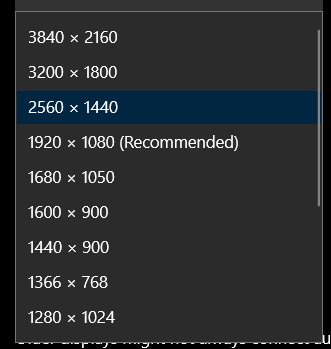
user posted image

not sure what you mean doesnt work on desktop, I'm using it right now on my desktop
lil_chocobo
post Apr 11 2021, 10:16 AM

On my way
****
Senior Member
602 posts

Joined: May 2006
From: kay ell


QUOTE(Dwango @ Apr 3 2021, 01:24 PM)
Yes I read about the scaling issue in that zooming to 125% or higher may be required on QHD is it is on a 24" monitor.

From your response I presume it is better for me to save the RM300 and go with 1080 FHD if it is a 24".
*
if its for productivity, go for 27 qhd, even better 32 at 4k.

but not 27 at 4k, might be too small, and scaling will make it look like qhd.
Andrewtst
post Apr 11 2021, 12:36 PM

Forgiveness is Happiness
*********
All Stars
29,779 posts

Joined: Jan 2009
From: Johor, Malaysia.


QUOTE(lil_chocobo @ Apr 11 2021, 10:16 AM)
if its for productivity, go for 27 qhd, even better 32 at 4k.

but not 27 at 4k, might be too small, and scaling will make it look like qhd.
*
TBH 4k in 32" also need scaling, even 55" also.

Basically 4k resolution is unusable without scaling.
lil_chocobo
post Apr 12 2021, 12:44 AM

On my way
****
Senior Member
602 posts

Joined: May 2006
From: kay ell


QUOTE(Andrewtst @ Apr 11 2021, 12:36 PM)
TBH 4k in 32" also need scaling, even 55" also.

Basically 4k resolution is unusable without scaling.
*
yeah, but at least not to a point where making uhd look like qhd kind of scaling. im using 125%, texts are readable. cant imagine 4k at 27 at the same scaling.

oh ya. not gaming of course. only productivity. having that 4 windows in one screen is really helps alot.

 

Change to:
| Lo-Fi Version
0.0194sec    0.41    5 queries    GZIP Disabled
Time is now: 21st December 2025 - 06:52 AM