Welcome Guest ( Log In | Register )

Outline · [ Standard ] · Linear+

 Win 7 upgrade to Win 10 for Asus N56VZ, can it be done?

views
     
TS9926
post Mar 31 2021, 02:32 PM, updated 5y ago

Getting Started
**
Junior Member
279 posts

Joined: Feb 2013


Hi guys, I am having a 8 years old Asus N56VZ running on Windows 7 home premium came with the PC. I am wondering is it possible to upgrade it to run Windows 10? Tried to google but I could not find a suitable driver for this PC to be used in Windows 10, and even Asus website itself no longer provide driver download for Windows 7 for this particular model. Some users in Oversea are able to upgrade it but having some issue with incompatible audio driver which cause the volume is very soft. Hope all the Sifu here can shed some light on this. TQ

*PC running on 8GB ram, I5-3210 CPU and 500GB SSD

*Quick update on 1st April 2021
I have upgraded to win 10 using the microsoft image creation tool via upgrade option, not doing a clean install. However I have encountered a few problem
- Card reader not working
- Bluetooth not showing up (solved by installing latest driver via windows update)
- GPU not showing up (solved via install latest Nvidia driver)
- CPU Temp reach 70c which normally only 55c when idling in Windows 7
- FN key not working at all

I have tried to install to latest driver / rolled back to old driver but still some issues can't be solved, anyone mind to help?

This post has been edited by 9926: Apr 1 2021, 04:36 PM
hightechgadgets8
post Mar 31 2021, 02:37 PM

\(^o^)/
*******
Senior Member
6,017 posts

Joined: Sep 2011


get a spare hdd and try, if driver problems, which i doubt has any, install back the old ssd
jimmychangas
post Mar 31 2021, 02:42 PM

Getting Started
**
Junior Member
149 posts

Joined: Jul 2012


Windows 10 usually installs the basic drivers soon after the OS installation itself.

I have installed Windows 10 on 2 Asus laptops from 2012; after letting Windows 10 go through all the updates via Windows Update, the display webcam audio drivers work fine. Even the brightness key on the keyboard works.
PJng
post Mar 31 2021, 02:47 PM

10k Club
********
All Stars
12,039 posts

Joined: Oct 2017


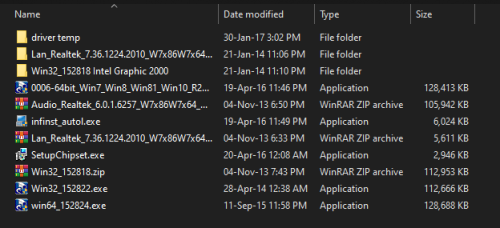
https://www.howtogeek.com/266072/you-can-st...7-8-or-8.1-key/

my pc i5 2300, also no windows 10 driver,
all i use windows 7 driver, no problem

i just try go to asus website, show empty webpage

just try again got win 7 and win 8 driver
if after install some component not working may try win 7 driver


This post has been edited by PJng: Mar 31 2021, 02:58 PM


Attached thumbnail(s)
Attached Image
TS9926
post Mar 31 2021, 03:04 PM

Getting Started
**
Junior Member
279 posts

Joined: Feb 2013


QUOTE(hightechgadgets8 @ Mar 31 2021, 02:37 PM)
get a spare hdd and try, if driver problems, which i doubt has any, install back the old ssd
*
oh great, never thought of using a spare HDD to try first, thanks for suggesting
TS9926
post Mar 31 2021, 03:06 PM

Getting Started
**
Junior Member
279 posts

Joined: Feb 2013


QUOTE(jimmychangas @ Mar 31 2021, 02:42 PM)
Windows 10 usually installs the basic drivers soon after the OS installation itself.

I have installed Windows 10 on 2 Asus laptops from 2012; after letting Windows 10 go through all the updates via Windows Update, the display webcam audio drivers work fine. Even the brightness key on the keyboard works.
*
I see, how about those software which came pre-installed in the PC? I know not all are useful but would like to retain it if possible. I know there is an eSupport folder in C drive which consist of all the software installer, just I am not sure whether it will work in Windows 10. Anyway thanks for sharing
hightechgadgets8
post Mar 31 2021, 03:07 PM

\(^o^)/
*******
Senior Member
6,017 posts

Joined: Sep 2011


QUOTE(jimmychangas @ Mar 31 2021, 02:42 PM)
Windows 10 usually installs the basic drivers soon after the OS installation itself.

I have installed Windows 10 on 2 Asus laptops from 2012; after letting Windows 10 go through all the updates via Windows Update, the display webcam audio drivers work fine. Even the brightness key on the keyboard works.
*
afaik windows update runs after activation, if unactivated, gotta manual install
PJng
post Mar 31 2021, 03:10 PM

10k Club
********
All Stars
12,039 posts

Joined: Oct 2017


if do clean install, those preinstalled software will gone
it give you a clean window without extra software
ktek
post Mar 31 2021, 03:17 PM

小喇叭
********
All Stars
13,202 posts

Joined: Jul 2006
QUOTE(PJng @ Mar 31 2021, 02:47 PM)
https://www.howtogeek.com/266072/you-can-st...7-8-or-8.1-key/

my pc i5 2300, also no windows 10 driver,
all i use windows 7 driver, no problem

i just try go to asus website, show empty webpage

just try again got win 7 and win 8 driver
if after install some component not working may try win 7 driver
*
i hate asus lagi teruk now server remove driver ASUSmy
TS9926
post Mar 31 2021, 03:21 PM

Getting Started
**
Junior Member
279 posts

Joined: Feb 2013


QUOTE(PJng @ Mar 31 2021, 02:47 PM)
https://www.howtogeek.com/266072/you-can-st...7-8-or-8.1-key/

my pc i5 2300, also no windows 10 driver,
all i use windows 7 driver, no problem

i just try go to asus website, show empty webpage

just try again got win 7 and win 8 driver
if after install some component not working may try win 7 driver
*
It is strange that when I go to ASUS website to download driver it show nothing...but you get to view a list of it.
Do I need all the drivers in your list or only certain driver?
PJng
post Mar 31 2021, 03:26 PM

10k Club
********
All Stars
12,039 posts

Joined: Oct 2017


QUOTE(ktek @ Mar 31 2021, 03:17 PM)
i hate asus lagi teruk now server remove driver ASUSmy
*
because i worry that happen, i download all driver on my second hard disk

user posted image

my pc got 2 HDD, so i clean install, second HDD still can access
QUOTE(9926 @ Mar 31 2021, 03:21 PM)
It is strange that when I go to ASUS website to download driver it show nothing...but you get to view a list of it.
Do I need all the drivers in your list or only certain driver?
*
1st i try link on google search result, it show empty page,
then i try a long patch, asus home page, driver, search, key in model name, then that list is show
normally i just see anything not working i only install,
or open device manager got anything show !
list time my pc intel chipset show !, on board card reader keep on show on This PC, i only install that driver
jimmychangas
post Mar 31 2021, 03:27 PM

Getting Started
**
Junior Member
149 posts

Joined: Jul 2012


QUOTE(9926 @ Mar 31 2021, 03:06 PM)
I see, how about those software which came pre-installed in the PC? I know not all are useful but would like to retain it if possible. I know there is an eSupport folder in C drive which consist of all the software installer, just I am not sure whether it will work in Windows 10. Anyway thanks for sharing
*
if you do a clean install you probably won't be getting any of the pre-installed software that came with your laptop. Like the other guy said, do it on a spare HDD/SSD which is a good idea.

QUOTE(hightechgadgets8 @ Mar 31 2021, 03:07 PM)
afaik windows update runs after activation, if unactivated, gotta manual install
*
you sir, are not wrong smile.gif
loki
post Mar 31 2021, 03:29 PM

Look at all my stars!!
*******
Senior Member
2,109 posts

Joined: Jan 2003
From: Damansara Damai, PJ


hybrid graphics, normally will face some problems getting the graphic drivers..
TS9926
post Mar 31 2021, 06:01 PM

Getting Started
**
Junior Member
279 posts

Joined: Feb 2013


QUOTE(PJng @ Mar 31 2021, 03:26 PM)
because i worry that happen, i download all driver on my second hard disk

user posted image

my pc got 2 HDD, so i clean install, second HDD still can access
1st i try link on google search result, it show empty page,
then i try a long patch, asus home page, driver, search, key in model name, then that list is show
normally i just see anything not working i only install,
or open device manager got anything show !
list time my pc intel chipset show !, on board card reader keep on show on This PC, i only install that driver
*
OKay thanks for the info, gonna try it after work today
TS9926
post Mar 31 2021, 06:02 PM

Getting Started
**
Junior Member
279 posts

Joined: Feb 2013


QUOTE(jimmychangas @ Mar 31 2021, 03:27 PM)
if you do a clean install you probably won't be getting any of the pre-installed software that came with your laptop. Like the other guy said, do it on a spare HDD/SSD which is a good idea.
you sir, are not wrong smile.gif
*
Alright, then I will try to install windows 10 on a separate HDD first, TQ
TS9926
post Mar 31 2021, 06:03 PM

Getting Started
**
Junior Member
279 posts

Joined: Feb 2013


QUOTE(loki @ Mar 31 2021, 03:29 PM)
hybrid graphics, normally will face some problems getting the graphic drivers..
*
What does hybrid graphics means?
PJng
post Mar 31 2021, 06:03 PM

10k Club
********
All Stars
12,039 posts

Joined: Oct 2017


QUOTE(9926 @ Mar 31 2021, 06:01 PM)
OKay thanks for the info, gonna try it after work today
*
typo , i mean long path, not long patch
ktek
post Apr 1 2021, 12:43 PM

小喇叭
********
All Stars
13,202 posts

Joined: Jul 2006
QUOTE(9926 @ Mar 31 2021, 06:03 PM)
What does hybrid graphics means?
*
meaning on board gpu can switch to geforce/ radeon gpu.
mix 2 in 1
TS9926
post Apr 1 2021, 04:32 PM

Getting Started
**
Junior Member
279 posts

Joined: Feb 2013


QUOTE(ktek @ Apr 1 2021, 12:43 PM)
meaning on board gpu can switch to geforce/ radeon gpu.
mix 2 in 1
*
I see, I have upgrade to win 10 this morning and the GPU just need to install driver only. But I encounter many problems like Bluetooth/card reader/keyboard function keys not working. CPU temperature also higher than when in Windows 7
ktek
post Apr 1 2021, 04:35 PM

小喇叭
********
All Stars
13,202 posts

Joined: Jul 2006
QUOTE(9926 @ Apr 1 2021, 04:32 PM)
I see, I have upgrade to win 10 this morning and the GPU just need to install driver only. But I encounter many problems like Bluetooth/card reader/keyboard function keys not working. CPU temperature also higher than when in Windows 7
*
if lazy to find one by one from device manager.
i recommend use driver genius (ok thing) from cena.
just avoid tick unnecessary option during setup

2 Pages  1 2 >Top
 

Change to:
| Lo-Fi Version
0.0211sec    0.39    6 queries    GZIP Disabled
Time is now: 9th December 2025 - 08:27 PM