Welcome Guest ( Log In | Register )

Bump Topic Topic Closed RSS Feed

Outline · [ Standard ] · Linear+

Hardware Hackintosh Thread, The Official OSX86 Thread

views
     
bola
post Dec 20 2007, 11:13 PM

Getting Started
**
Junior Member
222 posts

Joined: Jan 2003
QUOTE(allvin @ Dec 19 2007, 04:53 PM)
choose asus mainboard, core2duo, 2gb ddr2 ram, nvidia 7000series graphic card and whatever size hdd space. Sth like that...

Btw, just choose intel core2duo for the processor and for the mainboard, it should be okay for any brand but must be intel chipset la. Ntg much really. If you mention laptop, then really will cause some headache if you're out of luck wink.gif
*
hi
please allow me to clarify, its :
- an ASUS mobo
- intel core 2 duo processor
- 2 GB DDR2 RAM
- nvidia 7000 series vid card

now my questions:
- any particular ASUS motherboard? and which chipset?
- any DDR2 RAM? 533 667 or 800? any particlar brand working better than another?
- any particular nvidia 7000 card?
- hopefully all the above cost something around a total of RM1000-1200?

thanks in advance

sincerely,
hackintosh newbie
bola
post Aug 13 2008, 10:30 PM

Getting Started
**
Junior Member
222 posts

Joined: Jan 2003
Hi hackintosh newbie here,

I plan on building a OSX86 box and I've been reading up on the hardware compatibility list on OSX86project.org.

here are the list of items i've shortlisted:
QUOTE
Motherboard: ABIT I-45CV (RM160) or GIGABYTE GA-G31M-S2L (RM190)
Processor: Intel Core 2 Duo E7200 2.53Ghz 1066fsb 3mb (RM385)
RAM: 2GB Kingston PC800 DDR2 x 2 (RM125 x 2 = RM250)
Video: ATI Radeon Sapphire HD3650 512MB DDR2 (RM200) or NVIDIA Galaxy 8500GT 512MB DDR2 (RM200)
HDD: SATA 2 Seagate 500GB 32M (RM250) or Western Digital 640GB 16M (RM270)
Casing + PSU: not sure how much it would cost. hopefully something small. suggestions?

optional purchase: WIFI USB stick: D-Link G122 (RM80) or Netgear WG111A (RM75)
Decision on the components was based on my budget of < RM1400 and complexity in installing drivers/patches (if necessary).

I was wondering if some of you hackintosh sifus can look through and give me some pointers or suggestion for alternative components.
oh and maybe clue me in on which installation would be easiest (kalyway or leo4allv3, etc) smile.gif

thank you all in advance
bola
post Aug 27 2008, 09:24 PM

Getting Started
**
Junior Member
222 posts

Joined: Jan 2003
Ok I've bought all the stuff for the Hackintosh. Went over my initial RM1400 budget cos i went with a Lian Li PC-V350 casing. total cost came to RM1750.

anyway here are the specs again:
Motherboard: GIGABYTE GA-G31M-S2L
Processor: Intel Core 2 Duo E7200 2.53Ghz 1066fsb 3mb
RAM: 2GB Kingston PC800 DDR2 x 2
Video: ATI Radeon Sapphire HD3650 512MB DDR2
HDD: SATA 2 Western Digital 500GB 16M
DVDRW: Asus
Casing + PSU: Lian Li PC-V350 + a Gigabyte PSU

I installed 10.5.2 using the Leo4Allv3 iso.
Everything worked out of the box except the the videocard. manage to get drivers from This Link and enabled all resolutions. (even managed to get the dual screen working)

My question is, can i patch it with the Mac 10.5.4 COmbo Update from apple (Combo Update link) ?

Thanks in advance.

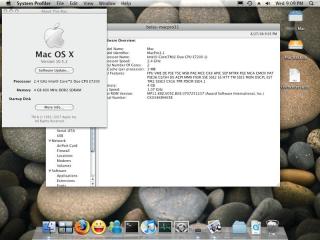
attached some photos. dunno if that helps though
Attached Image Attached Image Attached Image
bola
post Aug 27 2008, 10:47 PM

Getting Started
**
Junior Member
222 posts

Joined: Jan 2003
yeah i downloaded the iATKOS_4i.iso too.
at about 2.7gb, its much smaller than the Leo4Allv3.iso
also downloading the iDeneb_v1_10.5.4 iso. (3.8gb) which was based on the Leo4All distro (if you can call it a distro)

both claims to be 10.5.4
bola
post Aug 27 2008, 11:58 PM

Getting Started
**
Junior Member
222 posts

Joined: Jan 2003
i dont think i've come across any. if im not mistaken all leopard discs are 10.5.
The Mac machines it just updates it to 10.5.1 or 10.5.4 or whatever via MacOS Software Update.

I might be wrong.

My macbook is still on tiger smile.gif
bola
post Aug 29 2008, 11:51 PM

Getting Started
**
Junior Member
222 posts

Joined: Jan 2003
QUOTE(aarone @ Aug 28 2008, 06:12 PM)
nice hackintosh refrigerators.Got beer?
*
no. only chips.... silicon chips wink.gif

QUOTE(gozila84 @ Aug 29 2008, 07:03 AM)
use Kalway 10.5.3 combo update then use online update to 10.5.4.
it work for me thumbup.gif
*
thanks will go download kalyway 10.5.3 combo update then.


oh another thing, did anyone managed to get Adobe CS3 working in it?


This post has been edited by bola: Aug 30 2008, 12:12 AM
bola
post Aug 31 2008, 08:01 PM

Getting Started
**
Junior Member
222 posts

Joined: Jan 2003
Do you think this work with the hackintosh?
http://twistedmelon.com/mira/

I have one of those apple remotes that came with the macbook. but never used.

maybe with the mira/manta tr1 i can finally get this hackintosh working as a HTPC, using the apple remote and FrontRow
bola
post Jan 5 2009, 10:58 AM

Getting Started
**
Junior Member
222 posts

Joined: Jan 2003
Hi,

Been using Kalyway 10.5.2 (or was it Leo4all 10.5.2? anyway) since August '08.

1. Is it ok to just use the System Update to update to 10.5.6?
I've also downloaded the update.dmg. Would this be better?
Just want to know if it will screw up the boot up or not.

2. Another matter, i have a 1st gen iphone. initially when i plug it in it recognized the phone. but now it doesn't. any ideas?

would appreciate ur help. thanks.


bola
post Feb 11 2009, 09:22 PM

Getting Started
**
Junior Member
222 posts

Joined: Jan 2003
i'm currently on kalyway 10.5.2 and have been trying to install the retail OSX dvd via boot 132 method.
found that i have to build my own boot132 disc but i couldn't get Slimbuild to work properly. is there a proper guide on the net where i can follow?
and is anyone out there with the Gigabyte G31M- S2L kexts? or even a prebuilt G31M boot disc iso?

QUOTE(digswell @ Feb 6 2009, 03:06 PM)
For me i not burn dvd iso on dvd-r ......i using external hdd . using disk utility .. restore to the ext hdd and install chameleon bootloader on to it to make it bootable.....eazy and fast . i can install iPC ,leo4all .. etc in 10 to 20minit
*
i managed to restore the retail DVD onto an external HDD and ran Chemeleon to install the bootloader onto the external HDD. It booted went into Darwin and as that thing spins around, the PC reboots. what am i doing wrong?

This post has been edited by bola: Feb 11 2009, 09:25 PM
bola
post Feb 12 2009, 12:46 AM

Getting Started
**
Junior Member
222 posts

Joined: Jan 2003
QUOTE(skitZo` @ Feb 11 2009, 10:57 PM)
Hi

Have you tried the generic iso? What kind of errors occur with the slimbuild iso maker? What kexts are u using for boot 132? You could start with the generic iso and add additional kexts later.

It would be much easier to create a boot 132 usb loader. With usb loader you can add and remove kext without having to burn and recreate iso`s. Remember to backup yr extensions folder from kalyway install. u may need it later.
Boot USB
*
Actually i've been a little ambitious. i thought i try and use the Stickpin USB Boot 132 method once i've built the iso using Slimbuild. my confusion is actually regarding the outputted files.

i tried the [9]-step Stickpin USB Boot132 method with the generic.iso (40mb) as well. i followed the steps to the dot but it pops up with an error saying:
SYSLINUX 3.63
Could not find kernal image: linux
Boot:

QUOTE
As for the pc rebooting i think you have the wrong kernel or i IntelCPUMdisabler kext is not loaded hence kernel panics, but of course you cant boot without a boot132 cd even if u have chameleon on the external HDD. The right kext are not loaded.
im on an intel core 2 duo E7200 2.53Ghz. can't i use the vanilla kernel from the retail dvd itself?
QUOTE
btw, which retail method you`re using?Kext EFI partition?

im still rather new in all this.
my understanding is to:
1. get boot 132 CD( or USB or restored retail dvd in an external hdd with cameleon installed) working.
2. swap out the Boot132 disc and boot the OSX Retail DVD
3. run through and complete the OSX installation
4. run cameleon to install bootloader + kext into efi partition.

are my assumptions wrong?
bola
post Feb 12 2009, 10:05 PM

Getting Started
**
Junior Member
222 posts

Joined: Jan 2003
QUOTE(skitZo` @ Feb 12 2009, 12:59 AM)
Stickpin method should work, review back your steps. Else just use the generic iso to boot and install retail.

Or you could try SLimbuild method to create yr boot 132 cd.
Put custom kexts in extensions folder, mod kernels in kernels folder and boot.plist file in plist folder. Run sudo ./slimbuild2.sh
i used the SlimbuildGUI from PCWizcomputer.com instead of running through Terminal (not comfortable and not sure what i'm doing)
user posted image
i managed to get a video tutorial from Vimeo but i dunno where to find the kernel and plist. what is plist by the way? tongue.gif


QUOTE
Yes you can use the vanilla kernel, i think yr intelCPUMdisabler/Disabler kext is not loaded iinm. Could you boot with -v and check whats the error. Try bootin retail with the boot 132 cd or usb.

Yeah yr steps seems ok....should work flawlessly with the right kexts.
the only kext i found for my motherboard seems to be the one attached (below) for the ALC662 audio kext. everything else seems to run OTB. that was the reason i insisted on this motherboard after reading the installation wiki on 10.5.2 on OSX86Project.org

QUOTE
BTW what graphic card ure using?
*

this is my hardware
Motherboard: GIGABYTE GA-G31M-S2L
Processor: Intel Core 2 Duo E7200 2.53Ghz 1066fsb 3mb
RAM: 2GB Kingston PC800 DDR2 x 2
Video: ATI Radeon Sapphire HD3650 512MB DDR2

is there a kext for this card? Apple Software Update seems to recognize it as a ATI Radeon HD 2600 XT and prompts me to do a Firmware Update all the time.


Attached File(s)
Attached File  AppleHDA___Realtek_ALC662__Output__Mic_.zip ( 367.32k ) Number of downloads: 64
bola
post Feb 23 2009, 03:40 PM

Getting Started
**
Junior Member
222 posts

Joined: Jan 2003
QUOTE(bola @ Feb 12 2009, 10:05 PM)

this is my hardware
Motherboard: GIGABYTE GA-G31M-S2L
Processor: Intel Core 2 Duo E7200 2.53Ghz 1066fsb 3mb
RAM: 2GB Kingston PC800 DDR2 x 2
Video: ATI Radeon Sapphire HD3650 512MB DDR2

is there a kext for this card? Apple Software Update seems to recognize it as a ATI Radeon HD 2600 XT and prompts me to do a Firmware Update all the time.
*
i couldn't get my motherboard to boot from the USB. maybe its the settings. USB-HDD / USB-ZIP /USB-FDD?

anyway i did manage to boot from the generic.iso Boot 132 disc and installed OSX Retail 10.5.6 but only AFTER removing the video card and plugging into the onboard VGA output jack.

my problem now is implementing PC EFI / Chameleon. from PCWIZ
the bootloader will jump into the apple logo boot screen and get stuck there. Nothing else happens after.

Haven't even had the opportunity to setup the other kexts - sound & video

Can anyone tell me what is wrong?


bola
post Feb 23 2009, 05:16 PM

Getting Started
**
Junior Member
222 posts

Joined: Jan 2003
QUOTE(skitZo` @ Feb 23 2009, 03:47 PM)
Boot with -v and see whats the error. Could be waiting for root device. After u install Chameleon/PC EFI, did you install the necessary system kext? AppleDecrypt.kex,  Disabler.kext and SMBIOSEnabler.kext?

And your modified kexts are they installed in a separate folder or in the /S/L/E folder?
*
can i just use this from PCWIZ instead?
user posted image


it has AppleDecrypt.kext , Disabler.kext and OpenHaltRestart.kext as default kext listed.
can't seem to select the other options eg DSDT patch or extensions.mkext

i assume the INSTALL CUSTOM KEXT FROM HD option is where i pull in all the Sound and etc kexts, yeah?

bola
post Mar 12 2009, 05:31 PM

Getting Started
**
Junior Member
222 posts

Joined: Jan 2003
QUOTE(skitZo` @ Feb 23 2009, 03:47 PM)
Boot with -v and see whats the error. Could be waiting for root device. After u install Chameleon/PC EFI, did you install the necessary system kext? AppleDecrypt.kex,  Disabler.kext and SMBIOSEnabler.kext?

And your modified kexts are they installed in a separate folder or in the /S/L/E folder?
*
i managed to get the OSX retail to boot with the kext from the generic boot132.iso. i have also managed to install chameleon on the retailOSX partition. all this is done without a video card but on the on-board VGA graphics.

i then
> installed the kext for Radeon HD3650 obtained from ATI Radeon HD pkg installers 10.5.6
> shutdown
> slotted in the ATI Radeon Sapphire HD3650 512MB DDR2
> plug in the DVI cable
> and rebooted

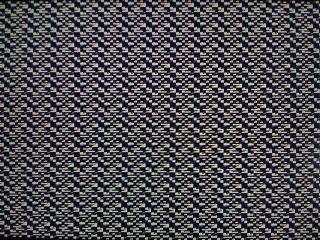
the thing booted up and all i can see was some something resembling a magiceye poster smile.gif

Attached Image
what is wrong?

when i was on 10.5.2 Kalyway it all worked fine. could even install with the graphics card plugged in.
bola
post Mar 14 2009, 04:18 PM

Getting Started
**
Junior Member
222 posts

Joined: Jan 2003
QUOTE(bola @ Mar 12 2009, 05:31 PM)
i managed to get the OSX retail to boot with the kext from the generic boot132.iso. i have also managed to install chameleon on the retailOSX partition.  all this is done without a video card but on the on-board VGA graphics.

i then
> installed the kext for Radeon HD3650 obtained from ATI Radeon HD pkg installers 10.5.6
> shutdown
> slotted in the ATI Radeon Sapphire HD3650 512MB DDR2
> plug in the DVI cable
> and rebooted

the thing booted up and all i can see was some something resembling a magiceye poster smile.gif

Attached Image
what is wrong?

when i was on 10.5.2 Kalyway it all worked fine. could even install with the graphics card plugged in.
*
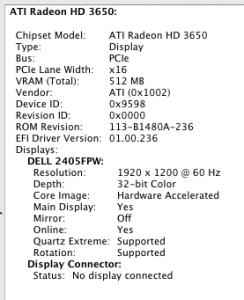
nevermind. i got it working with THIS Radeon HD pkg . Some guy from the #RadeonHD channel on irc.osx86.hu pointed me in the right direction.

Attached Image
bola
post Mar 14 2009, 06:25 PM

Getting Started
**
Junior Member
222 posts

Joined: Jan 2003
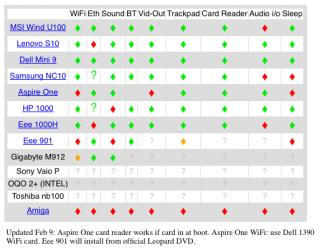
for those looking at purchasing a netbook for OSX, maybe you all can consider this chart.
Attached Image

i got it from boingboing
bola
post Mar 15 2009, 03:30 PM

Getting Started
**
Junior Member
222 posts

Joined: Jan 2003
how do i get the Monitor to sleep?
it would show whats on the monitor after the set timeout. eg if set the screen timeout to 5mins, whatever that is showing at that last moment is what the monitor will be stuck at. be it a screensaver or the desktop.

bola
post Mar 17 2009, 10:29 AM

Getting Started
**
Junior Member
222 posts

Joined: Jan 2003
QUOTE(Kyl3 @ Mar 16 2009, 03:34 PM)
Can you pm me a tutorial of the efi?
*
yeah PM me the tutorial on getting the kext the OSX hidden partition too.

another thing, how do i do a clone of the good OSX installation onto an external harddisc for future external restore instead of having a reinstall from the Boot132 + Retail DVD?
bola
post Apr 26 2009, 12:02 PM

Getting Started
**
Junior Member
222 posts

Joined: Jan 2003
I recently signed up for the RM99/month HP + streamyx FREE PC combo and got the Compaq CQ2035D desktop.
user posted image
» Click to show Spoiler - click again to hide... «

I have since voided the warranty by swapping out the Vista Home Basic HDD with a 500gb Sata replacement.
Been trying all weekend to install the RETAIL OSX 10.5.6 with a generic Boot 132 disc. However the Retail disc fails to load.

I did the boot -v option and the process stops at:
MAC Framework successfully initialized
using 5242 buffer headers and 4096 cluster IO buffer headers
dsmos: Starting ....

What is wrong ah?

Anyone has the same HP + Streamyx combo and has successfully installed retail copy on it? care to share?
Perhaps a customized Boot 132 disc?

Topic ClosedOptions
 

Change to:
| Lo-Fi Version
0.1444sec    0.27    7 queries    GZIP Disabled
Time is now: 6th December 2025 - 10:39 AM