

Hello
Just wondering if there has been a recent default display font change on the mobile version? Probably just me, getting old with bad eyesight but today's font seems to be slightly slimmer than usual.
Font change on Mobile version?
Font change on Mobile version?
|
|
 Mar 2 2021, 11:53 AM, updated 5y ago Mar 2 2021, 11:53 AM, updated 5y ago
Show posts by this member only | Post
#1
|
 
Senior Member
1,514 posts Joined: Jan 2011  
|
Hello
Just wondering if there has been a recent default display font change on the mobile version? Probably just me, getting old with bad eyesight but today's font seems to be slightly slimmer than usual. |
|
|
|
|
|
Mar 2 2021, 12:19 PM
Show posts by this member only | IPv6 | Post
#2
|

All Stars
12,053 posts Joined: Oct 2017 
|
Yes, font change, i open thread on k to compare edi
|
|
|
Mar 2 2021, 12:20 PM
Show posts by this member only | Post
#3
|
|
Senior Member
1,514 posts Joined: Jan 2011
|
Just looks.. odd
Characters are wider, but slimmer with slightly bigger spacing between each character. |
|
|
Mar 2 2021, 01:55 PM
Show posts by this member only | IPv6 | Post
#4
|
|
All Stars
12,053 posts Joined: Oct 2017
|
Now not even on content
On thread list also change On list font seem more narrow Desktop site still no change |
|
|
Mar 2 2021, 02:15 PM
Show posts by this member only | Post
#5
|
 
Admin
1,806 posts Joined: Jan 2003 From: Captain's Cabin, Black Pearl 
|
we're switching to device based font's for the mobile layout. so essentially the best font that is available for display on your device will be used. this allows your device to render the fonts at its optimal resolution (retina/amoled etc displays) PJng liked this post
|
|
|
Mar 2 2021, 02:38 PM
Show posts by this member only | IPv6 | Post
#6
|

All Stars
26,532 posts Joined: Jan 2003
|
QUOTE(se7en @ Mar 2 2021, 02:15 PM) we're switching to device based font's for the mobile layout. so essentially the best font that is available for display on your device will be used. Is there any way for us to disable this feature from our end? It is not so optimal for people with poor eyesights, it appears too narrow in my device.this allows your device to render the fonts at its optimal resolution (retina/amoled etc displays)  This post has been edited by Human Nature: Mar 2 2021, 02:42 PM |
|
|
|
|
|
Mar 2 2021, 02:42 PM
Show posts by this member only | Post
#7
|
|
Admin
1,806 posts Joined: Jan 2003 From: Captain's Cabin, Black Pearl
|
QUOTE(Human Nature @ Mar 2 2021, 02:38 PM) Is there any way for us to disable this feature from our end? It is not so optimal for people with poor eyesights. How exactly are you viewing all your other apps (eg Facebook, Youtube, Twitter etc) as these apps are also defaulting to a similar font set on mobile.What device are you using? We are still tweaking some aspects of the font layout/spacing etc. Send us a screenshot and we'll see what can be done. |
|
|
Mar 2 2021, 02:57 PM
Show posts by this member only | IPv6 | Post
#8
|
|
All Stars
26,532 posts Joined: Jan 2003
|
QUOTE(se7en @ Mar 2 2021, 02:42 PM) How exactly are you viewing all your other apps (eg Facebook, Youtube, Twitter etc) as these apps are also defaulting to a similar font set on mobile. A screenshot comparison between Facebook and Lowyat. On iphone 7 plus here. Font appears to be smaller on the right side.What device are you using? We are still tweaking some aspects of the font layout/spacing etc. Send us a screenshot and we'll see what can be done. 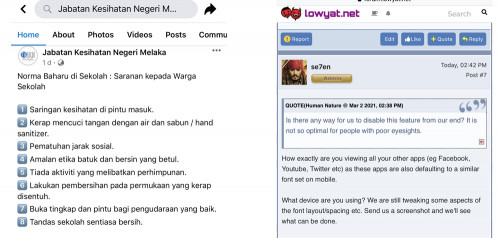 |
|
|
Mar 2 2021, 09:12 PM
Show posts by this member only | Post
#9
|
|
Senior Member
1,514 posts Joined: Jan 2011
|
I can't compare against how it used to be because... for obvious reasons.
This is how it looks like on my end. On main forum, title text is big and sub titles/ sub forum is just too small. On subforum itself, the same.. titles of threads are way bigger than the other details. And looking at threads directly, the title seems to be too small. Looks out of place to me. Attached thumbnail(s) 


|
|
|
Mar 2 2021, 09:21 PM
|
|
Senior Member
2,098 posts Joined: Jan 2008
|
font is ok, but i dont like its not sync, some big size, some small size, not cohesive.
|
|
|
Mar 2 2021, 09:31 PM
Show posts by this member only | IPv6 | Post
#11
|
|
Junior Member
723 posts Joined: Jul 2008
|
Isn't it also a browser issue? I remember some forum (not Lowyat) have really wacky font sizing when viewed in mobile. Can't remember now. Try a different browser and see if that's still the case?
se7en Consider adding text font size adjuster such as in the page below? I'm sure there's many people who really wish, for fonts to be, just bigger. https://www.scribblehub.com/read/239965-the...chapter/240169/ |
|
|
Mar 2 2021, 09:36 PM
|
|
Senior Member
1,514 posts Joined: Jan 2011
|
QUOTE(zuhaili87 @ Mar 2 2021, 09:21 PM) font is ok, but i dont like its not sync, some big size, some small size, not cohesive. Yeah maybe... it seems rather inconsistent right now. |
|
|
Mar 2 2021, 09:38 PM
Show posts by this member only | IPv6 | Post
#13
|
|
All Stars
12,053 posts Joined: Oct 2017
|
Cannot really see what different on screenshot
|
|
|
|
|
|
Mar 2 2021, 09:40 PM
|
|
Senior Member
1,514 posts Joined: Jan 2011
|
QUOTE(PJng @ Mar 2 2021, 09:38 PM) Cannot really see what different on screenshot Text sizeThis post has been edited by Seager: Mar 2 2021, 09:40 PM |
|
|
Mar 2 2021, 09:50 PM
Show posts by this member only | IPv6 | Post
#15
|
|
All Stars
26,532 posts Joined: Jan 2003
|
I noticed that the font size has increased slightly (comparing the same post on my screenshot above)
|
|
|
Mar 20 2021, 11:30 AM
Show posts by this member only | IPv6 | Post
#16
|
|
All Stars
12,053 posts Joined: Oct 2017
|
After this thread font look is back normal
Now i see font type is different |
| Change to: |  0.0165sec 0.0165sec
 0.43 0.43
 6 queries 6 queries
 GZIP Disabled GZIP Disabled
Time is now: 19th December 2025 - 02:32 AM |
 Quote
Quote