Welcome Guest ( Log In | Register )

Outline · [ Standard ] · Linear+

Xiaomi Redmi K40/POCO F3 Discussion

views
     
wirelessbuyer
post Apr 16 2021, 07:19 AM

Casual
***
Junior Member
346 posts

Joined: Jul 2012
QUOTE(soulseeker6187 @ Apr 16 2021, 07:16 AM)
Anyone have problem with the google feed scrolling not smooth. The fps seems choppy. But if open google app, is smooth.
*
Same here, it seems the issue is with poco launcher implementation of google feed. Tried other launcher google feed is quite smooth
wirelessbuyer
post Apr 16 2021, 06:14 PM

Casual
***
Junior Member
346 posts

Joined: Jul 2012
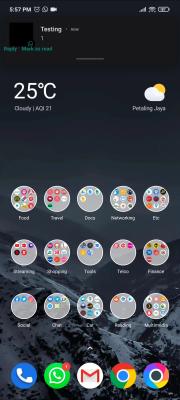
Anyone else facing the same issue? 2 different type floating notification, 1 with some alignment issue (which allow to be expand as floating windows) and another 1 is the normal for miui.


Attached thumbnail(s)
Attached Image Attached Image
wirelessbuyer
post Apr 19 2021, 04:47 PM

Casual
***
Junior Member
346 posts

Joined: Jul 2012
QUOTE(Chisinlouz @ Apr 19 2021, 02:53 PM)
[attachmentid=10848949]

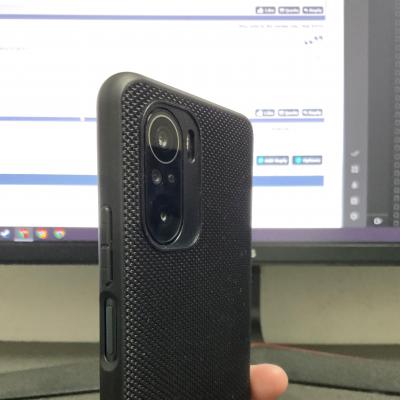
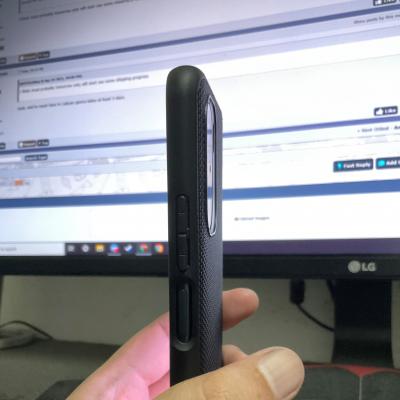
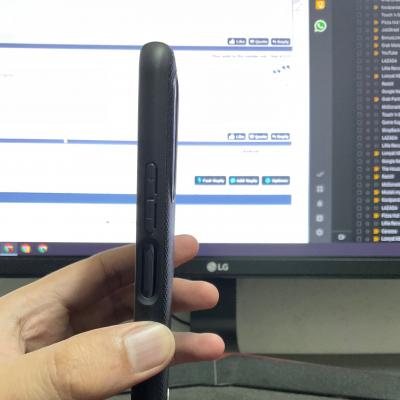
Hi. Anyone use casing with camera cover on the right?

Are these 2 casing, camera section higher than camera itself (so that my camera doesn't scratch on floor?)
*
I'm using the nilkin nylon, the casing camera section is higher than the lens, so should be fine.


Attached thumbnail(s)
Attached Image Attached Image Attached Image
wirelessbuyer
post Apr 20 2021, 10:42 AM

Casual
***
Junior Member
346 posts

Joined: Jul 2012
QUOTE(soultaker @ Apr 20 2021, 04:59 AM)
| Charger | Protocol | From | To | Duration |
Poco F3 Charger Mi Turbo Charge 33W 15% 100% 45m
Poco F3 Charger Quick Charge 27W 12% 100% 1h 8m
Ugreen Charger  Quick Charge 3.0 18W 14% 100% 1h 21m

The final 1% took a while to finished.

Note: For the 2nd row result I used the Poco F3 charger but it didn't trigger the turbo charge (assumed it was 27W based on the charger supported output). BTW, I'm using the Ugreen 2M 40W/5A cable.
*
May I know how you check which protocol the charger is using? Any special tools needed?
wirelessbuyer
post Apr 20 2021, 11:54 AM

Casual
***
Junior Member
346 posts

Joined: Jul 2012
QUOTE(jazzkobis @ Apr 20 2021, 11:31 AM)
ya mine didnt work when lying flat. but not that sensitive when upright. probably like 70%
*
Same bro, won't work when lay down on flat surface, maybe they do this on purpose? It seems like the proximity sensor is sensitive at the 2 hole next to ir blaster hole (top), if you cover the 2 hole it won't work at all.
wirelessbuyer
post Jun 2 2021, 09:23 AM

Casual
***
Junior Member
346 posts

Joined: Jul 2012
QUOTE(Thrust @ Jun 2 2021, 06:37 AM)
My Facebook app can't tap to enlarge pictures.. it will show a blank page. Just updated to the recent miui.
*
Same issue, but it only appear when there is multiple pictures in a single post. A post with single picture don't have this problem tho
wirelessbuyer
post Dec 30 2021, 06:25 PM

Casual
***
Junior Member
346 posts

Joined: Jul 2012
Anyone here successfully using any type c hub/adapter together with hard disk/microsd/ethernet with poco F3?

Mine doesn't detect at all. I've tried with 2 type c-to-type a adapter and 10-in1 ugreen type c adapter
wirelessbuyer
post Dec 30 2021, 07:15 PM

Casual
***
Junior Member
346 posts

Joined: Jul 2012
QUOTE(Optizorb @ Dec 30 2021, 06:58 PM)
already enable usb hardware debugging in dev options?

test with pendrive and keyboard/mouse first.. these 3 items can detect?

this vid shows can detect 2tb hdd

*
Enabling USB debugging only still doesn't work
Enabling both USB debugging and USB debugging (security setting) also doesn't work

I just tested again with usb wireless mouse, poco F3 doesn't detect it. When I tested on my samsung tablet, it's working right after I plug in the dongle with type-c adapter. Also, if I connect my phone to my pc, using the original usb cable, my pc also doesn't detect the phone

Any ideas? rclxub.gif
wirelessbuyer
post Dec 30 2021, 10:08 PM

Casual
***
Junior Member
346 posts

Joined: Jul 2012
QUOTE(Optizorb @ Dec 30 2021, 09:39 PM)
restart the phone after enable dev options + enable usb debugging?
*
Still doesn't work for me. Btw, does yours working fine?
wirelessbuyer
post Dec 30 2021, 10:43 PM

Casual
***
Junior Member
346 posts

Joined: Jul 2012
QUOTE(Optizorb @ Dec 30 2021, 10:20 PM)
what is your ROM? Stock? when did you buy your phone?

yea mine working fine with original cable connect to pc.. does anything pop up on your phone after you connect the cable to phone and pc?
I selected file storage option when connected to pc..

and i use my old OTG adapter that came with my S8, can connect and use mouse no problem.. no hdd to test, but should be able to connect as well..

1) try a different usb port on your pc..
if still cant
2) can test on another computer to see if it connects?

Could be your this computer got some missing drivers.. but then it doesn't explain why cant detect through OTG as well.. rclxub.gif

ultimately, if do all those still cant. then i guess you need to take a visit to SC and let them check.
Could be the type C port got hardware issue.. and if that's the case then go get it claimed under warranty..

I seen people complained before in F3 fb groups regarding charging port issues..
*
The popup notification that you mention doesn't appear at all when I use otg or even plugin to my pc. I've tested on usb 3.0 and 2.0 port on my pc but still no luck cry.gif

I might perform factory reset tomorrow, if still doesn't work maybe I will send it over to service center. Too lazy to do this, since I don't have backup phone and kinda urgently need to use phone cry.gif

Anyway, thanks for you help

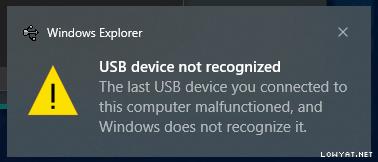
EDITED: After factory reset and connect to my pc and laptop I saw this error message on windows10 and it still doesn't detect the phone, maybe the data pin on the type c connector is faulty. The otg function also still didn't work

This post has been edited by wirelessbuyer: Dec 31 2021, 11:57 AM


Attached image(s)

Attached Image
wirelessbuyer
post Jan 7 2022, 07:00 PM

Casual
***
Junior Member
346 posts

Joined: Jul 2012
QUOTE(Optizorb @ Dec 31 2021, 03:19 PM)
yeah i guess its a hardware issue. Go claim ur warranty for it.. I seen quite a few others had this problem as well..  doh.gif
*
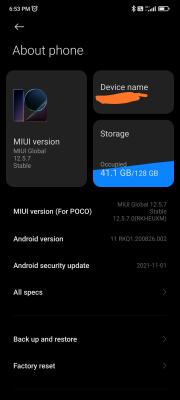
I've send it over to mi authorised sc (OSR) at lowyat plaza 4th floor on tuesday noon, they change the motherboard and it is ready to collect on the next day which is wednesday morning. Can confirm the mobo change, since the IMEI is different compare to the original. They also change the rom to EU as well, originally was on 12.0.5-RKHEUXM something like that, after full update was on 12.5.7-RKHEUXM

But after I've setup everything, found out the mic volume is very low and the proximity sensor seems not working properly, where the screen didn't turn off at all when put next to the ear when answering call. End up send it back to them again on that day. doh.gif

The next day, thursday around 3pm, the device is ready again to be collected and so far everything is fixed. Now pc my able to detect the phone as well as all type-c dongle able to detect as well including mouse, microsd and thumb drive.

Conclusion, this service center (OSR) seems very fast to repair my phone, maybe because they got ready parts available since f3 is quite a popular model. However, their repair quality checking could be improve.


Attached thumbnail(s)
Attached Image
wirelessbuyer
post Jan 7 2022, 09:31 PM

Casual
***
Junior Member
346 posts

Joined: Jul 2012
QUOTE(Zhik @ Jan 7 2022, 09:09 PM)
They can fix proximity sensor and the microphone issue?
*
Yes now it is fixed. In my case the proximity and mic was already working before I send for service for the first time, but got issue after the mobo change.
wirelessbuyer
post May 1 2022, 08:39 PM

Casual
***
Junior Member
346 posts

Joined: Jul 2012
QUOTE(supadupa @ May 1 2022, 04:56 PM)
oh...used to LED indicator d ma

so Always On Display won't spoil the display and drain battery?
*
Aside from AOD, you can also enable the setting to light up screen when where is new notification, instead of just pulse the black screen, so that you can immediately glance the notification content whether it is a important one or not.

AOD will have little impact on battery life, I personally prefer to turn it off


Change to:
| Lo-Fi Version
0.1226sec    0.74    7 queries    GZIP Disabled
Time is now: 5th December 2025 - 02:16 PM