

 Aug 26 2007, 01:04 AM, updated 19y ago


- - - - - - - - - - - - - - - - - - - - - - - - - - - - - - - - - - - - - - - - - - - - - - - - - - - - - - - - -
How to set up GW-US54Mini2G for DS

note: Please make sure you have your PC/laptop's WiFi disabled, before starting.
1) Driver
Download the latest driver from Planex:
http://www.planex.net/download/wireless/gw-us54mini2.htm
don't use the driver from the CD, as I believed that version is buggy.
2) Installations
Please refer to the User's Manual... and take note on the following:
Chapter 2
#1. ...
...
#4. choose "Planex Configuratiohn Tool";
#5. choose Optimize for performance mode";
---subpar: up until here, done ---
3) Configurations on [B]GW-US54Mini2[/b]
- Look for the "PCi" icon at Taskbar;

- Right click and select "Switch to AP Mode"

- Once you "Switch to AP Mode", you should see the utility pop up below.
Here you have to set your "SSID" to any name of your choice.
- by default, it's "planexuser";
- Clicking on "Auth. vs Security" will allow you to configure the security. This step is optional.
- If you choose to set the security, kindly configure according to the following:

password = can be any 5 alphanumeric characters, e.g. AB123;
--- subpar: still no problem, right up til here --- - There's another window that pop up when you "Switch to AP Mode", i.e. Internet Connection Sharing with SoftAP - an ICS bridging for the software AP.

- Select the "name" of your Ehternet Adapter;
- Click "Enable ICS";
[*]Done.
- - - - - - - - - - - - - - - - - - - - - - - - - - - - - - - - - - - - - - - - - - - - - - - - - - - - - - - - -
--- subpar: now this is the part i have problems with. i can't 'enable ICS' because apparently it doesn't allow IP addresses starting from 192.168.0.x
screenie here:-
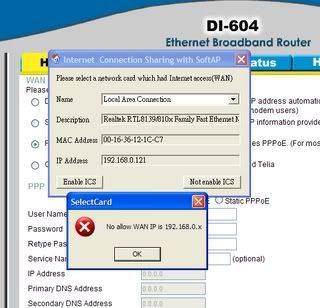
as you can see, my IP address is 192.168.0.121. u think, 'very easy leh, just change the IP address lar.' but no! for whatever reason, i found out my router only accepts IP addresses from 192.168.0.1-192.168.0.199. so if i change to 192.168.(1-210947981y49).(1-8976764178), i cannot connect to the net. and if i cannot connect to the net, the wireless connection is 'limited.'
hoho. basically i'm screwed? i'm no expert at networking and pc stuff, so if anyone can help me i'll be hugely grateful. just bought this today, and i have to hand in 2 assignments by wed but my hands itchy cannot dont touch it.
and btw, it works okay with my psp so i know it's not the mini's fault. i just can't set up the AP mode. but station mode works fine.
 Quote
Quote


 0.0147sec
 0.75
0.75
 5 queries
 GZIP Disabled