Outline ·
[ Standard ] ·
Linear+
Enquiries/Recommendations Laptop USB-C and 4K External Monitor Refresh Rate, External 4K monitor lags with HDMI
|
TSjacobcheong
|
 Feb 7 2021, 04:26 PM, updated 5y ago Feb 7 2021, 04:26 PM, updated 5y ago
|
New Member


|
Background:
I have recently purchased a 4K external monitor (ie. Dell S3221QS, 3840 x 2160 @ 60 Hz) for my home office use.
I have a Lenovo ThinkBook 14s laptop that I have purchased from Lenovo a couple of months back.
Both laptop and external monitor specs are as listed below.
I noticed that there is a lag when the external monitor resolution is set to 4K (ie. 3840 x 2160) and connection using HDMI-HDMI cable.
The Intel UHD Graphics driver which is able to support a max refresh rate of 75Hz (@ 3840 x 2160) according to Intel Driver & Support Assistant.
Upon further checking HDMI standards online, the HDMI 1.4b port on the Lenovo ThinkBook 14s has a refresh rate limitation of 30Hz only at 4K resolution.
For info, I charge my laptop using the Lenovo supplied 65W AC Adapter Slim (3pin)-UK (USB Type C) which happens to be a Display Port / Power Delivery port.
Question:
1) Will I be able to achieve 4K resolution @ 60Hz if I connected my laptop to the external monitor using USB-C (from laptop) to Display Port (to monitor)?
2) What options are available if the USB-C slot is used for display but also require Power Delivery?
Hope to get some guidance from the experts here.
Thank you so much.
Monitor Specs:
Dell S3221QS
3840 x 2160 @ 60 Hz
2 x HDMI (HDCP 2.2)
DisplayPort (DisplayPort 1.2 mode)
Audio line-out
USB 3.0 upstream
USB 3.0 downstream
USB 3.0 downstream with Battery Charging 1.2
Laptop Specs:
Lenovo ThinkBook 14s
Country/Region : Malaysia
Processor : Intel Core i7-10510U Processor (1.80GHz, up to 4.90GHz with Turbo Boost, 4 Cores, 8MB Cache)
Preload OS : Windows 10 Pro 64
Preload Language : Windows 10 Pro 64 English/Simplified Chinese
DIMM Memory : 16GB DDR4 2666MHz SODIMM
Storage Selection : 512GB Solid State Drive, M.2 2242, PCIe-NVMe, TLC
Display : 14.0" FHD (1920x1080), IPS, 250nits, Anti-glare, Non-touch
Graphics : AMD Radeon 630 2GB GDDR5 32bits
Wireless LAN : Wi-Fi 6 2x2 AX, Bluetooth Version 5.0 or above
Security Chip : Discrete TPM ROW
Camera : 720p HD Camera, No Mic
Microphone : Array Microphone
Surface Treatment : Anodizing Sandblasting
Palmrest : Metal
Battery : 4 Cell Li-Polymer Internal Battery, 45Wh
Power Adapter : 65W AC Adapter Slim (3pin)-UK (USB Type C)
Lenovo ThinkBook 14s Ports / Slots:
USB-C Gen 2 (display port / power delivery)
2 x USB 3.1 Gen 1 (one always on)
Headphone / mic combo
HDMI 1.4b
This post has been edited by jacobcheong: Feb 7 2021, 04:30 PM
|
|
|
|
|
|
msacras
|
Feb 8 2021, 12:45 AM
|
|
|
1. Yes you can. USB-C DP has higher bandwidth vs HDMI1.4 https://psref.lenovo.com/syspool/Sys/PDF/Th...14_IML_Spec.pdf2. The easiest solution I can think of is to get a 4K60Hz USB-C to HDMI/miniDP adapter with PD. The output will be in HDMI/miniDP. Though 60W PD may fall short to your laptop’s power requirement of 65W (actual usage unlikely to reach 65W, but for my dell the insufficient power popups are annoying). https://s.lazada.com.my/s.cuMcxhttps://www.choetech.com/product/usb-c-to-m...rt-4k-60hz.htmlThis post has been edited by msacras: Feb 8 2021, 01:01 AM |
|
|
|
|
|
xerox8908
|
Feb 8 2021, 02:49 AM
|
|
|
QUOTE(msacras @ Feb 8 2021, 12:45 AM) 1. Yes you can. USB-C DP has higher bandwidth vs HDMI1.4 https://psref.lenovo.com/syspool/Sys/PDF/Th...14_IML_Spec.pdf2. The easiest solution I can think of is to get a 4K60Hz USB-C to HDMI/miniDP adapter with PD. The output will be in HDMI/miniDP. Though 60W PD may fall short to your laptop’s power requirement of 65W (actual usage unlikely to reach 65W, but for my dell the insufficient power popups are annoying). https://s.lazada.com.my/s.cuMcxhttps://www.choetech.com/product/usb-c-to-m...rt-4k-60hz.htmlThat's wrong. No matter how you convert the bandwidth will not output 4k 60hz. It has nothing to do with what kind of port. |
|
|
|
|
|
fireballs
|
Feb 8 2021, 03:10 AM
|
|
|
|
|
|
|
|
|
msacras
|
Feb 8 2021, 04:42 AM
|
|
|
QUOTE(xerox8908 @ Feb 8 2021, 02:49 AM) That's wrong. No matter how you convert the bandwidth will not output 4k 60hz. It has nothing to do with what kind of port. As stated in the PSREF, the USB-C double as DisplayPort and support a max resolution of 4k60hz (in contrary to HDMI1.4 which is stuck with 4k30hz max) 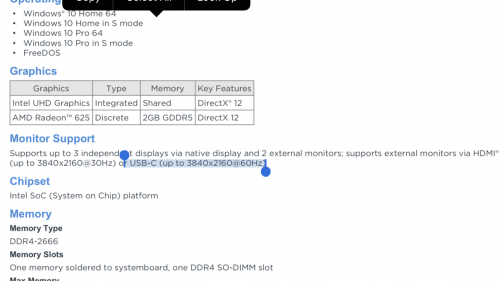 Keyword is USB-C DisplayPort or DisplayPort Alt Mode. https://www.displayport.org/displayport-over-usb-c/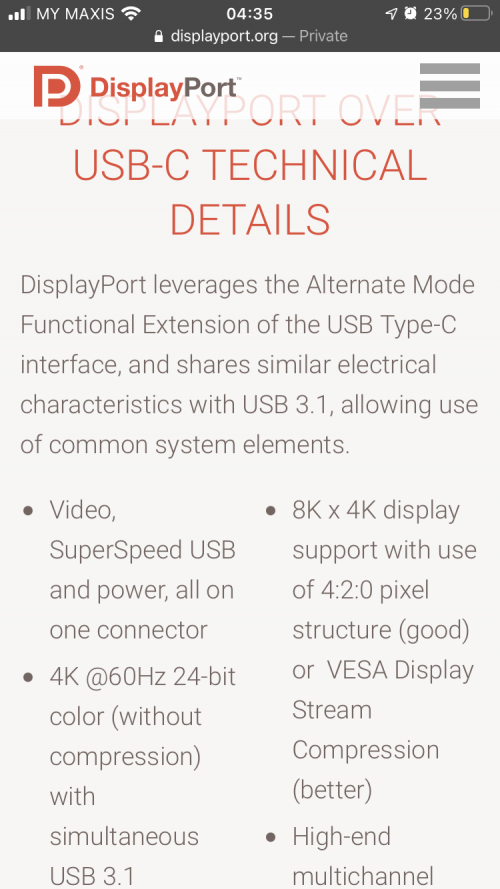 |
|
|
|
|
|
TSjacobcheong
|
Feb 8 2021, 10:16 AM
|
New Member
|
QUOTE(msacras @ Feb 8 2021, 04:42 AM) As stated in the PSREF, the USB-C double as DisplayPort and support a max resolution of 4k60hz (in contrary to HDMI1.4 which is stuck with 4k30hz max) Keyword is USB-C DisplayPort or DisplayPort Alt Mode. https://www.displayport.org/displayport-over-usb-c/Thanks for the tip and advice @msacras. I will try to find a USB-C to HDMI / Display Port 1.2 adapter that has 65W PD and see if it works. If anyone has a recommendation, please feel free to share here. Thank you so much. Will continue to update here once progress has been made. |
|
|
|
|
|
msacras
|
Feb 8 2021, 01:15 PM
|
|
|
QUOTE(jacobcheong @ Feb 8 2021, 10:16 AM) Thanks for the tip and advice @msacras. I will try to find a USB-C to HDMI / Display Port 1.2 adapter that has 65W PD and see if it works. If anyone has a recommendation, please feel free to share here. Thank you so much. Will continue to update here once progress has been made. I don’t think PD 65W variant exist, as the threshold is typically 60W then 100W. I searched for Ugreen hubs as they often come with 100W PD, but to no available. They didn’t have SKU that fulfill both 4k60hz and 100W PD together, LOL. I will suggest give the 60W one a try first to see if it causing any problem. Cause most ultrabook didn’t really require 65W charger to charge as their max power limits may be configured differently and substantially lower than 65W. This post has been edited by msacras: Feb 8 2021, 01:18 PM |
|
|
|
|
|
karheng
|
Feb 8 2021, 03:58 PM
|
|
|
Thinkbook 14s is HDMI 1.4b or 2.0?
The website mentioned HDMI 2.0. Maybe latest model come with HDMI 2.0?
I just bought HDMI 2.0 cable for my T14, but still on FHD monitor.
This post has been edited by karheng: Feb 8 2021, 04:02 PM
|
|
|
|
|



 Quote
Quote


 0.0165sec
 0.96
0.96
 5 queries
 GZIP Disabled