Welcome Guest ( Log In | Register )

Outline · [ Standard ] · Linear+

 Windows 10 installation, Windows cannot be installed to this disk

views
     
TSkx221005
post Jan 25 2021, 11:12 PM, updated 5y ago

Getting Started
**
Junior Member
94 posts

Joined: Aug 2011
Hi guys, I need some help here.
I wanted to reformat my pc with windows 10. Eventually when i wanted to install to the partition i want ©, it shows Windows cannot be installed to this disk. The selected disk is of the gpt partition style.
But at the same time i accidentally formattted C as well. I had read about the way to install the windows is to go command prompt and remove all the partition. But the problem is i still need my partition (D).
Is there anyway to reinstall window in other way round instead or remove and clean all the partition
YLT
post Jan 25 2021, 11:45 PM

Casual
***
Junior Member
424 posts

Joined: Jan 2003


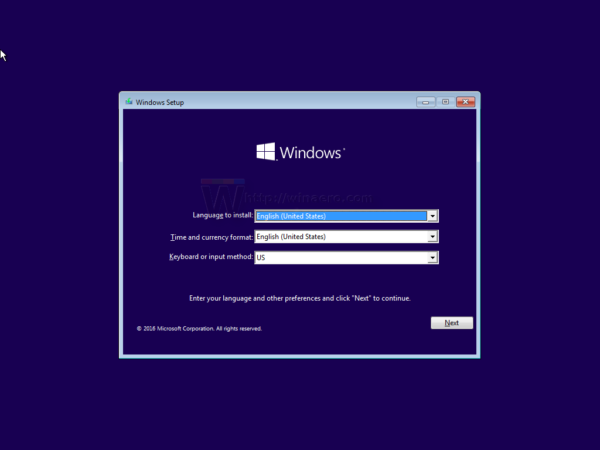
Your windows 10 installation media can boot into windows setup screen?

e.g. this screen

user posted image

This post has been edited by YLT: Jan 25 2021, 11:47 PM
Satori 14118a
post Jan 25 2021, 11:58 PM

Regular
******
Senior Member
1,006 posts

Joined: Sep 2014


Guide here.

https://pureinfotech.com/create-custom-part...all-windows-10/
TSkx221005
post Jan 26 2021, 12:01 AM

Getting Started
**
Junior Member
94 posts

Joined: Aug 2011
QUOTE(YLT @ Jan 25 2021, 11:45 PM)
Your windows 10 installation media can boot into windows setup screen?

e.g. this screen

user posted image
*
YES it CAN.
TSkx221005
post Jan 26 2021, 12:02 AM

Getting Started
**
Junior Member
94 posts

Joined: Aug 2011
Updated :
When during boot menu, I have 2 choice of USB booting
1st is General Udisk 5
2nd is UEFI: General Udisk 5
which 1 should i choose?
PJng
post Jan 26 2021, 10:00 AM

10k Club
********
All Stars
12,039 posts

Joined: Oct 2017


Try turn off UEFI or EFI on bios
YLT
post Jan 26 2021, 11:08 AM

Casual
***
Junior Member
424 posts

Joined: Jan 2003


At the windows setup screen. Press SHIFT + F10 to open command prompt.

1. At the command prompt, type: Diskpart.exe.
2. At the DISKPART prompt, type: Select Disk 1. (Provided is disk 1)
3. At the DISKPART prompt, type: CLEAN ALL (The CLEAN ALL command removes all partition and volume information from the hard drive
being focused on.)
4. At the DISKPART prompt, type: Exit.
5. Reboot computer to continue with the normal installation.

The steps should clear all the disk partition.

If you're not sure. Google diskpart for more info.
RectangleX
post Jan 26 2021, 12:33 PM

On my way
****
Junior Member
642 posts

Joined: Mar 2017
QUOTE(kx221005 @ Jan 25 2021, 11:12 PM)
Hi guys, I need some help here.

I wanted to reformat my pc with windows 10. Eventually when I wanted to install to the partition I want ( C ), it shows Windows cannot be installed to this disk. The selected disk is of the GPT partition style.

But at the same time I accidentally formatted ( C ) as well. I had read about the way to install the windows is to go command prompt and remove all the partition. But the problem is I still need my partition ( D ).

Is there anyway to reinstall window in other way round instead orof remove and clean all the partitions?

*
Yes, there is a way.

Read:

Create Windows 10 setup ISO with Rufus.

user posted image

1. Download Windows 10 ISO using "Media Creation Tool"
2. Use a USB flash drive for creating a bootable Windows 10 setup ISO
3. Next to [Boot selection] select the downloaded ISO earlier
4. Under [Partition scheme] choose GPT, click START, wait till done
5. Boot it up, choose the drive ( C ) partition to install and you can keep your drive ( D ) data.

This post has been edited by RectangleX: Jan 26 2021, 01:00 PM
acbc
post Jan 26 2021, 12:35 PM

Look at all my stars!!
*******
Senior Member
9,048 posts

Joined: Jan 2003
I got the same problems on some motherboards with both IDE and SATA onboard. After disabling the IDE, all ok.
Doudouzei P
post Feb 5 2021, 02:10 PM

New Member
*
Probation
6 posts

Joined: Feb 2021


QUOTE(kx221005 @ Jan 25 2021, 11:12 PM)
Is there anyway to reinstall window in other way.
As i know a Windows 10 installation method provided by Microsoft, which is to use the Windows installation media.


Change to:
| Lo-Fi Version
0.0294sec    0.73    5 queries    GZIP Disabled
Time is now: 10th December 2025 - 02:14 AM