

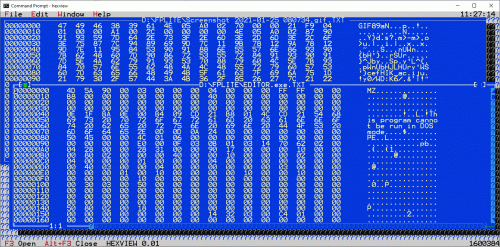
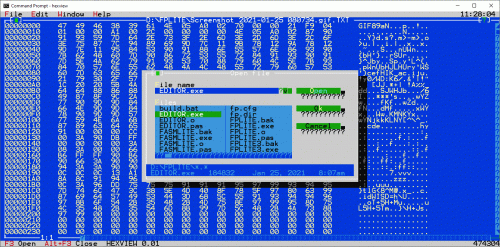
[attachmentid=10765829]
This post has been edited by FlierMate: Nov 25 2022, 10:09 PM
Attached File(s)
 HEXVIEW.zip ( 144.83k )
Number of downloads: 11
HEXVIEW.zip ( 144.83k )
Number of downloads: 11Open-Source Hex Viewer Project
|
|
 Jan 25 2021, 11:40 AM, updated 4y ago Jan 25 2021, 11:40 AM, updated 4y ago
Show posts by this member only | IPv6 | Post
#1
|
 
Validating
543 posts Joined: Nov 2020 
|
Can anyone help me to test this HEXVIEW.exe (source code included)?
[attachmentid=10765829] This post has been edited by FlierMate: Nov 25 2022, 10:09 PM Attached File(s)
HEXVIEW.zip ( 144.83k )
Number of downloads: 11 |
|
|
|
|
|
Jan 27 2021, 11:12 AM
Show posts by this member only | IPv6 | Post
#2
|
|
Validating
543 posts Joined: Nov 2020
|
------------------
This post has been edited by FlierMate: Apr 14 2021, 12:31 AM |
|
|
Oct 2 2021, 12:43 AM
Show posts by this member only | IPv6 | Post
#3
|
|
Validating
543 posts Joined: Nov 2020
|
A hexdump file utility written in assembly language for Linux x64. #Open-source #Made-in-Malaysia
This post has been edited by FlierMate: Feb 5 2022, 05:16 PM |
|
|
Oct 9 2021, 10:15 PM
Show posts by this member only | IPv6 | Post
#4
|
|
Validating
543 posts Joined: Nov 2020
|
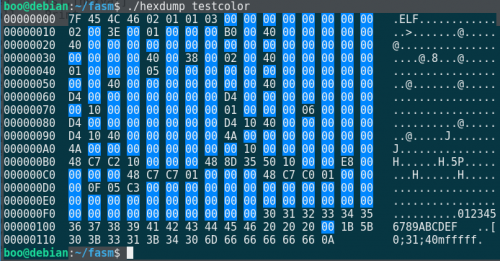
Now my hexdump utility support colors!!! But currently only blue background for null values (0x0), and it is well displayed only on screen. DO NOT use it to redirect to file output.
 This post has been edited by FlierMate: Jan 28 2022, 09:34 AM Attached File(s)
hexdump_v0.02.zip ( 1.9k )
Number of downloads: 12 |
|
|
Jul 18 2022, 04:30 PM
Show posts by this member only | IPv6 | Post
#5
|
|
Validating
139 posts Joined: Jun 2022
|
This is a new fix for hexdump (ELF64), so that it shows colors correctly on terminal emulator with white background as well (previous version v0.02 only work well with black background).
Just change the last second line from: CODE colorblack db 27,'[48:5:0m' ; ANSI escape code lenblack = $ - colorblack ...to... CODE colorblack db 27,'[0m' ; ANSI escape code lenblack = $ - colorblack So that it applies "reset" effect to the colors and styles. This is how new version will look like after the minor change above: 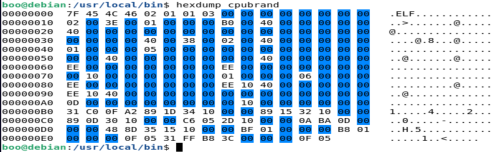 I am not attaching the files. As a side notes, Linux also comes with "xxd", "od" and "hexdump". Using preinstalled "hexdump -C filename" is the same as using my version of "hexdump filename".  |
|
|
Jul 24 2022, 09:23 PM
Show posts by this member only | IPv6 | Post
#6
|
|
Validating
139 posts Joined: Jun 2022
|
A boring Sunday. Let me introduce my utf8count utility!
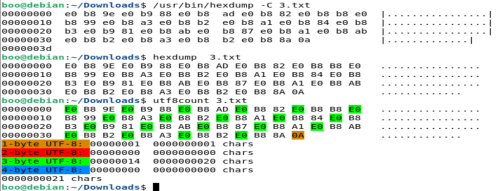 (3.txt is a text file containing Thai scripts) From the screenshot, you likely to notice two hexdump command. They are different. /usr/bin/hexdump - Comes with Linux /usr/local/bin/hexdump - My own "hexdump" written in Assembly language, compiled with fasm and copied to that folder /usr/local/bin/utf8count - A special file utility calculating the number of UTF-8 characters in a text file If you want a handy program to calculate UTF-8 chars in a text file, consider my utf8count.asm! Please compile with flat assembler. It targets Linux x64. (No Windows version is available at the moment) Use utf8count to analyze 1.txt (containing Chinese characters): 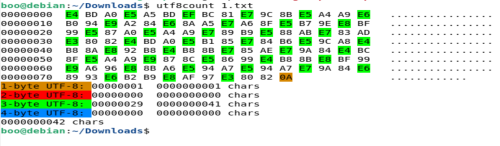 Use utf8count to analyze 2.txt (containing Arabic characters):  Use utf8count to analyze 4.txt (containing Emoji, most are 4-byte UTF8): 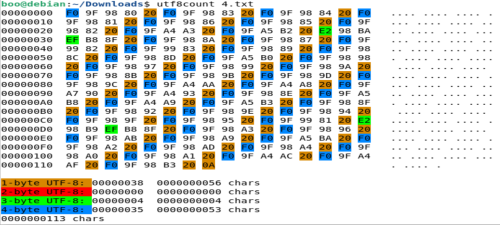 Use utf8count to analyze 5.txt (containing Tamil script): QUOTE நீங்கள் எப்படி இருக்கிறீர்கள்? 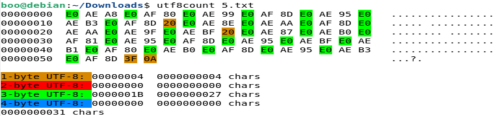 Limitation: -This app doesn't check for invalid UTF-8 sequence -No support for byte order mark (BOM) -Analyzing binary file will definitely give wrong character count as binary file is not text file This post has been edited by FlierMate1: Aug 18 2022, 06:14 PM Attached File(s)
utf8count.zip ( 2.9k )
Number of downloads: 6 |
|
|
|
|
|
Sep 6 2022, 03:54 PM
Show posts by this member only | IPv6 | Post
#7
|
|
Validating
12 posts Joined: Sep 2022
|
Forgot to mention about plain English text file, it is all 1-byte UTF-8 (also known as ASCII), in brown color:
https://pictr.com/images/2022/09/06/E0UyYZ.md.png |
|
|
Sep 12 2022, 03:16 PM
Show posts by this member only | IPv6 | Post
#8
|
|
Validating
12 posts Joined: Sep 2022
|
In February 2022, I have ported my hexdump utility from Linux to Windows.
The original set of Linux system calls match the corresponding Windows API. QUOTE Call stack (Linux) --> GetCommandLineA (Win32 API) I am pleased to attach the Windows x86 version of my hexdump (command-line) file utility.syscall 2 --> CreateFileA syscall 0 --> ReadFile syscall 1 --> WriteFile syscall 3 --> CloseHandle syscall 60 --> ExitProcess Attached File(s)
HEXDUMPQ.zip ( 1.9k )
Number of downloads: 8 |
|
|
Jan 27 2023, 09:13 PM
Show posts by this member only | IPv6 | Post
#9
|
|
Validating
90 posts Joined: Jan 2023
|
I ported my Hexdump again,
 this time to DOS 16-bit version! Assembly source file is included (using DOS int 21h interrupt). this time to DOS 16-bit version! Assembly source file is included (using DOS int 21h interrupt).But it supports small file below 64KB, as I still don't know how to convert 32-bit number to hexadecimal in DOS.  I upload to here as my backup, since I don't use GitHub for these kind of projects. Attached File(s)
HEXDUMPD.zip ( 1.91k )
Number of downloads: 8 |
|
|
Jan 27 2023, 09:52 PM
Show posts by this member only | IPv6 | Post
#10
|
|
Validating
90 posts Joined: Jan 2023
|
Below is API calls between Linux, Windows and DOS:
QUOTE * Call stack (Linux) --> GetCommandLineA (Win32 API) --> Program Segment Prefix (DOS) This post has been edited by FlierMate4: Feb 4 2023, 12:08 PM* syscall 2 --> CreateFileA --> DOS Interrupt AH=3dh * syscall 0 --> ReadFile --> DOS Interrupt AH=3fh * syscall 1 --> WriteFile --> DOS Interrupt AH=2 & AH=9 * syscall 3 --> CloseHandle --> DOS Interrupt AH=3eh * syscall 60 --> ExitProcess --> DOS Interrupt AH=4ch |
|
|
Feb 14 2023, 06:05 PM
|
|
Validating
90 posts Joined: Jan 2023
|
I am attaching hexdump v0.03 (for Linux) with following fixes:
* catch file open error (with error code -4095 and above, not -1 which never work) * reset ANSI color style to work with terminal window of any color This post has been edited by FlierMate4: Feb 18 2023, 11:36 PM Attached File(s)
hexdump_v0.03.zip ( 2.05k )
Number of downloads: 7 |
|
|
Apr 9 2023, 11:47 PM
Show posts by this member only | IPv6 | Post
#12
|

Validating
163 posts Joined: Apr 2020
|
QUOTE(FlierMate4 @ Jan 27 2023, 09:13 PM) I ported my Hexdump again, I helped FlierMate account to release HEXDUMPD (Hexdump for DOS) v0.02, which supports file above 64KB, now with proper 32-bit number conversion, special thanks to @angch. this time to DOS 16-bit version! Assembly source file is included (using DOS int 21h interrupt).But it supports small file below 64KB, as I still don't know how to convert 32-bit number to hexadecimal in DOS. I upload to here as my backup, since I don't use GitHub for these kind of projects.  Zip file contains source code and DOS EXE. This post has been edited by Tullamarine: Apr 14 2023, 06:57 PM |
|
|
Aug 7 2023, 04:17 PM
Show posts by this member only | IPv6 | Post
#13
|
|
Validating
329 posts Joined: Jun 2023
|
Derived from hexdump for Windows, I create a file color visualizer for Windows, it analyzes binary file and text file and gives distinct color output!
Suitable for both CMD and PS. EXE and source code are included. MIT license apply. EXE Binary File: 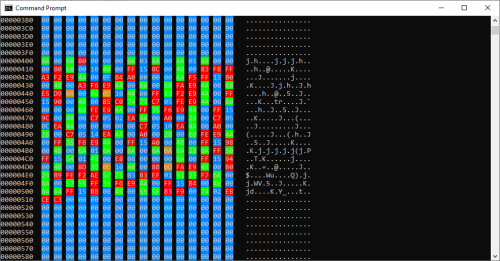 Text File: 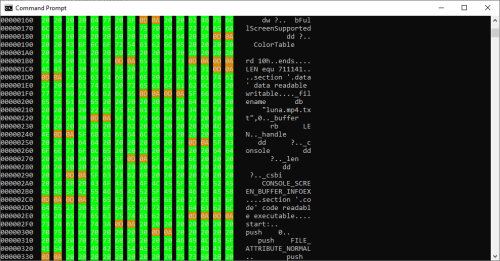 UTF-8 Text File: 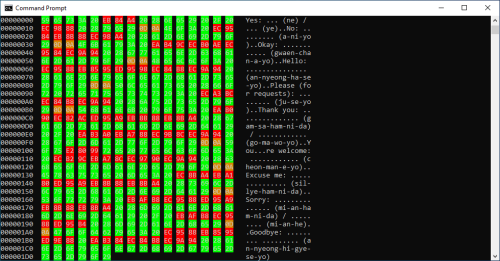 PNG Image File: 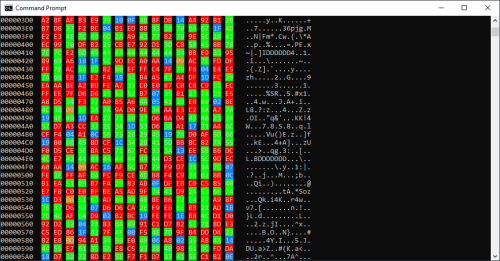 This post has been edited by MatQuasar: Sep 28 2023, 02:39 PM Attached File(s)
COLORDUMP.zip ( 3.34k )
Number of downloads: 13 |
| Change to: |  0.0232sec 0.0232sec
 0.62 0.62
 6 queries 6 queries
 GZIP Disabled GZIP Disabled
Time is now: 8th December 2025 - 11:53 PM |
 Quote
Quote