Outline ·
[ Standard ] ·
Linear+
Official TM UniFi High Speed Broadband Thread V39, READ 1ST PAGE FOR RELEVANT WIFI INFO
|
loobighead
|
 Jun 17 2021, 10:51 PM Jun 17 2021, 10:51 PM
|
Getting Started


|
Hi, I am planning to subscribe 800mbps unifi business plan for my shop. It’s an old shop lot hence the shop lot has no built in infrastructure for unifi cabling. However, I have done the plaster ceiling for my shop, if I would like to request the contractor to pull the cabling above the ceiling, may I know roughly what are the extra charges? I did read the unifi website guide but it’s not clearly stated over there as I know it’s case by case basis. I do have 3 manholes ready throughout the distance of around 50 feet from outside of my shop into my office, and I have a row of led light (with gap of <1 meter apart to each other) that can be remove so the technician is able to put their hand through the hole for pulling the wire. I just like to have a rough idea before the installation, just in case I won’t kena chop by the contractor 🤣 thank you in advance for any kind of advice, peace!
|
|
|
|
|
|
loobighead
|
Jun 20 2021, 03:05 PM
|
Getting Started
|
Hi, I am planning to subscribe 800mbps unifi business plan for my shop. It’s an old shop lot hence the shop lot has no built in infrastructure for unifi cabling. However, I have done the plaster ceiling for my shop, if I would like to request the contractor to pull the cabling above the ceiling, may I know roughly what are the extra charges? I did read the unifi website guide but it’s not clearly stated over there as I know it’s case by case basis. I do have 3 manholes ready throughout the distance of around 50 feet from outside of my shop into my office, and I have a row of led light (with gap of <1 meter apart to each other) that can be remove so the technician is able to put their hand through the hole for pulling the wire. I just like to have a rough idea before the installation, just in case I won’t kena chop by the contractor 🤣 thank you in advance for any kind of advice, peace!
|
|
|
|
|
|
loobighead
|
Sep 29 2021, 05:03 PM
|
Getting Started
|
QUOTE(PRSXFENG @ Sep 29 2021, 04:20 PM) Replace with own router, stock router not good "latest device" is just an excuse when their stock router cant do good Thanks for your reply man, even with good router, what’s the idea speed that’s acceptable? In addition, how about the direct LAN speed? 600 mbps download is reasonable? I am expecting an stable 700 mbps and above download speed though😂 Sorry for having so many question, I live in a town that only have 8mbps streamyx and just recently open for my shop to upgrade to a 800mbps unifi🤣 |
|
|
|
|
|
loobighead
|
Sep 29 2021, 06:46 PM
|
Getting Started
|
QUOTE(SilentVampire @ Sep 29 2021, 06:41 PM) You should be getting 700-800mbps at least. Have you tried with another device such as a laptop? The best thing to do is to get your own router. Their stock router is only okay but not good, especially for a 800mbps connection. I don’t have a laptop with me now, my desktop is 5 years old, so I thought not “latest” enough to test it🤣 what bothers me the most is the 5ghz wifi connection only can hit maximum 300 mbps plus even while I am using 1 device only and sitting next to the router. |
|
|
|
|
|
loobighead
|
Sep 29 2021, 08:49 PM
|
Getting Started
|
QUOTE(MyProLife @ Sep 29 2021, 09:08 PM) Usually with decent router, can achieve about 500mbps with AC router within close distance (given that the phone has 2x2 antenna and support AC 5ghz. Your iPhone (is your screenshot from older iPhone? Because aspect ratio and status bar seems like you are using it) should achieve higher speed with decent router, even better if you use at least iPhone 11 series that support AX wifi 6 , then you can get better speed with AX wifi 6 router. You have sharp eye, the uploaded photo of speed test is captured using iPhone 7. Herby I attached the screenshot of speed test of my iPhone 11 Pro at close range. Basically no difference😂 So I should be contented if my AC 5ghz speed can hit a 500mbps I guess, even though I am expecting higher. I have contacted my unifi installer telling them if they can bring their “lastest device” to do speed test at my router and if they can hit close to 800mbps, I will let thing pass. After hearing this, the technician told me he will be bringing me a new tp link router and test again for me tomorrow, if every thing goes well, I can keep the tp link router for the time being until my M9 mesh Wifi come in. Thanks again for explaining to me and I really appreciate all the advice given. Let’s see how it goes and I will update here again! 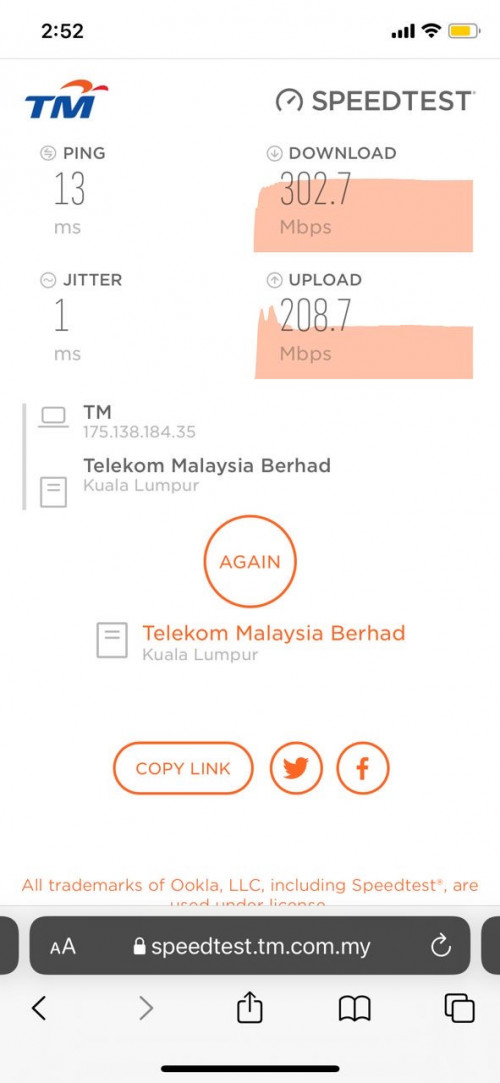 |
|
|
|
|
|
loobighead
|
Sep 30 2021, 01:42 PM
|
Getting Started
|
QUOTE(afif92 @ Sep 30 2021, 03:47 AM) I'm getting below speed at XT8 node with ethernet backhaul by using iPhoneX.. Unifi 800Mbps 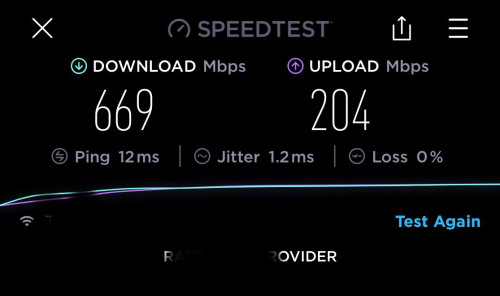 If direct LAN speed, can get roughly 830Mbps download and 207Mbps upload.. you can expect stable 800Mbps speed if download thru supported server like Google Drive.. Latest update, I can’t connect to internet since last night so I complain to my unifi installer. This morning he brings in a tp link ac1200 to test, in the end failed to make it works, switch back to the fiberhome router originally given to me upon installation. After that he makes some calls and voila, I am getting 800mbps download and 200mbps upload using direct LAN connection from router to desktop via cat6 cable and similar outcome using my PS5. For wireless connection using 5ghz, my iPhone 11 Pro manage to get 400 mbps plus download and 200 mbps upload as well. So I guess their technician must have done something to my port after I make the complaint. All the pictures are attached below for future references and the next update would be after I get my M9 plus mesh, thanks every one for the comment and advice! 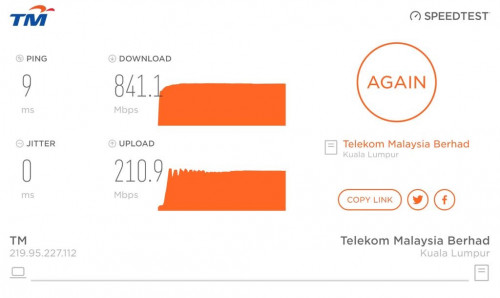 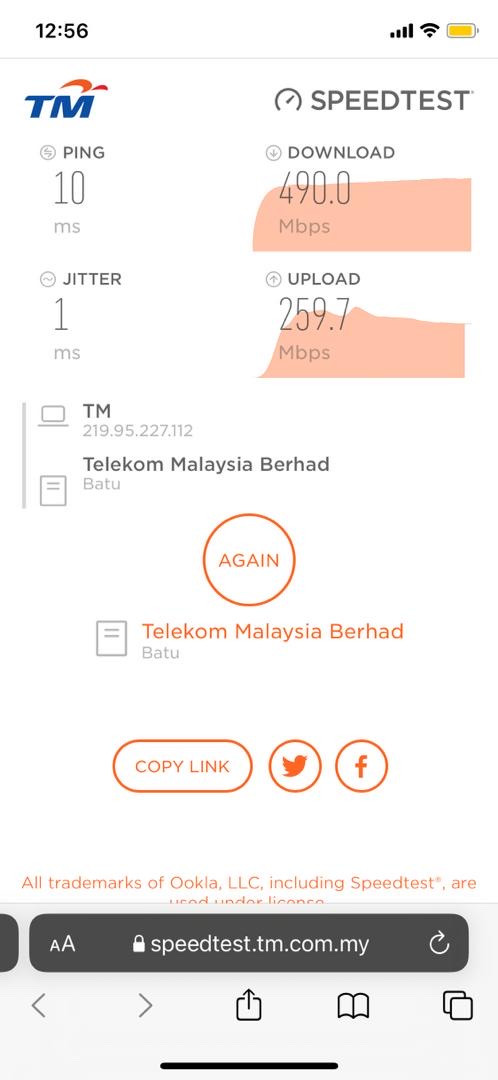 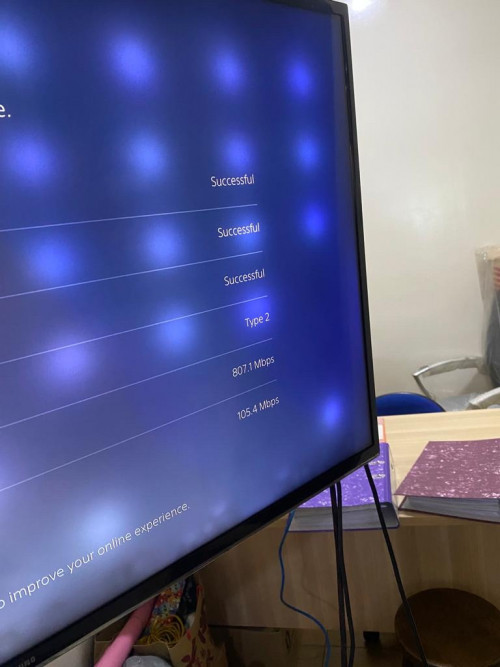 This post has been edited by loobighead: Sep 30 2021, 01:44 PM This post has been edited by loobighead: Sep 30 2021, 01:44 PM |
|
|
|
|
|
loobighead
|
Sep 30 2021, 01:51 PM
|
Getting Started
|
QUOTE(PRSXFENG @ Sep 29 2021, 11:37 PM) haha he knows he's busted Tbh it was bad pairing for him to give you the FiberHome router in the first place It would have worked fine on 30/100/300 mbps plans, but pretty bad on your 800mbps plan Also, when you do get the mesh, disregard TM's instructions of connecting like this Modem -> router -> mesh Instead throw the router out a window and connect like so Modem -> mesh It should have better peformance Ok la, the unifi installer is very friendly to be honest, he is just relaying what the tm technician told him to. I still give their service a 10 out of 10 and I can see the effort he puts in to solve the problem. I have updated the outcome in previous post, I have a strong hunch it’s tm technician side doing something with my port hence I am not getting optimal speed at the beginning. Thanks for the advice man, will definitely try your suggestion upon receiving my M9 plus mesh. |
|
|
|
|
|
loobighead
|
Oct 2 2021, 05:30 PM
|
Getting Started
|
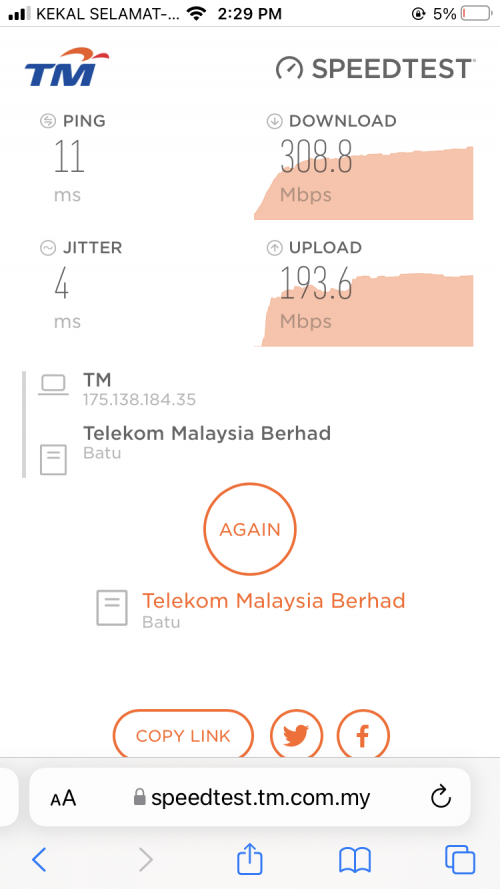
QUOTE(tng55 @ Oct 1 2021, 11:29 PM) you still prefer Free router by TM right good luck they bring TP Link router is crap glad to hear you still love Free Router tp link and fiberhome router both crap mine installed unifi they give tp link ac1200 look crap after tm unifi technical left then i removed tp link ac1200 then i plug my own Asus Router vola Stable connection i using RT-AC68U i will upgrade ASUS GT-AX11000 Router i still waiting TM Unifi offer 800mbps good price reduce i still use 100mbps 129 i know someone lucky 800mbps most RM159 OR RM169 OR RM179 OR RM189 that i waiting offering i got called received they offering 300mbps with Deco RM159 i tell rejected if possible 300MBPS RM139 they said can't i did tell i don't need Deco i did ask 800MBPS They told RM249 i rejected i asking can get RM169 or RM179 for 800MBPS without Deco and without TV they said can't so i already reject 300mbps RM159 end story i will wait until offer for 800MBPS for RM159 or RM169 or RM179 below like that Received my M9 plus mesh, here are the speed for main and sub mesh. In my area only have streamyx top package of 8mbps before launching of this unifi package, I guess I can’t complain much for paying rm349 upgrading to 800mbps unifi business as I have no other alternative available. Hope I can get a discount after a year or two contract with tm ba😂 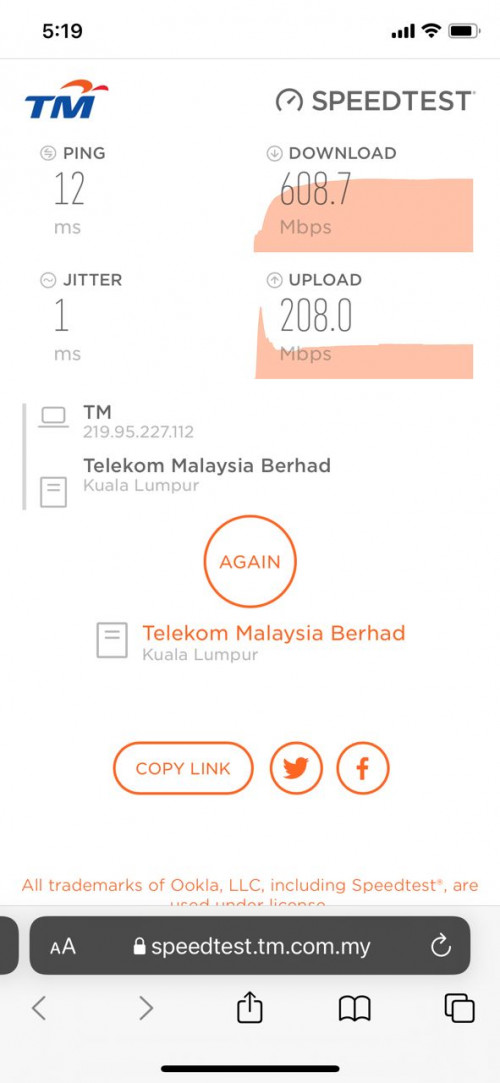 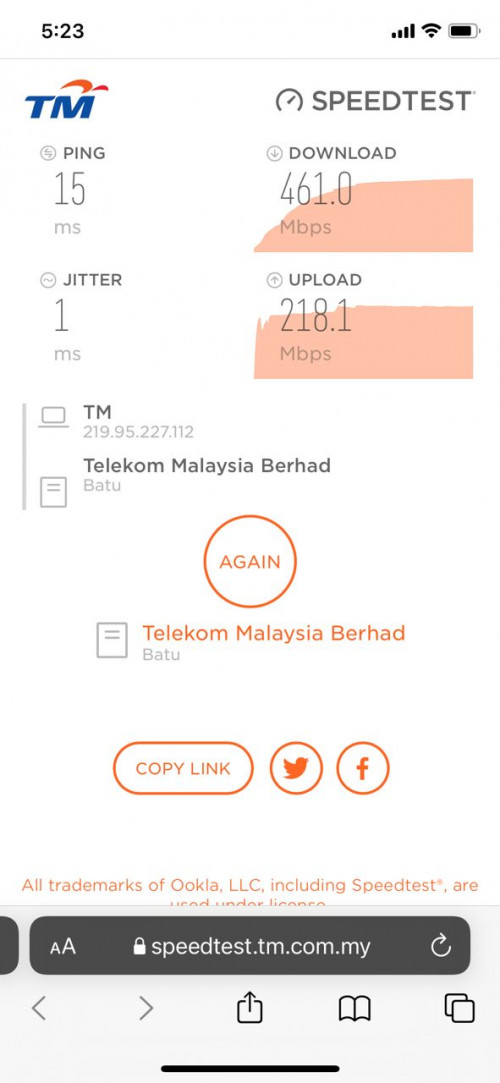 This post has been edited by loobighead: Oct 2 2021, 05:35 PM This post has been edited by loobighead: Oct 2 2021, 05:35 PM |
|
|
|
|
|
loobighead
|
Oct 2 2021, 06:49 PM
|
Getting Started
|
QUOTE(Hummingbird @ Oct 2 2021, 07:07 PM) May I check if the second unit is connected via wire or wireless? Wireless, under 5ghz, using iPhone 11 Pro. Distance from main to secondary mesh around 10-12 feet away straight line without any obstruction in between using wireless connection. This post has been edited by loobighead: Oct 2 2021, 06:50 PM |
|
|
|
|
|
loobighead
|
Oct 2 2021, 08:24 PM
|
Getting Started
|
QUOTE(soonwai @ Oct 2 2021, 08:21 PM) Nice speeds, very similar to mine. Deco M9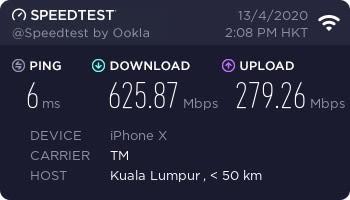 Deco M9 #1 as Router/AP (wired) Upstairs 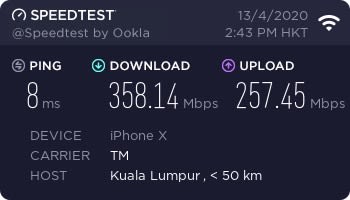 Deco M9 #2 Downstairs (not wired) 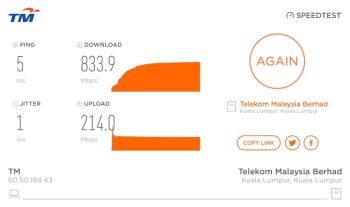 Deco M9 #1 as Router/AP (wired) to MacBook ethernet From: https://forum.lowyat.net/index.php?showtopi...post&p=96378294The M9s are pretty good but encountered a few probs so far (even with latest firmware): 1. I use a Mikrotik router as my main router. The M9s as APs only. Sometimes when my router goes down, the main M9 will turn on its DHCP server screwing everything up. This happens even if set to AP mode. Very annoying but not really a problem since my main router rarely goes down. 2. My HP Deskjet printer would not connect to the M9's wifi unless I turn off Roaming. Another HP Officejet printer also problem, I can see it but I can't connect to it. So just print using USB. Nice sharing man! Just curious how you do the firmware update of your M9 plus? Now what bother me is that my ps5 is located 4M away from the main mesh but it couldn’t get a good speed, not even 100mbps using ps5 speed test🤣 For the printer part, sorry for not being able to provide solid solution, let’s hope someone here can solve the problem for you! |
|
|
|
|
|
loobighead
|
Oct 3 2021, 02:08 PM
|
Getting Started
|
QUOTE(muscaa @ Oct 2 2021, 11:07 PM) I am using Dlink X5460 router and I found the speed was slow after I have upgraded the iOS to 15.0. a week ago Then I updated the firmware to the latest version 1.10B10 The unifi speed was back to normal download 800Mbps and upload 200Mbps  Hei man, this is the wireless speed?! If yes I really need to change my router already🤣 |
|
|
|
|
|
loobighead
|
Oct 3 2021, 02:11 PM
|
Getting Started
|
QUOTE(soonwai @ Oct 3 2021, 01:24 AM) I did the firmware update using the Deco app. As soon as I set it up, it asked if I wanted to update. Is your PS5 using wifi? Any idea which server it does the test to? The result of the speed test would highly depend on that. Can the ps5 download a speed test app like Ookla Speedtest? Anyway, forgot to mention that I'm no longer using the M9 Plus. Currently using 2 units of M5, both wired. Sold off the M9 Plus since I didn't need the 3rd radio. Speed of the M5 is not too bad also. The even cheaper M4 should give around the same speeds but I like the size of the M5.  Deco M5 Upstairs (wired)  Deco M5 Downstairs (wired) Your package is 500mbps or 800mbps if I may ask? If 500mbps using mesh, device connect wirelessly and able to get this speed I won’t complain already🤣 For the ps5 speed last night (100mbps download only) I finally figure out it connected to 2.4ghz of my mesh wifi, hence the speed is slow. I set the ps5 to only connect 5ghz network and the speedtest improved to around 300mbps down and 100mbps up. This post has been edited by loobighead: Oct 3 2021, 02:16 PM |
|
|
|
|
|
loobighead
|
Oct 3 2021, 02:18 PM
|
Getting Started
|
QUOTE(Hummingbird @ Oct 3 2021, 01:55 PM) I see, that is great. Anyway I just checked the spec of your mesh routers. It has three wireless bands so the third band is serving as a dedicated backhaul in meshing mode. I think for the dual band version of the mesh systems, the 5Ghz is used as both backhaul and wifi broadcasting band, hence the speed is usually not up to the standard. Wah, this is an info I never know. 3 wireless bands means 2.4ghz, 5ghz and another one is what huh? In the deco app I only can select 2.4 and 5 only. |
|
|
|
|
|
loobighead
|
Oct 3 2021, 02:20 PM
|
Getting Started
|
QUOTE(tng55 @ Oct 2 2021, 11:12 PM) glad to hear i hope you speed accepted but i am not 100% you may use free router you agree speed then no need buy new own router Hei man, since you say so, any router you recommending? Of course a budget friendly one la, not something even more expensive then my ps5🤣 |
|
|
|
|
|
loobighead
|
Oct 4 2021, 11:49 AM
|
Getting Started
|
QUOTE(soonwai @ Oct 3 2021, 11:31 PM) Mine is 800Mbps. If use the Deco M9, I get speeds similar to yours. https://forum.lowyat.net/index.php?showtopi...ost&p=102501459As mentioned before, I'm now using the M5, smaller, cheaper but slower. I'd recommend this if the units are going to be wired. If wireless than M9 is the way to go because of its 3 radios. Also I use a separate router, the M5s are just as APs. Unsure if the M5 can handle 800Mbps of routing. Ahh I see, after looking through the posts I am in dilemma should I just stick to what I have now or buy a new router that can broadcast a 20*80 shoplot, the router will be place at middle of the shop and coverage need to be able to cater ground floor and first floor. Do you have any recommendation? A budget friendly one maybe 🤣 |
|
|
|
|



 Quote
Quote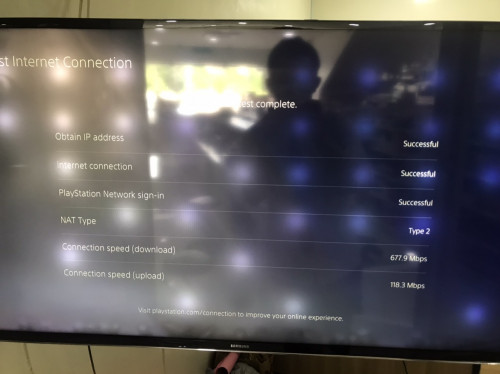


 0.1956sec
 0.60
0.60
 7 queries
 GZIP Disabled