Welcome Guest ( Log In | Register )

Bump Topic Topic Closed RSS Feed

Outline · [ Standard ] · Linear+

 Official TM UniFi High Speed Broadband Thread V39, READ 1ST PAGE FOR RELEVANT WIFI INFO

views
     
kk131
post Jun 3 2021, 11:20 AM

On my way
****
Junior Member
566 posts

Joined: Jun 2005
From: Somewhere over the rainbow


Wondering what's the best offer that existing Unifi subscribers are being offered now, I received a call from their sales -

300/50 Mbps RM159/month
300/50 MBps with IPTV RM179/month

both with TP-Link mesh deco (router + node)

My desktops, NAS, TV etc. are all connected with ethernet and I already have good WiFi coverage in the house, so TP-Link equipment is of imited interest. Can you bargain with them to reduce cost if you don't take their hardware or do they have better deals? I read in this thread last November they were offering 300Mbps for RM139.
kk131
post Jun 3 2021, 12:48 PM

On my way
****
Junior Member
566 posts

Joined: Jun 2005
From: Somewhere over the rainbow


QUOTE(ckimsem @ Jun 3 2021, 11:55 AM)
300mbps @ RM139 is for users of 2018, and IINM this plan will revert back to NP:RM199 once contract ended. This plan is no longer offered, unless if you could get someone with this plan switching to yours.

As for 300mbps @ RM159, it’s perpetual discount which the price will remain @ RM159 after contract. If you don’t need the Deco units, you may try to sell them off.

Why don’t you consider DiGi/Celcom/Maxis fibre? Their plans are a bit cheaper.
*
Thanks for the reply. Looking at the competition's web sites for 300/50:

Digi - RM150/month
Celcom - RM140/month (RM21 deduction for 3 months)
Maxis - I've had enough of their business practices with Astro, so they're not in consideration

So Celcom offers a better deal. Any feedback on their service?

I've been a long time subscriber to Unifi and am very satisfied with their service - I get a dynamic ip address free which is a +. With Celcom no doubt I would be stuck behind GCNAT. I run quite a few services on my home server - Bitwarden, Nextcloud, music streaming, do you know if Celcom block ports to prevent this?

Guess I should be asking some of these questions in the Celcom FTTH thread.

This post has been edited by kk131: Jun 3 2021, 01:39 PM
kk131
post Jun 15 2021, 01:02 PM

On my way
****
Junior Member
566 posts

Joined: Jun 2005
From: Somewhere over the rainbow


QUOTE(akhito @ Jun 14 2021, 04:29 PM)
802.11n not 5Ghz at least need 802.11ac adapter. So ya ur laptop not supported just use ethernet if u need high speed, cuz i dun really recommend buying another adapter or laptop for 5Ghz
*
802.11n operates on both 2.4GHz & 5Ghz, maybe support is not set in his router.
kk131
post Dec 13 2021, 11:12 AM

On my way
****
Junior Member
566 posts

Joined: Jun 2005
From: Somewhere over the rainbow


QUOTE(calson @ Dec 13 2021, 12:03 AM)
Did anyone facing issue that their Unifi public IP is only accessible from other unifi public ip?

Previously i did port forwarding and allow access into my server via public IP.

However it stop working few days ago and upon troubleshooting, the IP only accessible by other unifi subscriber.

Currently i'm in oversea, therefore need to access the server via public ip..
I even try to use VPN back to malaysia and still not working.

Lastly ask my friend in Malaysia to try using both of his phone (4G) and PC (unifi)

Only PC will work... also tested connect phone to wireless (running Unifi) and it is working
*
Is it a public ip or is it in the CGNAT block 100.64.0.0/10 (100.64.0.0 to 100.127.255.255, netmask 255.192.0.0)?

Unifi implemented CGNAT recently - lots of posts here.

Maybe you access via ipv6 if you have it set.
kk131
post Dec 30 2021, 08:48 AM

On my way
****
Junior Member
566 posts

Joined: Jun 2005
From: Somewhere over the rainbow


We really need a price war to bring the price down. Malaysia retail broadband is still expensive compared to world prices. Hope Celcom/Digi or one of the others will trigger some real competition.
kk131
post Dec 30 2021, 02:10 PM

On my way
****
Junior Member
566 posts

Joined: Jun 2005
From: Somewhere over the rainbow


QUOTE(John42 @ Dec 30 2021, 12:58 PM)
The price now is much better than last time where VIP5 costs RM 149 🙃. I am from this batch of time using Unifi so now 100 Mbps which cost less than RM 149(VIP5) some users are paying less than RM100 for 100 Mbps so I wouldn't be complaining about that. You know what is the most expensive thing in MY? Is the car prices here which is second highest in the world 🙃
*
Yes agreed, the trend for RM/GB is ever downwards, hoping that more FTTH operators coming onboard will accelerate the trend.
kk131
post Jan 1 2022, 07:35 AM

On my way
****
Junior Member
566 posts

Joined: Jun 2005
From: Somewhere over the rainbow


QUOTE(RiriRuruRara @ Jan 1 2022, 01:54 AM)
Guy if using the router and modem tm provide is it possible that my neighbour house he can see and receive my wifi signal?

Staying in a semidetached house and I'm asking about the house that doesn't share the same wall as mine?
*
Yes .. if you've shared your wifi password with him. You should be able to login to your router and see connected devices.
kk131
post Jan 1 2022, 04:31 PM

On my way
****
Junior Member
566 posts

Joined: Jun 2005
From: Somewhere over the rainbow


QUOTE(RiriRuruRara @ Jan 1 2022, 03:24 PM)
Thank you.
At the router configuration page the wireless client part will show everyone that been using your WiFi right??
*
Only the devices presently connected. If you're concerned then change the WiFi password in the router, most probably you need to change for both 2.4 & 5GHz bands.

This post has been edited by kk131: Jan 1 2022, 04:33 PM
kk131
post Jan 10 2022, 11:30 AM

On my way
****
Junior Member
566 posts

Joined: Jun 2005
From: Somewhere over the rainbow


QUOTE(alucard89 @ Jan 10 2022, 11:06 AM)
Exactly how to do that with ipv6?
Ipv4, if public ip can just portforward
If private, then need to use alternative like reverse ssh tunnel, ngrok, tailscale
I just don’t quite understand it with ipv6
*
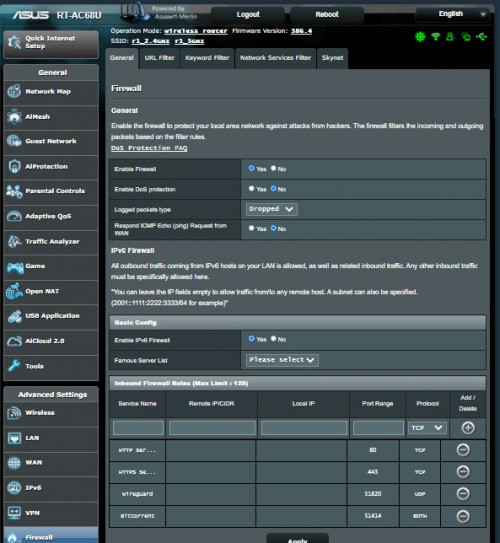
You're assigned public ipv6 addresses for your devices by Unifi dhcp if you enable ipv6 on the router. On your router you should be able to set access through the ipv6 firewall for the services you want to access from the internet. I only have experience of Asus routers, there isn't any dhcp6.


kk131
post Jan 10 2022, 05:32 PM

On my way
****
Junior Member
566 posts

Joined: Jun 2005
From: Somewhere over the rainbow


QUOTE(alucard89 @ Jan 10 2022, 04:34 PM)
Ok, i have one running asuswrt
So there’s another setting with the firewall i need to configure first?
Once that’s done, i can get the ipv6 ip address for my device then?

Example, my hp t430 running on debian
Ipv4 - 192.168.2.120
Ipv6 - ?

I have a few apps running on it (homeassistant, plex, etc)
How would i access each one running on different port?
Ipv4 - homeassistant (192.168.2.120:8123)
Ipv6 - ?

Are the ipv6 permanent or need to use something like duckdns for ipv4?
*
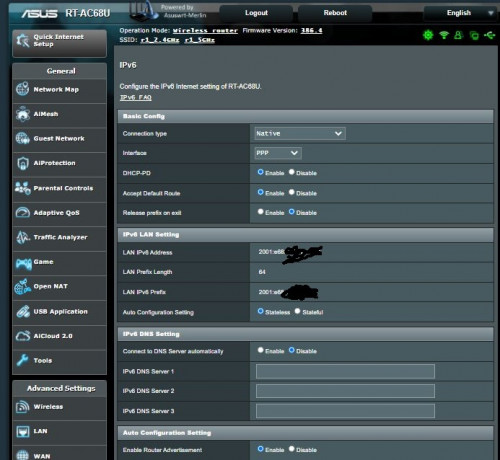
Set ipv6 on

user posted image

Then open up ports in ipv6 firewall

user posted image

Unifi should retain the DHCP address assignments if you don't release the addresses on exit. I use duckdns to associate the ipv6 dynamic addresses with host names (DNS AAA records), run the dyndns update script on my server .

This post has been edited by kk131: Jan 10 2022, 05:48 PM
kk131
post Jan 10 2022, 09:00 PM

On my way
****
Junior Member
566 posts

Joined: Jun 2005
From: Somewhere over the rainbow


QUOTE(alucard89 @ Jan 10 2022, 07:31 PM)
Thanks, what do you mean by ‘release the addresses on exit’?
How to avoid that?
If you have release address on exit set, when the internet connection drops, ipv6 assignments will be released, so you will most probably get new ipv6 addresses assigned by Unifi when the link comes up again. If you look at the first screenshot the option is given.

QUOTE
If i wanna access service running on port 8000, and with duckdns already setup for ipv6. Would it be something like this?

mypc.duckdns.org:8000
Yes.

QUOTE
Does ipv6 still work on cellular network like maxis, unifi air for remote access? i do know they block portforward by default
*
No knowledge of Maxis, Digi mobile network is only using ipv4. You can check your phone settings to see assigned ip addresses assigned when you're on mobile data.

This post has been edited by kk131: Jan 10 2022, 09:02 PM
kk131
post Jan 18 2022, 08:21 AM

On my way
****
Junior Member
566 posts

Joined: Jun 2005
From: Somewhere over the rainbow


QUOTE(JohnLai @ Jan 17 2022, 07:46 PM)
So far, I only know https://dynv6.com/ does thing correctly on IPv6 DDNS. laugh.gif
*
Duckdns has supported ipv6 for a few years.
kk131
post Jan 18 2022, 03:36 PM

On my way
****
Junior Member
566 posts

Joined: Jun 2005
From: Somewhere over the rainbow


QUOTE(Kiding @ Jan 18 2022, 02:29 PM)
All Unifi assigned IPV6 is public IP, you can say it is WAN IP, but not LAN IP. number of IPV6 addresses is very huge, more than the number of sand particles on earth, TM can virtually assign million IPv6 addresses per person.

What unifi assigned is /64 prefix, it means the first 64 bits of IPv6 portion is assigned by TM, the second part 64 bits is assigned by your router (DHCPv6) or SLAAC. you can control of the second part (host addresses), but the first part, it is dynamically assigned by TM. I wonder can we request to have fix IPv6 prefix from TM?
*
The DHCP-PD in your router should have the option to release/retain the prefix on exit (connection drop), the prefix is allocated by Unifi based on the router DUID, normally the WAN port MAC address.
kk131
post Feb 19 2022, 08:13 AM

On my way
****
Junior Member
566 posts

Joined: Jun 2005
From: Somewhere over the rainbow


QUOTE(Maxieos @ Feb 19 2022, 05:26 AM)
Anyone try plugin an external 2.5 HD to the USB router ? how do safely remove drive ?
*
For Asus routers there's a 'safely remove' button on the Network Map page of the web interface. Other brands of router should have something similar.
kk131
post Feb 20 2022, 08:40 AM

On my way
****
Junior Member
566 posts

Joined: Jun 2005
From: Somewhere over the rainbow


QUOTE(Maxieos @ Feb 19 2022, 09:52 PM)
Which asus router do you suggest ? normal usage but hope to get a good function.

-Support 2.5 HD power or printer with USB
-Separate Device IP to run VPN
-Seperate Device to run IPv4 (mobile ) and both on (PC)
-Individually Block device wireless MAC and IP address the device is accessing.

Does Unifi Dlink able to flash to open wrt stable and run the requirement above ? I don't really need Unifi TV.
*
You're off topic in this thread, you would be better asking in the WiFi router thread https://forum.lowyat.net/index.php?showtopic=4658096&hl=#

Most, if not all you could do with router running Asus Merlin firmware, for WiFi6 AX86U & AX68U are popular choices. You would have to become familiar with SSH terminal access and iptables to do some IP6 blocking.

This post has been edited by kk131: Feb 20 2022, 08:41 AM
kk131
post Feb 25 2022, 09:43 AM

On my way
****
Junior Member
566 posts

Joined: Jun 2005
From: Somewhere over the rainbow


QUOTE(Dylnyat @ Feb 25 2022, 09:28 AM)
Any of u experience frequent IP @ BTU restart randomly?

My btu randomly restart n change my ip.
i want to know why it randomly restart. Few times im in a busy situation the internet restart…

Any idea?
*
Are you sure it's the BTU and not the router rebooting? Have you checked your router log?

Topic ClosedOptions
 

Change to:
| Lo-Fi Version
0.0341sec    0.53    7 queries    GZIP Disabled
Time is now: 5th December 2025 - 05:24 PM