Welcome Guest ( Log In | Register )

Bump Topic Topic Closed RSS Feed

Outline · [ Standard ] · Linear+

 Official TM UniFi High Speed Broadband Thread V39, READ 1ST PAGE FOR RELEVANT WIFI INFO

views
     
cheekian
post Apr 2 2021, 10:03 PM

Getting Started
**
Junior Member
141 posts

Joined: Dec 2012


Does anyone use 100Mbps with the modem HG850a which it doesn't support gigabit ethernet. I tried few times to request change, still no luck... always said the speed is fast enough, my here always cap at 92Mbps due to the modem...

This post has been edited by cheekian: Apr 2 2021, 10:06 PM
cheekian
post Apr 2 2021, 10:51 PM

Getting Started
**
Junior Member
141 posts

Joined: Dec 2012


QUOTE(XeactorZ @ Apr 2 2021, 11:33 PM)
what is your current package?
*
100Mbps, changed at the end of 2019, originally 50Mbps last time.
cheekian
post Apr 2 2021, 11:30 PM

Getting Started
**
Junior Member
141 posts

Joined: Dec 2012


QUOTE(soonwai @ Apr 3 2021, 12:21 AM)
When I did the upgrade from 50M to 100M in 2017 (RM10 RYE2017 upgrade), TM changed my HG850a to a gigabit HG8240H. Not sure why they didn't change yours.
https://forum.lowyat.net/index.php?showtopi...&#entry87272167
*
I changed to 100Mbps plan on end of 2019 (YEP 2019) - RM129 from 50Mbps (at that time RM179), that time they just provide a new router (DIR-842), that time they said change modem need do another request. Today I had changed new router TP-link AX73, and just now try my luck to ask for change it, but still no luck. (I used live chat to try, call 100 will helps?)

I had asked few times already to request that, but they said, is already satisfied/enough to reach the speed... Then if there is no any free speed upgrades in the future, that means I would stick with the speed (less than 94Mbps) forever?

This post has been edited by cheekian: Apr 2 2021, 11:33 PM
cheekian
post Apr 3 2021, 12:21 AM

Getting Started
**
Junior Member
141 posts

Joined: Dec 2012


QUOTE(soonwai @ Apr 3 2021, 12:40 AM)
If the HG850a power adaptor stops working, you can report it and chances are that TM will change it to a new gigabit modem. Just make sure you have a spare 12V 1A DC adaptor that you can use while waiting for the techs to come.

Power adaptors tend to die quite often from natural causes like lightning or being mishandled by humans  smile.gif .
*
Good tip, my HG850a power adapter is actually almost reach to the end of life due to it sometimes suddenly shut down when move the modem and turn it back normal when replug the modem.

I also had explain this issue to the live chat just now, but he seems treat me like a fool telling me that no any issue from their side. I just want change to a new modem provided by TM, is that so hard? bangwall.gif
cheekian
post Dec 17 2021, 11:22 AM

Getting Started
**
Junior Member
141 posts

Joined: Dec 2012


QUOTE(BenYeeHua @ Dec 17 2021, 10:14 AM)
Get kicked to Private IPv4 during midnight 3 AM, current plan is 100M 30 days free speed upgrade, all China app speed drop extremely heavy to less than 30kb/s, home page loading and QQ image loading take at least 10s, those China app I mentioned are having CDN server at Singapore and HK...

Great... sweat.gif
---
Testing on IPv6 now, CloudFlare not at KUL also facing heavy speed drop to 35kb/s too, based on testing is TM send me to their CloudFlare HK server..... sweat.gif

So, great, much heavy QoS implement on private IP, and it will heavy affecting your Public IPv6...
---
So far affected is.

The worst -> the bad

115.134.107.x - even having heavy packet drop for using Lazada App, but strangely having speed up to 60kb/s to CloudFlare HK.
60.53.x.x
175.141.x.x

Will stop researching, it is pretty much useless now, heavy QoS drop, so anyone don't have method to switch back public IP, right? hmm.gif
---
Final reboot, get back to IP range 180.74.x.x, still having heavy QoS drop, compare with public 180.74.x.x.
So, their private IP is, shit, all loading much much slower than my mobile data now.... sweat.gif
---
Refuse to switch back public IP, nah, wait until they send people and test themselves la. sweat.gif

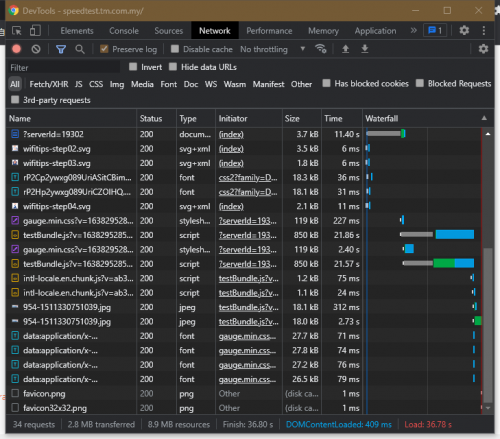
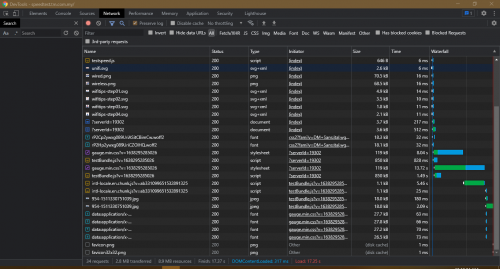
Here is the proof of slowing down, on their own speedtest website lol. laugh.gif

» Click to show Spoiler - click again to hide... «

*
I having the same issue like you, some webpages are very slow, I thought is system down. Current plan is 100M, not even free speed upgrade, using TP-AX73 router too rclxub.gif

cheekian
post Dec 17 2021, 03:46 PM

Getting Started
**
Junior Member
141 posts

Joined: Dec 2012


QUOTE(BenYeeHua @ Dec 17 2021, 03:33 PM)
So it is area depended?
Melaka, loading take like 1 mins with heavy packet drop, others thing are the same. hmm.gif
*
JB here also affected

Topic ClosedOptions
 

Change to:
| Lo-Fi Version
0.2083sec    0.53    7 queries    GZIP Disabled
Time is now: 8th December 2025 - 10:59 PM