Welcome Guest ( Log In | Register )

Bump Topic Topic Closed RSS Feed

Outline · [ Standard ] · Linear+

 Official TM UniFi High Speed Broadband Thread V39, READ 1ST PAGE FOR RELEVANT WIFI INFO

views
     
cannavaro
post Feb 3 2021, 02:30 PM

CATTENACIO
*******
Senior Member
3,008 posts

Joined: Sep 2005
From: T.T.D.I, Bukit Damansara


QUOTE(akping_1 @ Feb 3 2021, 01:34 PM)
current using 800Mbps with unifi TV for RM189 b4 sst with contract until end of this year.
just received a call from stupid TM to offer me 3 option with 2 years renew contract:
1) RM279 with new hypptv box and all channels
2) RM259 with new hypptv box and basic channels
3) RM239 with only basic Hypptv...

i really wonder how the TM marketing thinking...
*
Previously there are people looking for this 189@800Mbps bro.. maybe you can sell it via transfer ownership method xD if you are looking to switch

A few years ago I asked TM if a customer do transfer ownership, will the special perpetual discounts be retained? The staff said yes.
No idea if it still applies today
cannavaro
post Feb 11 2021, 07:46 PM

CATTENACIO
*******
Senior Member
3,008 posts

Joined: Sep 2005
From: T.T.D.I, Bukit Damansara


QUOTE(orangubat @ Feb 11 2021, 01:17 PM)
I don't have such luck, I was paying RM129 for the 500Mpbs Turbo Upgrade, from last month, they started charging RM229 claiming that offer expired. As I want to keep the bill to not more than RM150, I asked for downgrade to 300Mbps. In email they offer me RM139.

Then they called up and say no more such plan, now 300Mbps without unifiTV is RM199. Even when I threaten to cancel and migrate to Maxis Fibre also they refused to honour the RM139 which was offered in email. Really shit!
*
Wow this is new.. there is someone else in here paying RM129 for 500Mbps (due to mistake by TM cs when removing tv pack)
How did you get that package in the first place?
cannavaro
post Feb 26 2021, 11:43 AM

CATTENACIO
*******
Senior Member
3,008 posts

Joined: Sep 2005
From: T.T.D.I, Bukit Damansara


So I called TM to ask about this latest loyalty mesh wifi promo that's being talked about... got the notification on myunifi app.

I was told that all three of my 800Mbps accounts are not eligible including the one that's out of contract because the promo is only for upgrade and not downgrade.
The agent even said it is better if I maintain the account because supposedly I won't get this price ever again (RM229 for 800Mbps. Not the lowest out there I know).
Transfer ownership of account still works though (special price maintain), he confirmed.

edit:
forgot to mention, he said even those new users who subscribe to the '1 month trial' promo can get this offer

This post has been edited by cannavaro: Feb 26 2021, 11:45 AM
cannavaro
post Mar 10 2021, 04:52 PM

CATTENACIO
*******
Senior Member
3,008 posts

Joined: Sep 2005
From: T.T.D.I, Bukit Damansara


QUOTE(Hwoarang45 @ Mar 10 2021, 01:08 PM)
restart modem and i get this , its consistent cap at 94mbps only for my 100mbps package , should i complain to them?

user posted image
*
Sharing my experience back in 2016 when I was using 100Mbps.. one of the idiot pioneer waterfish accounts, LOL
I was using a router with GbE ports, IIRC it was WDR 4300
I could easily get more than 100Mbps when running a speedtest even via 2.4 wifi (using a certain asus usb wifi adapter, forgot the name)
Usually it was in the 110Mbps range.
Then 1 day I was testing this tplink router with fast ethernet ports.. bought it not for my own use, I believe it was the C60..
No matter how many times I ran the speedtest via ethernet I could not get 100Mbps. The highest was 97Mbps but mostly 94, 95. As expected, when I switched to my own router, speed returned to normal.

I didn't read your earlier posts, but I'm guessing you are using a router with fast ethernet ports?
cannavaro
post Jul 23 2021, 11:51 AM

CATTENACIO
*******
Senior Member
3,008 posts

Joined: Sep 2005
From: T.T.D.I, Bukit Damansara


QUOTE(comet2232 @ Jul 22 2021, 08:09 PM)
They offered via call after I emailed them regarding my intention to port to digi home fibre.
*
Were you really planning to port, and if yes, is it a requirement to email TM first?
cannavaro
post Sep 4 2021, 07:24 PM

CATTENACIO
*******
Senior Member
3,008 posts

Joined: Sep 2005
From: T.T.D.I, Bukit Damansara


QUOTE(HumanExtinction @ Sep 4 2021, 07:10 PM)
Just now morning PCOM a few guys come and install fibre at my apartment, afternoon already got agent come ask want to upgrade or not. Decided to upgrade from shitmyx 8mbps to 800mbps since me and my family all super content user heavy.

Any idea what kinda of router they will give for 800mbps user? Also forget to ask the agent just now, any installation fees as well?
*
AFAIK, nowadays they give you 2 x Deco M9 Plus for 800Mbps. Not sure if they have changed it.
Standard installation is free. Non standard however is chargeable.. example of non standard = installer have to route the fibre through the ceiling, having to use a microduct to put the fibre in, etc

If really don't wanna pay anything just tell the installer that you want a free installation.


cannavaro
post Sep 5 2021, 05:42 PM

CATTENACIO
*******
Senior Member
3,008 posts

Joined: Sep 2005
From: T.T.D.I, Bukit Damansara


QUOTE(HumanExtinction @ Sep 4 2021, 11:52 PM)
I see. I thought the contractor will bring the mesh wifi together with the router. So most likely they will provide AZ router than other brand? My gaming pc is bit far away from the telephone cable / router. I have a high end mobo that can support wifi 6 and 5ghz, hopefully this mesh can help me to get around 600-700mbps speed. Don't know if power line can help to get max 800mbps speed or not if connected to the router and my pc.
*
If you connect your PC via ethernet to the secondary M9, and the said M9 is getting full signal (monitor from the Deco app) from the primary M9, you can get full 800 Mbps. I've tested this in router mode. Not sure if it's the same if the M9 is on AP mode.

cannavaro
post Sep 6 2021, 01:07 PM

CATTENACIO
*******
Senior Member
3,008 posts

Joined: Sep 2005
From: T.T.D.I, Bukit Damansara


QUOTE(Steponlego @ Sep 6 2021, 12:23 PM)
If I replace the router given by TM, will my internet become somewhat better? Currently during peak hour at 8pm until 11pm, ping will become unusually high and sometimes youtube will auto change to 360p. I'm looking at Mercysys MR70X over here, looks good enough and cheap. I'm don't care about wireless performance because got M9 Deco.
How to do this but on the primary M9? I just can't get any internet connection via ethernet when I use the M9 as router in PPPoE mode. It says that I got invalid IP.
*
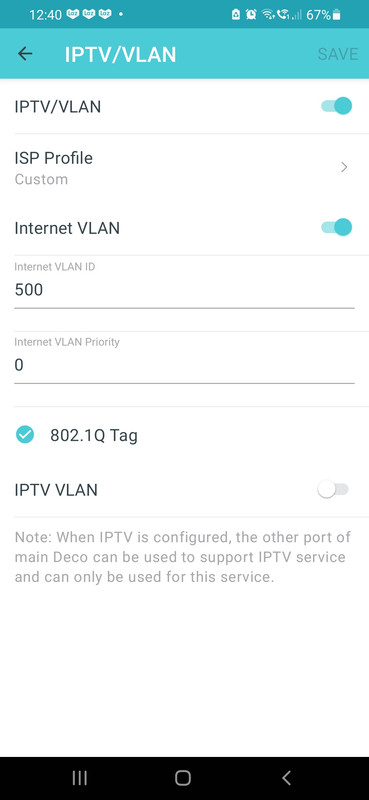
Did you use the tm unifi preset? because the 2nd port is set for the white unifi stb
Use custom settings like below
user posted image
cannavaro
post Sep 7 2021, 10:40 PM

CATTENACIO
*******
Senior Member
3,008 posts

Joined: Sep 2005
From: T.T.D.I, Bukit Damansara


QUOTE(HumanExtinction @ Sep 6 2021, 11:37 PM)
hi sifu, a question. My apartment is only 700 sq ft and the router is approximately 25 - 30 feet to my pc. With the method you mentioned, is it possible to get full 800mbps? Of course lan is impossible as the router is too far away from the pc. If only connect to mesh wifi and no any cabling or whatsoever, is it possible to achieve a min of 600mbps?

user posted image
*
When I did the test it was around 5m, no walls or doors, practically sitting in front of the main deco. If 25 - 30 feet with no walls or doors and 2nd M9 is getting a full signal from the main M9 (at least in the deco app), I'm guessing that it would be possible to get at least 500Mbps ish?

Another test I did (same method, wire PC directly to the 2nd M9) where the deco app shows the secondary M9 getting 2 bars from the main node (didn't check the dBm though), I could get 300++ Mbps.
cannavaro
post Sep 16 2021, 01:15 AM

CATTENACIO
*******
Senior Member
3,008 posts

Joined: Sep 2005
From: T.T.D.I, Bukit Damansara


Was at my parents house yesterday, mom was complaining about her BBC Player UK being slow (watching on CWGTV using a smart dns service). I decided to reboot the connection. Before doing so I checked the ip, it was in this range: 1.9.xx.xx, haven't seen this before.
After rebooting both modem and router and reestablishing the connection. much to my surprise the exact same ip was given! Can't possibly be a static ip?

I didn't reset the connection for the 2nd time though
cannavaro
post Sep 16 2021, 01:29 PM

CATTENACIO
*******
Senior Member
3,008 posts

Joined: Sep 2005
From: T.T.D.I, Bukit Damansara


QUOTE(YoungMan @ Sep 16 2021, 09:18 AM)
If you just turn off the modem for a while, you might get back the same IP. But if you turn off for say 5 to 10 minutes, then it may give you different IP.
*
Oh I didn't know this is possible.. I thought it had something to do with whatever that was causing the slowdown that started in the northern areas as reported.. a glitch in the system or some sort sweat.gif

Topic ClosedOptions
 

Change to:
| Lo-Fi Version
0.2018sec    0.56    7 queries    GZIP Disabled
Time is now: 1st December 2025 - 06:20 PM