Outline ·
[ Standard ] ·
Linear+
Official TM UniFi High Speed Broadband Thread V39, READ 1ST PAGE FOR RELEVANT WIFI INFO
|
Brotherjoe
|
 Mar 23 2021, 10:30 PM Mar 23 2021, 10:30 PM
|

|
QUOTE(sHawTY @ Mar 19 2021, 11:55 AM) 1. Connect a laptop or desktop directly to the router using an Ethernet cable to make sure you are definitely getting 300Mb/s. If yes, then proceed with the next 2 steps 2. When using above 50Mb/s, always use 5GHz, never 2.4GHz 3. Set your 5GHz bandwidth to 80MHz. Not 20, not 40, not auto, not 20/40/80. Not sure if the DIR-842 allows you to set it to 80MHz only or not. If not, then time to dump it and get a better router such as the ASUS RT-AX56U This is where you can find it, don't ask me how to access your router configuration, I don't have time to spoon-feed you with every detail. Google it yourself 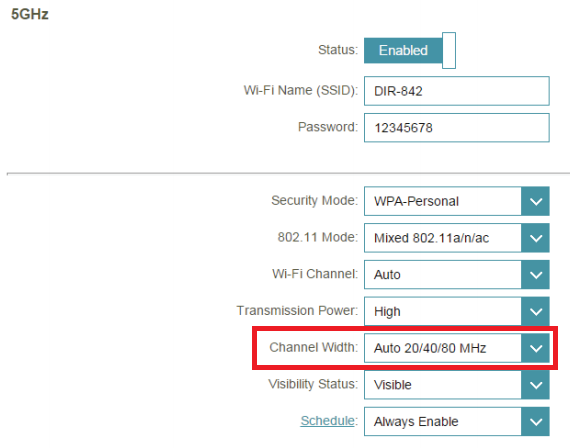 Hi There, Does your DIR 842 overheating? |
|
|
|
|
|
Brotherjoe
|
Jul 31 2021, 10:38 PM
|
|
|
Anyone using Dlink DIR-842. Did TM push 3.07TM firmware to your router yesterday noon?
|
|
|
|
|
|
Brotherjoe
|
Aug 2 2021, 03:53 PM
|
|
|
QUOTE(The.Lucas.DaY @ Aug 2 2021, 03:23 PM) Do we actually need to upgrade TM stock router firmware? I didn't upgrade mine since Unifi installed it, any benefits of upgrading? Thanks It seem like it will get auto update when new TM firmware is available. I didn't update.. only noticed firmware changed after I encountered connection issue my company VPN, connection keep dropping.. However it got stabilized after manually restart the router |
|
|
|
|
|
Brotherjoe
|
Aug 2 2021, 04:18 PM
|
|
|
QUOTE(blibala @ Aug 2 2021, 04:15 PM) Can TM router flash international firmware? I think you can.. just need to make sure you have the correct firmware for the hardware version. Else you might brick the router.. Flash at your own risk.  |
|
|
|
|
|
Brotherjoe
|
Aug 2 2021, 04:32 PM
|
|
|
QUOTE(The.Lucas.DaY @ Aug 2 2021, 04:28 PM) My D-Link DIR-842 still v3.01TM, firmwre verison dated May 2018  Aiks.. why are you still on the initial firmware? Try login to your router and click on the check firmware. I still don't see the actual change log.. what is changed between 3.06tm to 3.07tm 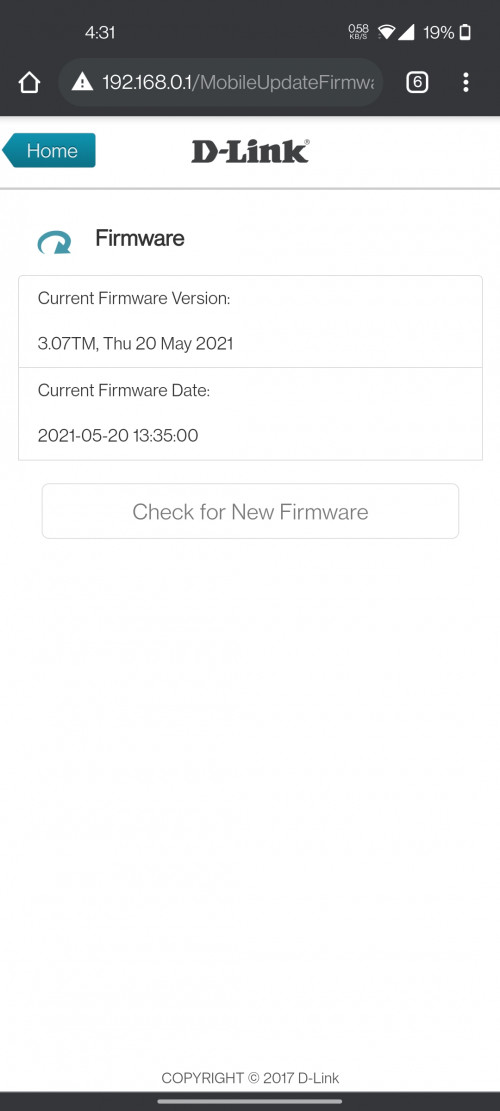 This post has been edited by Brotherjoe: Aug 2 2021, 04:34 PM This post has been edited by Brotherjoe: Aug 2 2021, 04:34 PM |
|
|
|
|
|
Brotherjoe
|
Aug 2 2021, 05:44 PM
|
|
|
QUOTE(Sam Leong @ Aug 2 2021, 04:38 PM) can , but your USB wont work (mostly , i dun need usb) the benefits is you can get security patch , or greater encryption like WPA3 Did you try openwrt? https://openwrt.org/toh/d-link/dir-842 |
|
|
|
|
|
Brotherjoe
|
Aug 2 2021, 06:29 PM
|
|
|
QUOTE(The.Lucas.DaY @ Aug 2 2021, 06:09 PM) I didn't do any setting on it, by default should be auto update isn't it I noob on this, any benefits for updating? normally it will fix stability and security patching if there is any. |
|
|
|
|
|
Brotherjoe
|
Aug 2 2021, 10:17 PM
|
|
|
QUOTE(The.Lucas.DaY @ Aug 2 2021, 10:06 PM) When i check for new firmware update 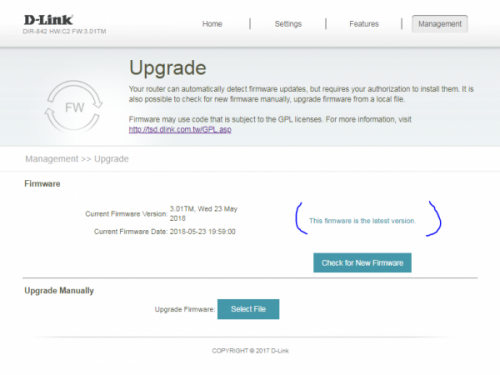 QUOTE(aniq8676 @ Aug 2 2021, 10:14 PM) Or you can ask TM technician to upgrade your router firmware via remotely. Since every router supplied by the TM has a TR-069 "Your router can automatically detect firmware updates, but requires your authorization to install them." It said this.. but mine was installed without my authorization..  |
|
|
|
|
|
Brotherjoe
|
Aug 4 2021, 11:34 PM
|
|
|
QUOTE(Masamilow @ Aug 4 2021, 10:54 PM) Anyone from Penang experiencing slow connection at the moment? Try Speedtest and result show 8mbps only. Same here bayan lepas area.. |
|
|
|
|
|
Brotherjoe
|
Aug 7 2021, 09:57 AM
|
|
|
QUOTE(filage @ Aug 7 2021, 09:46 AM) Anybody experience extreme lag recently on 1.9.1.9 Dns? it used to be quite zappy until recently, I was so frustrated thought its network issue, changed thr dns and things are zappy again.  Go 8.8.8.8 and 8.8.4.4 |
|
|
|
|
|
Brotherjoe
|
Oct 10 2021, 05:06 PM
|
|
|
Found the root cause.
Wifi channel conflict with neighbour
This post has been edited by Brotherjoe: Oct 10 2021, 05:13 PM
|
|
|
|
|
|
Brotherjoe
|
Dec 11 2021, 10:42 AM
|
|
|
Anyone here get a temporary unifi speed upgrade for 30 days, today?
|
|
|
|
|



 Quote
Quote
 0.2598sec
 0.41
0.41
 7 queries
 GZIP Disabled