

 Feb 12 2022, 11:26 AM


Lucky still got extra port without the head/connector, just need to put it as new port inside the box before reconnect my cable.
Also found out someone pulling fiber directly to window, was wonder why there are flying fiber until drop to ground, then check it is connected to window, not hanging on the walls like official contractor jobs, can be the house owner disallow tenant drilling a hole on the house.

QUOTE(QuantumEdge @ Feb 11 2022, 12:45 PM)
I was having issues with FB and Twitter images not loading every night, and often Youtube videos loading super slow.
Often lag spikes in-game during the same time.
Seems like a common problem for TM users in the southern region.

IPv6 issues, try disable it first.Often lag spikes in-game during the same time.
Seems like a common problem for TM users in the southern region.
If still there, and your speed test normal, then it is UniFi issues.

QUOTE(sadlyfalways @ Feb 11 2022, 03:14 PM)
Hello guys, anyone else here Samsung smart things user? I am unable to use smart things app when I am connected to Wi-Fi. It just loads constantly. Works instantly on 4G. I’ve tried disabling ipv6 but the issue is still there.
Anyone else having this problem too ?
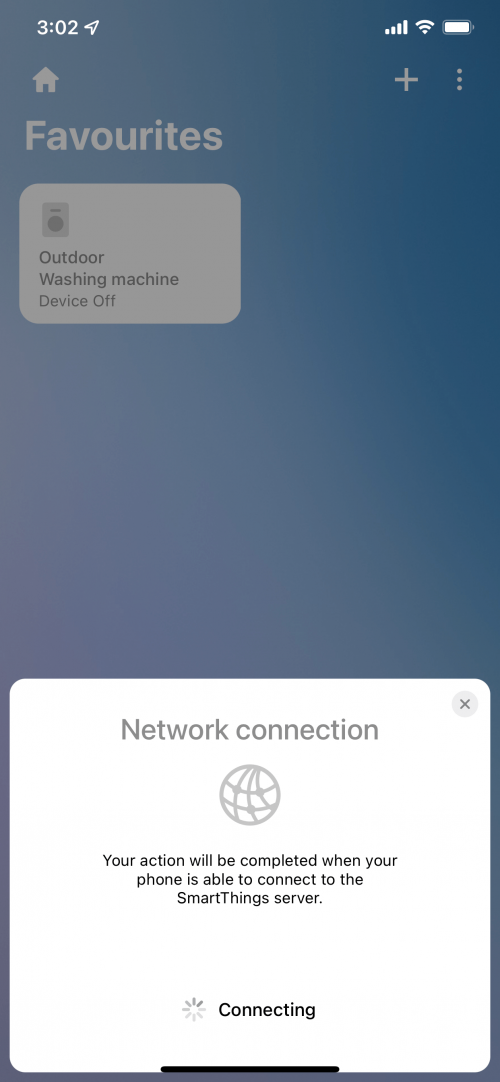
DNS?Anyone else having this problem too ?
Try setup temporary DNS first, tutorial.
https://developers.google.com/speed/public-...s/using#android
Normally the server is at SG, so...
If still can't, then need extra software for checking the IP it is connecting to.
QUOTE(annoymous1234 @ Feb 12 2022, 11:10 AM)
Weird. I didn't know upgrading from 50mbps to 100mbps requires installer to come. I used 100mbps before and no need installer
Free speed upgrade 30 days 30M to 100M also not required, hmm...I think it is because they got in record that your TM modem/router can't support 1Gbps or something.

 Quote
Quote


 Is it really that bad?




 0.0243sec
 0.88
0.88
 6 queries
 GZIP Disabled