Outline ·
[ Standard ] ·
Linear+
Official TM UniFi High Speed Broadband Thread V39, READ 1ST PAGE FOR RELEVANT WIFI INFO
|
aniq8676
|
 Feb 6 2022, 12:50 AM Feb 6 2022, 12:50 AM
|

|
QUOTE(coolkwc @ Feb 6 2022, 12:16 AM) Installed Unifi 300Mbps on Thursday, after that away from home for 2 days, today back home the modem show red blinking light at 'LOS' indicator. After reset the port via unifi live chat still the same. Very very poor luck here.  there are several possibilities. 1. issue on fiber cable (make sure the fiber cable is not bent) or 2. issues on the fiber port on the modem (make sure the fiber port connection on the modem is not loose and dusty) or 3. issues on DP. |
|
|
|
|
|
coolkwc
|
Feb 6 2022, 01:00 AM
|
|
|
QUOTE(aniq8676 @ Feb 6 2022, 12:50 AM) there are several possibilities. 1. issue on fiber cable (make sure the fiber cable is not bent) or 2. issues on the fiber port on the modem (make sure the fiber port connection on the modem is not loose and dusty) or 3. issues on DP. I suspect the outdoor splicing is break. |
|
|
|
|
|
YoungMan
|
Feb 6 2022, 10:10 AM
|
|
|
QUOTE(coolkwc @ Feb 6 2022, 01:16 AM) Installed Unifi 300Mbps on Thursday, after that away from home for 2 days, today back home the modem show red blinking light at 'LOS' indicator. After reset the port via unifi live chat still the same. Very very poor luck here. Fastest way to solve is to call back the technician that came to install your Unifi if you still have the number. Otherwise no choice have to call 100 to report. |
|
|
|
|
|
OlgaC4
|
Feb 6 2022, 11:49 AM
|
|
|
Subscribe 300mb package but speed test only 245mb is this normal or i have to complaint?
|
|
|
|
|
|
ideaplus
|
Feb 6 2022, 12:20 PM
|
|
|
QUOTE(OlgaC4 @ Feb 6 2022, 11:49 AM) Subscribe 300mb package but speed test only 245mb is this normal or i have to complaint? Speedtest using wired or wireless? |
|
|
|
|
|
tng55
|
Feb 6 2022, 12:55 PM
|
|
|
QUOTE(OlgaC4 @ Feb 6 2022, 11:49 AM) Subscribe 300mb package but speed test only 245mb is this normal or i have to complaint? speedtest wired or wifi if using free tm router confirm can't handle wifi full speed wire depend speed its not TM problem its router crap |
|
|
|
|
|
OlgaC4
|
Feb 6 2022, 01:32 PM
|
|
|
QUOTE(ideaplus @ Feb 6 2022, 12:20 PM) Speedtest using wired or wireless? wired |
|
|
|
|
|
jhleo1
|
Feb 6 2022, 01:49 PM
|
|
|
Also all depends on your devices and network port, cables etc. QUOTE(OlgaC4 @ Feb 6 2022, 01:32 PM) |
|
|
|
|
|
aniq8676
|
Feb 6 2022, 01:58 PM
|
|
|
QUOTE(OlgaC4 @ Feb 6 2022, 01:32 PM) what router do you use? make sure NAT is ENABLE and QOS is DISABLE |
|
|
|
|
|
OlgaC4
|
Feb 6 2022, 01:59 PM
|
|
|
ok found the problem. Roll back to old firmware. New firmware microtik not suitable for old device.
|
|
|
|
|
|
sadlyfalways
|
Feb 6 2022, 05:05 PM
|
|
|
Hello, is anybody having issues with YouTube on Unifi?
I have a wired connection to my Apple TV and am using ipv6 and Google dns, but today when watching it keeps buffering
Sometimes it even stops halfway and doesn’t load
|
|
|
|
|
|
jhleo1
|
Feb 6 2022, 05:36 PM
|
|
|
Disable ip6 to test. QUOTE(sadlyfalways @ Feb 6 2022, 05:05 PM) Hello, is anybody having issues with YouTube on Unifi? I have a wired connection to my Apple TV and am using ipv6 and Google dns, but today when watching it keeps buffering Sometimes it even stops halfway and doesn’t load |
|
|
|
|
|
Alexandra123
|
Feb 6 2022, 07:25 PM
|
Getting Started

|
Currently Unifi 100Mbps RM129, but last month don't know why suddenly checked speedtest can get up to 300+Mbps until yesterday, then today I checked again and back to 100+Mbps, at January this month i saw forum here got people also can free upgraded with the same current package price.
So this meaning I not in the SWU Package right!?
|
|
|
|
|
|
PJng
|
Feb 6 2022, 07:58 PM
|
|
|
QUOTE(Alexandra123 @ Feb 6 2022, 07:25 PM) Currently Unifi 100Mbps RM129, but last month don't know why suddenly checked speedtest can get up to 300+Mbps until yesterday, then today I checked again and back to 100+Mbps, at January this month i saw forum here got people also can free upgraded with the same current package price. So this meaning I not in the SWU Package right!? Temporary speed upgrade, 1 month |
|
|
|
|
|
guardog
|
Feb 7 2022, 02:11 PM
|
New Member
|
anyone using DVG-F2452 router provided by tmnet? I am unable to find firmware update for this router on d-link website. There's no auto-update feature in the router page too.
|
|
|
|
|
|
coolkwc
|
Feb 7 2022, 02:34 PM
|
|
|
Guys, anyone here your fiber cable near your modem is using splicing rather than connector? How is the durability? The installer told me TM now ban the installer to use connector to join the head themself,  instead must splice and fuse the cable pre-mounted with header using splicing machine like below which i feel is silly, because the splicing break multiple times during installation and i don't feel it is secure, scare later break again if pulled accidently (you know kids) 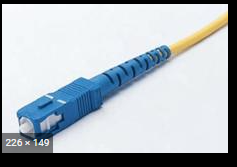 He told me this is a controversial decision by TM because seems they want to benefit the cloni who sell the pre-mount header and splicing machine. This post has been edited by coolkwc: Feb 7 2022, 02:45 PM |
|
|
|
|
|
JohnnyBoy92
|
Feb 7 2022, 02:36 PM
|
Getting Started
|
Hi yall, anybody upgraded from Unifi 100mbps to 300mbps + free mesh wifi? Does it need technician for installation?
|
|
|
|
|
|
aniq8676
|
Feb 7 2022, 02:47 PM
|
|
|
QUOTE(JohnnyBoy92 @ Feb 7 2022, 02:36 PM) Hi yall, anybody upgraded from Unifi 100mbps to 300mbps + free mesh wifi? Does it need technician for installation? For the latest mesh wifi, TM will come to your premise for installation. You will be given 2 fiberhome routers SR-1041Y to form mesh network This post has been edited by aniq8676: Feb 7 2022, 02:47 PM |
|
|
|
|
|
coolkwc
|
Feb 7 2022, 02:58 PM
|
|
|
QUOTE(aniq8676 @ Feb 7 2022, 02:47 PM) For the latest mesh wifi, TM will come to your premise for installation. You will be given 2 fiberhome routers SR-1041Y to form mesh network wa, their fiberhome router is mesh ready oh...i just order Asus XT8 to replace it.  |
|
|
|
|
|
aniq8676
|
Feb 7 2022, 03:00 PM
|
|
|
QUOTE(coolkwc @ Feb 7 2022, 02:34 PM) Guys, anyone here your fiber cable near your modem is using splicing rather than connector? How is the durability? The installer told me TM now ban the installer to use connector to join the head themself, instead must splice and fuse the cable pre-mounted with header using splicing machine like below which i feel is silly, because the splicing break multiple times during installation and i don't feel it is secure, scare later break again if pulled accidently (you know kids) He told me this is a controversial decision by TM because seems they want to benefit the cloni who sell the pre-mount header and splicing machine. TM now uses this method for the installation process. Unless your premise built-in with Fiber-wall-socket, they will give you this cable. (depend on the installer) 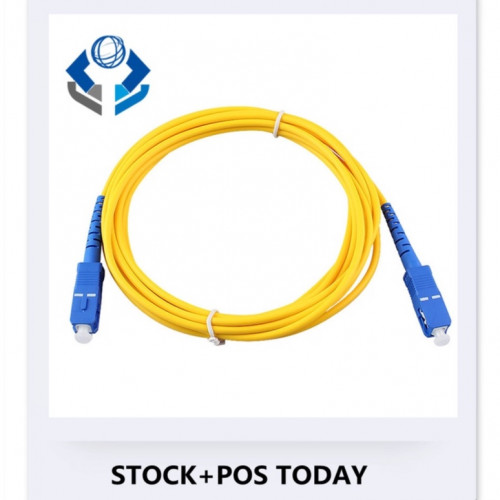 |
|
|
|
|



 Quote
Quote




 0.0460sec
 0.68
0.68
 6 queries
 GZIP Disabled