Welcome Guest ( Log In | Register )

Bump Topic Topic Closed RSS Feed
413 Pages « < 138 139 140 141 142 > » Bottom

Outline · [ Standard ] · Linear+

 Official TM UniFi High Speed Broadband Thread V39, READ 1ST PAGE FOR RELEVANT WIFI INFO

views
     
heLL_bOy
post May 24 2021, 01:04 PM

Regular
******
Senior Member
1,350 posts

Joined: Nov 2004
From: HEAVEN & HELL


QUOTE(go626201 @ May 24 2021, 12:37 PM)
If u continue play around with TM,then might can contact to higher technical network team. I think I share the article before. (OVH network issue)
Keep play around with TM and MCMC.

And I also contact OVH 2-3days ago,they just replies on this morning.I told them TM don't bother the case, they said they also contact TM already. Hopefully the problem can be solve abit in next few days.
I already don't have hope for fully fix,but at least dont having more than 100ms at night, then i will be satisficed.
*
playing with them need alot of patient... not 1 week can settle maybe take a month or more.

hopefully can hear some news from OVH as they only can communicate to their network operation centre team.


go626201
post May 24 2021, 01:19 PM

Regular
******
Senior Member
1,882 posts

Joined: Sep 2017
QUOTE(heLL_bOy @ May 24 2021, 01:04 PM)
playing with them need alot of patient... not 1 week can settle maybe take a month or more.

hopefully can hear some news from OVH as they only can communicate to their network operation centre team.
*
Ya need patient to play around with them.

I just added some VPN SG location to my smokeping to see which is suitable for current situation at night.
Currently targeting FastestVPN,hopefully it will be stable at night,and i am going to get account to use.

Anyone can share what vpn u are using?Or can pm ur connected SG vpn ip address?
(Currently monitoring SG Location VPN only,will add MY Server very soon so MY IP also can PM me thanks. Please also tell me the VPN brand name)
evilhomura89
post May 24 2021, 03:57 PM

Look at all my stars!!
*******
Senior Member
5,886 posts

Joined: Jan 2003
From: BM


QUOTE(heLL_bOy @ May 24 2021, 01:04 PM)
playing with them need alot of patient... not 1 week can settle maybe take a month or more.

hopefully can hear some news from OVH as they only can communicate to their network operation centre team.
*
Is there a templated complain letter that we can use to report to MCMC?
A proper letter to explain what's happening behind the scene and the possible cause of slowdown

I believe a lot of us are experiencing slow down with unifi but we are not well versed enough in trying to explain or figure out what's happening behind the scene.
Most of the time we can only do a generic complain of internet slowdown without understanding the real issue and TM's only solution is reset port reset port. When this happens, our general non-technical complain will be brushed away/neglected with the tidak apa attitude.

I suppose if more of us could report to MCMC with the proper details using a template, things might move in our favor?
Just my 2 cent smile.gif


go626201
post May 24 2021, 04:01 PM

Regular
******
Senior Member
1,882 posts

Joined: Sep 2017
QUOTE(evilhomura89 @ May 24 2021, 03:57 PM)
Is there a templated complain letter that we can use to report to MCMC?
A proper letter to explain what's happening behind the scene and the possible cause of slowdown 

I believe a lot of us are experiencing slow down with unifi but we are not well versed enough in trying to explain or figure out what's happening behind the scene.
Most of the time we can only do a generic complain of internet slowdown without understanding the real issue and TM's only solution is reset port reset port. When this happens, our general non-technical complain will be brushed away/neglected with the tidak apa attitude.

I suppose if more of us could report to MCMC with the proper details using a template, things might move in our favor?
Just my 2 cent  smile.gif
*
Yours suggestion is correct way to force TM Unifi to fix the problem,but really need alot of people to do it together or else mcmc just dont care about it.
heLL_bOy
post May 24 2021, 04:14 PM

Regular
******
Senior Member
1,350 posts

Joined: Nov 2004
From: HEAVEN & HELL


QUOTE(go626201 @ May 24 2021, 01:19 PM)
Ya need patient to play around with them.

I just added some VPN SG location to my smokeping to see which is suitable for current situation at night.
Currently targeting FastestVPN,hopefully it will be stable at night,and i am going to get account to use.

Anyone can share what vpn u are using?Or can pm ur connected SG vpn ip address?
(Currently monitoring SG Location VPN only,will add MY Server very soon so MY IP also can PM me thanks. Please also tell me the VPN brand name)
*
thanks for providing the smokeping on your back end.

notworthy.gif notworthy.gif
heLL_bOy
post May 24 2021, 04:20 PM

Regular
******
Senior Member
1,350 posts

Joined: Nov 2004
From: HEAVEN & HELL


QUOTE(evilhomura89 @ May 24 2021, 03:57 PM)
Is there a templated complain letter that we can use to report to MCMC?
A proper letter to explain what's happening behind the scene and the possible cause of slowdown 

I believe a lot of us are experiencing slow down with unifi but we are not well versed enough in trying to explain or figure out what's happening behind the scene.
Most of the time we can only do a generic complain of internet slowdown without understanding the real issue and TM's only solution is reset port reset port. When this happens, our general non-technical complain will be brushed away/neglected with the tidak apa attitude.

I suppose if more of us could report to MCMC with the proper details using a template, things might move in our favor?
Just my 2 cent  smile.gif
*
my case

i just input my issue on MCMC report together attached with smokeping result or pingplotter result. but always my report get closed without solution as you refer previous post.

and today i directly call up MCMC and made my dissatisfaction on how TM handling this and see how this few days TM reply on this.

your 2cent might be right... maybe our complain lack of template letter and they tend to ignore the issue with proper handling the issue.
newlich
post May 24 2021, 04:20 PM

New Member
*
Junior Member
37 posts

Joined: Apr 2011
QUOTE(aniq8676 @ May 20 2021, 01:58 PM)
May i know, do House A and House B use the same FDC code? An example is BS C016 . If both houses use the same fiber cabinet, it is not a problem to make a swap
*
Yup. I swapped and it doesn't works. smile.gif FYI, both houses are 16 km apart.

QUOTE(PRSXFENG @ May 20 2021, 02:12 PM)
You need to unplug the fibre cable before powering it on to access it ircc, as it receives configs from the OLT to disable the web page, and also that's where the speed config is set ircc.
EDIT: this might be wrong, try 1.254 or 100.254
Also, do not use the root/adminHW password printed on the modem, use telecomadmin/admintelecom, this shows more options.

Do not look at the fibre btw, it's laser and it can blind you.

I think @Anime4000 knows better (sorry I don't know how to mention someone on lowyat forums)
*
Yup. I unplugged the fiber cable before access it. No luck sad.gif
newlich
post May 24 2021, 04:51 PM

New Member
*
Junior Member
37 posts

Joined: Apr 2011
Guys, should I enable IPv6 for Unifi? I mean, will it be better in term of speed and stability?
go626201
post May 24 2021, 04:55 PM

Regular
******
Senior Member
1,882 posts

Joined: Sep 2017
QUOTE(newlich @ May 24 2021, 04:51 PM)
Guys, should I enable IPv6 for Unifi? I mean, will it be better in term of speed and stability?
*
If u only mainly use for popular site like YouTube Facebook or any big sites,then enable is okay.
Otherwise u may having connection issue for specific site.
Unifi normally does not optimize ipv6 connection,only famous site with ipv6 is okay.
shaktiv8
post May 24 2021, 06:51 PM

Casual
***
Junior Member
363 posts

Joined: Sep 2014


QUOTE(go626201 @ May 24 2021, 04:55 PM)
If u only mainly use for popular site like YouTube Facebook or any big sites,then enable is okay.
Otherwise u may having connection issue for specific site.
Unifi normally does not optimize ipv6 connection,only famous site with ipv6 is okay.
*
oh i see, i thought ipv6 is supposed to be better overall?

ive put off enabling ipv6 because i do not understand slaac or dchpv6 and find it unsettling not to have a NAT for network security reasons, but everything seems much faster now haha
jacktiew
post May 24 2021, 08:02 PM

Getting Started
**
Junior Member
289 posts

Joined: Sep 2012
Can you guys access https://www.maxis.com.my with IPv6 enable. It's been a while since I cannot access without turning off IPv6.
aniq8676
post May 24 2021, 08:07 PM

Regular
******
Senior Member
1,524 posts

Joined: Dec 2020
From: Perak


QUOTE(jacktiew @ May 24 2021, 08:02 PM)
Can you guys access https://www.maxis.com.my with  IPv6 enable. It's been a while since I cannot access without turning off IPv6.
*
still can
go626201
post May 24 2021, 09:01 PM

Regular
******
Senior Member
1,882 posts

Joined: Sep 2017
Looks like today TM finally take action to partial resolve the routing issue to singapore. icon_idea.gif

Edit:
I am satisficed now for the very short latency spikes only for today.
And also not very high latency for specific host. (My favorite OVH rclxms.gif )

Edit2:
high again but still on normal high level.

This post has been edited by go626201: May 24 2021, 09:41 PM
afif92
post May 24 2021, 09:51 PM

Casual
***
Junior Member
374 posts

Joined: Mar 2010
QUOTE(go626201 @ May 24 2021, 09:01 PM)
Looks like today TM finally take action to partial resolve the routing issue to singapore.  icon_idea.gif

Edit:
I am satisficed now for the very short latency spikes only for today.
And also not very high latency for specific host. (My favorite OVH  rclxms.gif )

Edit2:
high again but still on normal high level.
*
after read this comment, immediately connect vpn SG. I feel the improvement. Livestream facebook gaming better compared to previous days thru SG.
go626201
post May 24 2021, 10:14 PM

Regular
******
Senior Member
1,882 posts

Joined: Sep 2017
QUOTE(afif92 @ May 24 2021, 09:51 PM)
after read this comment, immediately connect vpn SG. I feel the improvement. Livestream facebook gaming better compared to previous days thru SG.
*
Hi,can i know which vpn u are using?
Chiggah
post May 24 2021, 10:52 PM

On my way
****
Junior Member
567 posts

Joined: Oct 2004
QUOTE(go626201 @ May 24 2021, 10:14 PM)
Hi,can i know which vpn u are using?
*
I’m using Freedome VPN

But was getting around 30ms from 8:30pm

Not the usual 15-18ms
afif92
post May 24 2021, 11:08 PM

Casual
***
Junior Member
374 posts

Joined: Mar 2010
QUOTE(go626201 @ May 24 2021, 10:14 PM)
Hi,can i know which vpn u are using?
*
ExpressVPN
shaktiv8
post May 24 2021, 11:30 PM

Casual
***
Junior Member
363 posts

Joined: Sep 2014


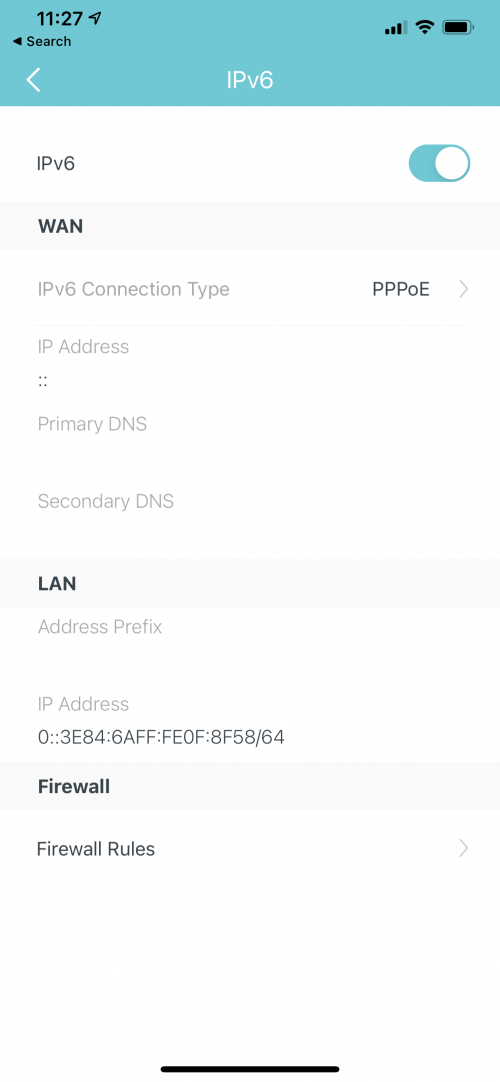
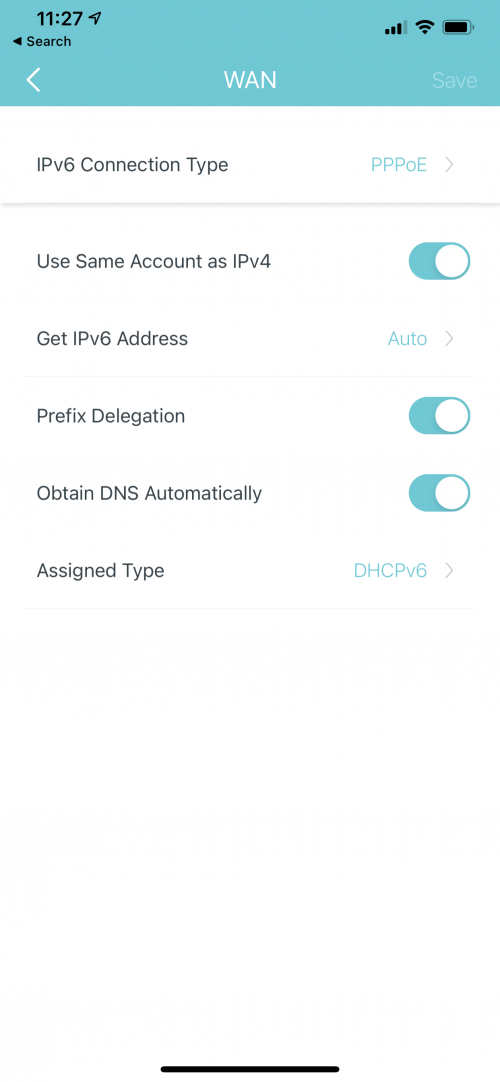
Hello guys! Is anyone having trouble with ipv6? I can’t seem to enable it for the past hour and if I do enable it I do not even get ipv4 internet

Is there something wrong with my settings or I’m not sure what’s happening? If I reboot the modem ipv4 connection comes back but not v6

Had no issues in the morning when using cloud flare dns. Now with automatic dns nothing seems to be working
user posted image
user posted image


When I changed the dns to google ipv6 and v4 dns, the ipv6 address came up instantly. Why is this haha, am I doing something wrong ? Does tm not have an ipv6 dns? Am I supposed to input it myself ??


Edit again hahah: if I set the ipv4 to google dns, I am able to enable ipv6 and it obtains an ipv6 dns automatically

If ipv4 is set to auto dns ™, internet does not connect if ipv6 auto dns is enabled. So no internet at all, and no dns for both

Very weird

This post has been edited by shaktiv8: May 24 2021, 11:49 PM
olivur
post May 25 2021, 02:38 PM

ollie ollie oxen free
******
Senior Member
1,277 posts

Joined: Jul 2011
so like what's the best offer you guys have gotten for 800mbps "upgrade"

price thrown at me was 239myr (just internet + mesh set up and no tv package)
aniq8676
post May 25 2021, 03:32 PM

Regular
******
Senior Member
1,524 posts

Joined: Dec 2020
From: Perak


QUOTE(olivur @ May 25 2021, 02:38 PM)
so like what's the best offer you guys have gotten for 800mbps "upgrade"

price thrown at me was 239myr (just internet + mesh set up and no tv package)
*
Promo price without UnifiTV

300Mbps with Mesh - RM159
500Mbps with Mesh - RM199
800Mbps with Mesh - RM239


413 Pages « < 138 139 140 141 142 > » Top
Topic ClosedOptions
 

Change to:
| Lo-Fi Version
0.0234sec    0.87    6 queries    GZIP Disabled
Time is now: 9th December 2025 - 02:28 PM