Welcome Guest ( Log In | Register )

Bump Topic Topic Closed RSS Feed
413 Pages « < 104 105 106 107 108 > » Bottom

Outline · [ Standard ] · Linear+

 Official TM UniFi High Speed Broadband Thread V39, READ 1ST PAGE FOR RELEVANT WIFI INFO

views
     
soonwai
post Apr 11 2021, 03:57 AM


********
All Stars
11,458 posts

Joined: Oct 2007
From: KL


QUOTE(John42 @ Apr 11 2021, 02:47 AM)
Hi guys does anyone have issues with WhatsApp video call lagging? It's happening on my mom's phone which is Oppo A53. I am using Unifi 100 Mbps and recently changed to my own router but the issue still persists. I have already reinstalled the app and even cleared the phone system settings but the issue is still there. The video call lagging is only on some contacts. I hope someone could help me with this. Is it possible for me to bring the phone to the oppo service centre for this kind of issue since it is under warranty?
*
It’s kinda hard to pin this on the phone, the svc ctr will probably push the blame to whatsapp or the network, unless you have 2 A53s and can demo to them that it happens only on one of the phones.
PRSXFENG
post Apr 11 2021, 08:13 AM

Look at all my stars!!
*******
Senior Member
2,608 posts

Joined: Nov 2020


QUOTE(John42 @ Apr 11 2021, 02:47 AM)
Hi guys does anyone have issues with WhatsApp video call lagging? It's happening on my mom's phone which is Oppo A53. I am using Unifi 100 Mbps and recently changed to my own router but the issue still persists. I have already reinstalled the app and even cleared the phone system settings but the issue is still there. The video call lagging is only on some contacts. I hope someone could help me with this. Is it possible for me to bring the phone to the oppo service centre for this kind of issue since it is under warranty?
*
Maybe the other contact is the one having network issues?
Try another video calling app
aniq8676
post Apr 11 2021, 12:07 PM

Regular
******
Senior Member
1,524 posts

Joined: Dec 2020
From: Perak


QUOTE(PRSXFENG @ Apr 11 2021, 08:13 AM)
Maybe the other contact is the one having network issues?
Try another video calling app
*
Deleted

This post has been edited by aniq8676: Apr 11 2021, 12:09 PM
aniq8676
post Apr 11 2021, 12:09 PM

Regular
******
Senior Member
1,524 posts

Joined: Dec 2020
From: Perak


QUOTE(John42 @ Apr 11 2021, 02:47 AM)
Hi guys does anyone have issues with WhatsApp video call lagging? It's happening on my mom's phone which is Oppo A53. I am using Unifi 100 Mbps and recently changed to my own router but the issue still persists. I have already reinstalled the app and even cleared the phone system settings but the issue is still there. The video call lagging is only on some contacts. I hope someone could help me with this. Is it possible for me to bring the phone to the oppo service centre for this kind of issue since it is under warranty?
*
the issue you are facing is related to the compatibility of the Whatsapp application on your phone. This is not an internet problem or router problem, because you stated that the whatsapp problem only happened on the Oppo XX model but did not happen any problem on the other brands
John42
post Apr 11 2021, 12:26 PM

Getting Started
**
Junior Member
256 posts

Joined: Aug 2019
QUOTE(PRSXFENG @ Apr 11 2021, 08:13 AM)
Maybe the other contact is the one having network issues?
Try another video calling app
*
OK the thing is the other contact still using the stock TP link AC1200 router. I was using that router as well but changed it to my own router on 23rd of March. Only on my mom's phone got this problem. The other side they keep telling me it's my Internet issue even after I told them that I have already change the router 🙄. So I even contacted WhatsApp with the logs and they said nothing wrong with the app. This issue only occurs for 2 contacts. One of them using unifi fibre with stock TP link router and the other is using VDSL aka copper with Netis orange modem/router. So I was wondering is the stock equipment from TM is the culprit or what. Since my mom's phone under warranty I wonder is it really the phone issue? This is my first time with Oppo. I am using Honor and when I contact one of them there's no this video call lagging 😒. This thing keep me pushing me to find the root cause of it.
John42
post Apr 11 2021, 12:54 PM

Getting Started
**
Junior Member
256 posts

Joined: Aug 2019
QUOTE(aniq8676 @ Apr 11 2021, 12:09 PM)
the issue you are facing is related to the compatibility of the Whatsapp application on your phone. This is not an internet problem or router problem, because you stated that the whatsapp problem only happened on the Oppo XX model but did not happen any problem on the other brands
*
Yes that's what I am thinking. I have already send an email to WhatsApp with the logs and they said that there's no issue with the app 😒
pcbuilder420
post Apr 12 2021, 02:13 PM

Getting Started
**
Junior Member
112 posts

Joined: Nov 2020
Anyone having issues connecting to Battlenet? Was working fine till today.
Can't connect to any domain or websites under Blizzard as well it seems.
tzxsean
post Apr 12 2021, 02:29 PM

Lonely Driver
*******
Senior Member
5,608 posts

Joined: Jan 2010


QUOTE(pcbuilder420 @ Apr 12 2021, 02:13 PM)
Anyone having issues connecting to Battlenet? Was working fine till today.
Can't connect to any domain or websites under Blizzard as well it seems.
*
Having issue connecting to overseas server
soonwai
post Apr 12 2021, 02:37 PM


********
All Stars
11,458 posts

Joined: Oct 2007
From: KL


QUOTE(pcbuilder420 @ Apr 12 2021, 02:13 PM)
Anyone having issues connecting to Battlenet? Was working fine till today.
Can't connect to any domain or websites under Blizzard as well it seems.
*
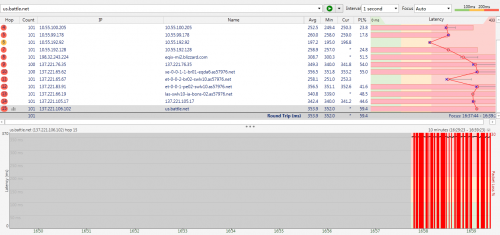
ok here
user posted image
izzany P
post Apr 12 2021, 02:41 PM

New Member
*
Probation
1 posts

Joined: Jan 2021
QUOTE(pcbuilder420 @ Apr 12 2021, 02:13 PM)
Anyone having issues connecting to Battlenet? Was working fine till today.
Can't connect to any domain or websites under Blizzard as well it seems.
*
I can play retail WoW but seems to dc me everytime I tried connecting to WoW Classic.
pcbuilder420
post Apr 12 2021, 02:55 PM

Getting Started
**
Junior Member
112 posts

Joined: Nov 2020
Thought it was a blanket ban from TM's end on all Blizzard domains, like in the past. Connecting via mobile data works as usual.
My Bnet client totally unable to connect to the Internet, so can only appear offline with no access to my library. Don't know about Warcraft, but was looking forward to some Warzone but guess I'll have to wait for it to resolve itself.

QUOTE(tzxsean @ Apr 12 2021, 02:29 PM)
Having issue connecting to overseas server
*
NA?

Edit: seems like Rainbow 6 servers are a bit wonky as well, managed to connect sometimes, but keep DCing to servers. Another screw up on TM's end?

This post has been edited by pcbuilder420: Apr 12 2021, 03:04 PM
heLL_bOy
post Apr 12 2021, 04:44 PM

Regular
******
Senior Member
1,350 posts

Joined: Nov 2004
From: HEAVEN & HELL


QUOTE(pcbuilder420 @ Apr 12 2021, 02:55 PM)
Thought it was a blanket ban from TM's end on all Blizzard domains, like in the past. Connecting via mobile data works as usual.
My Bnet client totally unable to connect to the Internet, so can only appear offline with no access to my library. Don't know about Warcraft, but was looking forward to some Warzone but guess I'll have to wait for it to resolve itself.
NA?

Edit: seems like Rainbow 6 servers are a bit wonky as well, managed to connect sometimes, but keep DCing to servers. Another screw up on TM's end?
*
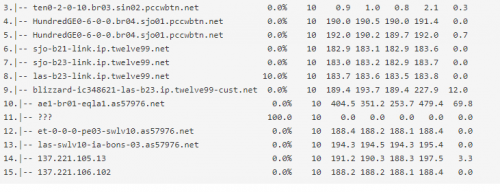
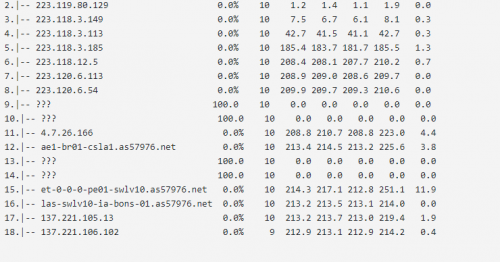
it seem the issue is from TM itself.

look at the ping and traceroute

user posted image


this is SG vpn ping and traceroute seem everything was ok.

user posted image

this is MSIA vpn ping and traceroute also look everything was ok

user posted image

This post has been edited by heLL_bOy: Apr 12 2021, 04:52 PM
tungfunglaw
post Apr 12 2021, 07:48 PM

Getting Started
**
Junior Member
258 posts

Joined: Aug 2008


QUOTE(John42 @ Apr 11 2021, 12:26 PM)
OK the thing is the other contact still using the stock TP link AC1200 router. I was using that router as well but changed it to my own router on 23rd of March. Only on my mom's phone got this problem. The other side they keep telling me it's my Internet issue even after I told them that I have already change the router 🙄. So I even contacted WhatsApp with the logs and they said nothing wrong with the app. This issue only occurs for 2 contacts. One of them using unifi fibre with stock TP link router and the other is using VDSL aka copper with Netis orange modem/router. So I was wondering is the stock equipment from TM is the culprit or what. Since my mom's phone under warranty I wonder is it really the phone issue? This is my first time with Oppo. I am using Honor and when I contact one of them there's no this video call lagging 😒. This thing keep me pushing me to find the root cause of it.
*
the other end's stock router maybe is the main cause.

my relative's calling on unifi stock router, the video will 'hang' 3-5secs every 2-3mins but no such issue if using mobile data.

u can test using this method.


babycookie
post Apr 12 2021, 08:16 PM

Getting Started
**
Junior Member
54 posts

Joined: Feb 2009


QUOTE(pcbuilder420 @ Apr 12 2021, 03:13 PM)
Anyone having issues connecting to Battlenet? Was working fine till today.
Can't connect to any domain or websites under Blizzard as well it seems.
*
Yeap since this morning. Then it will have random time when its okay, then suddenly it isnt again. I play world of warcraft can't even interact with NPCs. Just now was okay for a while then now suddenly not again. Sigh.
shinjite
post Apr 12 2021, 08:43 PM

�ŞħĬΩĵΐŦ��
********
All Stars
19,320 posts

Joined: Jan 2003
From: Klang


Is TM Having issues at the moment? High ping rates and the speed was horrendous
coolguy_0925
post Apr 12 2021, 08:58 PM

Look at all my stars!!
*******
Senior Member
4,538 posts

Joined: Jan 2003
QUOTE(shinjite @ Apr 12 2021, 08:43 PM)
Is TM Having issues at the moment? High ping rates and the speed was horrendous
*
Looks okay here

Try restarting?
babycookie
post Apr 12 2021, 09:08 PM

Getting Started
**
Junior Member
54 posts

Joined: Feb 2009


QUOTE(shinjite @ Apr 12 2021, 09:43 PM)
Is TM Having issues at the moment? High ping rates and the speed was horrendous
*
If its connected to US servers it would seem yes. Tm Issue
pcbuilder420
post Apr 12 2021, 09:10 PM

Getting Started
**
Junior Member
112 posts

Joined: Nov 2020
QUOTE(heLL_bOy @ Apr 12 2021, 04:44 PM)
it seem the issue is from TM itself.

look at the ping and traceroute

user posted image
this is SG vpn ping and traceroute seem everything was ok.

user posted image

this is MSIA vpn ping and traceroute also look everything was ok

user posted image
*
QUOTE(babycookie @ Apr 12 2021, 08:16 PM)
Yeap since this morning. Then it will have random time when its okay, then suddenly it isnt again. I play world of warcraft can't even interact with NPCs. Just now was okay for a while then now suddenly not again. Sigh.
*
Good to see it's not only on my end. Hopefully will get fixed soon, but knowing TM..
Ubisoft and Blizzard servers are the only ones I'm aware of that is affected at the moment, DOTA was working fine.
heLL_bOy
post Apr 12 2021, 09:19 PM

Regular
******
Senior Member
1,350 posts

Joined: Nov 2004
From: HEAVEN & HELL


QUOTE(shinjite @ Apr 12 2021, 08:43 PM)
Is TM Having issues at the moment? High ping rates and the speed was horrendous
*
towards where?

so far was okay didn't encounter anything yet, maybe you could share to us to find out.


QUOTE(pcbuilder420 @ Apr 12 2021, 09:10 PM)
Good to see it's not only on my end. Hopefully will get fixed soon, but knowing TM..
Ubisoft and Blizzard servers are the only ones I'm aware of that is affected at the moment, DOTA was working fine.
*
its good that you guys could made a report to TM and give them the Blizzard IP address to rectify the issue otherwise there will no further action taken by TM.
shinjite
post Apr 12 2021, 09:32 PM

�ŞħĬΩĵΐŦ��
********
All Stars
19,320 posts

Joined: Jan 2003
From: Klang


QUOTE(heLL_bOy @ Apr 12 2021, 09:19 PM)
towards where?

so far was okay didn't encounter anything yet, maybe you could share to us to find out.
its good that you guys could made a report to TM and give them the Blizzard IP address to rectify the issue otherwise there will no further action taken by TM.
*
I did a trace route from my Asus router. This is what I got

traceroute to Lowyat.net (172.67.74.89), 30 hops max, 60 byte packets
1 175.138.211.254 (175.138.211.254) 4.611 ms 4.443 ms 4.531 ms
2 10.55.49.51 (10.55.49.51) 115.157 ms 10.55.49.49 (10.55.49.49) 111.853 ms 10.55.49.51 (10.55.49.51) 115.175 ms
3 10.55.100.124 (10.55.100.124) 113.207 ms 10.55.99.178 (10.55.99.178) 112.043 ms 10.55.100.76 (10.55.100.76) 108.761 ms
4 10.55.100.86 (10.55.100.86) 110.044 ms 10.55.100.88 (10.55.100.88) 117.251 ms 10.55.100.86 (10.55.100.86) 110.714 ms
5 172.69.19.16 (172.69.19.16) 112.671 ms 111.320 ms 114.586 ms
6 172.67.74.89 (172.67.74.89) 112.049 ms 109.342 ms 108.844 ms

What the heck?
It looks like I am not the only one getting those 10.55 IPs

This post has been edited by shinjite: Apr 12 2021, 09:33 PM

413 Pages « < 104 105 106 107 108 > » Top
Topic ClosedOptions
 

Change to:
| Lo-Fi Version
0.0232sec    0.52    6 queries    GZIP Disabled
Time is now: 7th December 2025 - 05:27 PM