


Official TM UniFi High Speed Broadband Thread V39, READ 1ST PAGE FOR RELEVANT WIFI INFO
Official TM UniFi High Speed Broadband Thread V39, READ 1ST PAGE FOR RELEVANT WIFI INFO
|
|
 Apr 1 2021, 10:36 AM Apr 1 2021, 10:36 AM
|
 
Staff
72,797 posts Joined: Sep 2005 From: KUL  
|
Thanks guys for the useful feedback. I have read the termination clause and I'm within Celcom/Digi Fibre coverage, will opt for either one in the meantime.
|
|
|
|
|
|
Apr 1 2021, 11:04 AM
|
 
Junior Member
166 posts Joined: Jan 2008
|
I am on unifi lite 10 Mbps (upgraded from streamyx in 2018).
I checked with unifi chat and the agent say got port for my area. Planning to upgrade to 300 Mbps package with TV. Currently using Tenda D301 router, can I get optimum speed with it? Or the contractors will offer me another new stock router? Or I buy my own? Thanks. |
|
|
Apr 1 2021, 12:10 PM
Show posts by this member only | IPv6 | Post
#1943
|

Senior Member
1,524 posts Joined: Dec 2020 From: Perak 
|
QUOTE(XIII @ Apr 1 2021, 11:04 AM) I am on unifi lite 10 Mbps (upgraded from streamyx in 2018). About your router, you don't have to worry because new unifi users will be given a new set of router based on WIFI5I checked with unifi chat and the agent say got port for my area. Planning to upgrade to 300 Mbps package with TV. Currently using Tenda D301 router, can I get optimum speed with it? Or the contractors will offer me another new stock router? Or I buy my own? Thanks.  |
|
|
Apr 1 2021, 12:16 PM
|

Junior Member
123 posts Joined: Jul 2006 From: KL, Malaysia. 
|
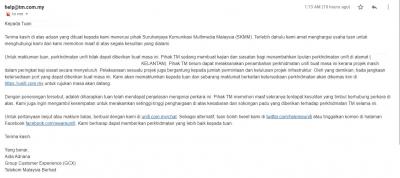
TM answer always use "template"... just change name and address only  This is for my mother in-law house at kampung.. This post has been edited by Sabenarian: Apr 1 2021, 12:17 PM |
|
|
Apr 1 2021, 12:48 PM
|

Junior Member
584 posts Joined: May 2013
|
QUOTE(Sabenarian @ Apr 1 2021, 01:16 PM)
TM answer always use "template"... just change name and address only This is for my mother in-law house at kampung.. |
|
|
Apr 1 2021, 12:51 PM
|
|
Junior Member
123 posts Joined: Jul 2006 From: KL, Malaysia.
|
QUOTE(xCryptik @ Apr 1 2021, 12:48 PM) Which area? Tumpat, Kelantan.. early 2021 Unifi enter my area.. when I see the banner, I straight away register..TM rep said the port is "available" only dont know exactly can install..This post has been edited by Sabenarian: Apr 1 2021, 12:53 PM |
|
|
|
|
|
Apr 1 2021, 02:12 PM
|
|
Junior Member
584 posts Joined: May 2013
|
QUOTE(Sabenarian @ Apr 1 2021, 01:51 PM) Tumpat, Kelantan.. early 2021 Unifi enter my area.. when I see the banner, I straight away register..TM rep said the port is "available" only dont know exactly can install.. Usually with banner up is to collect demand for that area.If you're the only person in that area, then it will be don't know when can install. |
|
|
Apr 1 2021, 02:16 PM
|
|
Junior Member
363 posts Joined: Sep 2014
|
Sorry, just want to ask again lol. Is 1.9.55.x a proper Unifi ip? Because my torrents seems to be much slower on this ip. When I search ip look up it says it’s a streamyx ip
|
|
|
Apr 1 2021, 02:42 PM
|

Senior Member
1,350 posts Joined: Nov 2004 From: HEAVEN & HELL
|
QUOTE(shaktiv8 @ Apr 1 2021, 02:16 PM) Sorry, just want to ask again lol. Is 1.9.55.x a proper Unifi ip? Because my torrents seems to be much slower on this ip. When I search ip look up it says it’s a streamyx ip 1.9.xx.xx ip belong to unifi ip prefix. It can be use on streamyx or unifi fiber depend how TM allocate their IPs into their network.you may disconnect and connect back your connection in router to get new ip if you feel that this range IP are slow. |
|
|
Apr 1 2021, 02:51 PM
|
|
Senior Member
1,350 posts Joined: Nov 2004 From: HEAVEN & HELL
|
QUOTE(XIII @ Apr 1 2021, 11:04 AM) I am on unifi lite 10 Mbps (upgraded from streamyx in 2018). when you apply unifi fiber they will give you a new set router together with a fiber modem.I checked with unifi chat and the agent say got port for my area. Planning to upgrade to 300 Mbps package with TV. Currently using Tenda D301 router, can I get optimum speed with it? Or the contractors will offer me another new stock router? Or I buy my own? Thanks. Tenda D301 only support ADSL2+ is not support fiber if i am correct. so which mean is not compatible to use on fiber. |
|
|
Apr 1 2021, 07:41 PM
Show posts by this member only | IPv6 | Post
#1951
|

Junior Member
665 posts Joined: Mar 2016
|
So TM intl routing already known as suck routing
But i nvr expect a suck performance on local network too  almost 100ms to a local DC? srsly? |
|
|
Apr 1 2021, 07:44 PM
|
|
Junior Member
584 posts Joined: May 2013
|
QUOTE(Sam Leong @ Apr 1 2021, 08:41 PM) So TM intl routing already known as suck routing Routing seems bad lately. But i nvr expect a suck performance on local network too almost 100ms to a local DC? srsly? Usually WZRY(mobile game)at 100ms China server. Now 200ms++.. |
|
|
Apr 1 2021, 08:02 PM
Show posts by this member only | IPv6 | Post
#1953
|
|
Junior Member
665 posts Joined: Mar 2016
|
QUOTE(xCryptik @ Apr 1 2021, 07:44 PM) Routing seems bad lately. but HPJY 和平精英 Looks good , Tencent allocate a HK Tencent Server for overseas IP ,around 60-80ms , not sure WZRY do this same or notUsually WZRY(mobile game)at 100ms China server. Now 200ms++.. |
|
|
|
|
|
Apr 1 2021, 09:47 PM
|

Junior Member
278 posts Joined: May 2017 From: Selangor
|
Anyone using wifi extender, like Xiaomi, D-Link brand, is it worth or nahh
|
|
|
Apr 1 2021, 10:23 PM
|

Senior Member
3,845 posts Joined: Aug 2005
|
QUOTE(JadenFongV @ Apr 1 2021, 09:47 PM) Anyone using wifi extender, like Xiaomi, D-Link brand, is it worth or nahh It all depends on what your problem and environment you are at and what are you trying solve?  If you can provide a little more details on it, then pretty sure many here can help This post has been edited by VeeJay: Apr 1 2021, 10:24 PM JadenFongV liked this post
|
|
|
Apr 1 2021, 10:36 PM
|
|
Junior Member
278 posts Joined: May 2017 From: Selangor
|
QUOTE(VeeJay @ Apr 1 2021, 10:23 PM) It all depends on what your problem and environment you are at and what are you trying solve? My main wifi router is D-Link DIR-842 from TM, using is for 2 years+ with 100mbps Unifi. Located in first floor. It performs quite well in first floor and also in second floor before. Until recently, the wifi signal in 2nd floor is not stable. If you can provide a little more details on it, then pretty sure many here can help I test the wifi signal with "Wifi Analyzer", even my neighbor's wifi signal is better than mine, result may not that accurate tho. I change to different channel but sometimes good sometimes bad. |
|
|
Apr 1 2021, 10:38 PM
Show posts by this member only | IPv6 | Post
#1957
|
|
Senior Member
1,524 posts Joined: Dec 2020 From: Perak
|
QUOTE(JadenFongV @ Apr 1 2021, 09:47 PM) Anyone using wifi extender, like Xiaomi, D-Link brand, is it worth or nahh it is better to buy MESH wifi instead of wifi extender. Unless you buy a wifi extender that has mesh support |
|
|
Apr 1 2021, 10:47 PM
Show posts by this member only | IPv6 | Post
#1958
|
|
Senior Member
1,524 posts Joined: Dec 2020 From: Perak
|
QUOTE(JadenFongV @ Apr 1 2021, 10:36 PM) My main wifi router is D-Link DIR-842 from TM, using is for 2 years+ with 100mbps Unifi. Located in first floor. It performs quite well in first floor and also in second floor before. Until recently, the wifi signal in 2nd floor is not stable. i can make the assumption that there may be a network congestion issue on the WIFI in your area. I recommend you to always change the WIFI channel from time to time, to ensure no interference. I include a link from youtube for reference I test the wifi signal with "Wifi Analyzer", even my neighbor's wifi signal is better than mine, result may not that accurate tho. I change to different channel but sometimes good sometimes bad. https://youtu.be/aGTsep5KIh0 This post has been edited by aniq8676: Apr 1 2021, 10:52 PM MeowZ liked this post
|
|
|
Apr 1 2021, 10:57 PM
|
|
Junior Member
278 posts Joined: May 2017 From: Selangor
|
QUOTE(aniq8676 @ Apr 1 2021, 10:47 PM) i can make the assumption that there may be a network congestion issue on the WIFI in your area. I recommend you to always change the WIFI channel from time to time, to ensure no interference. I include a link from youtube for reference Thanks for the linkhttps://youtu.be/aGTsep5KIh0 I'm not sure, this problem happens since my next door neighbor moved in and installed Unifi This post has been edited by JadenFongV: Apr 1 2021, 10:58 PM |
|
|
Apr 1 2021, 11:07 PM
Show posts by this member only | IPv6 | Post
#1960
|
|
Senior Member
1,524 posts Joined: Dec 2020 From: Perak
|
QUOTE(JadenFongV @ Apr 1 2021, 10:57 PM) Thanks for the link I recommend you to download the wifi analyzer application/software on your phone or PC to identify the best wifi channels in your area. I'm not sure, this problem happens since my next door neighbor moved in and installed Unifi 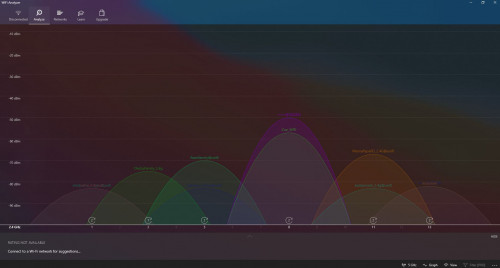 |
|
Topic ClosedOptions
|
| Change to: |  0.0196sec 0.0196sec
 0.28 0.28
 6 queries 6 queries
 GZIP Disabled GZIP Disabled
Time is now: 3rd December 2025 - 03:01 AM |
 Quote
Quote