Hello. I’m in a dilemma not sure which to get for the mbp m1, very high chance ill upgrade after 2-3 years of use, or I might use it longer 4-5 years...should I be getting the base model, or upgrade to 16gb ram and 512gb rom, not quite a fan of carrying ssd around, especially with only 2 ports available...prefer just the MacBook, simple and minimal...
Budget is a concern but not main (don’t mind to fork out the extra 1.6k), more of worrying that I’ll under utilize the specs or might not even need more than 8b ram/ 256gb rom at the end of the day...
From my iphone experience (I bought the 256gb iPhone 11 Pro Max and ended up downgrading to 64, which I sold the 256 at a loss, and finally didn’t even use half of 64 before getting the iphone 12 PM). And it’s an extremely tiring process to buy sell buy , and definitely do not want this to happen on the mbp
My usage is just for work and research, some light coding and abit of video editing (entry level for now) which might eventually lead to heavier task as I progress....so I’m convinced the 8gb ram is more than enough for now. But I’m also worried if I’ll be using this for many years, the 8gb/ 256 will eventually be an issue...coz something tells me that I won’t be upgrading the mbp soon, unlike the iphone...but who knows if there’s really a 14” next year, I might pull the trigger too..
I’m in a complete dilemma now, appreciate any advise or suggestions, tyvm!
This post has been edited by dikae: Dec 25 2020, 05:35 PM
No brainer. 16GB RAM. New models cannot be upgraded.
Yeap also reason why I’m in dilemma, coz ram cannot be upgraded but rom can always use external ssd..sigh was thinking to go both 16/512 for peace of mind but worry I’ll upgrade again if 14” ever happen next year not sure if it’s easier to resell a customed 16/512 or the base line model..
QUOTE(kngun @ Dec 25 2020, 05:37 PM)
You will not go wrong with MB Air 8gb with 512gb ssd
Not going for Mb air coz I like the touchbar on the pro, also the fan for peace of mind
Also not sure if it’s a wiser choice to go 16/256 or 8/512 coz people always say external ssd is much cheaper than apple’s price, besides the hassle to carry extra stuffs..and the ram is not upgradable..
This post has been edited by dikae: Dec 25 2020, 11:49 PM
I went for a 16/512. Ram to future proof and 512 for the slight added space but if I need more - there's always an added external ssd.
Ram no choice, HDD can always add external in the future.
Cool...do u think 256 is never going to be enough? Coz I don’t save any photos or etc on the Mac..pretty much only apps and normal small sized files..no games either...
Go for 16gb, im now typing with a 16gb ram 512gb ssd M1 macbook pro haha!
Jokes aside, this june I bought Macbook air 13 (2020) with i5, thought I will be making 1 video every 2 weeks or so. Turns out I needed more power for research with multiple safari tabs, video editing (final cut pro editing with 1080 videos for 6 hours will strained the hell out of my intel MBA lol!), and the 8gb MBA just burned my palm after an hour of using it! (nothing wrong with 8gb, more to blame myself for being cheapskate)
Lesson learnt: Never go cheapskate mode with Apple products - they are priced that low for a reason. They want you to fork out more to get something decent
Back to your question, if you need to do sustained work, consider 16gb, for the better peace of mind as time progresses. We may never know the updates to Big Sur or Big Sur +1 will need what kind of raw/cpu power when Apple chooses to focus more on M1/M2/M3 products instead of Intel, they have so much headroom to upgrade, for sure they will do something with it in the future!
As for storage, 256 GB is NOT ENOUGH if you are video editing. For now yes, you might be petting with 720p or 1080p videos and you have an external SSD/HDD. But down the road, when you up your game, you will need more space to pre-render proxy files (dont know the exact technical term) in final cut pro, which will take up huge spaces temporarily. My 256gb MBA was a nightmare after editing 20+ videos, all the residual image and videos and files just build up over time! (had to keep deleting after every project - my weekly 10 mins youtube video. What a pain in the crack!!!)
This post has been edited by Ziet Inv: Dec 26 2020, 10:19 PM
Hello. I’m in a dilemma not sure which to get for the mbp m1, very high chance ill upgrade after 2-3 years of use, or I might use it longer 4-5 years...should I be getting the base model, or upgrade to 16gb ram and 512gb rom, not quite a fan of carrying ssd around, especially with only 2 ports available...prefer just the MacBook, simple and minimal...
Budget is a concern but not main (don’t mind to fork out the extra 1.6k), more of worrying that I’ll under utilize the specs or might not even need more than 8b ram/ 256gb rom at the end of the day...
From my iphone experience (I bought the 256gb iPhone 11 Pro Max and ended up downgrading to 64, which I sold the 256 at a loss, and finally didn’t even use half of 64 before getting the iphone 12 PM). And it’s an extremely tiring process to buy sell buy , and definitely do not want this to happen on the mbp
My usage is just for work and research, some light coding and abit of video editing (entry level for now) which might eventually lead to heavier task as I progress....so I’m convinced the 8gb ram is more than enough for now. But I’m also worried if I’ll be using this for many years, the 8gb/ 256 will eventually be an issue...coz something tells me that I won’t be upgrading the mbp soon, unlike the iphone...but who knows if there’s really a 14” next year, I might pull the trigger too..
I’m in a complete dilemma now, appreciate any advise or suggestions, tyvm!
I'll say go light with the configuration (8+256) and save for next year's M2 or M1X series in their MBP 14". Bear in mind these are all rumors but MCK has been very reliable in giving out apple rumors that turn out to be true.
- New design - New form factor (14") - New LCD display technology
Since this is a first gen Apple Silicon, I would say go for the base model. Plus you r planning to upgrade to 14 inch (if that ever happen). Even if it does not, i think that the 2nd gen Apple silicon will be enuf to consider it. I think Apple is being conservative with the performance of M1. I believe the performance can go even higher. Probably to test the water 1st for their first arm mac chip.
Check this out see if you need 8 or 16gb. The video suggests that 8gb is enuf. Unless you r a heavy multitasker.
This post has been edited by potatolala: Jan 25 2021, 02:46 PM
Go for 16gb, im now typing with a 16gb ram 512gb ssd M1 macbook pro haha!
Jokes aside, this june I bought Macbook air 13 (2020) with i5, thought I will be making 1 video every 2 weeks or so. Turns out I needed more power for research with multiple safari tabs, video editing (final cut pro editing with 1080 videos for 6 hours will strained the hell out of my intel MBA lol!), and the 8gb MBA just burned my palm after an hour of using it! (nothing wrong with 8gb, more to blame myself for being cheapskate)
Lesson learnt: Never go cheapskate mode with Apple products - they are priced that low for a reason. They want you to fork out more to get something decent
Back to your question, if you need to do sustained work, consider 16gb, for the better peace of mind as time progresses. We may never know the updates to Big Sur or Big Sur +1 will need what kind of raw/cpu power when Apple chooses to focus more on M1/M2/M3 products instead of Intel, they have so much headroom to upgrade, for sure they will do something with it in the future!
As for storage, 256 GB is NOT ENOUGH if you are video editing. For now yes, you might be petting with 720p or 1080p videos and you have an external SSD/HDD. But down the road, when you up your game, you will need more space to pre-render proxy files (dont know the exact technical term) in final cut pro, which will take up huge spaces temporarily. My 256gb MBA was a nightmare after editing 20+ videos, all the residual image and videos and files just build up over time! (had to keep deleting after every project - my weekly 10 mins youtube video. What a pain in the crack!!!)
QUOTE(Icehart @ Dec 27 2020, 12:30 AM)
I'll say go light with the configuration (8+256) and save for next year's M2 or M1X series in their MBP 14". Bear in mind these are all rumors but MCK has been very reliable in giving out apple rumors that turn out to be true.
- New design - New form factor (14") - New LCD display technology
Since this is a first gen Apple Silicon, I would say go for the base model. Plus you r planning to upgrade to 14 inch (if that ever happen). Even if it does not, i think that the 2nd gen Apple silicon will be enuf to consider it. I think Apple is being conservative with the performance of M1. I believe the performance can go even higher. Probably to test the water 1st for their first arm mac chip.
Check this out see if you need 8 or 16gb. The video suggests that 8gb is enuf. Unless you r a heavy multitasker.
Thanks guys for sharing. Appreciate all these info...
QUOTE(MaxLaw @ Dec 27 2020, 10:16 AM)
Standard config like 8GB RAM + 256GB Storage would be easier to resell in the future
Yea the issue with my dilemma is that I’m not sure if I’ll resell it in the near future or keep it for 5-10 years hand me down over to my kids etc etc etc...but I have to agree with you normally base specs will be easier to resell (benchmarking iphone resale), but it might backfire if I ever want to keep it for 5-8 years use, don’t think base spec will be enough for long term use..
Thanks guys for sharing. Appreciate all these info... Yea the issue with my dilemma is that I’m not sure if I’ll resell it in the near future or keep it for 5-10 years hand me down over to my kids etc etc etc...but I have to agree with you normally base specs will be easier to resell (benchmarking iphone resale), but it might backfire if I ever want to keep it for 5-8 years use, don’t think base spec will be enough for long term use..
Well if that's the case then you should go all out. M1 is not slow by today's standard. I have been using 2015 15" MBP max out the spec and it's still performing well currently. I have no urge to upgrade as it's still butter smooth. To me, M1 or my MBP is still the same for my usage scenario.
Standard config like 8GB RAM + 256GB Storage would be easier to resell in the future
QUOTE(Icehart @ Dec 27 2020, 03:21 PM)
Well if that's the case then you should go all out. M1 is not slow by today's standard. I have been using 2015 15" MBP max out the spec and it's still performing well currently. I have no urge to upgrade as it's still butter smooth. To me, M1 or my MBP is still the same for my usage scenario.
Hmm but if I ever resell it a year or 2 later, u think the custom specs will be harder to sell?
You will lose a lot more with custom spec. There won't be much price difference with base spec. However, because of this, it is also easier to sell.
Hmm so I guess it boils down to whether will I be keeping it for many years to come or resell after a year or two, at least it narrows down my dilemma now
Anyway any idea how many available gb comes with the base model after deducting bigsur and other defaulted apps?
This post has been edited by dikae: Dec 27 2020, 04:35 PM
Hmm so I guess it boils down to whether will I be keeping it for many years to come or resell after a year or two, at least it narrows down my dilemma now
Anyway any idea how many available gb comes with the base model after deducting bigsur and other defaulted apps?
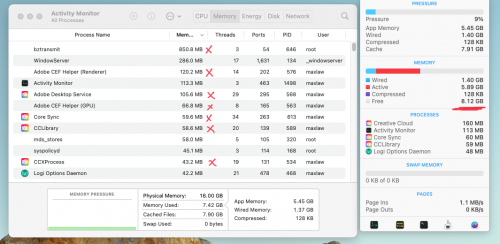
Not sure about the base model, but here's my memory usage when I'm not doing anything (there's a backup process running + some other Adobe services)... You can deduct the red "X" to get the rough minimal memory used... But from what I understand, macOS has a different way of using and managing memory on M1 Macs... low available memory doesn't' really mean you're out of memory...
thanks guys, i've decided to get the mbp 16/512...
EDIT: I have cancelled the purchase today, decided to wait for the redesigned 14", don't want to regret like the mbp15" refreshed in May 19 and the 16" replaces it completely in Nov 2019
This post has been edited by dikae: Jan 2 2021, 08:30 AM
Go for 16gb, im now typing with a 16gb ram 512gb ssd M1 macbook pro haha!
Jokes aside, this june I bought Macbook air 13 (2020) with i5, thought I will be making 1 video every 2 weeks or so. Turns out I needed more power for research with multiple safari tabs, video editing (final cut pro editing with 1080 videos for 6 hours will strained the hell out of my intel MBA lol!), and the 8gb MBA just burned my palm after an hour of using it! (nothing wrong with 8gb, more to blame myself for being cheapskate) :P
Lesson learnt: Never go cheapskate mode with Apple products - they are priced that low for a reason. They want you to fork out more to get something decent :D
Back to your question, if you need to do sustained work, consider 16gb, for the better peace of mind as time progresses. We may never know the updates to Big Sur or Big Sur +1 will need what kind of raw/cpu power when Apple chooses to focus more on M1/M2/M3 products instead of Intel, they have so much headroom to upgrade, for sure they will do something with it in the future!
As for storage, 256 GB is NOT ENOUGH if you are video editing. For now yes, you might be petting with 720p or 1080p videos and you have an external SSD/HDD. But down the road, when you up your game, you will need more space to pre-render proxy files (dont know the exact technical term) in final cut pro, which will take up huge spaces temporarily. My 256gb MBA was a nightmare after editing 20+ videos, all the residual image and videos and files just build up over time! (had to keep deleting after every project - my weekly 10 mins youtube video. What a pain in the crack!!!)


 Dec 25 2020, 05:33 PM, updated 5y ago


 , and definitely do not want this to happen on the mbp
 Quote
Quote


 not sure if it’s easier to resell a customed 16/512 or the base line model..







 0.0239sec
 0.91
0.91
 5 queries
 GZIP Disabled