Outline ·
[ Standard ] ·
Linear+
Expert come, Do you use fans on you router/modem?
|
TSRallyNight
|
 Dec 20 2020, 03:13 PM, updated 6y ago Dec 20 2020, 03:13 PM, updated 6y ago
|

|
Do you use fans on your router/modem?
Cause i saw some lazada on router has x number fans.
I just put my modem and router on top of laptop cooler pad without turnon. Avoid the heat stuck under the table. Scare fire.
This post has been edited by RallyNight: Dec 20 2020, 03:17 PM
|
|
|
|
|
|
syamirc
|
Dec 20 2020, 03:15 PM
|
|
|
Nope
|
|
|
|
|
|
smallcrab
|
Dec 20 2020, 03:17 PM
|
Getting Started

|
router can be overclocked ka
|
|
|
|
|
|
Baconateer
|
Dec 20 2020, 03:17 PM
|
|
|
why tho?
maybe only high end router has it
|
|
|
|
|
|
TSRallyNight
|
Dec 20 2020, 03:19 PM
|
|
|
QUOTE(Baconateer @ Dec 20 2020, 04:17 PM) why tho? maybe only high end router has it Touch my table felt exterme panas so i just left it on the unused laptop pad. |
|
|
|
|
|
Ask_Yip
|
Dec 20 2020, 03:20 PM
|
|
|
no
|
|
|
|
|
|
netmatrix
|
Dec 20 2020, 03:21 PM
|
|
|
Some router will generate quite a lot of heat. So having fans will alleviate the issue. Also helps to maintain reliability & stability.
|
|
|
|
|
|
TSRallyNight
|
Dec 20 2020, 03:24 PM
|
|
|
QUOTE(netmatrix @ Dec 20 2020, 04:21 PM) Some router will generate quite a lot of heat. So having fans will alleviate the issue. Also helps to maintain reliability & stability. When i try to wipe the desk, felt the a extreme heat spot under the router n modem. So just put 1 no use cm cooling laptop pad under it. This post has been edited by RallyNight: Dec 20 2020, 03:25 PM |
|
|
|
|
|
Baconateer
|
Dec 20 2020, 03:25 PM
|
|
|
QUOTE(RallyNight @ Dec 20 2020, 03:19 PM) Touch my table felt exterme panas so i just left it on the unused laptop pad. i left it on top of the router box but got ceiling fan blowing on it la |
|
|
|
|
|
zemega
|
Dec 20 2020, 03:25 PM
|
|
|
It depends on the place you put the router modem. If the place has dead air, no air flow, such as if you fart there, the smell will still be there for a few days, put some fan there. Such places are top of staircase. The heat will build up over time.
Especially with cheap equipments.
|
|
|
|
|
|
PJng
|
Dec 20 2020, 03:25 PM
|
|
|
No, just put separate with BTU, not stack it
|
|
|
|
|
|
TSRallyNight
|
Dec 20 2020, 03:27 PM
|
|
|
QUOTE(zemega @ Dec 20 2020, 04:25 PM) It depends on the place you put the router modem. If the place has dead air, no air flow, such as if you fart there, the smell will still be there for a few days, put some fan there. Such places are top of staircase. The heat will build up over time. Especially with cheap equipments. Kinda next to the wall afternoon sure got direct sunlight hit the wall. QUOTE(PJng @ Dec 20 2020, 04:25 PM) No, just put separate with BTU, not stack it I didnt stack them, i just leave it side by side on the laptop cooling pad. This post has been edited by RallyNight: Dec 20 2020, 03:29 PM |
|
|
|
|
|
quadcube
|
Dec 20 2020, 03:28 PM
|
|
|
I placed a fan to cool the SFP+ modules, otherwise they would be >75 degree Celsius  at the same time cool the other stuffs like TB3 nvme drive and the mini server 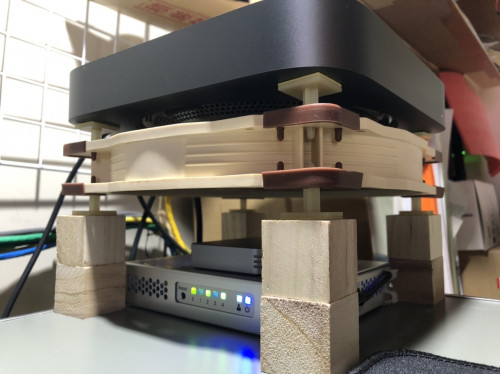 |
|
|
|
|
|
TSRallyNight
|
Dec 20 2020, 03:30 PM
|
|
|
QUOTE(quadcube @ Dec 20 2020, 04:28 PM) I placed a fan to cool the SFP+ modules, otherwise they would be >75 degree Celsius at the same time cool the other stuffs like TB3 nvme drive and the mini server You diy the wood job? Looks good man. |
|
|
|
|
|
fox_shinoda
|
Dec 20 2020, 03:30 PM
|
|
|
Didn’t put any cooler fan for my Asus RT-AX3000, it’s already placed on a well ventilated space. Been using it for 4-5 months 24/7 only reboot if there is a firmware update(like once a month) or power outage(which is rare)
No issue on performance
This post has been edited by fox_shinoda: Dec 20 2020, 03:31 PM
|
|
|
|
|
|
fireballs
|
Dec 20 2020, 03:30 PM
|
|
|
last time yes. overheat till hang. drill a big hole on the router and put a fan. settled.
tplink 2.4g days.
|
|
|
|
|
|
quadcube
|
Dec 20 2020, 03:31 PM
|
|
|
QUOTE(RallyNight @ Dec 20 2020, 03:30 PM) You diy the wood job? Looks good man. No, bought from daiso jp. This one very old pic, now is using stainless steel cylinders as the feet |
|
|
|
|
|
msacras
|
Dec 20 2020, 03:33 PM
|
|
|
QUOTE(smallcrab @ Dec 20 2020, 03:17 PM) router can be overclocked ka Got RGB = faster |
|
|
|
|
|
SUS~min~
|
Dec 20 2020, 03:35 PM
|
|
|
cheapo router if many device together use will hang or become slow. put speed ping all good
|
|
|
|
|
|
TSRallyNight
|
Dec 20 2020, 03:35 PM
|
|
|
QUOTE(fox_shinoda @ Dec 20 2020, 04:30 PM) Didn’t put any cooler fan for my Asus RT-AX3000, it’s already placed on a well ventilated space. Been using it for 4-5 months 24/7 only reboot if there is a firmware update(like once a month) or power outage(which is rare) No issue on performance QUOTE(fireballs @ Dec 20 2020, 04:30 PM) last time yes. overheat till hang. drill a big hole on the router and put a fan. settled. tplink 2.4g days. I just leave it on the laptop cm pad then. Cause underneath is alcohol collection 😅 QUOTE(msacras @ Dec 20 2020, 04:33 PM) Rgb water cooling. |
|
|
|
|
|
TSRallyNight
|
Dec 20 2020, 03:37 PM
|
|
|
QUOTE(~min~ @ Dec 20 2020, 04:35 PM) cheapo router if many device together use will hang or become slow. put speed ping all good No lag or hang after tukar from black cylinder to asus. Now speed lowest at 103.3 highest at 103.7mbps. Hhhggghhhhh Using unifi 100mbps This post has been edited by RallyNight: Dec 20 2020, 03:39 PM |
|
|
|
|
|
netmatrix
|
Dec 20 2020, 03:37 PM
|
|
|
QUOTE(RallyNight @ Dec 20 2020, 03:24 PM) When i try to wipe the desk, felt the a extreme heat spot under the router n modem. So just put 1 no use cm cooling laptop pad under it. I stick extra thick foam pads on the bottom to raise it up. And i do not stack router on something or vice versa. |
|
|
|
|
|
sakuraboo
|
Dec 20 2020, 03:37 PM
|
|
|
Asus ac86u fans stabilise the 5ghz antenna
|
|
|
|
|
|
TSRallyNight
|
Dec 20 2020, 03:39 PM
|
|
|
QUOTE(ALeUNe @ Dec 20 2020, 04:37 PM) Yes, I have a notebook cooler under router. 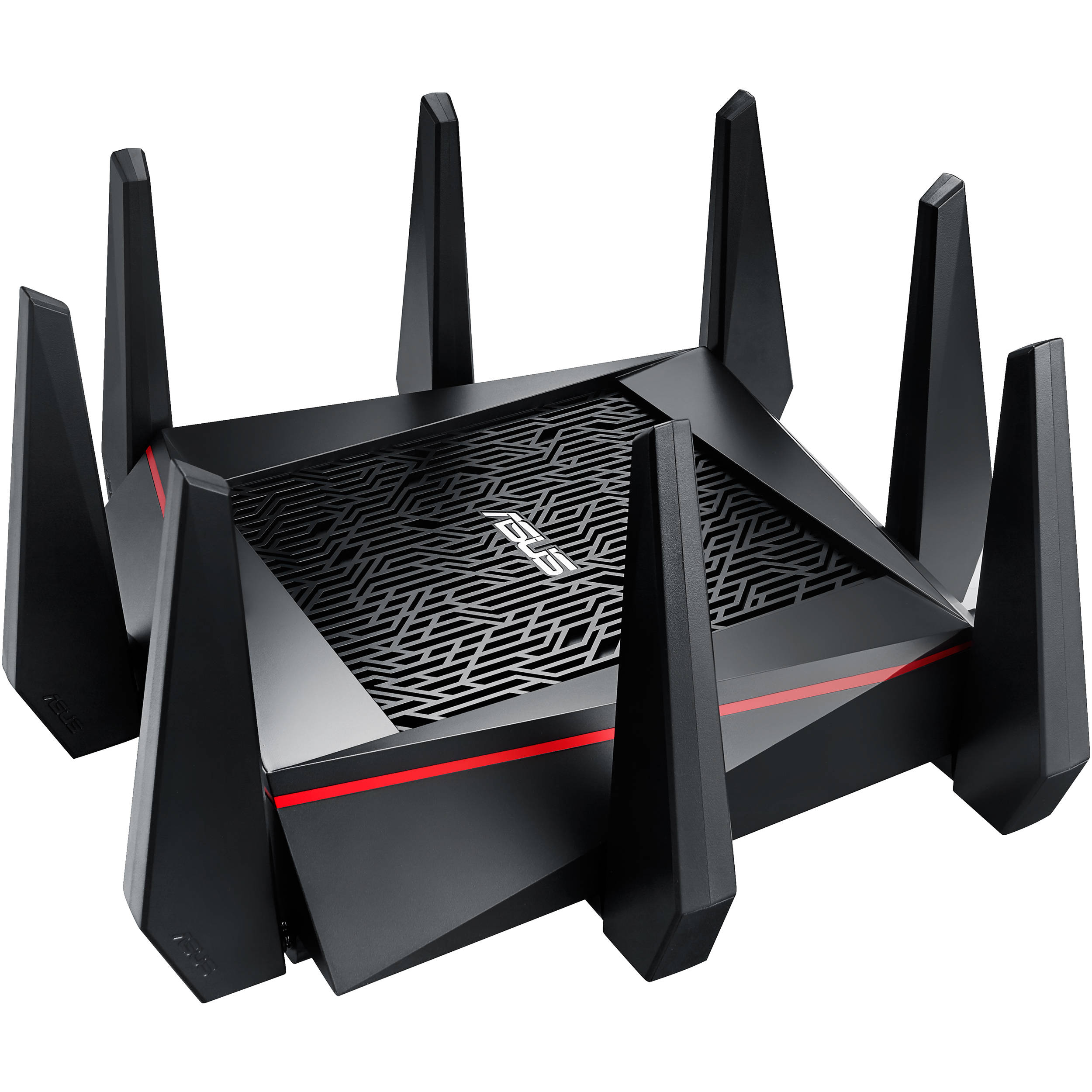  Tf lolol same cooling pad. I place both modem n router side by side. Didnt turnon only. |
|
|
|
|
|
dickybird
|
Dec 20 2020, 03:40 PM
|
|
|
I use laptop coolers under my unifi receiver and router and my unifi tvbox.
|
|
|
|
|
|
TSRallyNight
|
Dec 20 2020, 03:44 PM
|
|
|
QUOTE(dickybird @ Dec 20 2020, 04:40 PM) I use laptop coolers under my unifi receiver and router and my unifi tvbox. Same my tv box also has an small foam push it up. Felt like my tv table real stuck heat alot. |
|
|
|
|
|
zerorating
|
Dec 20 2020, 03:44 PM
|
|
|
no.
my headphone dac/amp are more hotter yet the manufacturer give 10 years warranty.
btw, the router is just warm, but not melting hot.
|
|
|
|
|
|
ALeUNe
|
Dec 20 2020, 03:58 PM
|
I'm the purebred with aristocratic pedigree

|
QUOTE(RallyNight @ Dec 20 2020, 03:39 PM) Tf lolol same cooling pad. I place both modem n router side by side. Didnt turnon only. You can leave it on 24/7. |
|
|
|
|
|
fireballs
|
Dec 20 2020, 04:08 PM
|
|
|
QUOTE(RallyNight @ Dec 20 2020, 03:35 PM) I just leave it on the laptop cm pad then. Cause underneath is alcohol collection 😅 Rgb water cooling. Tried. Stupid design poor ventilation Drill hole easier. |
|
|
|
|
|
zemega
|
Dec 20 2020, 04:11 PM
|
|
|
QUOTE(quadcube @ Dec 20 2020, 03:28 PM) I placed a fan to cool the SFP+ modules, otherwise they would be >75 degree Celsius at the same time cool the other stuffs like TB3 nvme drive and the mini server QUOTE(asphiroth @ Dec 20 2020, 03:55 PM) I might try these after all. |
|
|
|
|
|
zemega
|
Dec 20 2020, 04:11 PM
|
|
|
QUOTE(RallyNight @ Dec 20 2020, 03:27 PM) Kinda next to the wall afternoon sure got direct sunlight hit the wall. As long as air flows, doesn't matter. |
|
|
|
|
|
fireballs
|
Dec 20 2020, 04:14 PM
|
|
|
QUOTE(zemega @ Dec 20 2020, 04:11 PM) I might try these after all. That's very expensive. Just buy 5v case fan |
|
|
|
|
|
zemega
|
Dec 20 2020, 04:34 PM
|
|
|
QUOTE(fireballs @ Dec 20 2020, 04:14 PM) That's very expensive. Just buy 5v case fan I was thinking maybe get two of these 5V USB fan for router and BTU. Not an expert of fan though. Would it be enough. I can build the shroud myself. |
|
|
|
|
|
waghyu
|
Dec 20 2020, 04:42 PM
|
|
|
QUOTE(RallyNight @ Dec 20 2020, 03:13 PM) Do you use fans on your router/modem? Cause i saw some lazada on router has x number fans. I just put my modem and router on top of laptop cooler pad without turnon. Avoid the heat stuck under the table. Scare fire. No fire no fan. |
|
|
|
|
|
SUSdadah
|
Dec 20 2020, 04:46 PM
|
Getting Started
|
only unifi router overheat. Get a good router and no need fan.
|
|
|
|
|
|
netmatrix
|
Dec 20 2020, 04:50 PM
|
|
|
QUOTE(RallyNight @ Dec 20 2020, 03:39 PM) Tf lolol same cooling pad. I place both modem n router side by side. Didnt turnon only. I think no one realizes that routers/BTU (NAS) if turn on 24 hour everyday can heat up an average sized bedroom considerably. This post has been edited by netmatrix: Dec 20 2020, 04:50 PM |
|
|
|
|
|
netmatrix
|
Dec 20 2020, 04:51 PM
|
|
|
QUOTE(asphiroth @ Dec 20 2020, 03:55 PM) Item is nice. But expensive la. |
|
|
|
|
|
SUSDezs
|
Dec 20 2020, 04:54 PM
|
|
|
QUOTE(RallyNight @ Dec 20 2020, 03:13 PM) Do you use fans on your router/modem? Cause i saw some lazada on router has x number fans. I just put my modem and router on top of laptop cooler pad without turnon. Avoid the heat stuck under the table. Scare fire. Ayam actually curious if it helps to keep effiiency up for a small 3-5w fan on the side. Its always friggin hot when i touchy it. So far my testing is that yes, fans help keep it cool, but is it worth the power consumed by the fan? Hell knows. Same thing with the adapter, always warm also.. Well.. the fact all bigger switches screaming like hell into the night and in our server room should be the answer. But those are likely required cooling rather than a luxury. This post has been edited by Dezs: Dec 20 2020, 04:56 PM |
|
|
|
|
|
killerjeya
|
Dec 20 2020, 04:54 PM
|
Getting Started
|
Tp-link routers always run a bit hot (in my experience, at least). Used to have c1200, hot to the touch, but never had any issues. Recently switched to ax50, REALLY HOT, to the point of random reboots. Had a CM laptop cooler lying around. Got three fans that can be moved around. So I just put both modem and router on the cooler pad. Difference is night and day. Router is actually cool to the touch now, no more stability issues. This is with the cooler turned on. I think tplink routers are just poorly designed. It was my mistake getting the ax50 although I knew my old c1200 oso ran quite hot. Since that one had no stability issues, I thought why not? No more tplink for me after this.  This post has been edited by killerjeya: Dec 20 2020, 04:55 PM This post has been edited by killerjeya: Dec 20 2020, 04:55 PM |
|
|
|
|
|
y500
|
Dec 20 2020, 04:58 PM
|
|
|
QUOTE(asphiroth @ Dec 20 2020, 03:55 PM) mahal wei, any 5v usb fan will do  |
|
|
|
|
|
TSRallyNight
|
Dec 20 2020, 04:59 PM
|
|
|
QUOTE(netmatrix @ Dec 20 2020, 05:50 PM) I think no one realizes that routers/BTU (NAS) if turn on 24 hour everyday can heat up an average sized bedroom considerably. With fan on noticeable heat drop. |
|
|
|
|
|
ihavenoidea
|
Dec 20 2020, 04:59 PM
|
|
|
QUOTE(killerjeya @ Dec 20 2020, 04:54 PM) Tp-link routers always run a bit hot (in my experience, at least). Used to have c1200, hot to the touch, but never had any issues. Recently switched to ax50, REALLY HOT, to the point of random reboots. Had a CM laptop cooler lying around. Got three fans that can be moved around. So I just put both modem and router on the cooler pad. Difference is night and day. Router is actually cool to the touch now, no more stability issues. This is with the cooler turned on. I think tplink routers are just poorly designed. It was my mistake getting the ax50 although I knew my old c1200 oso ran quite hot. Since that one had no stability issues, I thought why not? No more tplink for me after this. well.. before too much heatsoak ruins the chip, just open it put a passive heatsink then drill more hole on top of it. |
|
|
|
|
|
brkli
|
Dec 20 2020, 05:00 PM
|
|
|
nope. use liquid cooling..  |
|
|
|
|
|
SUSDezs
|
Dec 20 2020, 05:01 PM
|
|
|
QUOTE(y500 @ Dec 20 2020, 04:58 PM) mahal wei, any 5v usb fan will do that deserves a friggin award hahahahaha - must as well put my floor fan there hahaha |
|
|
|
|
|
TSRallyNight
|
Dec 20 2020, 05:03 PM
|
|
|
QUOTE(killerjeya @ Dec 20 2020, 05:54 PM) Tp-link routers always run a bit hot (in my experience, at least). Used to have c1200, hot to the touch, but never had any issues. Recently switched to ax50, REALLY HOT, to the point of random reboots. Had a CM laptop cooler lying around. Got three fans that can be moved around. So I just put both modem and router on the cooler pad. Difference is night and day. Router is actually cool to the touch now, no more stability issues. This is with the cooler turned on. I think tplink routers are just poorly designed. It was my mistake getting the ax50 although I knew my old c1200 oso ran quite hot. Since that one had no stability issues, I thought why not? No more tplink for me after this. Same laptor cooler under it. Lols. |
|
|
|
|
|
bergstein
|
Dec 20 2020, 05:07 PM
|
|
|
imo if you realise some performance drop such as wifi suddenly stop working for short period of time or ocassionally drop packet,
and you touch it and feel it's hot, then such problem gone with fan blowing at it, then only you need to permanently setup a fan for this
most router should be ok to work properly even heat up a bit
|
|
|
|
|
|
SUSTheKingShark
|
Dec 20 2020, 05:09 PM
|
Getting Started
|
My router dunno how many years never shut down no use cooler fan pun, rosak ask your ISP to replace it la
|
|
|
|
|
|
TSRallyNight
|
Dec 20 2020, 05:10 PM
|
|
|
QUOTE(y500 @ Dec 20 2020, 05:58 PM) mahal wei, any 5v usb fan will do Lmao. This deserve award. |
|
|
|
|
|
SUSDezs
|
Dec 20 2020, 05:12 PM
|
|
|
Give it more engines and it will bring your wifi with you anywhere.. owai
|
|
|
|
|
|
katijar
|
Dec 20 2020, 05:12 PM
|
|
|
Air cond better
|
|
|
|
|
|
geelim77
|
Dec 20 2020, 05:12 PM
|
Getting Started
|
Put it in the fridge yoooooo
|
|
|
|
|
|
caksz
|
Dec 20 2020, 05:34 PM
|
New Member
|
Plug some cheap USB fan
|
|
|
|
|
|
olivur
|
Dec 20 2020, 05:48 PM
|
|
|
just placed a random corsair static pressure fan under my ac88u and it's been alright  |
|
|
|
|
|
ihm11
|
Dec 20 2020, 05:57 PM
|
Getting Started
|
put rubber feet prop it up setel lah
got gentle airflow over the housing can ady
put fan outside u r jes dissipating the heat buildup dat has found its way to the outside of the housing
u wan effective u drill sum vent holes n install the fan inside the housing directed @ the chipset/pcb
|
|
|
|
|
|
fireballs
|
Dec 20 2020, 06:01 PM
|
|
|
https://shopee.com.my/%E2%98%9EHot%E2%98%9C...7585.3751164890cheap and good. edit: haha same link as shared by taiko. mine cheaper by 45sen This post has been edited by fireballs: Dec 20 2020, 06:07 PM
|
|
|
|
|
|
dadurtyz
|
Dec 20 2020, 06:06 PM
|
|
|
Why would a router need a fan?
It design to withstand that, my old unifi router last me 7year and force to upgrade because of speed upgrade.
Dont waste ur thought by said it need that to prolong life or what so ever.
|
|
|
|
|
|
TSRallyNight
|
Dec 20 2020, 06:09 PM
|
|
|
QUOTE(dadurtyz @ Dec 20 2020, 07:06 PM) Why would a router need a fan? It design to withstand that, my old unifi router last me 7year and force to upgrade because of speed upgrade. Dont waste ur thought by said it need that to prolong life or what so ever. Nah, i ask ask only. I put an unused laptop cooler underneath it only. |
|
|
|
|
|
fireballs
|
Dec 20 2020, 06:11 PM
|
|
|
QUOTE(dadurtyz @ Dec 20 2020, 06:06 PM) Why would a router need a fan? It design to withstand that, my old unifi router last me 7year and force to upgrade because of speed upgrade. Dont waste ur thought by said it need that to prolong life or what so ever. some router is ran so hot that it reboot/hang randomly so far history of tplink from the oldest b/g generation to recent ac1200 all like that got one time i so mad i took off the entire plastic casing and let it run naked, put a old heatsink to it. 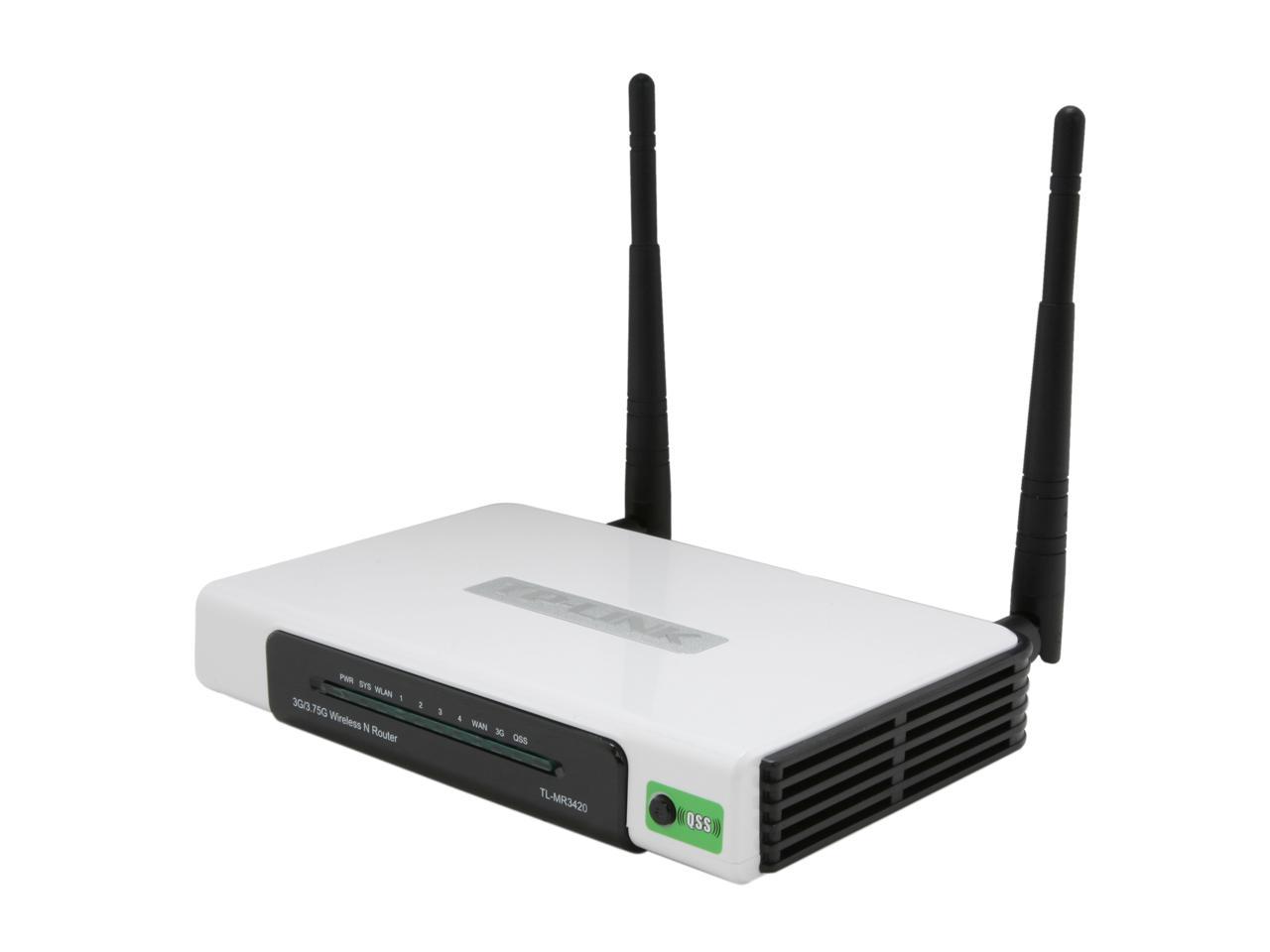 |
|
|
|
|
|
silvaco22
|
Dec 20 2020, 06:13 PM
|
Getting Started
|
QUOTE(quadcube @ Dec 20 2020, 03:28 PM) I placed a fan to cool the SFP+ modules, otherwise they would be >75 degree Celsius at the same time cool the other stuffs like TB3 nvme drive and the mini server Friggin love the noctua! I'm wondering how you connect the noctua to ur router? any pwm to usb adapter ure using? |
|
|
|
|
|
Skylinestar
|
Dec 20 2020, 06:14 PM
|
|
|
QUOTE(fireballs @ Dec 20 2020, 06:11 PM) some router is ran so hot that it reboot/hang randomly so far history of tplink from the oldest b/g generation to recent ac1200 all like that got one time i so mad i took off the entire plastic casing and let it run naked, put a old heatsink to it. I'm using mr3420. Day 1 launch till now still working fine without cooling. |
|
|
|
|
|
:3mushy:3
|
Dec 20 2020, 06:30 PM
|
|
|
What can be used as the feet? I have many 12cm fans, might want to try DIY.
|
|
|
|
|
|
burn22
|
Dec 20 2020, 06:32 PM
|
|
|
never, since day one.
|
|
|
|
|
|
quadcube
|
Dec 20 2020, 06:42 PM
|
|
|
QUOTE(silvaco22 @ Dec 20 2020, 06:13 PM) Friggin love the noctua! I'm wondering how you connect the noctua to ur router? any pwm to usb adapter ure using? Yea, the NF-A20 PWM is awesome, super silent. I run the fan with 12V from another switching psu, coupled with the LNA adapter to reduce its speed (no PWM driver) because winter and fan running full speed on my desk is a very bad idea QUOTE(:3mushy:3 @ Dec 20 2020, 06:30 PM) What can be used as the feet? I have many 12cm fans, might want to try DIY. Try find PCB stand, like my attached pic in previous post |
|
|
|
|
|
:3mushy:3
|
Dec 20 2020, 06:45 PM
|
|
|
QUOTE(quadcube @ Dec 20 2020, 06:42 PM) Yea, the NF-A20 PWM is awesome, super silent. I run the fan with 12V from another switching psu, coupled with the LNA adapter to reduce its speed (no PWM driver) because winter and fan running full speed on my desk is a very bad idea Try find PCB stand, like my attached pic in previous post I think I'll stop by Ace Hardware tomorrow and look for rubber gasket with hole in it, can grab mesh filter too and solder wire too. |
|
|
|
|
|
Quantum Geist
|
Dec 20 2020, 06:46 PM
|
Getting Started
|
Yes, because have old PC act as router with pfsense
|
|
|
|
|
|
pisces88
|
Dec 20 2020, 06:48 PM
|
|
|
Not for my modem, not for my switch, not on unifi's modem
|
|
|
|
|
|
lambsauce
|
Dec 20 2020, 06:52 PM
|
|
|
wanted to buy a cheap usb fan , but realized this router given by time gt no usb port cilaka
|
|
|
|
|
|
fireballs
|
Dec 20 2020, 06:54 PM
|
|
|
QUOTE(:3mushy:3 @ Dec 20 2020, 06:30 PM) What can be used as the feet? I have many 12cm fans, might want to try DIY. disposable chopstick |
|
|
|
|
|
:3mushy:3
|
Dec 20 2020, 06:54 PM
|
|
|
QUOTE(lambsauce @ Dec 20 2020, 06:52 PM) wanted to buy a cheap usb fan , but realized this router given by time gt no usb port cilaka What kind of router doesn't have USB port?  |
|
|
|
|
|
fireballs
|
Dec 20 2020, 06:55 PM
|
|
|
QUOTE(lambsauce @ Dec 20 2020, 06:52 PM) wanted to buy a cheap usb fan , but realized this router given by time gt no usb port cilaka steal power from the router power lah. 12v anyway ngam for 12v case fan also. |
|
|
|
|
|
zemega
|
Dec 20 2020, 07:05 PM
|
|
|
QUOTE(dadurtyz @ Dec 20 2020, 06:06 PM) Why would a router need a fan? It design to withstand that, my old unifi router last me 7year and force to upgrade because of speed upgrade. Dont waste ur thought by said it need that to prolong life or what so ever. Because some router/BTU are designed with minimum tolerance. Give it a heavy workload continuously and they start underperforming, or throttled. Some just hang. Some placement also don't have any airflow, so you need to introduce some airflow to dissipate the accumulated heat. |
|
|
|
|
|
AyamBlend
|
Dec 20 2020, 07:14 PM
|
New Member
|
Mrdiy labtop cooler
Rm16
Three years Day n night without rest. Led rosak 1.5year, fan still work till r recently
|
|
|
|
|
|
silvaco22
|
Dec 20 2020, 07:48 PM
|
Getting Started
|
QUOTE(quadcube @ Dec 20 2020, 06:42 PM) Yea, the NF-A20 PWM is awesome, super silent. I run the fan with 12V from another switching psu, coupled with the LNA adapter to reduce its speed (no PWM driver) because winter and fan running full speed on my desk is a very bad idea wait I still don't get it. You connect the fan directly to your PSU? I'm planning to do the same with my router since I have one noctua fan that i do not use. If I want to use this noctua to connect to the usb port, do I need an adapter? like 4pin pwm adapter to usb? |
|
|
|
|
|
ShadowR1
|
Dec 20 2020, 07:57 PM
|
|
|
Nope ... never have problem of em overheating.
|
|
|
|
|
|
lambsauce
|
Dec 20 2020, 08:40 PM
|
|
|
QUOTE(:3mushy:3 @ Dec 20 2020, 06:54 PM) What kind of router doesn't have USB port? QUOTE(fireballs @ Dec 20 2020, 06:55 PM) steal power from the router power lah. 12v anyway ngam for 12v case fan also. ayam serious, they gave tplink ac1350, no usb port |
|
|
|
|
|
enduser
|
Dec 20 2020, 08:50 PM
|
|
|
|
|
|
|
|
|
enduser
|
Dec 20 2020, 08:52 PM
|
|
|
QUOTE(lambsauce @ Dec 20 2020, 08:40 PM) ayam serious, they gave tplink ac1350, no usb port Ithis one got 2 usb port & surge arrestor https://www.lazada.com.my/products/apc-esse...i433798699.html |
|
|
|
|
|
fireballs
|
Dec 20 2020, 09:02 PM
|
|
|
|
|
|
|
|
|
HumanExtinction
|
Dec 20 2020, 09:06 PM
|
|
|
no nid fan
|
|
|
|
|
|
Neo8663
|
Dec 20 2020, 10:21 PM
|
|
|
Deleted
This post has been edited by Neo8663: Dec 23 2020, 12:22 PM
|
|
|
|
|
|
zemega
|
Dec 29 2020, 09:25 PM
|
|
|
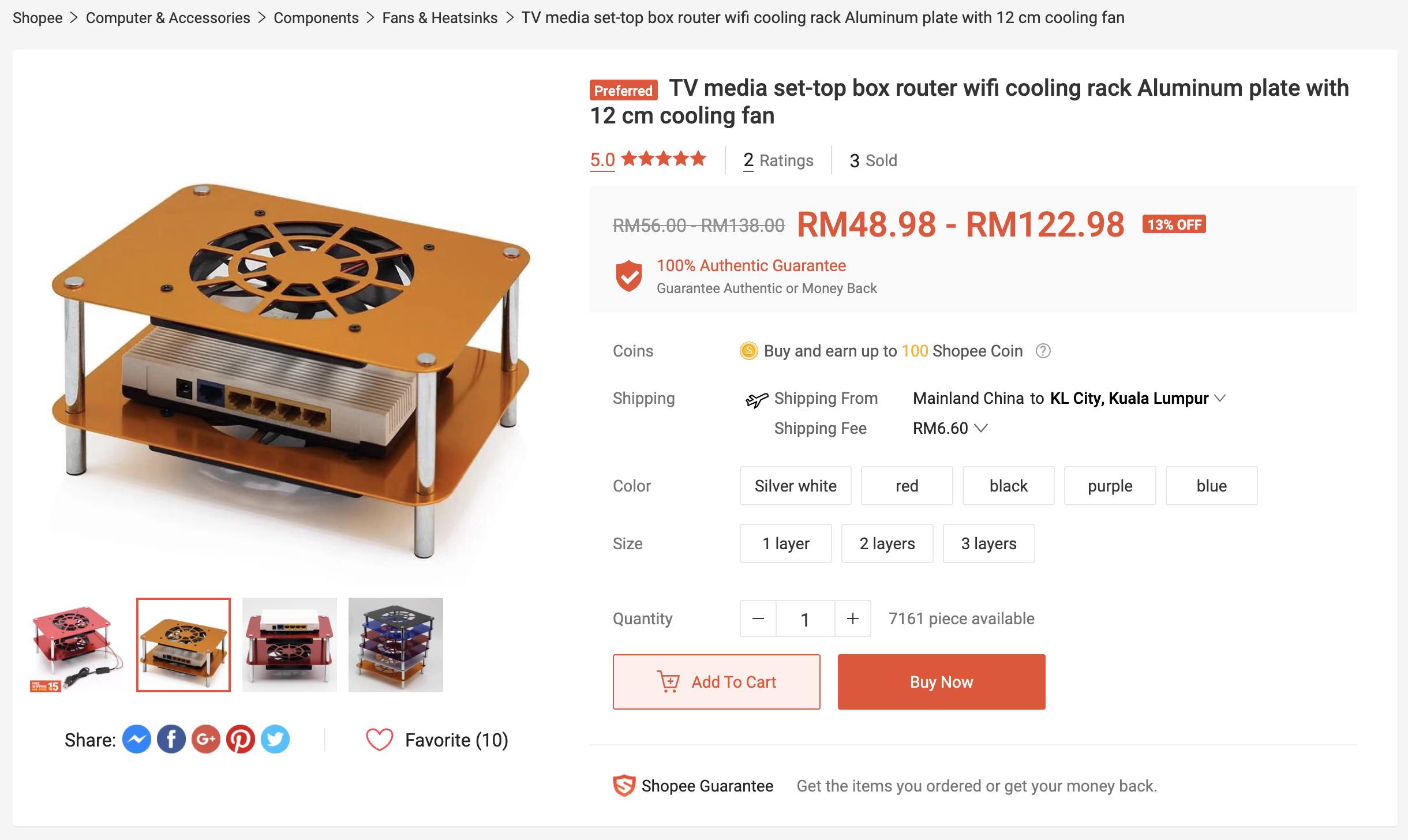
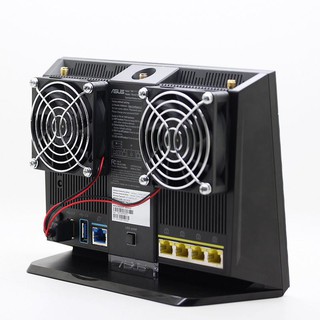
In a strange turn of event, I decided to get these cooling fans for BTU and router, and the desktop suddenly can use gigabit ethernet. Previously it always stuck at 100Mbps, and whenever I tried changing the duplex to gigabit, the connection won't work. It seems that heat does slow down/throttle the router and/or BTUs. The fans are pretty quiet by the way. |
|
|
|
|



 Quote
Quote




























 0.0298sec
 0.49
0.49
 5 queries
 GZIP Disabled