


Update: problem solved after I switched my refresh rate from 144 to 60 hz. Now my pc no issues at all.. lol. Software bug? 🤔🤔
This post has been edited by bobowyc: Jan 2 2021, 01:19 PM
CSGO FPS low?, Need help!
|
|
 Dec 13 2020, 10:30 PM, updated 5y ago Dec 13 2020, 10:30 PM, updated 5y ago
Show posts by this member only | Post
#1
|
 
Senior Member
1,921 posts Joined: Apr 2013 From: Petaling Jaya  
|
Hi guys, so just yesterday I tried to play csgo competitive and noticed my fps was capped at 30. Settings in console of fps_max also did not work. Before this I updated my Nvidia Graphics driver to the latest. Currently using i7 4770k and 1080ti. 16gb ram. anyone experienced this before? Even my PUBG also 30fps. But my other Ryzen system no such issue. CSGO with Ryzen 5 2600 and 1060 is 150+- and pubg was 60+-. So whats the issue here? My gpu or my SSD problem? Software? Sigh.
Update: problem solved after I switched my refresh rate from 144 to 60 hz. Now my pc no issues at all.. lol. Software bug? 🤔🤔 This post has been edited by bobowyc: Jan 2 2021, 01:19 PM |
|
|
|
|
|
Dec 13 2020, 10:35 PM
Show posts by this member only | Post
#2
|

Junior Member
81 posts Joined: Sep 2014
|
Maybe driver issue? Are the games rendering with ur gpu or cpu?
|
|
|
Dec 13 2020, 11:07 PM
Show posts by this member only | Post
#3
|

Senior Member
2,109 posts Joined: Jan 2003 From: Damansara Damai, PJ 
|
use back old driver? if no problem then driver problem
|
|
|
Dec 13 2020, 11:23 PM
Show posts by this member only | IPv6 | Post
#4
|

Senior Member
1,594 posts Joined: Feb 2006 
|
QUOTE(bobowyc @ Dec 13 2020, 10:30 PM) Hi guys, so just yesterday I tried to play csgo competitive and noticed my fps was capped at 30. Settings in console of fps_max also did not work. Before this I updated my Nvidia Graphics driver to the latest. Currently using i7 4770k and 1080ti. 16gb ram. anyone experienced this before? Even my PUBG also 30fps. But my other Ryzen system no such issue. CSGO with Ryzen 5 2600 and 1060 is 150+- and pubg was 60+-. So whats the issue here? My gpu or my SSD problem? Software? Sigh. Check the settings in Nvidia GeForce Experience. It sounds like it's limiting your fps to 30. |
|
|
Dec 13 2020, 11:35 PM
Show posts by this member only | Post
#5
|
|
Senior Member
1,921 posts Joined: Apr 2013 From: Petaling Jaya
|
QUOTE(Bull Poli @ Dec 13 2020, 10:35 PM) Maybe driver issue? Are the games rendering with ur gpu or cpu? I reinstalled the driver from GeForce Experience, still same.. Im not so sure. WHen I check my Task Manager, both CPU and GPU are about 50% usage. i think. +-. QUOTE(loki @ Dec 13 2020, 11:07 PM) use back old driver? if no problem then driver problem Hmm. Need to uninstall the driver first? lol. Kinda forgot how to do that. I just reinstalled the latest driver again just now. Still same problem. QUOTE(red streak @ Dec 13 2020, 11:23 PM) Check the settings in Nvidia GeForce Experience. It sounds like it's limiting your fps to 30. How ah? I tried to find cant find oh.. Or need to go through the CSGO in Geforce Experience? |
|
|
Dec 14 2020, 12:06 AM
Show posts by this member only | Post
#6
|
|
Senior Member
1,921 posts Joined: Apr 2013 From: Petaling Jaya
|
Welp. Found the issue. Just needed to optimize the game from GeForce Experience.. Working flawlessly now, but upon exiting i got a white screen and pink screen on my other monitor. and also the sound is working. only screen turned white, signs of gpu health not good?
|
|
|
|
|
|
Dec 14 2020, 12:45 AM
Show posts by this member only | Post
#7
|
|
Junior Member
81 posts Joined: Sep 2014
|
QUOTE(bobowyc @ Dec 14 2020, 12:06 AM) Welp. Found the issue. Just needed to optimize the game from GeForce Experience.. Working flawlessly now, but upon exiting i got a white screen and pink screen on my other monitor. and also the sound is working. only screen turned white, signs of gpu health not good? I dont think a bad GPU will cap you games to 30 fps. Has to be software issue. |
|
|
Dec 14 2020, 09:09 PM
Show posts by this member only | IPv6 | Post
#8
|
|
Senior Member
1,594 posts Joined: Feb 2006
|
QUOTE(bobowyc @ Dec 14 2020, 12:06 AM) Welp. Found the issue. Just needed to optimize the game from GeForce Experience.. Working flawlessly now, but upon exiting i got a white screen and pink screen on my other monitor. and also the sound is working. only screen turned white, signs of gpu health not good? Then it was definitely GeForce Experience limiting the FPS to 30 by default for whatever reason. There's settings in both AMD/Nvidia control panels that do this. I haven't had a Nvidia GPU in awhile so I'm not quite sure where it is but in AMD Radeon Software it looks like this.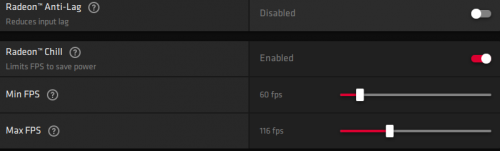 |
|
|
Dec 14 2020, 10:53 PM
Show posts by this member only | Post
#9
|
|
Senior Member
1,921 posts Joined: Apr 2013 From: Petaling Jaya
|
QUOTE(Bull Poli @ Dec 14 2020, 12:45 AM) I dont think a bad GPU will cap you games to 30 fps. Has to be software issue. QUOTE(red streak @ Dec 14 2020, 09:09 PM) Then it was definitely GeForce Experience limiting the FPS to 30 by default for whatever reason. There's settings in both AMD/Nvidia control panels that do this. I haven't had a Nvidia GPU in awhile so I'm not quite sure where it is but in AMD Radeon Software it looks like this. The problem now is after I turn on my PC, all the games will be capped at 30FPS. And where can i find that option as you have sent? I do not see it in GeForce Experience. And cant find it in Nvidia Control Panel. |
|
|
Dec 14 2020, 11:02 PM
|
|
Senior Member
1,921 posts Joined: Apr 2013 From: Petaling Jaya
|
QUOTE(red streak @ Dec 14 2020, 09:09 PM) Then it was definitely GeForce Experience limiting the FPS to 30 by default for whatever reason. There's settings in both AMD/Nvidia control panels that do this. I haven't had a Nvidia GPU in awhile so I'm not quite sure where it is but in AMD Radeon Software it looks like this. Okay thanks. I googled it and found the settings. Apparently its a new update.. Hmm. But after setting that and testing CSGO for 5mins and exiting, i get a white screen again. What does that mean? lol |
|
|
Dec 14 2020, 11:09 PM
|
|
Senior Member
1,921 posts Joined: Apr 2013 From: Petaling Jaya
|
So another update.. I changed to another acc to play CSGO and bam, same thing happens, cap is still at 299 FPS.. But in game its 30. How now? lol
|
|
|
Dec 15 2020, 03:47 AM
|
|
Junior Member
81 posts Joined: Sep 2014
|
QUOTE(bobowyc @ Dec 14 2020, 11:09 PM) So another update.. I changed to another acc to play CSGO and bam, same thing happens, cap is still at 299 FPS.. But in game its 30. How now? lol At this point probably best to reinstall everything. Reinstall the game, the drivers, maybe cpu drivers too. |
|
|
Dec 15 2020, 11:02 AM
|
|
Senior Member
1,921 posts Joined: Apr 2013 From: Petaling Jaya
|
QUOTE(Bull Poli @ Dec 15 2020, 03:47 AM) At this point probably best to reinstall everything. Reinstall the game, the drivers, maybe cpu drivers too. Honestly wanna reformat my windows. I think its best to do now. Hahaha. Lessen all the headache and hassle. XD |
|
|
Apr 29 2021, 07:22 PM
|
|
Probation
8 posts Joined: Aug 2020 From: Netherlands,Amsterdam
|
the only way is just purchasing a good pc, trust me, I had a laptop for 300$ and there were no way to play cs go on it, the moment I bought a pc with 3070 said that you just need to earn some money and buy a decent device.
-------------------- https://luckmillionaire.com/ |
|
|
Apr 29 2021, 09:02 PM
|
|
Senior Member
1,921 posts Joined: Apr 2013 From: Petaling Jaya
|
QUOTE(MathmcPERSON @ Apr 29 2021, 07:22 PM) the only way is just purchasing a good pc, trust me, I had a laptop for 300$ and there were no way to play cs go on it, the moment I bought a pc with 3070 said that you just need to earn some money and buy a decent device. lol.. im using i7-4770k and 1080ti bro.. csgo should run without any issues. before that i was running it at 144hz, i suspected a faulty or buggy update from nvidia which caused the issue, once i set my monitor to 60hz, the issue is gone.. until now.. there is no issue at all.. thats why i refrain from updating nvidia drivers now... LOL.. might try when im free and have a lot of time on my hands haha-------------------- https://luckmillionaire.com/ |
|
Topic ClosedOptions
|
| Change to: |  0.0257sec 0.0257sec
 0.64 0.64
 5 queries 5 queries
 GZIP Disabled GZIP Disabled
Time is now: 18th December 2025 - 10:54 PM |
 Quote
Quote