Welcome Guest ( Log In | Register )

930 Pages « < 916 917 918 919 920 > » Bottom

Outline · [ Standard ] · Linear+

 PlayStation 5 Community Official Thread | V3, PLAY has no limits

views
     
RoxyMunky
post Dec 9 2024, 04:48 PM

MalaoZai
******
Senior Member
1,852 posts

Joined: Feb 2006
From: MalaoLand


QUOTE(miyakochan89 @ Dec 9 2024, 03:10 PM)
Last time when i played games on my PC and PS5, i use a small USB fan and blow it on the case. Managed to keep everything quite cool too. Don't block the ventilation vents, and don't direct the fan into the vents.

HAHA!
*
yea, maybe can use the mini usb fan to help with the ventitalion surrounding the console

LegendLee
post Dec 10 2024, 11:56 AM

><3LG3|\|D
Group Icon
Elite
2,719 posts

Joined: Mar 2006


QUOTE(RoxyMunky @ Dec 9 2024, 01:13 PM)
hmm, sounds like this is the better and optimal way.

i've swapped my PS rear facing to the open area instead of the wall; which is now much more airy and room for the air to circulate

the small fan will only turn it on when needed, if i feel the hot air
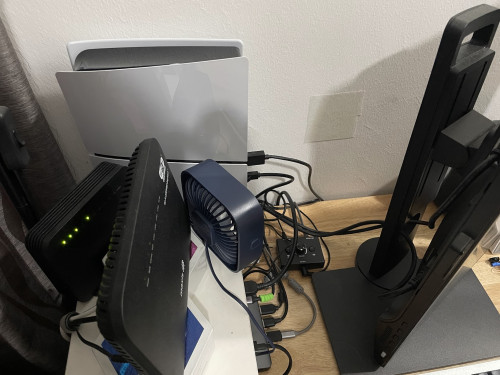
user posted image

on the other hand, I've also raised the console position for a better air circulation:
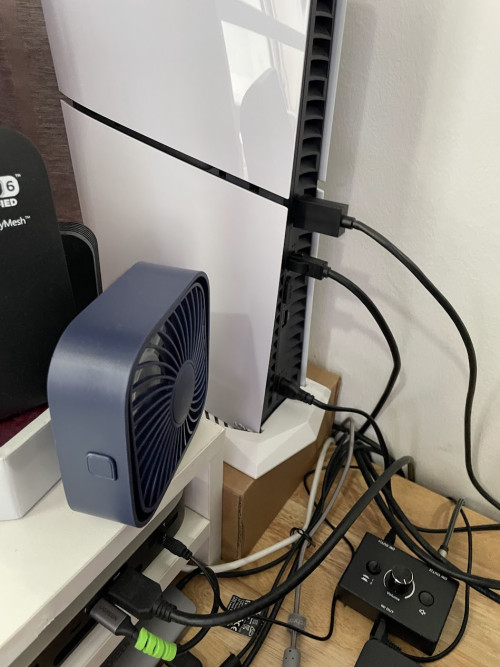
user posted image

yesterday night played another 2 hours of Diablo 4, and never see the overheating prompt.
*
I would actually recommend mounting a lot of your other items below your desk.
Keeping the desk clutter free would allow more circulation for the PS5.
At the same time it makes your desk look better too.

In summary
1. Mount the Router and Modem below your desk.
2. Most of the cables and USB hub can also be placed below the desk. There are many under desk - screw on mounts / cable management solutions.
3. Optional. But you can get a monitor mount too.

Those small circulation fan does work, but avoid those cooling mounts. They do more harm than good.
RoxyMunky
post Dec 10 2024, 12:29 PM

MalaoZai
******
Senior Member
1,852 posts

Joined: Feb 2006
From: MalaoLand


QUOTE(LegendLee @ Dec 10 2024, 11:56 AM)
I would actually recommend mounting a lot of your other items below your desk.
Keeping the desk clutter free would allow more circulation for the PS5.
At the same time it makes your desk look better too.

In summary
1. Mount the Router and Modem below your desk.
2. Most of the cables and USB hub can also be placed below the desk. There are many under desk - screw on mounts / cable management solutions.
3. Optional. But you can get a monitor mount too.

Those small circulation fan does work, but avoid those cooling mounts. They do more harm than good.
*
thanks for the kind advise.

Shall look into cable management to optimize the setup here.
Leo the Lion
post Dec 11 2024, 09:19 PM

Look at all my stars!!
*******
Senior Member
6,358 posts

Joined: Feb 2008
From: Internet World

Previously I reported some graphic glitching when playing FF7R on PS5 Pro.

There were some drop in frame rate too on certain scene

After reinstall the game, it seem to be resolved.

The game was migrated from my old base PS5

This post has been edited by Leo the Lion: Dec 11 2024, 09:19 PM
RoxyMunky
post Dec 12 2024, 07:20 AM

MalaoZai
******
Senior Member
1,852 posts

Joined: Feb 2006
From: MalaoLand


QUOTE(RoxyMunky @ Dec 9 2024, 01:13 PM)
hmm, sounds like this is the better and optimal way.

i've swapped my PS rear facing to the open area instead of the wall; which is now much more airy and room for the air to circulate

the small fan will only turn it on when needed, if i feel the hot air
user posted image

on the other hand, I've also raised the console position for a better air circulation:
user posted image

yesterday night played another 2 hours of Diablo 4, and never see the overheating prompt.
*
an update on using a cardboard box as a riser.

last night played D4 for an hour and the overheating message prompted. seems like the cardboard surface tends to trap heat. This is the first time i encountered this message while playing Diablo 4.

here's a quick google search recommendation:
Sony recommends placing a PlayStation 5 (PS5) on a hard surface, not on a carpet or rug, to prevent overheating and to keep the console cool. Carpets and rugs can trap dust and dirt in the console's air vents.

Here are some other tips for preventing your PS5 from overheating:
- Ensure there is at least 10 cm of free space around the console on each side
- Avoid placing the console in a cramped or narrow space
- Clean dust from the console's air vents
- Use the included PS5 stand to create space between the console and the surface it's on

Hence, I've removed the cardboard box "riser" and shall try again tonight.

snipersnake
post Dec 12 2024, 08:04 PM

typical abah
*******
Senior Member
2,652 posts

Joined: Jan 2003

still cant move on from GT7 biggrin.gif


Attached thumbnail(s)
Attached Image
-PuPu^ZaPruD3r-
post Dec 12 2024, 08:28 PM

PS5 gamer + 4D addict
*******
Senior Member
2,754 posts

Joined: Jan 2005
From: T20 area


This is mine 🤣🤣🤣

user posted image
user posted image
keewah
post Dec 15 2024, 05:06 PM

Casual
***
Junior Member
429 posts

Joined: Jan 2003
PlayStation Wrap-Up free PlayStation 30th Anniversary avatar codes
US: KHKG-H25M-5757
EU: Q237-5LR9-357P
JP: 5H8Q-A37B-6DJ6
GamersFamilia
post Dec 15 2024, 06:40 PM

Proud to be Malaysian
********
All Stars
17,804 posts

Joined: Dec 2007
From: Bandar Baru Bangi , Malaysia


QUOTE(keewah @ Dec 15 2024, 05:06 PM)
PlayStation Wrap-Up free PlayStation 30th Anniversary avatar codes
US: KHKG-H25M-5757
EU: Q237-5LR9-357P
JP: 5H8Q-A37B-6DJ6
*
Claimed for US id, How bout asia? Need to claim for my MY id
keewah
post Dec 15 2024, 11:11 PM

Casual
***
Junior Member
429 posts

Joined: Jan 2003
QUOTE(GamersFamilia @ Dec 15 2024, 06:40 PM)
Claimed for US id, How bout asia? Need to claim for my MY id
*
I got mine MY - Q237-5LR9-357P , but for some reason cannot claim .
Reason "The voucher code is incorrect or is no longer valid."
Zeliard
post Dec 15 2024, 11:48 PM

Getting Started
**
Junior Member
286 posts

Joined: Sep 2008


user posted image
d@odao
post Dec 16 2024, 06:44 AM

Daodao
*******
Senior Member
2,648 posts

Joined: Jan 2003
From: Sri Petaling, Seri Kembangan...
QUOTE(keewah @ Dec 15 2024, 11:11 PM)
I got mine MY - Q237-5LR9-357P , but for some reason cannot claim .
Reason "The voucher code is incorrect or is no longer valid."
*
Same here. Same message.
GamersFamilia
post Dec 16 2024, 07:45 AM

Proud to be Malaysian
********
All Stars
17,804 posts

Joined: Dec 2007
From: Bandar Baru Bangi , Malaysia


QUOTE(keewah @ Dec 15 2024, 11:11 PM)
I got mine MY - Q237-5LR9-357P , but for some reason cannot claim .
Reason "The voucher code is incorrect or is no longer valid."
*
Noted, I'm fine with just claimed for my US id
RoxyMunky
post Dec 16 2024, 01:00 PM

MalaoZai
******
Senior Member
1,852 posts

Joined: Feb 2006
From: MalaoLand


QUOTE(RoxyMunky @ Dec 12 2024, 07:20 AM)
an update on using a cardboard box as a riser.

last night played D4 for an hour and the overheating message prompted. seems like the cardboard surface tends to trap heat. This is the first time i encountered this message while playing Diablo 4.

here's a quick google search recommendation:
Sony recommends placing a PlayStation 5 (PS5) on a hard surface, not on a carpet or rug, to prevent overheating and to keep the console cool. Carpets and rugs can trap dust and dirt in the console's air vents.

Here are some other tips for preventing your PS5 from overheating:
- Ensure there is at least 10 cm of free space around the console on each side
- Avoid placing the console in a cramped or narrow space
- Clean dust from the console's air vents
- Use the included PS5 stand to create space between the console and the surface it's on

Hence, I've removed the cardboard box "riser" and shall try again tonight.
*
an update on this... my unit still goes overheat even when playing diablo 4 for an hour without air conditioning during time.

anyone sent their console to Sony Service Centree for repair due this case before? Any idea how long does it takes for the repair?

nearest SC in Cheras/KL area:
Sony Service Centre @ Sony Store BBCC
L2-12A Bukit Bintang City Centre, Jalan Hang Tuah, Pudu, 55100 Kuala Lumpur, KL and Selangor, 55100

+60 1-300-88-1233
11.00am - 9.00pm Mon - Sun

shinjite
post Dec 16 2024, 02:24 PM

�ŞħĬΩĵΐŦ��
********
All Stars
19,321 posts

Joined: Jan 2003
From: Klang


QUOTE(RoxyMunky @ Dec 16 2024, 01:00 PM)
an update on this... my unit still goes overheat even when playing diablo 4 for an hour without air conditioning during time.

anyone sent their console to Sony Service Centree for repair due this case before? Any idea how long does it takes for the repair?

nearest SC in Cheras/KL area:
Sony Service Centre @ Sony Store BBCC
L2-12A Bukit Bintang City Centre, Jalan Hang Tuah, Pudu, 55100 Kuala Lumpur, KL and Selangor, 55100

+60 1-300-88-1233
11.00am - 9.00pm Mon - Sun
*
Definitely a hot spot formed on the APU already, definitely need to reapply the liquid metal back
RoxyMunky
post Dec 16 2024, 03:13 PM

MalaoZai
******
Senior Member
1,852 posts

Joined: Feb 2006
From: MalaoLand


QUOTE(shinjite @ Dec 16 2024, 02:24 PM)
Definitely a hot spot formed on the APU already, definitely need to reapply the liquid metal back
*
damn...

then really need send it to Sony SC

any idea how long does it takes for the rework?
shinjite
post Dec 16 2024, 03:16 PM

�ŞħĬΩĵΐŦ��
********
All Stars
19,321 posts

Joined: Jan 2003
From: Klang


QUOTE(RoxyMunky @ Dec 16 2024, 03:13 PM)
damn...

then really need send it to Sony SC

any idea how long does it takes for the rework?
*
Can't answer because I have not send my PS5 in before. Probably others can share some light into this. Cheers!
GamersFamilia
post Dec 16 2024, 04:14 PM

Proud to be Malaysian
********
All Stars
17,804 posts

Joined: Dec 2007
From: Bandar Baru Bangi , Malaysia


Playstation holiday sale 19.12 .24 until 1.1.25
https://blog.playstation.com/2024/12/15/202...F7Der6mojvevC0Q
XeactorZ
post Dec 16 2024, 10:28 PM

♥ PandaDog ♥
*********
All Stars
31,608 posts

Joined: Aug 2010
QUOTE(RoxyMunky @ Dec 16 2024, 01:00 PM)
an update on this... my unit still goes overheat even when playing diablo 4 for an hour without air conditioning during time.

anyone sent their console to Sony Service Centree for repair due this case before? Any idea how long does it takes for the repair?

nearest SC in Cheras/KL area:
Sony Service Centre @ Sony Store BBCC
L2-12A Bukit Bintang City Centre, Jalan Hang Tuah, Pudu, 55100 Kuala Lumpur, KL and Selangor, 55100

+60 1-300-88-1233
11.00am - 9.00pm Mon - Sun
*
or can go the curve

btw since year end, I think will take at least 1 week

else send on 1st week on 2025 laugh.gif
Max2006
post Dec 17 2024, 12:58 AM

Look at all my stars!!
*******
Senior Member
4,099 posts

Joined: Mar 2006
Somehow they mess up the PS Wrap up avatar code. The one we got is for EU region, so of course it won't work with our Asia accounts.

The Asia code is 4T9C-FJQE-3JKH

Cheers.

930 Pages « < 916 917 918 919 920 > » Top
 

Change to:
| Lo-Fi Version
0.0457sec    0.25    6 queries    GZIP Disabled
Time is now: 8th December 2025 - 07:33 AM