Welcome Guest ( Log In | Register )

930 Pages « < 914 915 916 917 918 > » Bottom

Outline · [ Standard ] · Linear+

 PlayStation 5 Community Official Thread | V3, PLAY has no limits

views
     
XeactorZ
post Dec 4 2024, 10:04 AM

♥ PandaDog ♥
*********
All Stars
31,608 posts

Joined: Aug 2010
QUOTE(mydragoon @ Dec 4 2024, 08:54 AM)
honestly, didn't expect the incidental "damage" to my wallet from the PS5 purchase...

in just a month, ended up getting 2nd controller, a few games from Amazon US, a few games from local store.

and latest is GT7 since it was at almost 60%. but yeah, even with just dual-sense controller, still fun to drive with the motion sensor.

i need to get SSD as well. yesterday say Amazon US selling 2TB WD_Black SN850X for about rm640 including shipping, etc...

so close to pulling trigger, but in the end, didn't coz worry in case need to claim warranty..
*
can consider get kingston fury renegade which around RM 700, slightly expensive than wd sn850x that you bought from amazon US whistling.gif
mydragoon
post Dec 4 2024, 11:37 AM

Look at all my stars!!
*******
Senior Member
7,044 posts

Joined: Nov 2007


QUOTE(XeactorZ @ Dec 4 2024, 10:04 AM)
can consider get kingston fury renegade which around RM 700, slightly expensive than wd sn850x that you bought from amazon US whistling.gif
*
eh, that price... Amazon US or local price with official support? i dun mind if it's official unit. coz locally, the WD one selling for RM1k... sad.gif

GamersFamilia
post Dec 4 2024, 11:48 AM

Proud to be Malaysian
********
All Stars
17,812 posts

Joined: Dec 2007
From: Bandar Baru Bangi , Malaysia


Adata xpg gammix s70 blade m.2 ssd for ps5 the one you should avoid, the review thru amazon seems not that good, lots of complaint

This post has been edited by GamersFamilia: Dec 4 2024, 11:51 AM
XeactorZ
post Dec 4 2024, 12:22 PM

♥ PandaDog ♥
*********
All Stars
31,608 posts

Joined: Aug 2010
QUOTE(mydragoon @ Dec 4 2024, 11:37 AM)
eh, that price... Amazon US or local price with official support? i dun mind if it's official unit. coz locally, the WD one selling for RM1k... sad.gif
*
local price, search in shopee malaysia

incoming 12/12 can save more icon_idea.gif

QUOTE(GamersFamilia @ Dec 4 2024, 11:48 AM)
Adata xpg gammix s70 blade m.2 ssd for ps5 the one you should avoid, the review thru amazon seems not that good, lots of complaint
*
I saw review quite good, but then doesn't come with heatsink

kingston kc3000 is good too, but also doesn't come with heatsink sweat.gif

wd sn850x, samsung 990 pro and corsair mp600 lpx are good, but more expensive than kingston fury renegade laugh.gif
mydragoon
post Dec 4 2024, 03:01 PM

Look at all my stars!!
*******
Senior Member
7,044 posts

Joined: Nov 2007


i was using this article from Tom's Hardware as reference for the PS5 SSD:
https://www.tomshardware.com/best-picks/best-ps5-ssds
RoxyMunky
post Dec 4 2024, 03:12 PM

MalaoZai
******
Senior Member
1,852 posts

Joined: Feb 2006
From: MalaoLand


Good Afternoon All,

Im a new user on PS5 Slim Digital, put the unit vertically to save space.

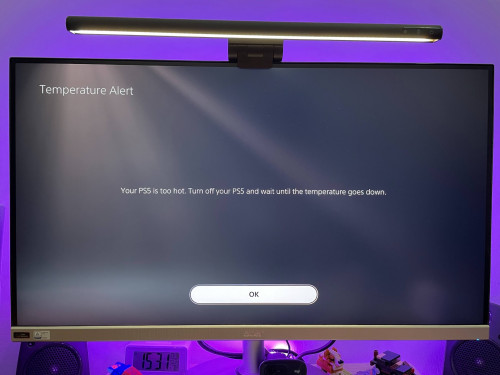
I encountered this overheat issue twice recently.

The flow is like this.
I usually play around 2 hours of Diablo 4 HoV gameplay, and then run AstroBot for my daughter to play. Then the message will pop up after few minutes playing AstroBot.

When I restart the PS5 and ran AstroBot again; the message no longer pop up. But when continue to play for like 20-30 minutes, PS5 will just force shut down by itself.

this happened in both condition:
1. Afternoon day time with or without aircond
2. Night time mostly fine with aircond - but happened once without aircond

in between, i put a small fan to help the PS5 ventilation by blowing it from the front; but still the overheat message popped up.

any lights to solve this issue?

user posted image
LegendLee
post Dec 4 2024, 04:27 PM

><3LG3|\|D
Group Icon
Elite
2,719 posts

Joined: Mar 2006


QUOTE(RoxyMunky @ Dec 4 2024, 03:12 PM)
Good Afternoon All,

Im a new user on PS5 Slim Digital, put the unit vertically to save space.

I encountered this overheat issue twice recently.

The flow is like this.
I usually play around 2 hours of Diablo 4 HoV gameplay, and then run AstroBot for my daughter to play. Then the message will pop up after few minutes playing AstroBot.

When I restart the PS5 and ran AstroBot again; the message no longer pop up. But when continue to play for like 20-30 minutes, PS5 will just force shut down by itself.

this happened in both condition:
1. Afternoon day time with or without aircond
2. Night time mostly fine with aircond - but happened once without aircond

in between, i put a small fan to help the PS5 ventilation by blowing it from the front; but still the overheat message popped up.

any lights to solve this issue?

user posted image
*
Have you tried placing the PS5 in a well ventilated area?
You can also try cleaning the dust out from the fan vents.

If those 2 doesn't work, you may want to get Sony or an expert to replace the liquid metal.
RoxyMunky
post Dec 4 2024, 04:29 PM

MalaoZai
******
Senior Member
1,852 posts

Joined: Feb 2006
From: MalaoLand


QUOTE(LegendLee @ Dec 4 2024, 04:27 PM)
Have you tried placing the PS5 in a well ventilated area?
You can also try cleaning the dust out from the fan vents.

If those 2 doesn't work, you may want to get Sony or an expert to replace the liquid metal.
*
Hi there, thanks for the kind input.

currently it is at a dead end corner of the room along with router, stowed behind my secondary monitor.

I never had this issue with my old PS4 phat edition.

i did try to open up the case and check the fan vents for any dust accumulation, but it looks all good.

maybe I can try to contact Sony support and see how.
Joey Christensen
post Dec 4 2024, 04:42 PM

Purgamentum init, exit purgamentum
*******
Senior Member
3,651 posts

Joined: Jan 2009
From: Fort Canning Garden Status: Dog Fighting


Had overheating issue with my OG with disc drive while playing Black Myth Wukong. Since I bought it, it's always on vertical. After encountering overheating issue twice, I've then placed it horizontally. No problem thereafter.

I did and internal cleaning before and it's pretty much clean. Highly unlikely because of accumulated dust since there's literally not much dust on the fan and heatsink. I suspect the liquid metal is the culprit (when it's in vertical).
TongCN
post Dec 4 2024, 05:23 PM

Look ma, I have lots stars :D
*******
Senior Member
6,659 posts

Joined: Aug 2008
From: Malaysia


QUOTE(RoxyMunky @ Dec 4 2024, 03:12 PM)
Good Afternoon All,

Im a new user on PS5 Slim Digital, put the unit vertically to save space.

I encountered this overheat issue twice recently.

The flow is like this.
I usually play around 2 hours of Diablo 4 HoV gameplay, and then run AstroBot for my daughter to play. Then the message will pop up after few minutes playing AstroBot.

When I restart the PS5 and ran AstroBot again; the message no longer pop up. But when continue to play for like 20-30 minutes, PS5 will just force shut down by itself.

this happened in both condition:
1. Afternoon day time with or without aircond
2. Night time mostly fine with aircond - but happened once without aircond

in between, i put a small fan to help the PS5 ventilation by blowing it from the front; but still the overheat message popped up.

any lights to solve this issue?

user posted image
*
How long you bought your PS5 slim ?

Try to place horizontally and test again ?

Previously got one guy claim that vertical long term will dmg the PS5 because of the liquid metal won't cover whole chip surface
But many PS Fan bomb him later XD
GamersFamilia
post Dec 4 2024, 05:27 PM

Proud to be Malaysian
********
All Stars
17,812 posts

Joined: Dec 2007
From: Bandar Baru Bangi , Malaysia


QUOTE(XeactorZ @ Dec 4 2024, 12:22 PM)
I saw review quite good, but then doesn't come with heatsink

kingston kc3000 is good too, but also doesn't come with heatsink sweat.gif

wd sn850x, samsung 990 pro and corsair mp600 lpx are good, but more expensive than kingston fury renegade laugh.gif
*
Upgraded mine to 2tb corsair mp600 lpx plus it comes with heatsink

Well i guess some review not that accurate via amazon.. But the most important thing is get the one with heatsink
GamersFamilia
post Dec 4 2024, 05:31 PM

Proud to be Malaysian
********
All Stars
17,812 posts

Joined: Dec 2007
From: Bandar Baru Bangi , Malaysia


QUOTE(Joey Christensen @ Dec 4 2024, 04:42 PM)
Had overheating issue with my OG with disc drive while playing Black Myth Wukong. Since I bought it, it's always on vertical. After encountering overheating issue twice, I've then placed it horizontally. No problem thereafter.

I did and internal cleaning before and it's pretty much clean. Highly unlikely because of accumulated dust since there's literally not much dust on the fan and heatsink. I suspect the liquid metal is the culprit (when it's in vertical).
*
Did you ever replace new liquid metal when do the internal cleaning?
ben3003
post Dec 4 2024, 05:34 PM

10k Club
********
All Stars
10,859 posts

Joined: Jan 2003
From: Sarawak


QUOTE(RoxyMunky @ Dec 4 2024, 04:29 PM)
Hi there, thanks for the kind input.

currently it is at a dead end corner of the room along with router, stowed behind my secondary monitor.

I never had this issue with my old PS4 phat edition.

i did try to open up the case and check the fan vents for any dust accumulation, but it looks all good.

maybe I can try to contact Sony support and see how.
*
dead corner of the room, stowed behind monitor, sounds like not well ventilated area. ps5 memang hotter than ps4 phat.
Joey Christensen
post Dec 4 2024, 05:45 PM

Purgamentum init, exit purgamentum
*******
Senior Member
3,651 posts

Joined: Jan 2009
From: Fort Canning Garden Status: Dog Fighting


QUOTE(GamersFamilia @ Dec 4 2024, 05:31 PM)
Did you ever replace new liquid metal when do the internal cleaning?
Nope. Just wipe the fan and heatsink. But not so much on heatsink since there's nothing in there. laugh.gif Maybe in the future will apply new liquid metal in it.
GamersFamilia
post Dec 4 2024, 05:59 PM

Proud to be Malaysian
********
All Stars
17,812 posts

Joined: Dec 2007
From: Bandar Baru Bangi , Malaysia


QUOTE(Joey Christensen @ Dec 4 2024, 05:45 PM)
Nope. Just wipe the fan and heatsink. But not so much on heatsink since there's nothing in there.  laugh.gif Maybe in the future will apply new liquid metal in it.
*
Ok good
RoxyMunky
post Dec 5 2024, 07:33 AM

MalaoZai
******
Senior Member
1,852 posts

Joined: Feb 2006
From: MalaoLand


QUOTE(Joey Christensen @ Dec 4 2024, 04:42 PM)
Had overheating issue with my OG with disc drive while playing Black Myth Wukong. Since I bought it, it's always on vertical. After encountering overheating issue twice, I've then placed it horizontally. No problem thereafter.

I did and internal cleaning before and it's pretty much clean. Highly unlikely because of accumulated dust since there's literally not much dust on the fan and heatsink. I suspect the liquid metal is the culprit (when it's in vertical).
*
hmm... same thing here that I did remove the panels and try to check for dust but it is pretty much clean.

maybe I try to put it horizontally, but my current desk setup not optimized for that.

never had any issue with my phat PS4.

QUOTE(TongCN @ Dec 4 2024, 05:23 PM)
How long you bought your PS5 slim ?

Try to place horizontally and test again ?

Previously got one guy claim that vertical long term will dmg the PS5 because of the liquid metal won't cover whole chip surface
But many PS Fan bomb him later XD
*
bought it home in end May 2024.

yea, maybe try to place it horizontally and give it a try; since you're the second person quoted this.

again, current desk setup is not opitimized for that, well... lets see.

QUOTE(ben3003 @ Dec 4 2024, 05:34 PM)
dead corner of the room, stowed behind monitor, sounds like not well ventilated area. ps5 memang hotter than ps4 phat.
*
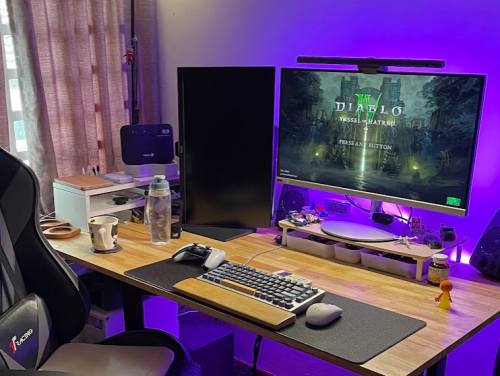
don't have any pics to show that, but here's my setup; whereby PS5 is behind the vertical monitor:

user posted image
ben3003
post Dec 5 2024, 08:11 AM

10k Club
********
All Stars
10,859 posts

Joined: Jan 2003
From: Sarawak


QUOTE(RoxyMunky @ Dec 5 2024, 07:33 AM)
hmm... same thing here that I did remove the panels and try to check for dust but it is pretty much clean.

maybe I try to put it horizontally, but my current desk setup not optimized for that.

never had any issue with my phat PS4.
bought it home in end May 2024.

yea, maybe try to place it horizontally and give it a try; since you're the second person quoted this.

again, current desk setup is not opitimized for that, well... lets see.
don't have any pics to show that, but here's my setup; whereby PS5 is behind the vertical monitor:

user posted image
*
Ya that is a very badly ventilated area. What i will do is to add 1 usb fan and blow air to the area so hot air wont trap at the back.

This post has been edited by ben3003: Dec 5 2024, 08:12 AM
RoxyMunky
post Dec 5 2024, 08:22 AM

MalaoZai
******
Senior Member
1,852 posts

Joined: Feb 2006
From: MalaoLand


QUOTE(ben3003 @ Dec 5 2024, 08:11 AM)
Ya that is a very badly ventilated area. What i will do is to add 1 usb fan and blow air to the area so hot air wont trap at the back.
*
Good morning,

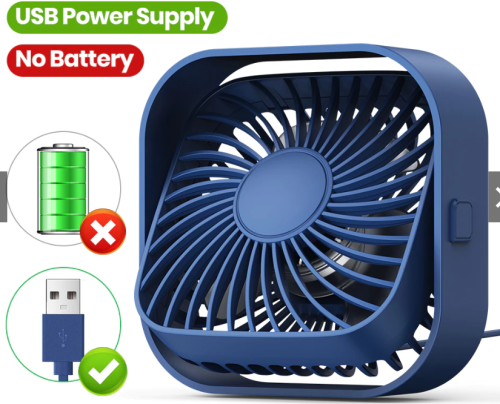
yea, i reckon this and added a usb powered fan to ventilate that area; but still problem persists sad.gif


user posted image
TongCN
post Dec 5 2024, 08:30 AM

Look ma, I have lots stars :D
*******
Senior Member
6,659 posts

Joined: Aug 2008
From: Malaysia


QUOTE(RoxyMunky @ Dec 5 2024, 07:33 AM)
hmm... same thing here that I did remove the panels and try to check for dust but it is pretty much clean.

maybe I try to put it horizontally, but my current desk setup not optimized for that.

never had any issue with my phat PS4.
bought it home in end May 2024.

yea, maybe try to place it horizontally and give it a try; since you're the second person quoted this.

again, current desk setup is not opitimized for that, well... lets see.
don't have any pics to show that, but here's my setup; whereby PS5 is behind the vertical monitor:

user posted image
*
Actually i also placed like that, i putting my PS5 phat behind my LG OLED TV (which i guess the heat from TV will pass behind also)

But so far have no issue and i always horizontal placement since day 1 (bought Feb 2023)

This post has been edited by TongCN: Dec 5 2024, 08:31 AM
ben3003
post Dec 5 2024, 09:04 AM

10k Club
********
All Stars
10,859 posts

Joined: Jan 2003
From: Sarawak


QUOTE(RoxyMunky @ Dec 5 2024, 08:22 AM)
Good morning,

yea, i reckon this and added a usb powered fan to ventilate that area; but still problem persists sad.gif
user posted image
*
i see, that place is really cramped from what i can see. try to move out of the position and play it as u normally do, if ok then means is ventilation problem, if still persist then can bring back to sony. it is diff from the guy above TongCN who put behind TV but in horizontal position, if can put horizontal means there must be some clearance behind.

This post has been edited by ben3003: Dec 5 2024, 09:04 AM

930 Pages « < 914 915 916 917 918 > » Top
 

Change to:
| Lo-Fi Version
0.0253sec    0.35    6 queries    GZIP Disabled
Time is now: 9th December 2025 - 05:20 PM