Outline ·
[ Standard ] ·
Linear+
USB problem
|
TSPJng
|
 Nov 19 2020, 08:57 PM, updated 5y ago Nov 19 2020, 08:57 PM, updated 5y ago
|

|
i have old 2012 pc, some time got issue some USB device cannot use when plug in
not sure is power not enough or port is degraded?
not functioning mean like plug printer, when print windows cannot detect, plug wireless mouse i can hear hardware plug in sound, but mouse did not move
yes i use USB speaker, sometime sound disort
what i do everytime is try switch this port to other port, or switch back to this port
back panel 4 port full
-power for speaker
-keyboard
-mouse
-USB sound card, onboard sound card only 1 site got sound
front panel 2 port
-printer
-free
|
|
|
|
|
|
netmatrix
|
Nov 20 2020, 08:53 AM
|
|
|
Usually the front usb port is prone to degradation. The cables used to link the port to motherboard is the one that causes the problem. There are solutions though.
1. Buy usb hub. Plug only low powered devices keyboard, mouse & printer on it.
2. Change the front panel usb ports. You can buy replacement built in usb port with 5.25 panel kit for this. Need to open the case to fix though.
|
|
|
|
|
|
TSPJng
|
Nov 24 2020, 12:15 AM
|
|
|
QUOTE(netmatrix @ Nov 20 2020, 08:53 AM) Usually the front usb port is prone to degradation. The cables used to link the port to motherboard is the one that causes the problem. There are solutions though. 1. Buy usb hub. Plug only low powered devices keyboard, mouse & printer on it. 2. Change the front panel usb ports. You can buy replacement built in usb port with 5.25 panel kit for this. Need to open the case to fix though. 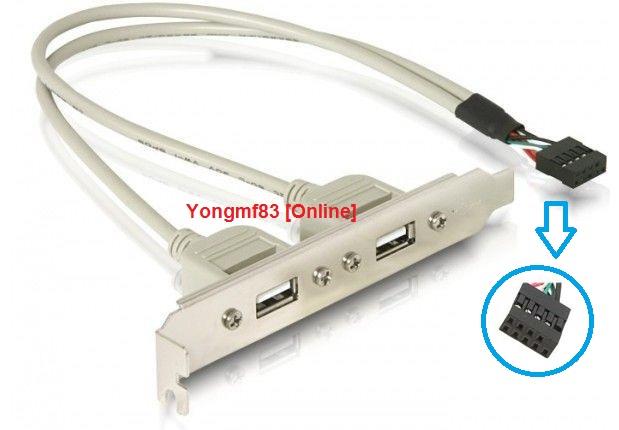 Just remember back i got open post about usb Someone suggest me add this What this called? |
|
|
|
|
|
netmatrix
|
Nov 24 2020, 12:21 AM
|
|
|
QUOTE(PJng @ Nov 24 2020, 12:15 AM) Just remember back i got open post about usb Someone suggest me add this What this called? This is the item https://shopee.com.my/product/29734956/553306540But i was suggesting something like this that uses the DVD drive bay. https://shopee.com.my/2-Ports-USB-3-0-%2B-U...zhoCgAUQAvD_BwEThis post has been edited by netmatrix: Nov 24 2020, 12:22 AM |
|
|
|
|
|
TSPJng
|
Nov 24 2020, 12:23 AM
|
|
|
QUOTE(netmatrix @ Nov 24 2020, 12:21 AM) I think i need open pc cover 1st before buy So cheap that thing |
|
|
|
|
|
netmatrix
|
Nov 24 2020, 12:25 AM
|
|
|
QUOTE(PJng @ Nov 24 2020, 12:23 AM) I think i need open pc cover 1st before buy So cheap that thing Yeah. I bought a few units to repair mine and my relative old PC. They front USB ports all damaged either from corrosion or wear.  |
|
|
|
|
|
TSPJng
|
Nov 24 2020, 12:27 AM
|
|
|
QUOTE(netmatrix @ Nov 24 2020, 12:25 AM) Yeah. I bought a few units to repair mine and my relative old PC. They front USB ports all damaged either from corrosion or wear. My pc front panel cd drive got another cover Not suitable to use those cd drive usb |
|
|
|
|
|
netmatrix
|
Nov 24 2020, 12:33 AM
|
|
|
QUOTE(PJng @ Nov 24 2020, 12:27 AM) My pc front panel cd drive got another cover Not suitable to use those cd drive usb If it is standard casing, can pop out the front panel one. If it was certain model that is cut into panel DVD door, then cannot. |
|
|
|
|
|
TSPJng
|
Nov 24 2020, 04:17 PM
|
|
|
QUOTE(netmatrix @ Nov 24 2020, 12:33 AM) If it is standard casing, can pop out the front panel one. If it was certain model that is cut into panel DVD door, then cannot. That USB above, is USB 2.0 or can choose USB3.0? My pc currently all post is 2.0 |
|
|
|
|
|
sHawTY
|
Nov 24 2020, 04:27 PM
|
|
|
The same issue can also be caused by degrading USB chipset
Yes, it happens. I've seen it on a lot of older PCs
|
|
|
|
|
|
netmatrix
|
Nov 24 2020, 04:30 PM
|
|
|
QUOTE(PJng @ Nov 24 2020, 04:17 PM) That USB above, is USB 2.0 or can choose USB3.0? My pc currently all post is 2.0 Nahh... 2.0 is the 9 pin connector. USB 3.0 is the weird long tiny pin connector. Some sell USB 2.0 with blue connector and 9 pin port scamming people it is 3.0. But if it is cheap, no one cares la. Else get the PCIE USB 3.0 card. https://shopee.com.my/PCIE-to-USB-3.0-4Port...5320.1703222379Or the one that has the internal 3.0 connector type. https://www.lazada.com.my/products/pci-e-to...6BoCc08QAvD_BwENowdays very flexible can mod everything. I even found a PATA 2.5" with M.2 SATA SSD adapter! Wanted to try this out on an old laptop with Pentium M processors. |
|
|
|
|
|
TSPJng
|
Nov 25 2020, 01:58 PM
|
|
|
QUOTE(netmatrix @ Nov 24 2020, 04:30 PM) Nahh... 2.0 is the 9 pin connector. USB 3.0 is the weird long tiny pin connector. Some sell USB 2.0 with blue connector and 9 pin port scamming people it is 3.0. But if it is cheap, no one cares la. Else get the PCIE USB 3.0 card. https://shopee.com.my/PCIE-to-USB-3.0-4Port...5320.1703222379Or the one that has the internal 3.0 connector type. https://www.lazada.com.my/products/pci-e-to...6BoCc08QAvD_BwENowdays very flexible can mod everything. I even found a PATA 2.5" with M.2 SATA SSD adapter! Wanted to try this out on an old laptop with Pentium M processors. Second one need other cable? I just open my PC 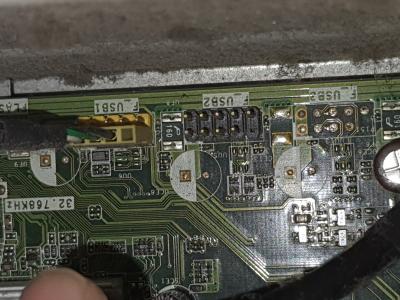
Mean that i plug to USB2? |
|
|
|
|
|
netmatrix
|
Nov 25 2020, 04:12 PM
|
|
|
QUOTE(PJng @ Nov 25 2020, 01:58 PM) Second one need other cable? I just open my PC
Mean that i plug to USB2? Your board they use only half of the usb yellow connector for front panel. Usb2 pins you can plug directly to the new usb panel but it only allows 2 port type. Dun buy 4 port type. If the board maker did not cheap out, you could get usb3 pins and you get another 2 more usb ports. 😁 |
|
|
|
|
|
joyjoymimi P
|
Dec 10 2020, 11:44 AM
|
New Member

|
QUOTE(PJng @ Nov 19 2020, 08:57 PM) i have old 2012 pc, some time got issue some USB device cannot use when plug in not sure is power not enough or port is degraded? not functioning mean like plug printer, when print windows cannot detect, plug wireless mouse i can hear hardware plug in sound, but mouse did not move yes i use USB speaker, sometime sound disort what i do everytime is try switch this port to other port, or switch back to this port back panel 4 port full -power for speaker -keyboard -mouse -USB sound card, onboard sound card only 1 site got sound front panel 2 port -printer -free There are multiple ways you can refer to fix USB keeps disconnecting on Windows where you can reinstall USB Drivers or disable the USB Selective Suspend, there are many other effective solutions too fix it too. Refer to the guidance above to fix the problem as soon as possible! |
|
|
|
|
|
chilskater
|
Dec 10 2020, 11:59 AM
|
|
|
use contact cleaner
|
|
|
|
|
|
RectangleX
|
Dec 10 2020, 12:00 PM
|
|
|
Encountering same issue before with my old PC, managed to fixed the issue by changing to a better power supply unit and problems solved.
|
|
|
|
|
|
TSPJng
|
Dec 10 2020, 10:58 PM
|
|
|
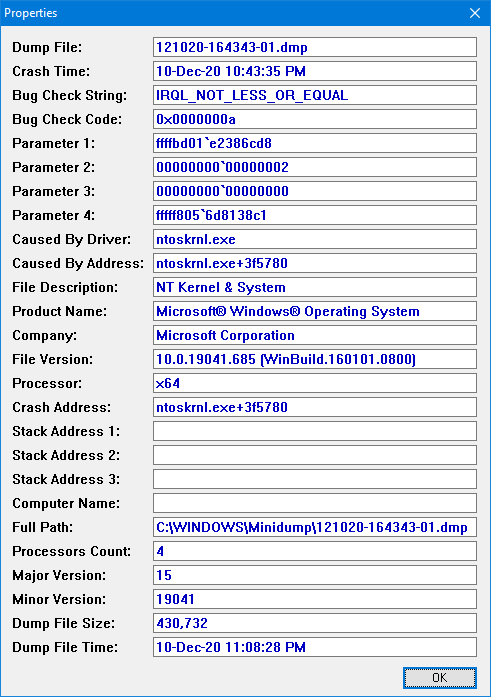
QUOTE(netmatrix @ Nov 25 2020, 04:12 PM) Your board they use only half of the usb yellow connector for front panel. Usb2 pins you can plug directly to the new usb panel but it only allows 2 port type. Dun buy 4 port type. If the board maker did not cheap out, you could get usb3 pins and you get another 2 more usb ports. 😁 Just plug in, windows BSOD then long been on cpu 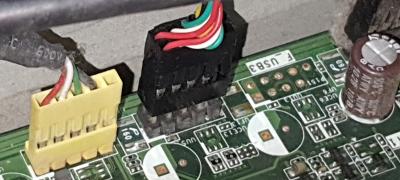
Are plug correctly? » Click to show Spoiler - click again to hide... « This post has been edited by PJng: Dec 10 2020, 11:28 PM |
|
|
|
|
|
TSPJng
|
Dec 11 2020, 12:05 AM
|
|
|
QUOTE(RectangleX @ Dec 10 2020, 12:00 PM) Encountering same issue before with my old PC, managed to fixed the issue by changing to a better power supply unit and problems solved. Last year already change power supply from come with pc 250w to cooler master 400w Yes 2012 until i change still running that 250w power supply Seem still happen This post has been edited by PJng: Dec 11 2020, 12:06 AM |
|
|
|
|
|
netmatrix
|
Dec 11 2020, 08:59 AM
|
|
|
QUOTE(PJng @ Dec 10 2020, 10:58 PM) Just plug in, windows BSOD then long been on cpu
Are plug correctly? » Click to show Spoiler - click again to hide... « Yes you plugged in correctly. Pin 1 on motherboard with corner market cable Red(5v) - + Gnd. Exactly like the yellow USB connector. But should push the black connector all the way into the board and not exposed pins like in your picture. Look at how yellow connector is plugged all the way in. Usually if i encounter connectivity problems, a spray on the connectors from a can of contact cleaner is very helpful. It helps to remove some corrosion/dust/ oil coating on the exposed connector pins. This post has been edited by netmatrix: Dec 11 2020, 12:50 PM |
|
|
|
|
|
RectangleX
|
Dec 11 2020, 11:21 AM
|
|
|
QUOTE(PJng @ Dec 11 2020, 12:05 AM) Last year already change power supply from come with pc 250w to cooler master 400w Yes 2012 until i change still running that 250w power supply Seem still happen Have you checked for swollen capacitors on the motherboard? Refer to this thread: https://forum.lowyat.net/topic/341368 |
|
|
|
|



 Quote
Quote




 0.0225sec
 0.74
0.74
 6 queries
 GZIP Disabled