Welcome Guest ( Log In | Register )

Outline · [ Standard ] · Linear+

Maxis Asus TUF-AX3000 Router with Maxis (VOIP) config, New Asus Router with Maxis VOIP Function

views
     
TSpetlover929
post Nov 17 2020, 01:00 PM, updated 6y ago

New Member
*
Newbie
4 posts

Joined: Dec 2014
Good afternoon sisters and brothers. I need your help please! icon_question.gif icon_question.gif icon_question.gif

Yesterday i spent 4 hours with maxis technical support. The lady support person was helpful. We tried to plug in here and there. We also tried many different settings but we still failed to get it working. This morning i called up the Asus technical support, but they also not able to help.


Reasons for using this new Asus TUF-AX3000:

1. Intermittent loss of internet connection
2. I need FREE Dynamic DNS function (Asus provides free DDNS) for IP CCTV viewing purpose.


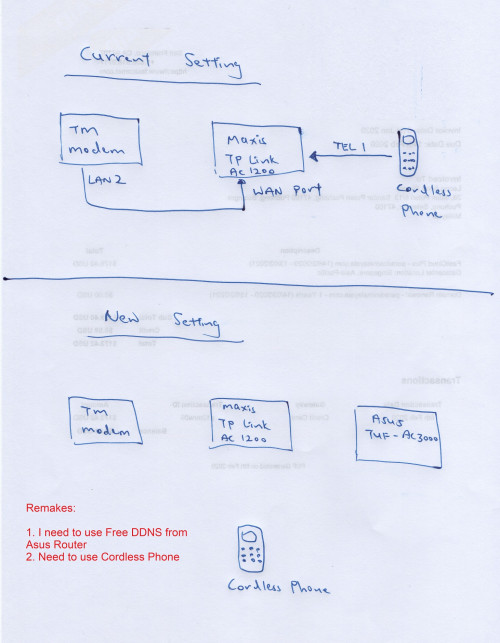
Current settings:

TM Modem (LAN 2) goes to Maxis Router (WAN Port)
Cordless phone goes to Maxis Router/TP Link Archer C1200 (TEL 1)

Remarks:

1. I need to use the FREE DDNS function of Asus Router and Cordless Phone


Now how do I configure my Asus TUF-AX3000 as main router and use the maxis voip function.


Anyone can give me detailed steps on setting it up? Appreciate that. thumbup.gif

user posted image
mhwee
post Nov 17 2020, 01:07 PM

Getting Started
**
Junior Member
241 posts

Joined: Sep 2005
From: Johor
QUOTE(petlover929 @ Nov 17 2020, 01:00 PM)
Good afternoon sisters and brothers. I need your help please!  icon_question.gif  icon_question.gif  icon_question.gif

Yesterday i spent 4 hours with maxis technical support. The lady support person was helpful. We tried to plug in here and there. We also tried many different settings but we still failed to get it working. This morning i called up the Asus technical support, but they also not able to help.
Reasons for using this new Asus TUF-AX3000:

1. Intermittent loss of internet connection
2. I need FREE Dynamic DNS function (Asus provides free DDNS) for IP CCTV viewing purpose. 
Current settings:

TM Modem (LAN 2) goes to Maxis Router (WAN Port)
Cordless phone goes to Maxis Router/TP Link Archer C1200 (TEL 1)

Remarks:

1. I need to use the FREE DDNS function of Asus Router and Cordless Phone
Now how do I configure my Asus TUF-AX3000 as main router and use the maxis voip function.
Anyone can give me detailed steps on setting it up? Appreciate that.  thumbup.gif
user posted image
*
I thought this is straight forward? I may be wrong biggrin.gif (I store my ac88u in dark corner long time)

1. From BTU of TM, should be port 2 as default (TM fibre unit)
2. link to wan of the asus router, select maxis profile,
3. Web interface of Asus the shown a port after you have selected maxis profile, Link that port to wan port of the maxis acher, then connect telefon to the same port of that maxis router as your existing setup
4. Disable the wifi of maxis acher router.
5. All other ports of maxis archer become no internet. Internet comes out from Asus's ports and asus wifi

This post has been edited by mhwee: Nov 17 2020, 01:20 PM
TSpetlover929
post Nov 17 2020, 03:16 PM

New Member
*
Newbie
4 posts

Joined: Dec 2014
QUOTE(mhwee @ Nov 17 2020, 01:07 PM)
I thought this is straight forward? I may be wrong  biggrin.gif (I store my ac88u in dark corner long time)

1. From BTU of TM, should be port 2 as default (TM fibre unit)
2. link to wan of the asus router, select maxis profile,
3. Web interface of Asus the shown a port after you have selected maxis profile, Link that port to wan port of the maxis acher, then connect telefon to the same port of that maxis router as your existing setup
4. Disable the wifi of maxis acher router.
5. All other ports of maxis archer become no internet. Internet comes out from Asus's ports and asus wifi
*
Brother, thanks for your reply. I thought no hope already.

I am not sure how to do the Point 3. If I select Maxis - Fiber as my profile, the PORT NUMBER will be shown there right. I think i see it last night. It was written "LAN PORT 1".

Do I need to disable the DHCP of the Maxis router?

Appreciate for your help.


DaTaPcHousE
post Nov 17 2020, 04:27 PM

Getting Started
**
Junior Member
150 posts

Joined: Feb 2007
From: Melaka


one more thing....
Please check if ur ip is public or private address, the asus ddns service works only on public IP.
TSpetlover929
post Nov 17 2020, 05:19 PM

New Member
*
Newbie
4 posts

Joined: Dec 2014
QUOTE(DaTaPcHousE @ Nov 17 2020, 04:27 PM)
one more thing....
Please check if ur ip is public or private address, the asus ddns service works only on public IP.
*
Good point brother, i already checked using "chicken ip" and confirmed the IP is public.


Thank you smile.gif
Zot
post Nov 17 2020, 05:27 PM

Look at all my stars!!
*******
Senior Member
7,938 posts

Joined: Mar 2014
QUOTE(petlover929 @ Nov 17 2020, 03:16 PM)
Brother, thanks for your reply. I thought no hope already.

I am not sure how to do the Point 3. If I select Maxis - Fiber as my profile, the PORT NUMBER will be shown there right. I think i see it last night. It was written "LAN PORT 1".

Do I need to disable the DHCP of the Maxis router?

Appreciate for your help.
*
I believe the configuration now is that the Maxis router is just for VoIP device. So, need to disable DHCP. The DHCP is only from the Asus.
mhwee
post Nov 17 2020, 07:15 PM

Getting Started
**
Junior Member
241 posts

Joined: Sep 2005
From: Johor
QUOTE(petlover929 @ Nov 17 2020, 03:16 PM)
Brother, thanks for your reply. I thought no hope already.

I am not sure how to do the Point 3. If I select Maxis - Fiber as my profile, the PORT NUMBER will be shown there right. I think i see it last night. It was written "LAN PORT 1".

Do I need to disable the DHCP of the Maxis router?

Appreciate for your help.
*
That does not matter. But the best practice is to disable. This is because your internet only available in asus router. Asus router will have DHCP by default. A dhcp in maxis router will do nothing. I give u a simple explanation :-

1. VLAN 621+VLAN 822 go in your asus wan - Asus does PPPOE connection (VLAN621) and gives you internet at all asus ports besides "LAN port 1" and WIFI.

2. Only VLAN 822 reach WAN port of Maxis router. Maxis router's WAN port by default expects both vlan 621 and 822, but only 822 reaches there and channel to your RJ11 telephone line. VLAN 621 does not reach there and does nothing at maxis router.

This post has been edited by mhwee: Nov 17 2020, 07:23 PM
kkean
post Dec 11 2020, 08:44 AM

New Member
*
Junior Member
7 posts

Joined: Apr 2008
QUOTE(mhwee @ Nov 17 2020, 01:07 PM)
I thought this is straight forward? I may be wrong  biggrin.gif (I store my ac88u in dark corner long time)

1. From BTU of TM, should be port 2 as default (TM fibre unit)
2. link to wan of the asus router, select maxis profile,
3. Web interface of Asus the shown a port after you have selected maxis profile, Link that port to wan port of the maxis acher, then connect telefon to the same port of that maxis router as your existing setup
4. Disable the wifi of maxis acher router.
5. All other ports of maxis archer become no internet. Internet comes out from Asus's ports and asus wifi
*
this model support maxis fibre? cause i want buy this model. haha


Change to:
| Lo-Fi Version
0.0149sec    0.72    5 queries    GZIP Disabled
Time is now: 14th December 2025 - 05:20 PM