Outline ·
[ Standard ] ·
Linear+
[2020] Mac Mini with M1 Discussion Thread
|
mamakap
|
 Feb 24 2021, 03:55 AM Feb 24 2021, 03:55 AM
|

|
QUOTE(carpathia @ Feb 23 2021, 05:59 PM) Cooler Master 34" ultrawide monitor 1) Cooler Master 34" ultrawide monitor 2 ) I bought a USB - Displayport from shopee. works well and output 144hz at ultrawide resolution 3) Yes So my macmini (usb c - displayport) m1 shares the same display with my lenovo notebook ( hdmi). i realised that whenever i turn on my macmini, the display will not output to the monitor and the monitor will say no signal, go to sleep. I have to turn off, unplug and plug the cable back in order for the mac mini to display to the monitor. thinking this was my monitor issue, i tried using the same usb c to displayport on my lenovo thinkpad on the same monitor and it works without any problems. so i dont think it's my cable or monitor issue. Have you try with USB-C Hub (HDMI and USB-C) connected to mac mini? |
|
|
|
|
|
toytoy
|
Feb 24 2021, 06:04 PM
|
|
|
Hi All, i just gotten M1 Mini last month. Paired it with Dell S2721QS. Bought an el cheapo USB-C to DP cable which stated to work at 4K@60Hz but the display signal keep turning on and off every other second.
May I know which cable is recommended or is it better to buy a USB-C to DP dongle and pair it with DP-DP cable?
|
|
|
|
|
|
ifani
|
Feb 24 2021, 06:29 PM
|
New Member

|
QUOTE(toytoy @ Feb 24 2021, 06:04 PM) Hi All, i just gotten M1 Mini last month. Paired it with Dell S2721QS. Bought an el cheapo USB-C to DP cable which stated to work at 4K@60Hz but the display signal keep turning on and off every other second. May I know which cable is recommended or is it better to buy a USB-C to DP dongle and pair it with DP-DP cable? why not just use a hdmi cable? |
|
|
|
|
|
toytoy
|
Feb 24 2021, 06:50 PM
|
|
|
QUOTE(ifani @ Feb 24 2021, 06:29 PM) why not just use a hdmi cable? Hi I have 2 monitors. Planning to plug the Dell 4k monitor using DP as it performs better with VRR (Freesync or something similar). I m using HDMI for another monitor now  |
|
|
|
|
|
carpathia
|
Feb 24 2021, 07:56 PM
|
|
|
QUOTE(mamakap @ Feb 24 2021, 03:55 AM) Have you try with USB-C Hub (HDMI and USB-C) connected to mac mini? i dont have a USB C Hub.... QUOTE(toytoy @ Feb 24 2021, 06:04 PM) Hi All, i just gotten M1 Mini last month. Paired it with Dell S2721QS. Bought an el cheapo USB-C to DP cable which stated to work at 4K@60Hz but the display signal keep turning on and off every other second. May I know which cable is recommended or is it better to buy a USB-C to DP dongle and pair it with DP-DP cable? i'm using a RM30+ USB C to Display port and im able to get full widescreen resolution at 144hz.... super smooth |
|
|
|
|
|
toytoy
|
Feb 24 2021, 10:43 PM
|
|
|
QUOTE(carpathia @ Feb 24 2021, 07:56 PM) i dont have a USB C Hub.... i'm using a RM30+ USB C to Display port and im able to get full widescreen resolution at 144hz.... super smooth Mind to share the brand? I am also using RM30+ cable from Shopee. But it didn't work for 4K. 1080p no problem. |
|
|
|
|
|
Kiding
|
Feb 24 2021, 11:30 PM
|
|
|
QUOTE(toytoy @ Feb 24 2021, 10:43 PM) Mind to share the brand? I am also using RM30+ cable from Shopee. But it didn't work for 4K. 1080p no problem. Do you know to run 4K@60Hz, you will need cable that able to transfer 18Gb bandwidth, and the longer the cable, the narrower the bandwidth it can run. Get a good quality cable that really support 4K HDR and support DP 1.4 version, also cable length the shorter the better, <=1 meter long is ideal. |
|
|
|
|
|
leechunghan
|
Feb 25 2021, 08:36 PM
|
|
|
For normal usage browsing and watch video 8/256 is enough to use?
|
|
|
|
|
|
carpathia
|
Feb 25 2021, 11:10 PM
|
|
|
QUOTE(toytoy @ Feb 24 2021, 10:43 PM) Mind to share the brand? I am also using RM30+ cable from Shopee. But it didn't work for 4K. 1080p no problem. 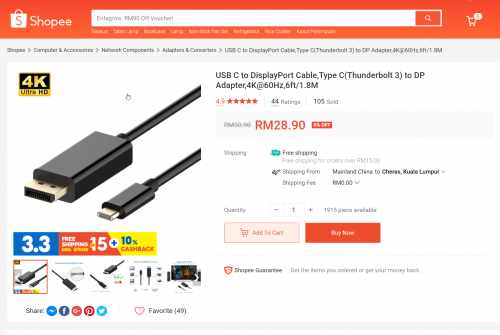 |
|
|
|
|
|
rickyro
|
Feb 26 2021, 01:22 AM
|
|
|
QUOTE(leechunghan @ Feb 25 2021, 08:36 PM) For normal usage browsing and watch video 8/256 is enough to use? Yes.. Definitely... After SSD formatting + base apps, the M1 MBP still got ~200gb of storage |
|
|
|
|
|
soonwai
|
Feb 26 2021, 01:28 AM
|
|
|
QUOTE(leechunghan @ Feb 25 2021, 08:36 PM) For normal usage browsing and watch video 8/256 is enough to use? If you don't download big stuff then OK. I bought 16/256 but I have an external 2TB NVME SSD. |
|
|
|
|
|
leechunghan
|
Feb 26 2021, 11:37 AM
|
|
|
QUOTE(rickyro @ Feb 26 2021, 01:22 AM) Yes.. Definitely... After SSD formatting + base apps, the M1 MBP still got ~200gb of storage How say after format SSD? Ur one is 8/256 also? |
|
|
|
|
|
leechunghan
|
Feb 26 2021, 11:42 AM
|
|
|
QUOTE(soonwai @ Feb 26 2021, 01:28 AM) If you don't download big stuff then OK. I bought 16/256 but I have an external 2TB NVME SSD. Thinking take 8/512 but scared no need that much memory, but also scared take jor 8/256 later no enough memory pulak  And also thinking want learn how to Edit and Cut Video those extra skill  |
|
|
|
|
|
rickyro
|
Feb 26 2021, 12:15 PM
|
|
|
QUOTE(leechunghan @ Feb 26 2021, 11:37 AM) How say after format SSD? Ur one is 8/256 also? As in.. After formatting + OS Installation + Built In Softwares I've both 8/256 and 16/256 This post has been edited by rickyro: Feb 26 2021, 12:15 PM |
|
|
|
|
|
leechunghan
|
Feb 26 2021, 12:26 PM
|
|
|
QUOTE(rickyro @ Feb 26 2021, 12:15 PM) As in.. After formatting + OS Installation + Built In Softwares I've both 8/256 and 16/256 Also thinking buy Mac want learn how to Edit and Cut Video those extra skill can do self geh vlog, you got use Final Cut Pro? The apps take many space mou? |
|
|
|
|
|
soonwai
|
Feb 26 2021, 01:11 PM
|
|
|
QUOTE(leechunghan @ Feb 26 2021, 11:42 AM) Thinking take 8/512 but scared no need that much memory, but also scared take jor 8/256 later no enough memory pulak And also thinking want learn how to Edit and Cut Video those extra skill Memory for sure cannot add. SSD at least still can add external. Even though it won't be as fast as the internal but external Thunderbolt drives good enough for me. |
|
|
|
|
|
rickyro
|
Feb 26 2021, 02:07 PM
|
|
|
QUOTE(leechunghan @ Feb 26 2021, 12:26 PM) Also thinking buy Mac want learn how to Edit and Cut Video those extra skill can do self geh vlog, you got use Final Cut Pro? The apps take many space mou? the apps itself do take a few gb though, better to check it through, if you do editing... better go for 16/512... unless you get a nice hub for the mac mini that can integrate nvme drive |
|
|
|
|
|
SticH
|
Feb 26 2021, 06:19 PM
|
|
|
Anyone external SSD runs hot?
My orico thunderbolt 3 nvme hub is so hot despite idling, not sure whats going on
|
|
|
|
|
|
soonwai
|
Feb 26 2021, 06:29 PM
|
|
|
QUOTE(SticH @ Feb 26 2021, 06:19 PM) Anyone external SSD runs hot? My orico thunderbolt 3 nvme hub is so hot despite idling, not sure whats going on My external Acasis Thunderbolt NVME enclosure has a surface temp of 42.4º. (according to cheap china temp gun). smartctl reporting 41º for the same SSD. Idling temps. |
|
|
|
|
|
soonwai
|
Feb 28 2021, 01:08 PM
|
|
|
A few problems encountered so far. Not sure Big Sur or M1 problems.
Happens on 11.2, 11.2.1, 11.2.2 and 11.3b2. (Can't remember if it happened on 11.1)
1. Video would play with a black screen. VLC+mp4 or mkv. VLC with mpeg2 in a DVD folder. Twice so far. Had to restart.
2. Safari losing Command-~ shortcut for switching windows. Quitting doesn't help. Had to restart. Once or twice so far.
3. Command-Tab app switcher would sometimes get stuck in my 2nd monitor and refuses to come back to my main monitor. Then after awhile, it does. Psychopathic Neural Engine at work. Happened a few times but not that often to be annoying.
Solved, OSI Layer 8 error. The App Switcher follows the monitor where I last accessed the dock.
4. Telco phone calls via my iPhone seems to be a lot less reliable than my MBPR Late 2013. Keeps disconnecting or losing audio or mic. Happens half the time. Enough for me not to want to use the Mac to make calls.
5. Screenshots stops working after awhile. ⌘-⇧-4 activates the selection pointer but doesn't capture anything. ⌘-⇧-5 brings up the screenshot bar but is unresponsive to anything other than Escape.
6. Illustrator 23.1.1 beachballs a lot when switching windows.
7. Crossover running Win32 apps loses mouse clicks. #2, #5 and #7 happen together.
The only thing special that I have that may be different from you guys is that I have a 3rd party kext running, Tuxera NTFS. To install this, I had to change my Mac's Security Policy to Reduced Security.
And I have one System Extension running, Little Snitch.
Updates:
28/2: 11.3b2 broke Crossover 64-bit bottles. 32-bit are OK.
4/3: Just installed 11.3b3. Crossover 64-bit bottles fixed.
This post has been edited by soonwai: Mar 4 2021, 06:58 PM
|
|
|
|
|



 Quote
Quote


 0.0301sec
 0.46
0.46
 6 queries
 GZIP Disabled