

QUOTE(sp6068 @ Dec 14 2021, 07:55 PM)

[2020] MacBook Air with M1 Discussion Thread
|
|
 Dec 15 2021, 04:46 AM Dec 15 2021, 04:46 AM
Return to original view | IPv6 | Post
#1
|
 
Junior Member
436 posts Joined: Oct 2005  
|
QUOTE(sp6068 @ Dec 14 2021, 07:55 PM) |
|
|
Dec 16 2021, 06:00 AM
Return to original view | IPv6 | Post
#2
|
|
Junior Member
436 posts Joined: Oct 2005
|
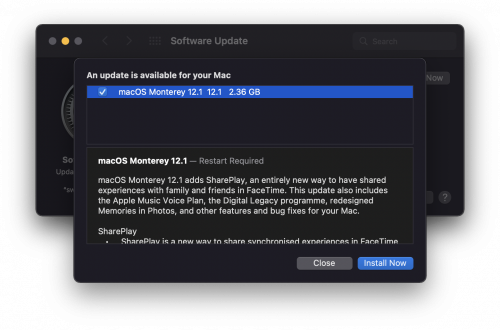
QUOTE(sp6068 @ Dec 15 2021, 09:38 PM) https://9to5mac.com/2021/12/14/some-users-a...ate-on-m1-macs/ Wow the quality control of Apple seems to be slipping. This has never happened before in the last 15 years I have used Apple products.Some users are not seeing the macOS Monterey 12.1 update on M1 Macs [Update: Fix in the comments] 1.) Open System Preferences > Software Update. Confirm that no update is available, and leave the window open. 2.) Open Applications > Utilities > Activity Monitor. 3.) Go to View > All Processes 4.) Search for 'com.apple.MobileSoftwareUpdate.UpdateBrainService' . Select it and click Force Quit. 5.) The 12.1 Update should appear in System Preferences. Click Update Now. 6.) The update may not download - force quit the com.apple.MobileSoftwareUpdate.UpdateBrainService again using Activity Monitor to start the download. |
|
|
Feb 5 2022, 08:47 AM
Return to original view | Post
#3
|
|
Junior Member
436 posts Joined: Oct 2005
|
QUOTE(sp6068 @ Jan 22 2022, 12:23 AM) You can also try dbrands skin (plain designs). https://dbrand.com/shop/apple-macbook-air-13-skins-2020-m1 Just applied some dbrand skins to my MBA and really love the feel and look. Do you guys have issue with the laptop heating up more so then when it was naked? Does the chassis contribute to heat dissipation or is it all the vents? |
| Change to: |  0.0775sec 0.0775sec
 1.14 1.14
 7 queries 7 queries
 GZIP Disabled GZIP Disabled
Time is now: 19th December 2025 - 02:31 PM |
 Quote
Quote