

I have tried updating drivers, AMD chipset software. even fresh install Windows 10 again.
But the problem still persist. Dump file in below.
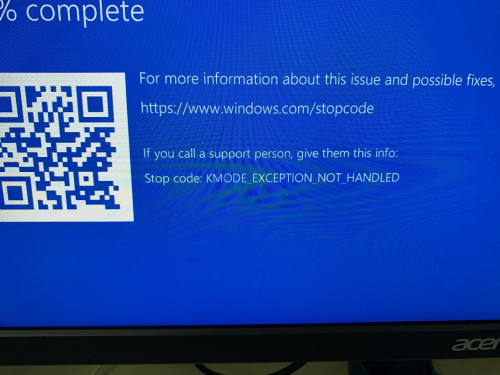
dump file
https://1drv.ms/u/s!ApPwtrmVbpTA3TslnAv...CimhsN?e=dOF8sQ
BSOD, KMODE_EXEPTION_NOT_HANDLED
|
|
 Nov 6 2020, 11:05 AM, updated 6y ago Nov 6 2020, 11:05 AM, updated 6y ago
Show posts by this member only | Post
#1
|
 
Junior Member
245 posts Joined: May 2009 
|
Need help here, just built a new PC myself, but BSOD happens occasionally.
I have tried updating drivers, AMD chipset software. even fresh install Windows 10 again. But the problem still persist. Dump file in below. dump file https://1drv.ms/u/s!ApPwtrmVbpTA3TslnAv...CimhsN?e=dOF8sQ |
|
|
|
|
|
Nov 6 2020, 11:10 AM
Show posts by this member only | Post
#2
|

Senior Member
3,389 posts Joined: Sep 2019
|
QUOTE(ganick5461 @ Nov 6 2020, 11:05 AM) Need help here, just built a new PC myself, but BSOD happens occasionally. All parts new?I have tried updating drivers, AMD chipset software. even fresh install Windows 10 again. But the problem still persist. Dump file in below. dump file https://1drv.ms/u/s!ApPwtrmVbpTA3TslnAv...CimhsN?e=dOF8sQ  |
|
|
Nov 6 2020, 11:18 AM
Show posts by this member only | Post
#3
|
|
Junior Member
245 posts Joined: May 2009
|
QUOTE(waghyu @ Nov 6 2020, 11:10 AM) All parts new? Not all new parts, some reuse.new parts 1. cpu 2. motherboard 3. gpu 4. ram 5. 500gb nvme sdd(boot drive) old parts 1. m.2 sata ssd 2. 3.5 sata hdd 3. 2.5 sata ssd 4. psu |
|
|
Nov 6 2020, 11:19 AM
Show posts by this member only | Post
#4
|

Senior Member
1,534 posts Joined: Jul 2006
|
check tat your ram is installed properly..
|
|
|
Nov 6 2020, 11:32 AM
Show posts by this member only | Post
#5
|
|
Junior Member
245 posts Joined: May 2009
|
QUOTE(sunami @ Nov 6 2020, 11:19 AM) check tat your ram is installed properly.. I reinstall the ram again, see how it goes. |
|
|
Nov 6 2020, 11:36 AM
Show posts by this member only | Post
#6
|
|
Senior Member
1,534 posts Joined: Jul 2006
|
QUOTE(ganick5461 @ Nov 6 2020, 12:32 PM) I reinstall the ram again, see how it goes. yes...ensure all the contacts are clean and free from dust...btw..how many rams you have? if reinstalled it doesnt fix the problem... try install one ram at a time....and start window....repeat the process |
|
|
|
|
|
Nov 6 2020, 11:40 AM
Show posts by this member only | Post
#7
|
|
Junior Member
245 posts Joined: May 2009
|
QUOTE(sunami @ Nov 6 2020, 11:36 AM) yes...ensure all the contacts are clean and free from dust... 8gb x2, i install it as per motherboard's manual instruction 2 channel.btw..how many rams you have? if reinstalled it doesnt fix the problem... try install one ram at a time....and start window....repeat the process |
|
|
Nov 6 2020, 12:12 PM
Show posts by this member only | Post
#8
|
|
Senior Member
3,389 posts Joined: Sep 2019
|
QUOTE(ganick5461 @ Nov 6 2020, 11:18 AM) Not all new parts, some reuse. remove old parts, just single boot drive and test it.new parts 1. cpu 2. motherboard 3. gpu 4. ram 5. 500gb nvme sdd(boot drive) old parts 1. m.2 sata ssd 2. 3.5 sata hdd 3. 2.5 sata ssd 4. psu |
|
|
Nov 6 2020, 12:18 PM
Show posts by this member only | IPv6 | Post
#9
|

Junior Member
931 posts Joined: Jan 2017 From: Kuala Lumpur
|
Could be driver issue, uninstall latest driver issue, try older stable version instead.
GPU/intel driver. |
|
|
Nov 12 2020, 08:51 AM
|
|
Junior Member
245 posts Joined: May 2009
|
I have tried using another RAM, removing old hard drive/ssd the problem still persist.
Just couldn't find any driver issue, BIOS is update to newer version also. |
|
|
Nov 12 2020, 09:01 AM
|

Junior Member
452 posts Joined: Jul 2019 
|
have you tried removing the m.2 sata and installing windows on the 2.5"? Just to re-confirm, is your m.2 sata installed in the correct slot (e.g., m.2_2)
|
|
|
Nov 12 2020, 09:49 AM
|
|
Junior Member
245 posts Joined: May 2009
|
QUOTE(Jescon @ Nov 12 2020, 09:01 AM) have you tried removing the m.2 sata and installing windows on the 2.5"? Just to re-confirm, is your m.2 sata installed in the correct slot (e.g., m.2_2) No i havent.I have two m.2 ssd, (1 x pcie3.0, 1 x sata). boot drive is the m.2 pcie. but my motherboard only m2_1 is supporting SATA, so I install the m.2 sata on m.2_1. Boot drive m.2 pcie on m2_2 |
|
|
Nov 12 2020, 09:49 AM
|
|
Junior Member
245 posts Joined: May 2009
|
QUOTE(Jescon @ Nov 12 2020, 09:01 AM) have you tried removing the m.2 sata and installing windows on the 2.5"? Just to re-confirm, is your m.2 sata installed in the correct slot (e.g., m.2_2) No i havent.I have two m.2 ssd, (1 x pcie3.0, 1 x sata). boot drive is the m.2 pcie. but my motherboard only m2_1 is supporting SATA, so I install the m.2 sata on m.2_1. Boot drive m.2 pcie on m2_2 |
|
|
Nov 12 2020, 09:51 AM
|
|
Junior Member
452 posts Joined: Jul 2019
|
QUOTE(ganick5461 @ Nov 12 2020, 09:49 AM) No i havent. try removing the m.2 sata (m.2_1)I have two m.2 ssd, (1 x pcie3.0, 1 x sata). boot drive is the m.2 pcie. but my motherboard only m2_1 is supporting SATA, so I install the m.2 sata on m.2_1. Boot drive m.2 pcie on m2_2 |
|
|
Nov 12 2020, 06:01 PM
|
|
Junior Member
245 posts Joined: May 2009
|
I discovered something strange, seems like the BSOD only occur when I have torrent running.
My PC sometimes could survive without bluescreen for 1 - 2 days, found out it is because that time I don't have torrent running!  Although it could be running for few hrs with torrent before blue screen. torrent files in is my other hard disk separately, using qBittorrent, uninstalled now, see how it goes. |
| Change to: |  0.0207sec 0.0207sec
 0.48 0.48
 5 queries 5 queries
 GZIP Disabled GZIP Disabled
Time is now: 12th December 2025 - 12:10 AM |
 Quote
Quote