Welcome Guest ( Log In | Register )

Outline · [ Standard ] · Linear+

 Can I transfer OEM Windows to another new pc

views
     
TSclivengu
post Oct 27 2020, 01:31 AM, updated 6y ago

Regular
******
Senior Member
1,850 posts

Joined: Nov 2005


I have an old custom build pc, with OEM System Builder Pack Windows Pro 7. My Windows 7 was later upgraded to Windows 10.

The pc motherboard just died, and I decided to scrap the build (sold them etc).

My question is: am I still able to use the windows license on a new build pc in future? I always heard that the OEM windows is tied to motherboard... but if I change my motherboard, does it mean I need to get a new Windows? Or in my case, totally scrap my old pc, and build a new system... must I buy a new win10 license, or is there a way to transfer it/reuse the license?

Hope I am able to get a direct not-so-complicated answer. sweat.gif Thanks.
waghyu
post Oct 27 2020, 01:49 AM

Look at all my stars!!
*******
Senior Member
3,389 posts

Joined: Sep 2019
QUOTE(clivengu @ Oct 27 2020, 01:31 AM)
I have an old custom build pc, with OEM System Builder Pack Windows Pro 7. My Windows 7 was later upgraded to Windows 10.

The pc motherboard just died, and I decided to scrap the build (sold them etc).

My question is: am I still able to use the windows license on a new build pc in future? I always heard that the OEM windows is tied to motherboard... but if I change my motherboard, does it mean I need to get a new Windows? Or in my case, totally scrap my old pc, and build a new system... must I buy a new win10 license, or is there a way to transfer it/reuse the license?

Hope I am able to get a direct not-so-complicated answer. sweat.gif  Thanks.
*
Cannot transfer, hardware locked.
TSclivengu
post Oct 27 2020, 01:57 AM

Regular
******
Senior Member
1,850 posts

Joined: Nov 2005


QUOTE(waghyu @ Oct 27 2020, 01:49 AM)
Cannot transfer, hardware locked.
*
Thank you for the straight answer! But how about if the existing build, but change the motherboard to new one (maybe same model, or different model), will windows still work ?
Momo33
post Oct 27 2020, 02:56 AM

Regular
******
Senior Member
1,448 posts

Joined: Oct 2019
QUOTE(clivengu @ Oct 27 2020, 02:57 AM)
Thank you for the straight answer! But how about if the existing build, but change the motherboard to new one (maybe same model, or different model), will windows still work ?
*
yes,,, can .
Always
Link your Windows 10 digital license to your Microsoft account. create a MS account and link your PC to it.
easy reactivate if you re install win 10
easy reactivate if you change hardware .


In Windows 10 (version 1607 or later), it is essential that you link your Microsoft account with the Windows 10 digital license on your device. Linking your Microsoft account with your digital license allows you to reactivate Windows using the Activation troubleshooter whenever you make a significant hardware change.

First, you'll need to find out if your Microsoft account (What is a Microsoft account?) is linked to your Windows 10 digital license. To find out, select the Start button, then select Settings > Update & Security and then select Activation . The activation status message will tell you if your account is linked.


https://support.microsoft.com/en-us/help/20...hardware-change


TSclivengu
post Oct 27 2020, 03:56 AM

Regular
******
Senior Member
1,850 posts

Joined: Nov 2005


QUOTE(Momo33 @ Oct 27 2020, 02:56 AM)
yes,,, can .
Always 
Link your Windows 10 digital license to your Microsoft account.  create a MS account and link your PC to it.
easy  reactivate if you re install win 10
easy  reactivate if you change hardware .
In Windows 10 (version 1607 or later), it is essential that you link your Microsoft account with the Windows 10 digital license on your device. Linking your Microsoft account with your digital license allows you to reactivate Windows using the Activation troubleshooter whenever you make a significant hardware change.

First, you'll need to find out if your Microsoft account (What is a Microsoft account?) is linked to your Windows 10 digital license. To find out, select the Start  button, then select Settings  > Update & Security  and then select Activation . The activation status message will tell you if your account is linked.
https://support.microsoft.com/en-us/help/20...hardware-change
*
Thank you so much for the guide!

I logged into my MS account (which I tend to forget over and over again and retrieved), and noticed that it has all my devices listed there: My current laptop, My Old PC, and even my old Lumia phone !! whistling.gif

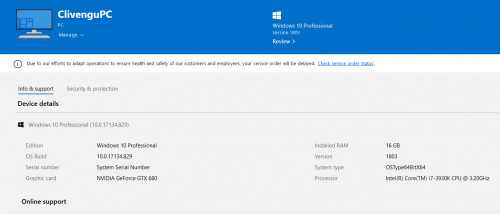
So for my old Pc (as screenshot below), is the PC that I have already wiped clean, formatted, and Motherboard has spoiled. I am selling the remaining parts to someone else, which I am not sure if he will repair the MB and resell it as a whole system, or just savage the parts separately.

My question now is: if the buyer repair/change a new motherboard of same model, when he install new windows, will the windows automatically uses my original license? Or it wont, unless he log in using my MS account?

I will probably build a new pc next year, so I won't be able to test if the license can be successfully transfer over to my new build. But looking at my account under devices, my old PC license should have successfully linked to my MS account. So do I need to "remove pc", so it knows that this pc no longer tied to this license, and then only I can apply the "floating" available license on my new pc next?

Sorry I hope I ask the question correcltly.. sweat.gif


user posted image
waghyu
post Oct 27 2020, 04:49 AM

Look at all my stars!!
*******
Senior Member
3,389 posts

Joined: Sep 2019
QUOTE(clivengu @ Oct 27 2020, 01:57 AM)
Thank you for the straight answer! But how about if the existing build, but change the motherboard to new one (maybe same model, or different model), will windows still work ?
*
Short answer no. Dont worry just buy license for rm10-15 online.
Momo33
post Oct 27 2020, 08:53 AM

Regular
******
Senior Member
1,448 posts

Joined: Oct 2019
QUOTE(clivengu @ Oct 27 2020, 04:56 AM)
Thank you so much for the guide!

I logged into my MS account (which I tend to forget over and over again and retrieved), and noticed that it has all my devices listed there: My current laptop, My Old PC, and even my old Lumia phone !! whistling.gif

So for my old Pc (as screenshot below), is the PC that I have already wiped clean, formatted, and Motherboard has spoiled. I am selling the remaining parts to someone else, which I am not sure if he will repair the MB and resell it as a whole system, or just savage the parts separately.

My question now is: if the buyer repair/change a new motherboard of same model, when he install new windows, will the windows automatically uses my original license? Or it wont, unless he log in using my MS account?

I will probably build a new pc next year, so I won't be able to test if the license can be successfully transfer over to my new build. But looking at my account under devices, my old PC license should have successfully linked to my MS account. So do I need to "remove pc", so it knows that this pc no longer tied to this license, and then only I can apply the "floating" available license on my new pc next?

Sorry I hope I ask the question correcltly..  sweat.gif
user posted image
*
the pc in question .. the Win 10 license you bought at shop ? retail version , mean you have the disc .

or comes with pc like dell , acer . OEM version .


TSclivengu
post Oct 27 2020, 01:00 PM

Regular
******
Senior Member
1,850 posts

Joined: Nov 2005


QUOTE(Momo33 @ Oct 27 2020, 08:53 AM)
the pc  in question  ..  the Win 10 license  you bought at shop  ?  retail version ,  mean you have the disc .

or  comes with pc  like dell , acer  .  OEM version .
*
It is from the custom build pc shop (not like dell, acer, asus those branded one)... It does come with a box , cd and series numbers all these. But it is written OEM system Builder Pack (Intended for system builders ONLY)
TechForumer
post Oct 27 2020, 01:02 PM

Casual
***
Junior Member
350 posts

Joined: Jan 2018
QUOTE(clivengu @ Oct 27 2020, 01:00 PM)
It is from the custom build pc shop (not like dell, acer, asus those branded one)... It does come with a box , cd and series numbers all these. But it is written OEM system Builder Pack (Intended for system builders ONLY)
*
An official OEM version usually doesn't come with any installation disc, they give you a license keys sticker or product keys in a card form depending on regions where you brought it. You will have to download the ISO using Media Creation Tool from Microsoft. Retail version do comes with an installation setup disc usually sealed in a DVD case or a box form factor.

This post has been edited by TechForumer: Oct 27 2020, 01:15 PM
Momo33
post Oct 27 2020, 02:08 PM

Regular
******
Senior Member
1,448 posts

Joined: Oct 2019
QUOTE(clivengu @ Oct 27 2020, 02:00 PM)
It is from the custom build pc shop (not like dell, acer, asus those branded one)... It does come with a box , cd and series numbers all these. But it is written OEM system Builder Pack (Intended for system builders ONLY)
*

from MS site say OEM pack cannot transfer .


from google .

OEM licenses are tied to the very first computer you install and activate it on
OEM versions allow all hardware upgrades except for an upgrade to a different model motherboard
OEM versions cannot be used to directly upgrade from an older Windows operating system


chtan
post Oct 27 2020, 02:11 PM

Look at all my stars!!
*******
Senior Member
2,353 posts

Joined: Jan 2003
QUOTE(Momo33 @ Oct 27 2020, 02:56 AM)
yes,,, can .
Always 
Link your Windows 10 digital license to your Microsoft account.  create a MS account and link your PC to it.
easy  reactivate if you re install win 10
easy  reactivate if you change hardware .
In Windows 10 (version 1607 or later), it is essential that you link your Microsoft account with the Windows 10 digital license on your device. Linking your Microsoft account with your digital license allows you to reactivate Windows using the Activation troubleshooter whenever you make a significant hardware change.

First, you'll need to find out if your Microsoft account (What is a Microsoft account?) is linked to your Windows 10 digital license. To find out, select the Start  button, then select Settings  > Update & Security  and then select Activation . The activation status message will tell you if your account is linked.
https://support.microsoft.com/en-us/help/20...hardware-change
*
You can but illegal.
TSclivengu
post Oct 27 2020, 03:13 PM

Regular
******
Senior Member
1,850 posts

Joined: Nov 2005


QUOTE(TechForumer @ Oct 27 2020, 01:02 PM)
An official OEM version usually doesn't come with any installation disc, they give you a license keys sticker or product keys in a card form depending on regions where you brought it. You will have to download the ISO using Media Creation Tool from Microsoft. Retail version do comes with an installation setup disc usually sealed in a DVD case or a box form factor.
*
In my case is a box with installation cd.. but outside written OEM system builder pack..


QUOTE(Momo33 @ Oct 27 2020, 02:08 PM)
from MS  site  say  OEM  pack  cannot transfer .
from google . 

OEM licenses are tied to the very first computer you install and activate it on
OEM versions allow all hardware upgrades except for an upgrade to a different model motherboard
OEM versions cannot be used to directly upgrade from an older Windows operating system
*
That's the official statement.... So with OEM.. whenever i change a motherboard (motherboard burn, or upgrade) will require a new windows license?? blink.gif


QUOTE(chtan @ Oct 27 2020, 02:11 PM)
You can but illegal.
*
So it is not legal to do that? im able to transfer the license.. but it is basically like a pirated version already?
chtan
post Oct 27 2020, 03:14 PM

Look at all my stars!!
*******
Senior Member
2,353 posts

Joined: Jan 2003
QUOTE(clivengu @ Oct 27 2020, 03:13 PM)
In my case is a box with installation cd.. but outside written OEM system builder pack..
That's the official statement.... So with OEM.. whenever i change a motherboard (motherboard burn, or upgrade) will require a new windows license??  blink.gif
So it is not legal to do that? im able to transfer the license.. but it is basically like a pirated version already?
*
Yup.
TechForumer
post Oct 27 2020, 08:49 PM

Casual
***
Junior Member
350 posts

Joined: Jan 2018
QUOTE(clivengu @ Oct 27 2020, 03:13 PM)
In my case is a box with installation cd.. but outside written OEM system builder pack..
*
Snap some photo of it for us to see. You may cover the product keys.
PJng
post Oct 28 2020, 06:45 PM

10k Club
********
All Stars
12,041 posts

Joined: Oct 2017


Look like i have same win 7 disc
OEM disc
ktek
post Oct 30 2020, 02:10 PM

小喇叭
********
All Stars
13,204 posts

Joined: Jul 2006
QUOTE(TechForumer @ Oct 27 2020, 01:02 PM)
An official OEM version usually doesn't come with any installation disc, they give you a license keys sticker or product keys in a card form depending on regions where you brought it. You will have to download the ISO using Media Creation Tool from Microsoft. Retail version do comes with an installation setup disc usually sealed in a DVD case or a box form factor.
*
white box version is oem (sold by msia big distributor.. a few la) got disc & coa sticker
color box version is retail like u mention. often no shop will keep stock


Change to:
| Lo-Fi Version
0.0197sec    0.74    5 queries    GZIP Disabled
Time is now: 12th December 2025 - 01:48 AM