Outline ·
[ Standard ] ·
Linear+
Maxis Fibre Problem!, Possible sabotaging by TM?
|
TSAnonymous26
|
 Oct 23 2020, 02:47 PM, updated 6y ago Oct 23 2020, 02:47 PM, updated 6y ago
|
Getting Started


|
Dear all, the story goes like this:
I've been noticing my home fibre connection having issue for the past few weeks, the ping always spike to 300-400ms every after few seconds, constant packet loss, and highly inconsistent internet connection speed. My current package is 300mbps package, download speed reaching below 100 mbps, as for the upload speed is even more ridiculous, under 10mbps, which suppose to be above 50mbps. I've already lodged a few complaints to Maxis for the past few weeks, they had came to my place and replaced a new router for me, but the problem still persists and they are still investigating the problem, which is absolutely frustrating because I've been using deteriorated connectivity for the past 3 weeks! I unable to play games, stream Youtube smoothly and etc yet I still have to pay full amount of bill.
Now suddenly I realized few weeks ago I received multiple phone call claimed they are calling from TM and would like to check if I am interested in porting out from my current Maxis Fibre plan to UniFi, since I'm still being bounded by Maxis Fibre contract, I rejected the offer without any further enquires. Few days after the phone call, I started having this slow connectivity issue, which makes me wonder if it is possible TM is sabotaging my line? Since to my knowledge Maxis is using the TM's fibre infrastructure.
Maxis also been very slow to resolve my issue, always telling me they are still investigating the issue, I've had enough with them and decided to lodge a complain to MCMC, anyone have experience lodging complain to MCMC? Does this really works?
This post has been edited by Anonymous26: Oct 23 2020, 03:00 PM
|
|
|
|
|
|
TSAnonymous26
|
Oct 23 2020, 02:52 PM
|
Getting Started
|
QUOTE(Raymond T. @ Oct 23 2020, 02:51 PM) Have you tried doing ping & Speedtest directly using LAN instead of WiFi ? Other than that have you tried switching default ISP DNS to Google DNS ? I tried to ping and do the speedtest using both cable and WiFi, both having the same result. Furthermore, my PS4 is also connected to my Router via Ethernet Cable, I've been consistently getting packet loss from all the multiplayer games, god damn frustrating   This post has been edited by Anonymous26: Oct 23 2020, 02:53 PM This post has been edited by Anonymous26: Oct 23 2020, 02:53 PM |
|
|
|
|
|
TSAnonymous26
|
Oct 23 2020, 02:56 PM
|
Getting Started
|
QUOTE(Raymond T. @ Oct 23 2020, 02:54 PM) I see, since you mentioned that Maxis has replaced the router so not a big issue with router. Just curious are you staying high rise or landed I'm staying highrise, highly likely the issue is caused by congested bandwidth from their part, I noticed the slow connectivity issue is more prominent during peak hour. This post has been edited by Anonymous26: Oct 23 2020, 02:57 PM |
|
|
|
|
|
TSAnonymous26
|
Oct 23 2020, 03:01 PM
|
Getting Started
|
QUOTE(Raymond T. @ Oct 23 2020, 02:59 PM) Actually if high rise building got many factors require to concern, sometimes it’s due to building cable having some issue which cause that perks. If your building is too old sometimes might face this kind of issue which really required good management to upgrade their network cable. But I thought the responsibility of maintaining network cable should lies on network provider instead of condo/apartment management right? |
|
|
|
|
|
TSAnonymous26
|
Oct 23 2020, 03:03 PM
|
Getting Started
|
QUOTE(harvin6 @ Oct 23 2020, 03:00 PM) Hey bro,,,im having the same thing also...the funny part is that tm fellow even started the convo by saying are you having connection issues with maxis fiber. I also reject not due to contract but other benefits. Yes playing games really efffected i really thought its the router problem because its the wifi signal keeps dropping...i might try to change that first. Did you lodge a complain? Whats their feedback to you? |
|
|
|
|
|
TSAnonymous26
|
Oct 23 2020, 03:12 PM
|
Getting Started
|
QUOTE(jetwash @ Oct 23 2020, 03:03 PM) Try asking at the network forum. I've also been having ping spikes and packet losses playing World of Tanks Blitz (server in Singapore), but the problems were partially reduced after I changed to the 2.4 GHz AP instead of the 5 GHz. Glad you solved your problem bro, I think ping spikes is normal when you are using 2.4ghz connection, connect to your 5ghz wifi or if possible try to use lan cable for best connectivity. QUOTE(Raymond T. @ Oct 23 2020, 03:05 PM) I think should be both parties JMB & Telco. Cause previously my office high rise building, I wanted to subscribe to Maxis since I’m using corporate account with Maxis. But the funny part is Maxis & Management seems cannot communicate well or maybe internal politics which required me to pay extra to pull new cable until office unit which cost few k, in the end I just opt for Unifi so straight forward without hassle. From the POV, TM & Maxis is using same infrastructure but management seems not giving accessibility to maxis 😂 I see, I think most probably TM also doing something behind the scene. But I have to say, from my experience, UniFi have much better network stability and consistency compare to Maxis. If I have to choose again, I will opted out Maxis Fibre, But TIME fibre still the best. This post has been edited by Anonymous26: Oct 23 2020, 03:14 PM |
|
|
|
|
|
TSAnonymous26
|
Oct 23 2020, 03:49 PM
|
Getting Started
|
QUOTE(Momo33 @ Oct 23 2020, 03:45 PM) ALREADY so many have warn in this forum about maxis slow in fixing faults . how can it be TM s problem when only you are facing the issue  most probably you are having some intermittent contact issues along the line . What I'm asking is the probability TM sabotaging my line, because I rejected their port in offer. Not TM sabotaging all Maxis user  This post has been edited by Anonymous26: Oct 23 2020, 03:50 PM This post has been edited by Anonymous26: Oct 23 2020, 03:50 PM |
|
|
|
|
|
TSAnonymous26
|
Oct 23 2020, 04:04 PM
|
Getting Started
|
QUOTE(Momo33 @ Oct 23 2020, 03:58 PM) not sure where you live , the area, in KV unifi tech team is like 90 % will be on site , the next working day of your complaint . replacing BTU only takes 30 mins to perform . and you can immediately call the tech to see if he is available. It seems you are quite knowledgeable in this field bro, any idea if it is possible my cases is caused by faulty BTU as well? Btw what is BTU? Lol |
|
|
|
|
|
TSAnonymous26
|
Oct 23 2020, 04:24 PM
|
Getting Started
|
QUOTE(Momo33 @ Oct 23 2020, 04:12 PM) yes possible , but more likely is contact connections , or your data on the maxis system corrupted. maxis tech should be able to see the error rates on your line and stability . BTU or fiber modem . is the first box where the fiber is plug in . i assume you are testing internet speed via a lan to pc connection or ? cos some issues on the wireless router can also cause this. Contact connections means?? Sorry abit noob in this field  As far as I remember, the day when he came to my place for diagnostic, he did use a small tiny device to test my connection, and he told me my line reading is very high, after they change the router, they told me it's back to normal already, but in fact the problem still persist..... Is this possible they just want to snake? even the reading is still high after replacing the router, but they unwillingly doing the extra work. This post has been edited by Anonymous26: Oct 23 2020, 04:24 PM |
|
|
|
|
|
TSAnonymous26
|
Oct 23 2020, 04:43 PM
|
Getting Started
|
QUOTE(Momo33 @ Oct 23 2020, 04:35 PM) the connection is fiber into --- .> BTU/ modem > --- lan cable ..> wireless router. not sure where / which point they measure ? not sure what you mean by high . high error ? or if you have spare LAN cables try replace the LAn cable s . try test speed using wireless AC band only . . hope you have a good phone I think they insert something into my BTU, what they told me is high reading, but I have no clue what they are talking about so I didn't further the question. Yeah, I already tried to replace cable but still the same issue. What you mean is to test the speed of my wifi only? disable my network connection or? |
|
|
|
|
|
TSAnonymous26
|
Oct 23 2020, 04:58 PM
|
Getting Started
|
QUOTE(Momo33 @ Oct 23 2020, 04:55 PM) my guess is they use a BERT bit error rate tester to the BTU. if not within specs then you have a bad line coming in . speed on wifi .. is normal standard wifi speed testing , use ookla speed test , use AC band 5Ghz band , use a latest phone . disable nothing . Yes, I'm quite certain they are using that BERT bit error rate tester you talking about, the funny part is, they said the reading back to normal after replacing the router. Does the router itself caused error reading in BERT? Doesn't seems possible right? Most likely they just want to snake, lazy to do the extra work |
|
|
|
|
|
TSAnonymous26
|
Oct 23 2020, 05:24 PM
|
Getting Started
|
QUOTE(Momo33 @ Oct 23 2020, 05:18 PM) I've been noticing my home fibre connection having issue for the past few weeks, the ping always spike to 300-400ms every after few seconds, constant packet loss, and highly inconsistent internet connection speed. My current package is 300mbps package, download speed reaching below 100 mbps, as for the upload speed is even more ridiculous, under 10mbps, which suppose to be above 50mbps. for this speed test are you using ookla to a local server . ? what ping time s and speed you get . it should be stable. test on pc ? test on phone ? your problem is strange , try to localise where its coming from first . in your house . I tested on both my pc and phone, while using ookla speed test, the ping have no issue at 12ms, but packet loss at 2-3%, because my issue is the ping will spike every after few seconds. In order to accurately testing my ping, I used this website https://www.meter.net/ping-test/This is 1 of the test result, as you can see from the result, the ping will spike to 250+ms range 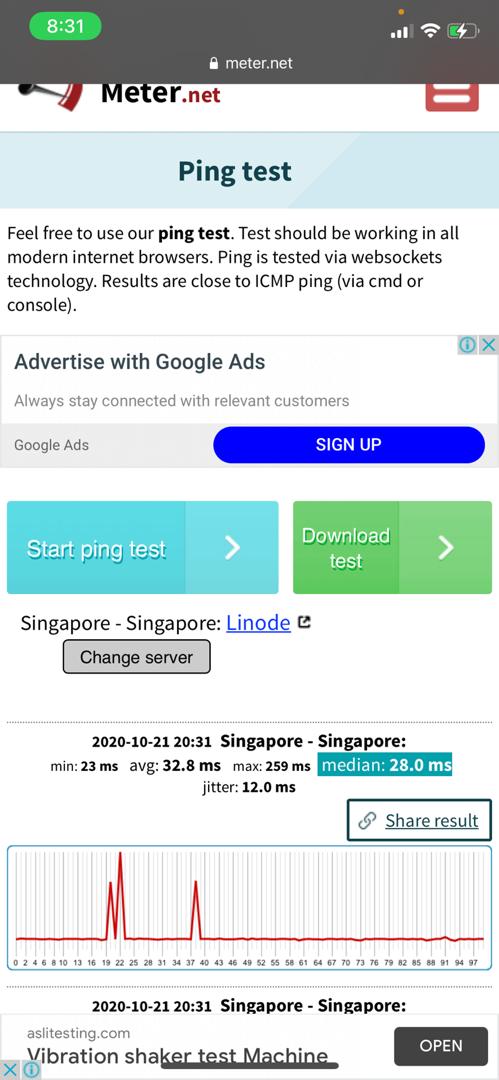 |
|
|
|
|
|
TSAnonymous26
|
Oct 23 2020, 05:38 PM
|
Getting Started
|
QUOTE(Momo33 @ Oct 23 2020, 05:35 PM) i am on unifi using your link to test . tested 3 time s. about the same . 2020-10-23 17:26Singapore - Singapore: min: 41 ms avg: 42.6 ms max: 58 ms ping dont effect internet speed . Any idea what could be happened to my internet? damn, the ping is unbearable during gaming session, and the speed is slow sometimes watch youtube pun susah, haiz  |
|
|
|
|
|
TSAnonymous26
|
Oct 23 2020, 05:49 PM
|
Getting Started
|
QUOTE(Momo33 @ Oct 23 2020, 05:48 PM) i will try getting a better wireless router first . since you have 300 Mbps plan. sure need a good router. Tapi use cable pun same issue, so i doubt router is the culprit, btw thanks for the insight bro. Best for me to wait for feedback from Maxis, if nxt week still cannot solve, I will lodge a complain to MCMC This post has been edited by Anonymous26: Oct 23 2020, 05:49 PM |
|
|
|
|
|
TSAnonymous26
|
Oct 23 2020, 10:07 PM
|
Getting Started
|
QUOTE(birain @ Oct 23 2020, 09:33 PM) take reading from the tiang, test the fiber cable reading. any numbers above 30, ask him to replug a new head. How can I take such reading? QUOTE(KennyKB @ Oct 23 2020, 09:38 PM) If the your speed is slow during peak hours but normal at off-peak hours like early morning then it is congestion problem. Nothing you can do about it except switch over to Unifi. Even Maxis themselves also unable to solve this issue? Wth? Can’t they provide extra bandwidth? |
|
|
|
|



 Quote
Quote

 0.0208sec
 0.37
0.37
 7 queries
 GZIP Disabled