Outline ·
[ Standard ] ·
Linear+
My ASCII art generator is up and running
|
axxer
|
 Oct 31 2020, 10:05 PM Oct 31 2020, 10:05 PM
|

|
Should really add ssl aka https. This is 2020, not 2010 anymore. Letsencrypt is free. Or if you're too lazy to request and install letsencrypt certificate by yourself, consider using cloudflare as dns/cdn provider and it'll encrypt too. Even my static placeholder page for my domain hosted on github already got ssl, twice, from letsencrypt on github end and from cloudflare on dns/cdn end.
|
|
|
|
|
|
axxer
|
Nov 1 2020, 12:06 AM
|
|
|
QUOTE(BigW @ Oct 31 2020, 11:41 PM) I just looked at Letencrypt and its Certbot, but my free web hosting provider (000webhost.com) does not support SSH access for free plan.... I wish to have HTTPS, but it is only on premium plan which I cannot afford.... If you can help further, I will appreciate. Move your domain dns provider to Cloudflare then. Basically create a cloudflare account and choose to move your domain's dns to it, it'll give a proper instruction there. After dns migration from your domain registrar to Cloudflare completed and propagated you'll auto have https. It'll just take like 1 hour to migrate and wait for the process to finish for a free no hassle https certificate auto deploy. No need ssh access, no need certbot. I've checked your whois, its hosted on GoDaddy. Easily can transfer dns to Cloudflare. This post has been edited by axxer: Nov 1 2020, 12:16 AM |
|
|
|
|
|
axxer
|
Nov 1 2020, 12:48 AM
|
|
|
QUOTE(BigW @ Nov 1 2020, 12:39 AM) This is a great help, however, it said point the nameserver to Cloudflare. (see pic below) 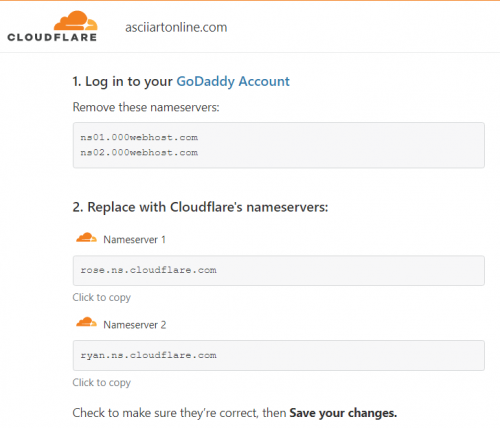 If I point it to Cloudflare instead of pointing it to 000webhost, then I will lose my free webhosting, is it?  No. Cloudflare will auto pull your dns zone from GoDaddy so all your A/TXT/CNAME record from GoDaddy will be auto populated there, including ones that pointed to 00webhost server. Whats its instructed you to do is change you dns nameserver which currently pointed to 00webhost to it. Why would you pointed your dns nameserver to 00webhost in the first place lol Since you already pointed your dns nameserver to use 00webhost, double check what cloudflare pull, either from GoDaddy or 00webhost. If your proper dns record is hosted on 00webhost and not GoDaddy and cloudflare pull from GoDaddy then yes you'll lose the proper record and need to build again. If thats the case then check your 00webhost panel and if theres a dns record there, then use that in cloudflare. This post has been edited by axxer: Nov 1 2020, 12:59 AM |
|
|
|
|
|
axxer
|
Nov 1 2020, 03:34 PM
|
|
|
QUOTE(BigW @ Nov 1 2020, 02:08 PM) Thanks for such a great help, my asciiartonline dot com is now HTTPS... yeah! About another website of mine with .my domain name, I have also requested to change nameserver to Cloudflare (because MYNIC does not allow us to modify it ourselves) but they are only working Mon-Fri. (sigh) Soon both of my website will be in HTTPS, aka SSL'ed. And I can't imagine it is FREE!  Interesting. So theres actually still registrar using archaic system like only staff can modify domain records and only in working office hour. Thats horrible. Tbh both 00webhost and mynic are horrible. The former because they haven't automated the process of requesting and deploying free letsencrypt cert to their users and the latter because the archaic stupid system of manually managing domain records. |
|
|
|
|
|
axxer
|
Nov 5 2020, 05:43 PM
|
|
|
QUOTE(calvynlee @ Nov 5 2020, 01:43 PM) note that cloudflare will give u SSL, but is from client side to domain (cloudflare dns) only, while domain to server without SSL, your data still not encrypted. To have complete solution, you still require ssl at your server end. He can't do it because 00webhost doesn't offer ssh to the shared hosting thus can't issue cert from the host itself so cloudflare as mitm ssl is better than no ssl at all. |
|
|
|
|



 Quote
Quote

 0.0176sec
 0.59
0.59
 6 queries
 GZIP Disabled