

Anyway, I'm only armed with a Canon EOS 400D with kit lens, so don't expect professional shots yeah

C&C welcomed!


Public My Gallery, Canon EOS 400D
|
|
 Aug 14 2007, 01:10 PM, updated 19y ago Aug 14 2007, 01:10 PM, updated 19y ago
Show posts by this member only | Post
#1
|
 
Senior Member
2,633 posts Joined: Jun 2005  
|
I actually started a gallery quite some time ago but I guess it went down the drain soon after. Was too busy with work so didn't take much pictures.
Anyway, I'm only armed with a Canon EOS 400D with kit lens, so don't expect professional shots yeah C&C welcomed! |
|
|
|
|
|
Aug 14 2007, 01:16 PM
Show posts by this member only | Post
#2
|

Junior Member
307 posts Joined: Mar 2006 From: Heaven 
|
wow wat a professional photographer some more pic???
|
|
|
Aug 14 2007, 01:16 PM
Show posts by this member only | Post
#3
|

Senior Member
3,114 posts Joined: Dec 2006
|
1 and 2=superb
3-no subject ler...should shot the "thecurve" sign 4-second last pic...VERY NICE.. i love it the last pic i think there should be a kid standing or smth..coz it look empty  |
|
|
Aug 14 2007, 01:45 PM
Show posts by this member only | Post
#4
|
|
Senior Member
2,380 posts Joined: Mar 2005
|
I love the way you compose your shots... Something diff from the rest.
|
|
|
Aug 14 2007, 02:59 PM
Show posts by this member only | Post
#5
|
|
Senior Member
2,633 posts Joined: Jun 2005
|
Thank you guys for the comments, will work on it accordingly
Here are some more pictures albeit they are a bit older ones      |
|
|
Aug 14 2007, 05:46 PM
Show posts by this member only | Post
#6
|
|
Senior Member
3,114 posts Joined: Dec 2006
|
nice bro..but the beach pic..i think should be wider a lil..seems to be very cut...
|
|
|
|
|
|
Aug 14 2007, 05:51 PM
Show posts by this member only | Post
#7
|

Senior Member
1,573 posts Joined: Oct 2004 From: Slave in Seremban...
|
To add a bit more on the beach photo, the horizon is senget.
|
|
|
Aug 14 2007, 06:08 PM
Show posts by this member only | Post
#8
|
|
Senior Member
3,114 posts Joined: Dec 2006
|
lolz...i tot i was the only one realising the sengetism... now i know its not eyesight problem.. lolz..
|
|
|
Aug 14 2007, 09:03 PM
Show posts by this member only | Post
#9
|

Senior Member
3,758 posts Joined: Apr 2006 From: Selayang
|
Good use of software there ... to me those are just blank images with no story behind but it's a good try. Keep it up!
|
|
|
Aug 15 2007, 12:16 PM
|

Senior Member
2,475 posts Joined: Nov 2005 From: kopitiam
|
one pic just the same as mine
 where u get the idea huh? mine was taken 4 years ago with my old 300d. where u get the idea huh? mine was taken 4 years ago with my old 300d.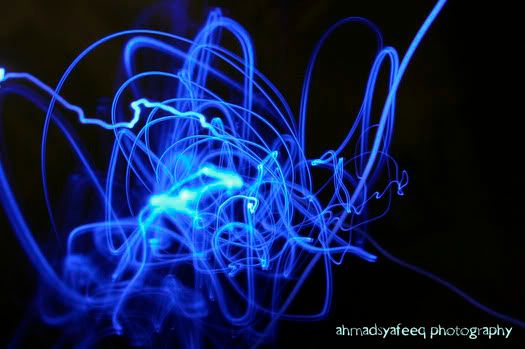 |
|
|
Aug 15 2007, 12:27 PM
|
 
VIP
4,077 posts Joined: Jan 2003 From: 한국
|
eh...if im not mistaken...you already post some of these picture in other thread last time rite...or you create a new one now?
|
|
|
Aug 15 2007, 12:35 PM
|

Senior Member
4,889 posts Joined: Jan 2005 From: Kelana Jaya
|
Maybe the thread has been removed due to long periods of inactivity. No idea but it has happened before...but yes, the pictures were posted in a previous thread before.
Agree with ac98, you need to put a lil more meaning into the pictures. And it is easy with those shots you have taken. |
|
|
Aug 15 2007, 02:10 PM
|
|
Senior Member
3,114 posts Joined: Dec 2006
|
QUOTE(dgrebel @ Aug 15 2007, 12:16 PM) one pic just the same as mine bro...teach me how to do this thing ler... where u get the idea huh? mine was taken 4 years ago with my old 300d. |
|
|
|
|
|
Aug 15 2007, 03:26 PM
|

Newbie
1 posts Joined: Jan 2005
|
QUOTE(orenzai @ Aug 15 2007, 02:10 PM) bro...teach me how to do this thing ler... hehe i tried this b4 in a dark room with just one light source (example the blue light), set ur shutter speed to 3sec above, press ur shutter n shoot the light source, drag ur cam all around to create that effect...hahahaha  This post has been edited by monsterX: Aug 15 2007, 03:27 PM |
|
|
Aug 15 2007, 06:44 PM
|
|
Senior Member
3,114 posts Joined: Dec 2006
|
oh...cool..but must use a sharp light source to make it look thin is it?
|
|
|
Aug 19 2007, 05:28 PM
|
|
Senior Member
2,475 posts Joined: Nov 2005 From: kopitiam
|
QUOTE(orenzai @ Aug 15 2007, 06:44 PM) oh...cool..but must use a sharp light source to make it look thin is it? i use 50mm f1.8 for that. set iso to 100. turn off all lightings except the led light. set exposure to +1, use slow shutter under 3 sec. move the lens randomly but pointing to the led light, voila! |
|
|
Aug 20 2007, 02:05 AM
|

Senior Member
1,077 posts Joined: Nov 2006 From: Sabah,Sandakan Status:STUNNED
|
Why are ur colours so sharp? is it this sharp once u upload it to ur pc? mind to share the settings? or u post processed it? coz im having some colour prob with the cam i have... hmm..
|
|
|
Aug 20 2007, 08:51 AM
|
|
Senior Member
2,475 posts Joined: Nov 2005 From: kopitiam
|
QUOTE(derek87 @ Aug 20 2007, 02:05 AM) Why are ur colours so sharp? is it this sharp once u upload it to ur pc? mind to share the settings? or u post processed it? coz im having some colour prob with the cam i have... hmm.. the key is exposure settings. i use bigger exposure to make the colour more define. sorry no photoshop editings made. |
|
|
Aug 20 2007, 01:48 PM
|
|
Senior Member
3,114 posts Joined: Dec 2006
|
QUOTE(dgrebel @ Aug 19 2007, 05:28 PM) i use 50mm f1.8 for that. set iso to 100. turn off all lightings except the led light. set exposure to +1, use slow shutter under 3 sec. move the lens randomly but pointing to the led light, voila! thns for the explanation bro!!  |
|
|
Aug 20 2007, 02:04 PM
|
|
Senior Member
1,077 posts Joined: Nov 2006 From: Sabah,Sandakan Status:STUNNED
|
QUOTE(dgrebel @ Aug 20 2007, 08:51 AM) the key is exposure settings. i use bigger exposure to make the colour more define. sorry no photoshop editings made. yeah i know.. but sometimes even i increase exposure to... lets say +1. sometimes i find that the gamma is too high.. >< like there's a piece of transparency in front of the pic..dgrebel : are u blinky? confused.. |
| Change to: |  0.0202sec 0.0202sec
 0.43 0.43
 5 queries 5 queries
 GZIP Disabled GZIP Disabled
Time is now: 23rd December 2025 - 04:36 AM |
 Quote
Quote