

QUOTE(mactreouser @ Oct 13 2020, 12:01 AM)
Thanks! Strange ya, why mine...only could input Single Word and couldn't go with pair and more?!

Just curious if it has to do with the "show predictive completion"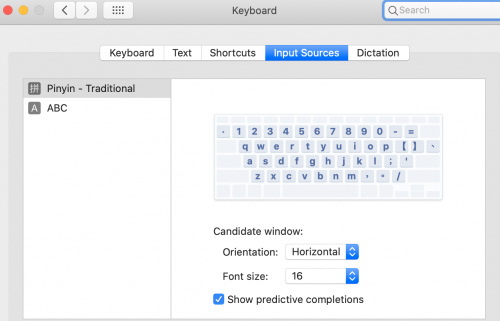
Catalina Chinese Input Problem, can only input single word
|
|
 Oct 13 2020, 09:05 AM Oct 13 2020, 09:05 AM
Return to original view | IPv6 | Post
#1
|
 
Senior Member
1,680 posts Joined: Jan 2003 From: Cyberjaya  
|
QUOTE(mactreouser @ Oct 13 2020, 12:01 AM) Thanks! Strange ya, why mine...only could input Single Word and couldn't go with pair and more?! Just curious if it has to do with the "show predictive completion" |
|
|
Oct 14 2020, 08:19 AM
Return to original view | IPv6 | Post
#2
|
|
Senior Member
1,680 posts Joined: Jan 2003 From: Cyberjaya
|
QUOTE(mactreouser @ Oct 13 2020, 10:33 PM) Thanks for feedback! To my knowledge language file always bundled, and its just enable/disable to your language menubar...I did (and turned off to check)! But,still the same! Very weird! In fact,how to reinstall languages? Just delete and add again in the Language from System Preferences? there is online guide for remove manually/using tool, never seen 1 which re-add did you tried to enable a different Chinese language? since we have simplified and traditional mactreouser liked this post
|
|
|
Oct 15 2020, 12:13 PM
Return to original view | IPv6 | Post
#3
|
|
Senior Member
1,680 posts Joined: Jan 2003 From: Cyberjaya
|
QUOTE(mactreouser @ Oct 15 2020, 01:06 AM) Agreed! I would suspect some plist settings changed or so...not sure if you want try reinstall macOS see if that helpsYes, I did disabled and enable for both . But no luck! Really super weird! Never facing such issue before! |
| Change to: |  0.0143sec 0.0143sec
 0.56 0.56
 6 queries 6 queries
 GZIP Disabled GZIP Disabled
Time is now: 18th December 2025 - 09:57 AM |
 Quote
Quote