

 both similar problems..mouse pointer and tablet pc pointer not responding. The first occasion after sending it it took 4 days and HP replace the LCD screen and keyboard..now after a week, still waiting for it
Anyone have the same issues?
HP Pavilion Tablet PC TX series, Discussion TX 1000, TX 2000 TX 2500
|
|
 Dec 18 2007, 12:54 AM Dec 18 2007, 12:54 AM
|
 
Junior Member
405 posts Joined: Jul 2005  
|
This is the second time I sent my TX for warranty repair..
both similar problems..mouse pointer and tablet pc pointer not responding. The first occasion after sending it it took 4 days and HP replace the LCD screen and keyboard..now after a week, still waiting for it Anyone have the same issues? |
|
|
|
|
|
Dec 18 2007, 08:06 AM
|

Senior Member
5,172 posts Joined: Jan 2003 From: Equine Park
|
i am that close to finish a deal in LYP for tx1316au... RM2999 for a tablet lappy... but no credit card to swipe...
|
|
|
Dec 18 2007, 02:08 PM
|

Junior Member
26 posts Joined: Dec 2007
|
my cpu temp is at 65-70 degrees now after i bought
Evercool NB-FA1 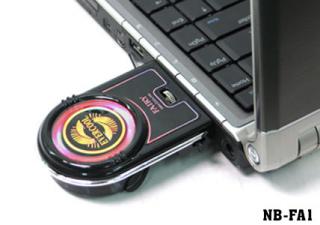
may i ask 1. is 60-70 degrees a normal cpu temperature? 2. which side of the tablet blows air out? the one near the s-video port OR the one near the battery thanks for helping |
|
|
Dec 18 2007, 02:41 PM
|

Senior Member
991 posts Joined: Aug 2006
|
QUOTE(PokDe @ Dec 18 2007, 02:08 PM) my cpu temp is at 65-70 degrees now after i bought it's normal if your running at max performance, if i change to power saver my heat is around 50degreeEvercool NB-FA1
may i ask 1. is 60-70 degrees a normal cpu temperature? 2. which side of the tablet blows air out? the one near the s-video port OR the one near the battery thanks for helping  |
|
|
Dec 18 2007, 06:01 PM
|

Senior Member
1,048 posts Joined: Aug 2007 
|
QUOTE(PokDe @ Dec 18 2007, 02:08 PM) my cpu temp is at 65-70 degrees now after i bought dude, both side of the near battery and s video port is the vent which is blow out heat. Evercool NB-FA1
may i ask 1. is 60-70 degrees a normal cpu temperature? 2. which side of the tablet blows air out? the one near the s-video port OR the one near the battery thanks for helping 60-70 degree is pretty hot and is normal for a tx when u are running high performance task. Would suggest u to use in air con room or get a nice cooler pad. e.g like zalman infinite. my tx running at 50-60 degree normally, sometime reach max at 62-65 celcious. |
|
|
Dec 18 2007, 08:49 PM
|
|
Junior Member
26 posts Joined: Dec 2007
|
yup, adjusting the power plan does help reducing the heat..
it drops below 60 with the help of additional exhaust fan & air-cond room |
|
|
|
|
|
Dec 18 2007, 09:04 PM
|

Senior Member
2,084 posts Joined: Jul 2005
|
QUOTE(ad2000 @ Dec 18 2007, 12:54 AM) This is the second time I sent my TX for warranty repair.. I know for sure that Lenovo will replace a new lappy once you return yours for warranty repair 3x. I am not sure HP does that also. both similar problems..mouse pointer and tablet pc pointer not responding. The first occasion after sending it it took 4 days and HP replace the LCD screen and keyboard..now after a week, still waiting for it Anyone have the same issues? so far i dun hv your kind of problem. Hopefully not too. Sorry to hear that you got such issue. Bersabar. |
|
|
Dec 18 2007, 10:08 PM
|
|
Junior Member
401 posts Joined: Jan 2005
|
Does any owners here have problems with their stylus? Everytime I reboot and attempt to calibrate the tablet, I always can't point right on the middle of the cursors and forces me to reinstall the video driver as advised by the HP customer care.
N yes, the heat of this model is kiling me too. |
|
|
Dec 19 2007, 01:19 AM
|
|
Senior Member
1,048 posts Joined: Aug 2007
|
QUOTE(viper_1129 @ Dec 18 2007, 10:08 PM) Does any owners here have problems with their stylus? Everytime I reboot and attempt to calibrate the tablet, I always can't point right on the middle of the cursors and forces me to reinstall the video driver as advised by the HP customer care. the stylus have no problem at all. But thw touchscreen feature of TX is not that good i admit. U cannot depend on the touch screen to complete ur task. Of course sometimes u can play wif the screen if u are feeling bored lolz...N yes, the heat of this model is kiling me too. |
|
|
Dec 20 2007, 01:26 AM
|
|
Senior Member
991 posts Joined: Aug 2006
|
QUOTE(Travies @ Dec 19 2007, 01:19 AM) the stylus have no problem at all. But thw touchscreen feature of TX is not that good i admit. U cannot depend on the touch screen to complete ur task. Of course sometimes u can play wif the screen if u are feeling bored lolz... try to press harder abit when u write |
|
|
Dec 20 2007, 11:18 PM
|
|
Junior Member
74 posts Joined: Oct 2007
|
err.. how to check temperature?
Added on December 20, 2007, 11:23 pmi sometimes gets letric shock on the left side of my tx when typing..  ouch.. ouch....and also when i touch the end of the charging cable (soemtimes).. does anyone have similar problem? This post has been edited by msh8h: Dec 20 2007, 11:23 PM |
|
|
Dec 20 2007, 11:51 PM
|
|
Senior Member
1,048 posts Joined: Aug 2007
|
QUOTE(msh8h @ Dec 20 2007, 11:18 PM) err.. how to check temperature? I using notebook hardware control software(NHC). u can try for it. it helps to control ur temperature and show u the detail ur hardware running.Added on December 20, 2007, 11:23 pmi sometimes gets letric shock on the left side of my tx when typing.. ouch....and also when i touch the end of the charging cable (soemtimes).. does anyone have similar problem? electric shock?? then u should complain to HP. if it happens very often, bring to HP centre complain to them ask them replace a new notebook for u, or else u bring to the higher authority. Is ur charging cable originally by HP? i suggest u to try it longer, if it keeps happening, then do not hesitate to bring to HP. dun give them face. This post has been edited by Travies: Dec 21 2007, 02:00 PM |
|
|
Dec 21 2007, 09:05 AM
|
|
Senior Member
991 posts Joined: Aug 2006
|
NHC is good for controlling...
|
|
|
|
|
|
Dec 22 2007, 09:14 AM
|
|
Junior Member
9 posts Joined: Dec 2007
|
QUOTE(Travies @ Dec 13 2007, 09:33 PM) my tx run with wireless pretty good. Have u try before at other wireless connection, maybe coffe bean or startbuck try out and see. if keep happen it, check ur setting. try cable connection too if cable connection will dc after 1.5 hours then it is not wireless problem anymore. try out and see, if face any prob juz update here. Hi all,contacted HP through Email, they advise to update the drivers for the WIFI Here i paste the email sent to me QUOTE it seems that the issue is related to corrupted driver of wi-fi device. In order to isolate the issue, please download and install the driver from the below mentioned web link: Its odd as i already updated my wireless LAN driver to the latest version, however i still have the intermitent connection, the intermittent connection disappear only when i update the Wireless Assistant. 1. First download and install Broadcom Wireless LAN Driver http://h10025.www1.hp.com/ewfrf/wc/softwar...os=2093&lang=en [NOTE: In case the web link does not open up, kindly copy and paste it into the address bar of the web browser on your system and click on go.] 2. After installing HP Broadcom Wireless LAN Driver, now install Wireless Assistant http://h10025.www1.hp.com/ewfrf/wc/softwar...os=2093&lang=en Check how it goes and let me know the result. ideally only the driver should affect the performance of the product..not additional software like the wireless assistant. Anyway it got my problem fixed..im happy for that regards |
|
|
Dec 24 2007, 10:14 AM
|

Junior Member
343 posts Joined: May 2005 From: In the net :D
|
Can't believe I've found a thread on this model.
Ok I got my TX1221au few days ago (to be precise 2 days ago) I've got a small glitch whenever I "opened" it too long. My mouse seems to "on and off" itself sometimes. It's not a big problem but it's pretty darn annoying. Didn't get much goodies apart from a free mouse with this thing and it still sells for 2999. The lappy is kinda cool and to be honest it's not meant for graphics design or gaming. To my wife it's superb just a lil heaty when used too long, so there goes few more RM on a cooler. Overall it's ok ... sounds ok graphics ok but sometimes lag (not too long but lagging is still lagging) |
|
|
Dec 24 2007, 03:41 PM
|
|
Senior Member
3,368 posts Joined: Nov 2005
|
QUOTE(affinity_07 @ Dec 24 2007, 10:14 AM) I've got a small glitch whenever I "opened" it too long. My mouse seems to "on and off" itself sometimes. It's not a big problem but it's pretty darn annoying. u mean the touchpad will stop functioning after u use it for too long?i think maybe is the power setting in vista |
|
|
Dec 24 2007, 04:50 PM
|

Junior Member
67 posts Joined: Nov 2006
|
hi,
i want to ask if the FINGERPRINT sensor works good?? thankx |
|
|
Dec 24 2007, 07:44 PM
|
|
Senior Member
2,084 posts Joined: Jul 2005
|
QUOTE(zmyeo54 @ Dec 24 2007, 04:50 PM) hi, there is a way to swipe your finger. sometime i logon with 1 swipe, others may take longer. its a little sensitive i think. when i am sweating, it won't work.i want to ask if the FINGERPRINT sensor works good?? thankx |
|
|
Dec 24 2007, 08:25 PM
|
|
Junior Member
26 posts Joined: Dec 2007
|
QUOTE when i am sweating, it won't work. mine won't work if the finger is too dry.. the finger needs to be slightly moist  |
|
|
Dec 24 2007, 10:59 PM
|
|
Junior Member
9 posts Joined: Dec 2007
|
Hi Guys..
Just a question, I have tried to burn a video DVD today using the sw provided with the PC called Windows DVD maker. Once i open that program and try to load in a file to converted to a video DVD, the program hanged and gives out this error msg  Anybody have the same problem as this ..It seems like some program called DEP(Data execution Prevention) is preventing me to launch the Windows DVD Maker. Just wondering whether any of you guys have burned a DVD Video on your TX rgds loli This post has been edited by loli: Dec 24 2007, 11:01 PM |
| Change to: |  0.0286sec 0.0286sec
 0.44 0.44
 6 queries 6 queries
 GZIP Disabled GZIP Disabled
Time is now: 9th December 2025 - 10:36 AM |
 Quote
Quote