Outline ·
[ Standard ] ·
Linear+
Problems with loading Thumbnail after iOS14, iOS14 Bug
|
SUShammer2020
|
 Sep 20 2020, 04:27 PM, updated 6y ago Sep 20 2020, 04:27 PM, updated 6y ago
|
New Member


|
Hi
I am just wondering anyone facing issues where the album art covers at Apple Music don't appear (leaving empty boxes)?
Also, anyone experiencing issues where the film art covers don't appear at iTunes and app thumbnails don't appear at the AppStore?
Thanks
|
|
|
|
|
|
hafz
|
Sep 20 2020, 04:29 PM
|
Getting Started
|
I got the same problem. But, since IOS 13.7 update
|
|
|
|
|
|
SUShammer2020
|
Sep 20 2020, 04:33 PM
|
New Member
|
Do you think is a common problem worldwide or merely a Malaysia problem?  QUOTE(hafz @ Sep 20 2020, 04:29 PM) I got the same problem. But, since IOS 13.7 update |
|
|
|
|
|
jiaen0509
|
Sep 20 2020, 05:22 PM
|
|
|
I changed my DNS to 9.9.9.9 and it works!
|
|
|
|
|
|
SUShammer2020
|
Sep 20 2020, 08:10 PM
|
New Member
|
QUOTE(jiaen0509 @ Sep 20 2020, 05:22 PM) I changed my DNS to 9.9.9.9 and it works! Thanks bro! |
|
|
|
|
|
hafz
|
Sep 20 2020, 08:13 PM
|
Getting Started
|
QUOTE(hammer2020 @ Sep 20 2020, 04:33 PM) Do you think is a common problem worldwide or merely a Malaysia problem? Maybe just a minor issue. Search Google the problem prior to IOS 14 QUOTE(jiaen0509 @ Sep 20 2020, 05:22 PM) I changed my DNS to 9.9.9.9 and it works! Thanks, solve by changing DNS. i'm using Google DNS |
|
|
|
|
|
jiaen0509
|
Sep 20 2020, 10:33 PM
|
|
|
QUOTE(hafz @ Sep 20 2020, 08:13 PM) Maybe just a minor issue. Search Google the problem prior to IOS 14 Thanks, solve by changing DNS. i'm using Google DNS Ermmm. I am using Google DNS originally. But it not load on some app icon pic. Until I changed to 9.9.9.9 But your Google DNS works! |
|
|
|
|
|
adam.wong
|
Sep 21 2020, 10:42 AM
|
New Member
|
Glad to know that I'm not the only one experiencing this issue. It's working on cellular but not on my home wifi. For me, I think it's failing even when I'm not using Google DNS. Will try it with 9.9.9.9 later. UPDATE: Without any DNS: 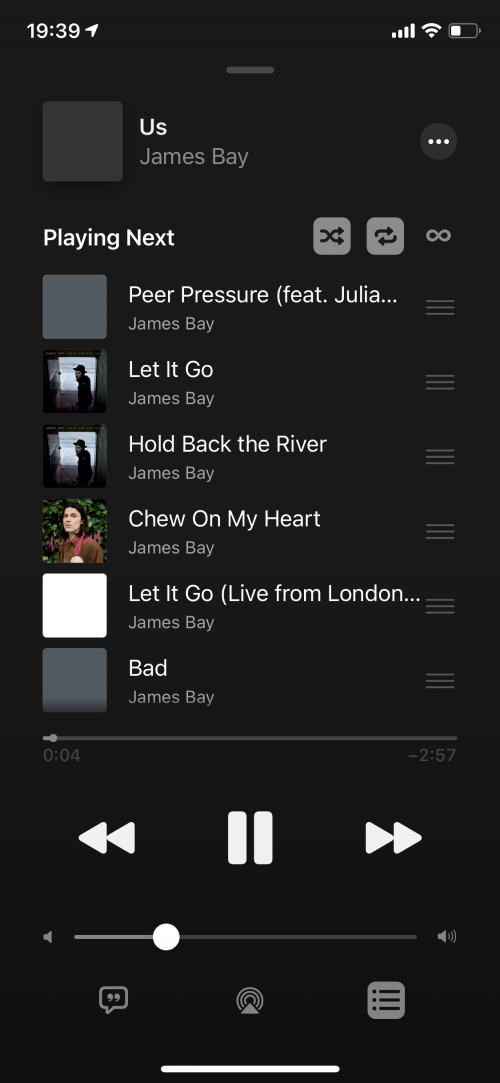 With 9.9.9.9 DNS: 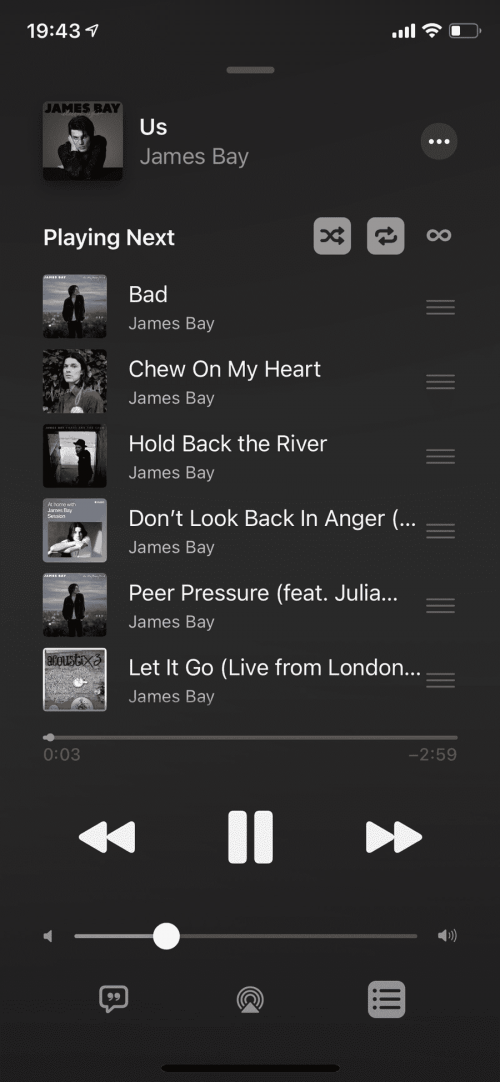 Thanks guys! This post has been edited by adam.wong: Sep 21 2020, 07:50 PM |
|
|
|
|
|
dawnreaver
|
Sep 23 2020, 12:52 PM
|
|
|
I think it's a routing issue with certain DNS servers.
|
|
|
|
|
|
Susuwatari
|
Sep 23 2020, 01:39 PM
|
|
|
QUOTE(dawnreaver @ Sep 23 2020, 12:52 PM) I think it's a routing issue with certain DNS servers. Yes, probably a routing issue as my dns hosted in US not affected. |
|
|
|
|
|
skip
|
Sep 23 2020, 08:14 PM
|
New Member
|
Hi, how to change the DNS settings?
|
|
|
|
|
|
SUShammer2020
|
Sep 23 2020, 10:30 PM
|
New Member
|
QUOTE(skip @ Sep 23 2020, 08:14 PM) Hi, how to change the DNS settings? Go to settings>WiFi Click on the blue (i) button at the connection your WiFi you are using. Click on the DNS button. Select manual. Enter 9.9.9.9. Delete the old dns address. |
|
|
|
|
|
hellfried
|
Sep 24 2020, 10:42 AM
|
|
|
Wow should have looked up this issue here in the first place! I have been private tweeting Apple for the past 10 days. They said they will call me this weekend. Looks like I have found the solution here.
|
|
|
|
|



 Quote
Quote







 0.0230sec
 1.22
1.22
 5 queries
 GZIP Disabled