Outline ·
[ Standard ] ·
Linear+
Programs Launching Automatically
|
TSmtcc
|
 Sep 13 2020, 05:51 PM, updated 6y ago Sep 13 2020, 05:51 PM, updated 6y ago
|
Getting Started


|
When i shut down my laptop with several applications are still open, the next time i start up my laptop. The programs that weren't closed will automatically be turned on.
I've already perform setting to ensure that these programs will not be be executed upon start up. I changed it at the Startup under Windows.
What is the reason to this and how do I solve it?
|
|
|
|
|
|
PJng
|
Sep 13 2020, 08:40 PM
|
|
|
I cannot remeber exactly where, but there is a setting page can set auto resume last open program Btw why don want close program before shut down? I always close all program before shut down https://www.howtogeek.com/396884/how-to-sto...arting-your-pc/This post has been edited by PJng: Sep 13 2020, 08:42 PM |
|
|
|
|
|
sHawTY
|
Sep 14 2020, 11:30 AM
|
|
|
Control Panel > Power Options > Choose What The Power Buttons Do > Click on "Change settings that are currently unavailable" > Disable "Turn on fast startup" > Save changes 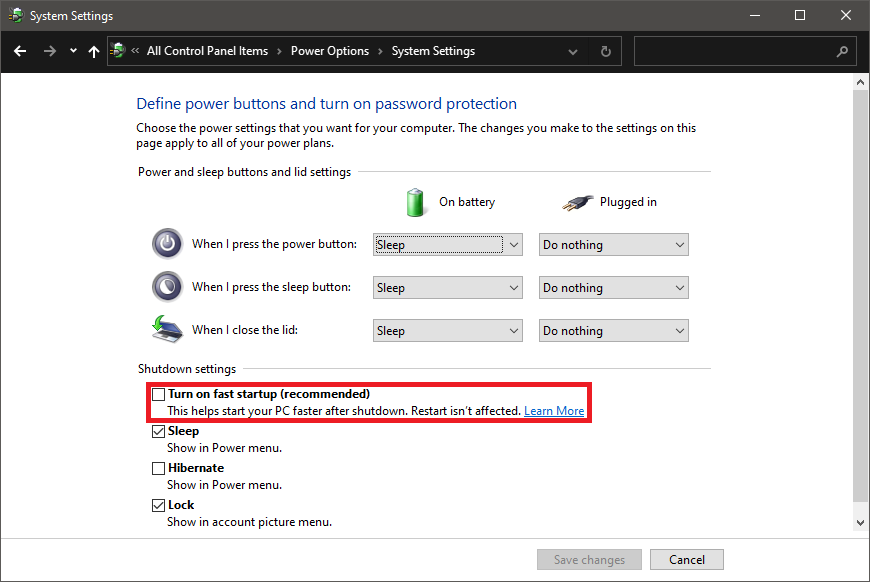 |
|
|
|
|
|
billclinton9x P
|
Oct 6 2020, 02:31 PM
|
New Member
|
Changing the settings at startup is what you need to do, go to Control Panel> Power Options> Choose What The Power Buttons Do and change the check / unchecked checkbox.
|
|
|
|
|



 Quote
Quote


 0.0167sec
 0.51
0.51
 5 queries
 GZIP Disabled