Outline ·
[ Standard ] ·
Linear+
Chat WTA - video editing tutorial, for noob
|
SUSselow and timid
|
 Sep 11 2020, 08:17 PM, updated 6y ago Sep 11 2020, 08:17 PM, updated 6y ago
|
New Member


|
am looking for advise or guidance to tutorials on how to edit vidoes and gifs.
basically what i am trying to do is overlay images and text captions, onto a video
i tried using gimp but it is dreadfully complicated.
|
|
|
|
|
|
Here to buy
|
Sep 11 2020, 08:25 PM
|
|
|
NO.
|
|
|
|
|
|
vanpersie91
|
Sep 11 2020, 08:25 PM
|
|
|
QUOTE(selow and timid @ Sep 11 2020, 08:17 PM) am looking for advise or guidance to tutorials on how to edit *videos* and gifs. basically what i am trying to do is overlay images and text captions, onto a video i tried using gimp but it is dreadfully complicated. |
|
|
|
|
|
HumanExtinction
|
Sep 11 2020, 08:26 PM
|
|
|
use adobe premiere jer, easy just overlay image and open caption
|
|
|
|
|
|
XxSupaNovaxX
|
Sep 11 2020, 08:26 PM
|
Getting Started
|
filmora https://usersdrive.com/c1gpl4nkzy3m.htmlThis post has been edited by XxSupaNovaxX: Sep 11 2020, 08:27 PM |
|
|
|
|
|
AeolusLite
|
Sep 11 2020, 08:28 PM
|
Getting Started
|
Davinci Resolve free
|
|
|
|
|
|
SUSDeathStrok3
|
Sep 11 2020, 08:28 PM
|
New Member
|
Adobe premier.....drag the text you've edited with most likely adobe photoshop to the frame you want.....or type text to it, very easy
Another easy 1 is Sony Vegas
|
|
|
|
|
|
damnkids01
|
Sep 11 2020, 08:29 PM
|
New Member
|
just use giphy
|
|
|
|
|
|
SUSseriosekitt3h
|
Sep 11 2020, 08:31 PM
|
|
|
QUOTE(selow and timid @ Sep 11 2020, 08:17 PM) am looking for advise or guidance to tutorials on how to edit vidoes and gifs. basically what i am trying to do is overlay images and text captions, onto a video i tried using gimp but it is dreadfully complicated. Video editor here. You need After Effects and Premiere Pro for that. |
|
|
|
|
|
Cheapodude
|
Sep 11 2020, 08:34 PM
|
Getting Started
|
Nowadays smartphone are powerful enough to edit videos. One such App u could use is Kinemaster. Especially convenient when u can to upload to any video sharing site.
|
|
|
|
|
|
SUSselow and timid
|
Sep 12 2020, 11:32 AM
|
New Member
|
thanks for all your advise , this is the video that i am trying to edited: https://www.youtube.com/watch?v=HYbGLye3io4&has_verified=1i only need 10 seconds between 1:00 until 1:10. which will be split into several scenes: SCENE 1: (first 3 seconds of the video) 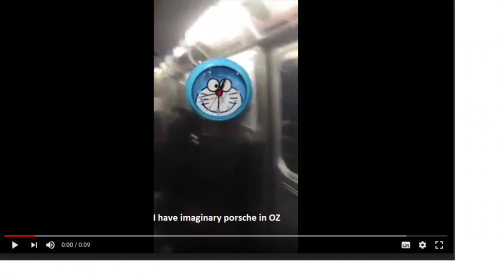 SCENE 2: (next 3 seconds of the video) 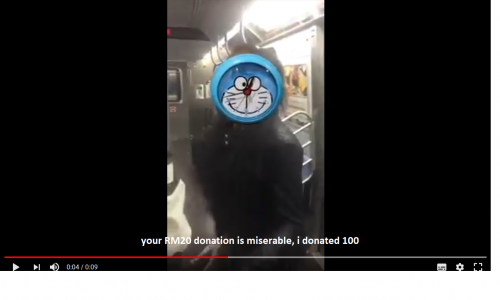 SCENE 3: (final 3 seconds of the video, no subtitles) This post has been edited by selow and timid: Sep 12 2020, 06:51 PM |
|
|
|
|
|
ihm11
|
Sep 12 2020, 11:37 AM
|
Getting Started
|
press F1
|
|
|
|
|
|
SUSselow and timid
|
Sep 14 2020, 12:02 AM
|
New Member
|
liamness help me to tag our mutual friend in and feel free to write something rude about me
|
|
|
|
|
|
FreedomSeeker
|
Sep 14 2020, 12:07 AM
|
New Member
|
Use filmora9 je... filmora9 is quite user friendly...
|
|
|
|
|
|
Stranger_
|
Sep 14 2020, 12:08 AM
|
Getting Started
|
Hi,
You should try out Premiere Pro if you wish to do so.
|
|
|
|
|
|
9m2w
|
Sep 14 2020, 01:05 AM
|
|
|
QUOTE(selow and timid @ Sep 12 2020, 11:32 AM) thanks for all your advise , this is the video that i am trying to edited: https://www.youtube.com/watch?v=HYbGLye3io4&has_verified=1i only need 10 seconds between 1:00 until 1:10. which will be split into several scenes: SCENE 1: (first 3 seconds of the video) SCENE 2: (next 3 seconds of the video) SCENE 3: (final 3 seconds of the video, no subtitles) You wanna get perma banned dude? This is how you get perma banned |
|
|
|
|
|
Yggdrasil
|
Sep 14 2020, 01:41 AM
|
|
|
Ask Sugu Pavithra
|
|
|
|
|
|
Immunityx7
|
Sep 14 2020, 01:42 AM
|
Getting Started
|
Filmora
|
|
|
|
|
|
SUSskyblack4492
|
Sep 14 2020, 02:03 AM
|
|
|
Become youtuber nice
|
|
|
|
|
|
SUSskyblack4492
|
Sep 14 2020, 02:03 AM
|
|
|
Become youtuber nice
|
|
|
|
|
|
sagethesausage
|
Sep 14 2020, 04:29 AM
|
|
|
QUOTE(seriosekitt3h @ Sep 11 2020, 08:31 PM) Video editor here. You need After Effects and Premiere Pro for that. I can do it all on Sony Vegas only. |
|
|
|
|
|
SUSselow and timid
|
Sep 21 2020, 10:32 AM
|
New Member
|
QUOTE(9m2w @ Sep 14 2020, 01:05 AM) You wanna get perma banned dude? This is how you get perma banned that's good advice i will keep it in mind |
|
|
|
|
|
ma pren
|
Sep 21 2020, 07:07 PM
|
New Member
|
ayam think instagram ken do dat... mek a pic folo objek behind...
|
|
|
|
|
|
SUSDezs
|
Oct 25 2020, 11:28 AM
|
|
|
QUOTE(selow and timid @ Sep 11 2020, 08:17 PM) am looking for advise or guidance to tutorials on how to edit vidoes and gifs. basically what i am trying to do is overlay images and text captions, onto a video i tried using gimp but it is dreadfully complicated. Ayam got online masterclass RM1997 only, after that ah in 6 months your skillz so l33t becum millionaire liao.. each project can make 177k man, price giant corporations pay u know? Sign up now, seats are limited - next time u ask the registraton fee become RM5997 liao |
|
|
|
|



 Quote
Quote















 0.0211sec
 0.63
0.63
 5 queries
 GZIP Disabled