

imac boot usb.30 ssd write speed slow, imac boot usb.30 ssd write speed slow
imac boot usb.30 ssd write speed slow, imac boot usb.30 ssd write speed slow
|
|
 Sep 8 2020, 11:08 AM, updated 6y ago Sep 8 2020, 11:08 AM, updated 6y ago
Show posts by this member only | Post
#1
|
 
Senior Member
3,065 posts Joined: Jan 2003 
|
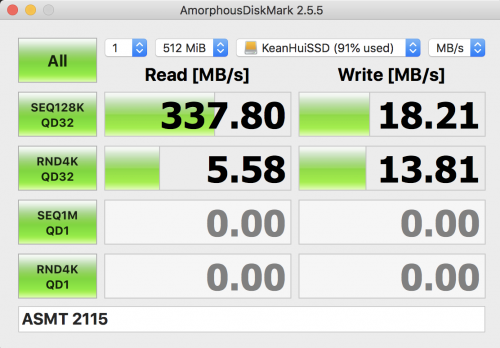
Help imac boot usb.30 ssd write speed slow, how to make it fast write speed
|
|
|
|
|
|
Sep 8 2020, 11:10 AM
Show posts by this member only | Post
#2
|

Senior Member
922 posts Joined: Dec 2006
|
QUOTE(fansoption @ Sep 8 2020, 11:08 AM) Help imac boot usb.30 ssd write speed slow, how to make it fast write speed new innovation maa. dont pertikai |
|
|
Sep 8 2020, 11:27 AM
Show posts by this member only | Post
#3
|

Senior Member
7,938 posts Joined: Mar 2014
|
External SSD with USB 3.0 interface?. Was it fast before?
|
|
|
Sep 8 2020, 12:05 PM
Show posts by this member only | IPv6 | Post
#4
|

Senior Member
6,496 posts Joined: Jan 2003 From: Kota Damansara  
|
What kind of drive are you using?
Ready to use portable drive or you retrofit a SSD into housing you bought? Which model of iMac? |
|
|
Sep 8 2020, 12:30 PM
Show posts by this member only | Post
#5
|
|
Senior Member
3,065 posts Joined: Jan 2003
|
if use thunlder boot will faster?
|
|
|
Sep 8 2020, 03:32 PM
Show posts by this member only | IPv6 | Post
#6
|
|
Senior Member
6,496 posts Joined: Jan 2003 From: Kota Damansara
|
Of course Thunderbolt are miles better, USB will only give you burst speed. Thunderbolt are consistent. They exist and constantly getting revision for a reason.
https://www.facebook.com/maccores/photos/a....495240730545165 |
|
|
|
|
|
Sep 9 2020, 09:23 AM
Show posts by this member only | Post
#7
|
|
Senior Member
3,065 posts Joined: Jan 2003
|
QUOTE(wei @ Sep 8 2020, 03:32 PM) Of course Thunderbolt are miles better, USB will only give you burst speed. Thunderbolt are consistent. They exist and constantly getting revision for a reason. but how come my usb 3.0 write speed canot reach 120mb/s....!https://www.facebook.com/maccores/photos/a....495240730545165 |
|
|
Sep 9 2020, 09:35 AM
Show posts by this member only | IPv6 | Post
#8
|
|
Senior Member
6,496 posts Joined: Jan 2003 From: Kota Damansara
|
You did not answer my first few questions.
|
|
|
Sep 9 2020, 09:58 AM
Show posts by this member only | Post
#9
|
|
Senior Member
3,065 posts Joined: Jan 2003
|
QUOTE(wei @ Sep 8 2020, 12:05 PM) What kind of drive are you using? i using 2.5inch 3.0 HDD case and my imac boot from USB3.0 SSD lo.Ready to use portable drive or you retrofit a SSD into housing you bought? Which model of iMac? 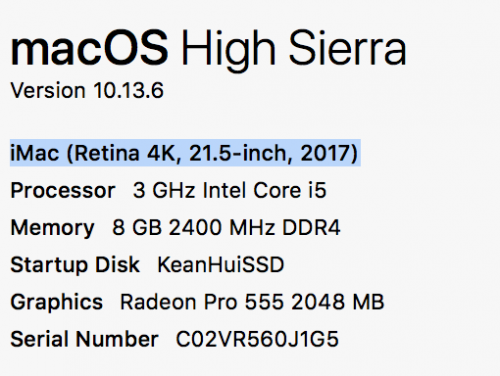 |
|
|
Sep 9 2020, 11:05 AM
Show posts by this member only | IPv6 | Post
#10
|
|
Senior Member
6,496 posts Joined: Jan 2003 From: Kota Damansara
|
Try get a better quality casing.
And if you boot and benchmark from the same drive the speed will definitely suffer. Also read about USB tech, they are only good on burst speed. Want to boot and do some short troubleshooting with USB maybe still ok, if long term working over USB it is not going to cut it. On a side note, your unit should have USB-C, that should be better over the USB3. This post has been edited by wei: Sep 9 2020, 11:07 AM |
|
|
Sep 9 2020, 02:20 PM
|
|
Senior Member
3,065 posts Joined: Jan 2003
|
thx bro
|
|
|
Sep 15 2020, 04:12 PM
|
|
Senior Member
3,065 posts Joined: Jan 2003
|
i change ugreen 3.1 2Gen TYPE A to TYPE -C case with new SSD .
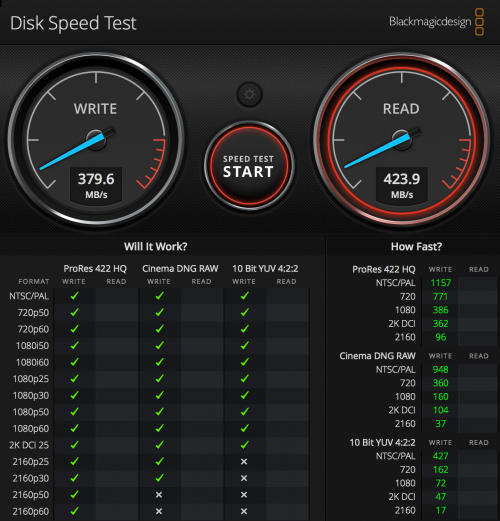 but my old ssd put on this case still write speed go 59mb./s why actually |
|
|
Sep 15 2020, 05:35 PM
Show posts by this member only | IPv6 | Post
#13
|
|
Senior Member
6,496 posts Joined: Jan 2003 From: Kota Damansara
|
Try put it into any internal SATA slot and see it behave the same. If same, it probably have a busted controller chip. Provided you have done re-partition and reformat.
|
| Change to: |  0.0213sec 0.0213sec
 0.51 0.51
 5 queries 5 queries
 GZIP Disabled GZIP Disabled
Time is now: 20th December 2025 - 07:16 AM |
 Quote
Quote