Outline ·
[ Standard ] ·
Linear+
OS Installing XP with MassStorage(SATA/RAID) Drivers, Can't find HDD in XP Setup ??
|
amdpsycho
|
 Oct 30 2007, 05:50 PM Oct 30 2007, 05:50 PM
|
New Member


|
QUOTE(SubKi||er @ Oct 29 2007, 03:55 PM) Sure, if only you would tell us what brand and model your WLAN adapter is. Oh yeah, that was totally my mistake. I formatted without making sure what the model was. I thought that maybe all the drivers were there. Had to reinstall Vista just to check that. Yeah, I know, that was totally lame  Anyway, I've found the model and the driver for it (Intel Wireless Wifi Link 4965AGN). Thanks for replying though. I appreciate it  |
|
|
|
|
|
TSSubKi||er
|
Oct 30 2007, 05:57 PM
|
|
|
QUOTE(amdpsycho @ Oct 30 2007, 05:50 PM) Oh yeah, that was totally my mistake. I formatted without making sure what the model was. I thought that maybe all the drivers were there. Had to reinstall Vista just to check that. Yeah, I know, that was totally lame Anyway, I've found the model and the driver for it (Intel Wireless Wifi Link 4965AGN). Thanks for replying though. I appreciate it Wireless Wifi Link 4965AGN XP driver by Intel http://downloadcenter.intel.com/filter_res...44&submit=Go%21 |
|
|
|
|
|
hairol83
|
Oct 30 2007, 11:17 PM
|
|
|
got another question.. everything just fine. except the audio driver.. when looking at device manager the audio already install.. but when i open the control panel to check the sound driver... aik.. no device found??!! WTF.... oredi download the Realtek Audio high definition for winXP.. but still no sound.. any idea?  |
|
|
|
|
|
TSSubKi||er
|
Oct 30 2007, 11:26 PM
|
|
|
QUOTE(hairol83 @ Oct 30 2007, 11:17 PM) got another question.. everything just fine. except the audio driver.. when looking at device manager the audio already install.. but when i open the control panel to check the sound driver... aik.. no device found??!! WTF.... oredi download the Realtek Audio high definition for winXP.. but still no sound.. any idea? This is seriously out of topic already... No more drivers problem after this please, else i won't answer. Your Realtek drivers are outdated or something did not install correctly if according to what you're describing is what i'm thinking. It has something to do with http://support.microsoft.com/kb/888111This post has been edited by SubKi||er: Nov 6 2007, 03:06 PM |
|
|
|
|
|
TSSubKi||er
|
Nov 6 2007, 03:06 PM
|
|
|
From my PM : @evilpuppy : HP Website never does provide enough detail on the specification of the laptop you're using because HP seems to have a lot of different hardware configuration for one model series. You will have to track it by looking at the model number on the bottom side of your laptop. Determine its series 400, series 500 or series 600 nVidia chipset before you download. Your PM is full 
Added on November 6, 2007, 3:19 pm@evilpuppy: Not that i don't want to reply but tha... CODE This message can not be sent because the recipient does not have permission to use the personal messenger or their personal messenger inbox is full.
This personal message has not been sent This post has been edited by SubKi||er: Nov 6 2007, 03:19 PM |
|
|
|
|
|
frozenthrone
|
Nov 6 2007, 10:51 PM
|
Getting Started
|
guys... have problem here... i wanna add new sata drive to my current pc that already have another sata with winXP installed..in BIOS the new drive detected,but in windows cannot detect...so how to make the new sata drive appear on windows??
|
|
|
|
|
|
TSSubKi||er
|
Nov 6 2007, 11:13 PM
|
|
|
QUOTE(frozenthrone @ Nov 6 2007, 10:51 PM) guys... have problem here... i wanna add new sata drive to my current pc that already have another sata with winXP installed..in BIOS the new drive detected,but in windows cannot detect...so how to make the new sata drive appear on windows?? Detect new hardware? Check your device manager? |
|
|
|
|
|
frozenthrone
|
Nov 7 2007, 12:14 AM
|
Getting Started
|
QUOTE(SubKi||er @ Nov 6 2007, 11:13 PM) Detect new hardware? Check your device manager? i already solve the problem myself..anyway thanx.. rightclick on my computer..click manage under disk management can see the undetected HDD on windows.. then right click on the undetected HDD and after that i forgot...  |
|
|
|
|
|
one_guy
|
Nov 8 2007, 11:32 AM
|
|
|
QUOTE(SubKi||er @ Aug 9 2007, 03:12 PM) Updated : Changed the guide a bit to reflect some changes.
Put a tick in the box which says "DriverPack MassStorage text mode". Bro,i'm not very understand what u say about this? Is it we need to check mark the box in the "DrivePack MassStrorage text mode" or we need to remove the check mark on that box? Because i see in your picture, the box left empty.. This post has been edited by one_guy: Nov 8 2007, 12:09 PM |
|
|
|
|
|
TSSubKi||er
|
Nov 8 2007, 02:00 PM
|
|
|
QUOTE(one_guy @ Nov 8 2007, 11:32 AM) Bro,i'm not very understand what u say about this? Is it we need to check mark the box in the "DrivePack MassStrorage text mode" or we need to remove the check mark on that box? Because i see in your picture, the box left empty.. Haha, read again, i said "Put a tick". Means you need to check the box if you still don't get it. This post has been edited by SubKi||er: Nov 8 2007, 02:01 PM |
|
|
|
|
|
Hyde`fK
|
Nov 13 2007, 02:28 PM
|
|
|
Another software to create the iso with additional drivers is nLite.
|
|
|
|
|
|
atlantis2007
|
Nov 15 2007, 03:40 PM
|
|
|
Im on my way of trying out the CD method on my Compaq Presario V3632TU Notebook PC I wonder if it will work.. the only reason am using this option cox.. I do not have USB FDD.. I heard there are way using USB thumbdrive to boot.. any advice? |
|
|
|
|
|
TSSubKi||er
|
Nov 15 2007, 03:56 PM
|
|
|
QUOTE(atlantis2007 @ Nov 15 2007, 03:40 PM) Im on my way of trying out the CD method on my Compaq Presario V3632TU Notebook PC I wonder if it will work.. the only reason am using this option cox.. I do not have USB FDD.. I heard there are way using USB thumbdrive to boot.. any advice? It should work on your notebook, but i don't dare say anything about the drivers available for your other devices on XP. Because i think most of them having problem with that. USB Thumbdrive, should be possible but i have yet to try it out. You can give it a try and maybe point me to it so i can update my guide with it too... |
|
|
|
|
|
seram
|
Nov 15 2007, 10:08 PM
|
Getting Started
|
hi mr subkiller can i use this at windows 2003 server r2 cd?becouse nowadays server didnt come with floppy drive..
|
|
|
|
|
|
TSSubKi||er
|
Nov 16 2007, 08:01 PM
|
|
|
QUOTE(seram @ Nov 15 2007, 10:08 PM) hi mr subkiller can i use this at windows 2003 server r2 cd?becouse nowadays server didnt come with floppy drive.. I'm not very sure but yes, it might be possible since Server 2003 uses the same installer and technology as XP. The problem is that the DriverPack might not have the drivers for your server as DriverPack is actually more tailored for use on normal PCs. You could however try to look around the internet and see if nLite could do you any good. nLite itself supports Windows Server 2003 and it is possible for you to just slipstream the driver of your server into the CD. All this however have not been tested by me so you need to poke around as there is no guarantee it would work. |
|
|
|
|
|
R00T
|
Nov 19 2007, 07:13 PM
|
|
|
i also have this problem
|
|
|
|
|
|
TSSubKi||er
|
Nov 21 2007, 06:04 PM
|
|
|
QUOTE(R00T @ Nov 19 2007, 07:13 PM) Which problem? |
|
|
|
|
|
SUSXbox 360
|
Nov 22 2007, 03:36 AM
|
Getting Started
|
Believe it or not my Vista suddenly was getting blue-screen of death... turns out my hard disk AHCI/SATA drivers went missing !!
God knows how this happened...
FOR VISTA USERS -->
Anyway, long story short... I downloaded Intel Matrix Storage (November 9th 2007 version) the 64bit floopy disk version. Then used Universal Extractor to extract the contents of the EXE. Turns out it is an image file ! Then had to use "Undisker" to get all the file contents. Finally, saved the files onto my USB thumb drive.
In Vista installation, I needed to select "Load driver" then point to the file folder containing the drivers. Then... voila ! It simply installed the latest SATA drivers for Vista.
Now Vista works like charm...
As for XP (I dual-boot), haven't tried the F6 method. I don't need to install the drivers, but I want to install the 'latest' version. Will be trying it soon.
|
|
|
|
|
|
keyz
|
Nov 22 2007, 09:05 AM
|
Regular

|
If the setting is grey out like the image below : 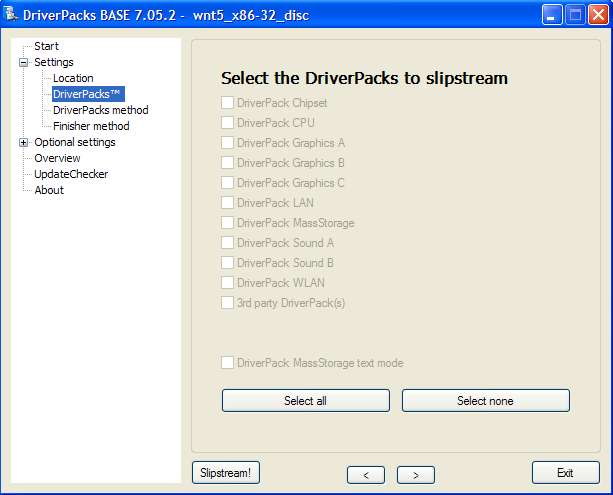 The solution : DO NOT extract the downloaded files into DriverPacks folder. Leave intact as is (i.e. copy that archive into DriverPacks folder). The DPs_BASE will automatically do the extraction. See the image below : QUOTE(SubKi||er) ..put the MassStorage pack you downloaded into the DriverPacks folder. 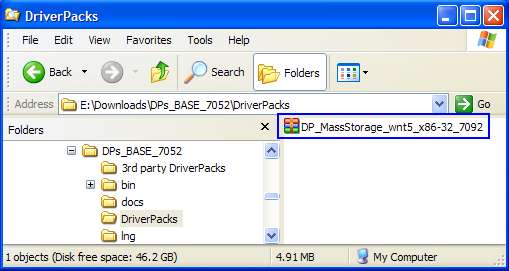 If you do it right, you can have the selection as below  : 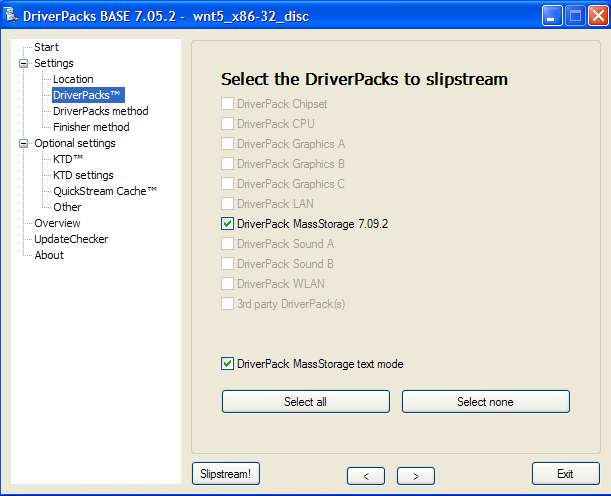 To thread starter : To thread starter :You can update this info at the 1st page. You may use the printscreen also. This post has been edited by keyz: Nov 22 2007, 03:00 PM |
|
|
|
|
|
TSSubKi||er
|
Nov 23 2007, 12:15 AM
|
|
|
QUOTE(keyz @ Nov 22 2007, 09:05 AM) To thread starter :You can update this info at the 1st page. You may use the printscreen also. Thanks for the help dude, updated the 1st post and proper credits given.  I will try if i can update the post with a few more other things like pendrive with floppy and stuffs when i'm free. Currently still have an exam on hand and might go for a family vacation after that so in case anyone wants to help me with it, i would still welcome it. |
|
|
|
|



 Quote
Quote


 0.0186sec
 0.17
0.17
 6 queries
 GZIP Disabled