Welcome Guest ( Log In | Register )

28 Pages « < 9 10 11 12 13 > » Bottom

Outline · [ Standard ] · Linear+

OS Installing XP with MassStorage(SATA/RAID) Drivers, Can't find HDD in XP Setup ??

views
     
ravemaster222003
post Apr 16 2008, 12:44 AM

Getting Started
**
Junior Member
243 posts

Joined: Aug 2006
From: Perak


@alexkwlee

This is the link page to download the driver sata. There also the step by step on how to make it. This driver is used for "F6 Stage"


http://h10025.www1.hp.com/ewfrf/wc/softwar...&os=228&lang=en

SeanVinces
post Apr 16 2008, 01:12 PM

Getting Started
**
Junior Member
82 posts

Joined: Dec 2006
From: Penang,Perak


hey i can't get the boot.img file ... or did i missed any step blink.gif
asiatrader98
post Apr 16 2008, 07:09 PM

Regular
******
Senior Member
1,485 posts

Joined: Dec 2005
QUOTE(SubKi||er @ Aug 9 2007, 03:12 PM)
Updated : Small changes (29th February 08)

There is 3 part of the guide :
Slipsteam the RAID/SATA drivers to the XP Setup and create an updated driver setup disc

! I would recommend that if possible use a CD-RW for your work unless of course you don't mind throwing a CD in case something mess up !

! As to simplify most of the errors that i get through PM, I recommend you to use the vanilla version of Windows XP aka clean setup itself without slipstreams. Avoid any "D3vil SP3 Edition" or such. This is due to the fact that some of these CD might have already been slipstreamed with drivers before and the tools listed here might not recognise the previous slipstreamer and mess up the CD. !

There is an increasing amount of thread on the matter and wish that i could be of some help and solve it easy way. I dare not put this in the Guide section so hopefully if its not appropriate here too, Mods please delete the thread or move it elsewhere. Thanks.

Opening :
Even with the existance of Windows Vista, XP nonetheless is still the choice of OS for a lot of people for now. But because of how old XP is to date and with the emerging of new technologies, the original drivers that came with the XP Setup itself is almost obsolete.

To cut the crap short, laptop doesn't have a floppy drive and XP is unable to load SATA/RAID drivers from another location besides floppy. Of course, not all laptop BIOSes can enable native SATA to emulate PATA hence the existance of this guide. So the only ways to install XP on your ub3r new laptop that runs SATA HDD would be to update the driver database in XP Setup itself.

Tools needed :How-to :
First of all, copy the contents of your CD to a working path, in this case i'll use C:\WINXP

Download DriverPack BASE from the link above as well as DriverPack MassStorage. Extract the BASE pack into a new folder and put the MassStorage pack you downloaded into the DriverPacks folder.

If the setting is grey out like the image below :
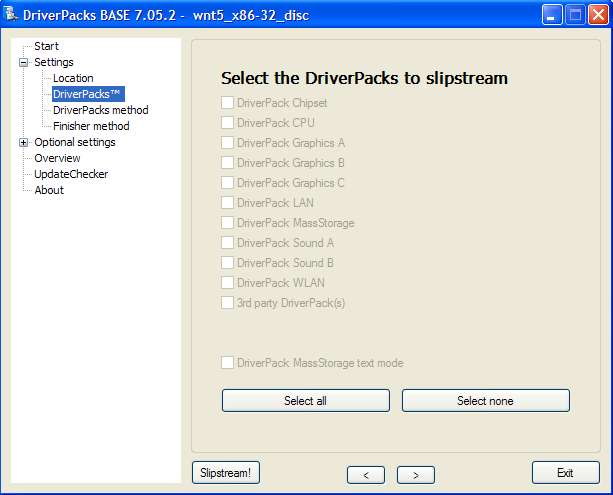
user posted image

The solution : DO NOT extract the downloaded files into DriverPacks folder. Leave intact as is (i.e. copy that archive into DriverPacks folder). The DPs_BASE will automatically do the extraction. See the image below :

QUOTE(SubKi||er)
..put the MassStorage pack you downloaded into the DriverPacks folder.
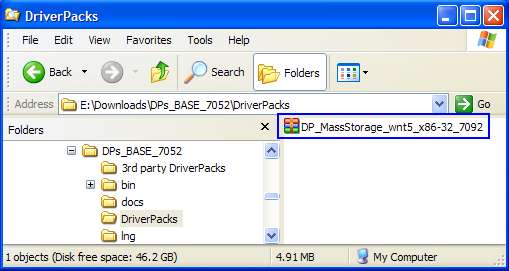

user posted image

If you do it right, you can have the selection as below rclxms.gif :

user posted image

Credits: keyz

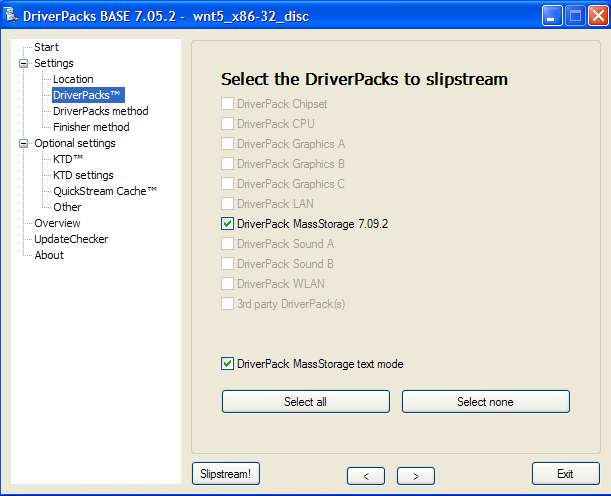
Execute DPs_BASE.exe and use the installation platform selected to disc. Browse to the XP working directory you copied from the CD just now, in my case C:\WINXP earlier. Select the DriverPacks list that will appear after loading the working directory and put a check mark on DriverPack MassStorage. Put a tick in the box which says "DriverPack MassStorage text mode". Leave all the other settings as it is if you don't know what is it for.

user posted image

After you're done with everything, hit the SlipStream! button and wait for the process to finish. The process should finish in around 10 minutes. After the slipstream process is finish, proceed by downloading CDIMAGE GUI. Extract and run the application, only change the "Root DIR" to your working directory in my case C:\WINXP and the "Iso file Path" to where you want to save the ISO file generated.

user posted image

Select the boot.img file to load the bootable image into the ISO file.

user posted image

Leave all other settings intact as it should unless you know what its doing. (Thanks Sk8teR)

After the ISO file is generated, burn it with any burning software to a CD and proceed with booting the setup. Your SATA hard drive should be recognised now without the need to press F6 and load drivers.

The DriverPack should contain most SATA/RAID device drivers so it should work on most computers.

The End.
*
thank you but after the ISO file is created, just burn this file to cd directly? only one file in cd?

Do I need to do anything with this ISO file? TQ

TSSubKi||er
post Apr 16 2008, 09:59 PM

Newbie
******
Senior Member
1,654 posts

Joined: Jan 2003
From: Miri City, Sarawak. Mood: Missing someone~


QUOTE(SeanVinces @ Apr 16 2008, 01:12 PM)
hey i can't get the boot.img file ... or did i missed any step  blink.gif
*
I just checked...there is a boot.img. Try tracing back the steps...

QUOTE(asiatrader98 @ Apr 16 2008, 07:09 PM)
Do I need to do anything with this ISO file? TQ
*
Use Nero to burn image file and open the ISO from Nero to burn. Not burn the ISO into the CD.
asiatrader98
post Apr 17 2008, 07:46 AM

Regular
******
Senior Member
1,485 posts

Joined: Dec 2005
QUOTE(SubKi||er @ Apr 16 2008, 09:59 PM)
I just checked...there is a boot.img. Try tracing back the steps...
Use Nero to burn image file and open the ISO from Nero to burn. Not burn the ISO into the CD.
*
yeah, i copy the ISO into CD/DVD, can not work..thank the info
if this is dvd-rw, how to burn image file ? same way? tongue.gif

TSSubKi||er
post Apr 17 2008, 04:02 PM

Newbie
******
Senior Member
1,654 posts

Joined: Jan 2003
From: Miri City, Sarawak. Mood: Missing someone~


QUOTE(asiatrader98 @ Apr 17 2008, 07:46 AM)
yeah, i copy the ISO into CD/DVD, can not work..thank the info
if this is dvd-rw, how to burn image file ? same way? tongue.gif
*
Yeah~!
asiatrader98
post Apr 17 2008, 04:36 PM

Regular
******
Senior Member
1,485 posts

Joined: Dec 2005
QUOTE(SubKi||er @ Apr 17 2008, 04:02 PM)
Yeah~!
*
thank SubKi||er,
by the way, why we shall select Intel 82801 HEM/HBM SATA AHCI Controller (Modile ICHBM-E/M) or Intel 82801 GHBM SATA AHCI Controller (Modile CH71Y)? Can I select any one SATA ACHI Controller (Mobile) for my notebook? rclxub.gif
TSSubKi||er
post Apr 17 2008, 08:36 PM

Newbie
******
Senior Member
1,654 posts

Joined: Jan 2003
From: Miri City, Sarawak. Mood: Missing someone~


QUOTE(asiatrader98 @ Apr 17 2008, 04:36 PM)
thank SubKi||er,
by the way, why we shall select Intel 82801 HEM/HBM SATA AHCI Controller (Modile ICHBM-E/M) or Intel 82801 GHBM SATA AHCI Controller (Modile CH71Y)? Can I select any one SATA ACHI Controller (Mobile) for my notebook? rclxub.gif
*
So you are burning the ISO or using the diskette route? If you're burning the ISO, why bother asking since the setup would find the correct one and install..

But if its the diskette route, you will have to tell me what chipset do you have because the driver are for specific chipsets.
asiatrader98
post Apr 18 2008, 12:53 PM

Regular
******
Senior Member
1,485 posts

Joined: Dec 2005
QUOTE(SubKi||er @ Apr 17 2008, 08:36 PM)
So you are burning the ISO or using the diskette route? If you're burning the ISO, why bother asking since the setup would find the correct one and install..

But if its the diskette route, you will have to tell me what chipset do you have because the driver are for specific chipsets.
*
yes u r right
previously, i try with the diskette route, setup ask for it, now with this
burning ISO, setup detect it automatically...SubKi||er, u r great, finally, solve my problem rclxm9.gif rclxms.gif Thank you very much

This post has been edited by asiatrader98: Apr 18 2008, 12:56 PM
cornelius_young
post Apr 18 2008, 01:26 PM

Casual
***
Junior Member
369 posts

Joined: Dec 2006
Just want to know, is this SATA driver for all types of SATA drive?
Cause I also have SATA drive on the HP laptop... Don't know which driver to use.
jiaxun
post Apr 18 2008, 02:36 PM

- Wh@†Eve® - ™
******
Senior Member
1,352 posts

Joined: Jun 2007
user posted image
did i miss any step? how to solve?
Dio Brando
post Apr 18 2008, 06:38 PM

New Member
*
Newbie
1 posts

Joined: Apr 2008
hi everyone, am currently downgrading acer aspire m5600 from vista to XP pro, and i cant find the driver for the SATA hdd... called up acer and they cant help too... any help will be appreciate...
TSSubKi||er
post Apr 18 2008, 07:25 PM

Newbie
******
Senior Member
1,654 posts

Joined: Jan 2003
From: Miri City, Sarawak. Mood: Missing someone~


QUOTE(asiatrader98 @ Apr 18 2008, 12:53 PM)
yes u r right
previously, i try with the diskette route, setup ask for it, now with this
burning ISO, setup detect it automatically...SubKi||er, u r great, finally, solve my problem rclxm9.gif  rclxms.gif Thank you very much
*
Glad it work for you~! Enjoy your XP~!

QUOTE(cornelius_young @ Apr 18 2008, 01:26 PM)
Just want to know, is this SATA driver for all types of SATA drive?
Cause I also have SATA drive on the HP laptop... Don't know which driver to use.
*
The SATA driver in the driverpack should contain all the famous and frequently used ones... You can give it a try as so far most ppl have no problems with it.

QUOTE(jiaxun @ Apr 18 2008, 02:36 PM)
user posted image
did i miss any step? how to solve?
*
Sorry about that, but tha....either my comp is not "liking" imageshacks or screamyx is screwing me. Can you like upload it somewhere else cause i can't seem to be able to open it.

Yeah...i miss out something which i tot was explanatory enough all this while...

Select disc and browse the I386 folder you copied out from the disc earlier.

QUOTE(Dio Brando @ Apr 18 2008, 06:38 PM)
hi everyone, am currently downgrading acer aspire m5600 from vista to XP pro, and i cant find the driver for the SATA hdd... called up acer and they cant help too... any help will be appreciate...
*
Full spec of your computer?

This post has been edited by SubKi||er: Apr 18 2008, 07:35 PM
kogula14
post Apr 20 2008, 12:58 PM

Getting Started
**
Junior Member
100 posts

Joined: May 2007
From: Diamond Bay, Malaysia


for those who couldn't bootup after burn, there must be mistake made while adding ISO file. The simple thing is that after u complete created a new slipsteam XP folder, u also can use Nero burner that have "boot" option. just click the "boot" option and add the new slipsteam xp folder and just click BURN.

that ;s it.
SkyW
post Apr 20 2008, 06:37 PM

New Member
*
Junior Member
44 posts

Joined: Dec 2007
A very useful thread. But I have one problem here. Hope someone may guide me.

My friend's laptop is originally coming with Vista OEM Home Edition. But changed to XP Professional (Maybe technician change for him, i dunno about it). Now, I want to reformat his laptop (unable to enter XP->blue screen come out half way). However, it was written that my hard disk is not found OR maybe due to manufacturer. So can this method solve my problem? Or I have to use XP Pro OEM version?

Please enlighten me. Thank you.
TSSubKi||er
post Apr 20 2008, 10:35 PM

Newbie
******
Senior Member
1,654 posts

Joined: Jan 2003
From: Miri City, Sarawak. Mood: Missing someone~


QUOTE(kogula14 @ Apr 20 2008, 12:58 PM)
for those who couldn't bootup after burn, there must be mistake made while adding ISO file. The simple thing is that after u complete created a new slipsteam XP folder, u also can use Nero burner that have "boot" option. just click the "boot" option and add the new slipsteam xp folder and just click BURN.

that ;s it.
*
I'm not sure if you tried my guide but its supposed to work. Those who are having problems earlier are those to slipstreamed the CD with something that have already been slipstreamed before...

I won't want to be asked for how to solve this thing you suggested because personally i never tried but thanks for the suggestion. I just want to leave a note to anyone reading...

QUOTE(SkyW @ Apr 20 2008, 06:37 PM)
A very useful thread. But I have one problem here. Hope someone may guide me.

My friend's laptop is originally coming with Vista OEM Home Edition. But changed to XP Professional (Maybe technician change for him, i dunno about it). Now, I want to reformat his laptop (unable to enter XP->blue screen come out half way). However, it was written that my hard disk is not found OR maybe due to manufacturer. So can this method solve my problem? Or I have to use XP Pro OEM version?

Please enlighten me. Thank you.
*
You mean re-installing the laptop with XP? Yeah...this solution would solve your problem.

If you meant Vista, i think vista would have detected your hard drive easily but if it doesn't, i guess you have to get SATA drivers for vista and load in the setup.
cornelius_young
post Apr 24 2008, 05:22 PM

Casual
***
Junior Member
369 posts

Joined: Dec 2006
Hi, I have successfully slipstream the SATA driver into my copy of Windows XP. I notice that there's winnt.sif files in the folder I386. So, I am going to make an unattended install XP however, the unattended Install should also be name winnt.sif.
So, how do I merge this files so that they can run unattended while maintaining the installation of SATA driver?
Is there any way I can test the install before decided to burn it into CD?
TSSubKi||er
post Apr 24 2008, 05:39 PM

Newbie
******
Senior Member
1,654 posts

Joined: Jan 2003
From: Miri City, Sarawak. Mood: Missing someone~


QUOTE(cornelius_young @ Apr 24 2008, 05:22 PM)
Hi, I have successfully slipstream the SATA driver into my copy of Windows XP.  I notice that there's winnt.sif files in the folder I386.  So, I am going to make an unattended install XP however, the unattended Install should also be name winnt.sif.
So, how do I merge this files so that they can run unattended while maintaining the installation of SATA driver?
Is there any way I can test the install before decided to burn it into CD?
*
winnt.sif file is supposed to be a setup answer file. This file tells the setup which files goes where as well as what files are on the CD. This means this file is the one who is going to tell the setup what drivers are on the CD which you slipstreamed earlier.

As for your question, the things that you wanna add into the winnt.sif file probably going to be the cd-key and some things to install and what not. To do this, try find out the sections which commands the winnt.sif file to do your thing and try copying the sections you want over to the winnt.sif file in the folder which you slipstreamed. If you open winnt.sif up with notepad then i suppose you will get what i mean.

Here's some reading you might want to check out : http://unattended.msfn.org/unattended.xp/view/web/19/

As for you last question to test the CD, normally they try running the setup on a virtual machine (think VMware or such). If you can complete the whole setup in virtualization then the CD should be ok. I don't have too many spare resources on my CPU to spare so normally i'll just throw the CD into one of those CPU they ask me to fix and try tongue.gif tongue.gif

I hope you get what i mean as i'm a little headache right now and i'm trying to get my language right.. tongue.gif
uncell
post Apr 25 2008, 02:59 AM

Getting Started
**
Junior Member
154 posts

Joined: Nov 2006
From: Kuala Lumpur


hey SubKi||er...

its working for me..
now im very happy ..
i have done installing my COMPAQ PRESARIO V3521 TU with your tutorial...

guys,just follow the step by SubKi||er post here...
its really easy.....

thanks again....


Added on April 25, 2008, 7:43 amerrmmm

where can i get the driver for my LAN..??
please give me the link here for my notebook PRESARIO V3521

This post has been edited by uncell: Apr 25 2008, 07:43 AM
KooHei
post Apr 25 2008, 01:23 PM

Casual
***
Junior Member
431 posts

Joined: Apr 2008
how about sas hard drive... anyone tried raid on it...?

28 Pages « < 9 10 11 12 13 > » Top
 

Change to:
| Lo-Fi Version
0.0262sec    0.68    6 queries    GZIP Disabled
Time is now: 7th December 2025 - 05:59 PM