Welcome Guest ( Log In | Register )

Outline · [ Standard ] · Linear+

 Should I put LAN point or use mesh network?

views
     
TShendry91
post Aug 4 2020, 09:46 PM, updated 6y ago

Getting Started
**
Junior Member
110 posts

Joined: Jun 2015
I am renovating my double storey house, thinking how to make the wifi full coverage in my house.

Should I pull the LAN(cat 6) cable on each point? Or I should use Mesh network instead of pull cable? Which one is more stable and useful in the future?
metalfire
post Aug 4 2020, 09:51 PM

Regular
******
Senior Member
1,302 posts

Joined: Oct 2005


LAN cables more stable
jetblast
post Aug 4 2020, 09:53 PM

Regular
******
Senior Member
1,039 posts

Joined: Oct 2006


Put lan use at least cat 6.i regret did not do it during my renovation. In the end had to run externally around the house. (corner lot)
blancpain4470
post Aug 4 2020, 10:13 PM

Regular
******
Senior Member
1,063 posts

Joined: Feb 2019


Where possible you should install cable as it is much more stable. At this point you should consider cat 6a/7 or even cat 8 for future proof.

Mesh wifi is quite good nowadays. It should also work for double storey with a pair of mesh. But if your house is not super big even a single powerful router alone may be sufficient. Factors to consider are thickness of your walls, wifi channels clashes, location of your router vs furtherest devices etc

As mesh wifi will keep on improving and routers are more powerful mesh network will be fine for most households. Check out Asus Zenwifi, Netgear Orbi and you will be impressed.
TShendry91
post Aug 4 2020, 10:14 PM

Getting Started
**
Junior Member
110 posts

Joined: Jun 2015
QUOTE(jetblast @ Aug 4 2020, 09:53 PM)
Put lan use at least cat 6.i regret did not do it during my renovation. In the end had to run externally around the house. (corner lot)
*
But Mesh Wifi look so powerful nowadays, it can cover whole house actually.
I can't see why need a LAN if using mesh wifi, anyone?
jetblast
post Aug 4 2020, 10:18 PM

Regular
******
Senior Member
1,039 posts

Joined: Oct 2006


QUOTE(hendry91 @ Aug 4 2020, 10:14 PM)
But Mesh Wifi look so powerful nowadays, it can cover whole house actually.
I can't see why need a LAN if using mesh wifi, anyone?
*
If you already doing renovation then better put cable. Also include cctv cable. If existing house then use mesh. I did my cabling about 7 years ago when mesh was lousy.
blancpain4470
post Aug 4 2020, 10:37 PM

Regular
******
Senior Member
1,063 posts

Joined: Feb 2019


QUOTE(hendry91 @ Aug 4 2020, 10:14 PM)
But Mesh Wifi look so powerful nowadays, it can cover whole house actually.
I can't see why need a LAN if using mesh wifi, anyone?
*
Even a top mesh WiFi still can't prevent channel clashing and wifi interference especially from your neighbors. Also I assume you don't have too much glass in your house. Modern houses with tons of glasses will kill your WiFi range quickly especially adding some walls in between.

If nothing else having a cable connection between 2 mesh WiFi routers is still better than using WiFi backhaul.

This post has been edited by blancpain4470: Aug 4 2020, 10:40 PM
TShendry91
post Aug 4 2020, 10:44 PM

Getting Started
**
Junior Member
110 posts

Joined: Jun 2015
QUOTE(blancpain4470 @ Aug 4 2020, 10:37 PM)
Even a top mesh WiFi still can't prevent channel clashing and wifi interference especially from your neighbors.

If nothing else having a cable connection between 2 mesh WiFi routers is still better than using WiFi backhaul.
*
If I pull the cable, what device should I use to broadcast the wifi signal?
QUOTE
having a cable connection between 2 mesh WiFi router

Does it mean I can plug my LAN cable into the mesh device to have a better connection.
TShendry91
post Aug 4 2020, 10:54 PM

Getting Started
**
Junior Member
110 posts

Joined: Jun 2015
QUOTE(blancpain4470 @ Aug 4 2020, 10:37 PM)
Even a top mesh WiFi still can't prevent channel clashing and wifi interference especially from your neighbors. Also I assume you don't have too much glass in your house. Modern houses with tons of glasses will kill your WiFi range quickly especially adding some walls in between.

If nothing else having a cable connection between 2 mesh WiFi routers is still better than using WiFi backhaul.
*
https://www.tp-link.com/us/support/faq/1794/
I just study on this link..
All my LAN(upstairs) will pull to my TV cabinet (downstairs), based on the link, I just need to add a switch at the TV cabinet and plug in all my LAN cable, so on the other side, use the LAN cable to plug in the mesh device. Am I right?
blancpain4470
post Aug 5 2020, 12:31 AM

Regular
******
Senior Member
1,063 posts

Joined: Feb 2019


Yes. If you pull the cable you need to have a point for your mesh router. Then this mesh router will connect to the main mesh router (which connects to your Unifi/Maxis/Time/etc) via your cable. This is more stable than connecting via 5ghz backhaul.

There are many ways to set up Ethernet at home. In your case I assumed your main router is upstairs (?). Then you can run a cable downstairs to the other mesh router. You can have a switch or use the Ethernet ports on the mesh router to connect to other points downstairs. Your cables just need to run from your TV cabinet to other rooms.

I am assuming you are using a pair of mesh routers. Of course you can only use a single router and connect the router directly to the switch in your TV cabinet. Depending on the number of devices this may work. My house has 50 devices so I need a pair of mesh routers.
idoblu
post Aug 5 2020, 06:19 AM

stars for sale
********
All Stars
11,308 posts

Joined: Feb 2008
QUOTE(hendry91 @ Aug 4 2020, 10:14 PM)
But Mesh Wifi look so powerful nowadays, it can cover whole house actually.
I can't see why need a LAN if using mesh wifi, anyone?
*
Even if you use mesh wifi, you should install cable for your mesh WiFi backhaul
Most mesh WiFi just using dual band which means there is no band dedicated for backhaul. A wired backhaul will provide top speed at all nodes

This post has been edited by idoblu: Aug 5 2020, 01:58 PM
biggie
post Aug 5 2020, 08:19 AM

Regular
******
Senior Member
1,291 posts

Joined: Jan 2003
Mesh is actually quite good nowadays. Unless you are a gamer then LAN is not actually necessary
SUSceo684
post Aug 5 2020, 01:36 PM

Component Burner
********
All Stars
11,667 posts

Joined: Jan 2003
From: Klang/Subang


Central router + a few good standalone AP connected by LAN cables (i.e. no need WLC) will be the best e.g. Aruba AP or Huawei ws5200 (in AP mode).

Mesh wifi still use some Wifi bandwidth frequency to connect them together which (constrain available frequencies for AP to device) and it still doesnt solve the concrete/steel mesh penetration of wall issue.

This post has been edited by ceo684: Aug 5 2020, 01:37 PM
WaCKy-Angel
post Aug 5 2020, 01:37 PM

PeACe~~
*********
All Stars
21,962 posts

Joined: Dec 2004
From: KL


QUOTE(jetblast @ Aug 4 2020, 09:53 PM)
Put lan use at least cat 6.i regret did not do it during my renovation. In the end had to run externally around the house. (corner lot)
*
why not fibre while u at it? lel
WaCKy-Angel
post Aug 5 2020, 01:39 PM

PeACe~~
*********
All Stars
21,962 posts

Joined: Dec 2004
From: KL


QUOTE(hendry91 @ Aug 4 2020, 10:14 PM)
But Mesh Wifi look so powerful nowadays, it can cover whole house actually.
I can't see why need a LAN if using mesh wifi, anyone?
*
LAN stable, Mesh not so stable.

Somemore Mesh consumes electricy whilst cable no need maintenance. Mesh also need to upgrade the router every few years when never technology comes out.
jetblast
post Aug 5 2020, 01:42 PM

Regular
******
Senior Member
1,039 posts

Joined: Oct 2006


QUOTE(WaCKy-Angel @ Aug 5 2020, 01:37 PM)
why not fibre while u at it? lel
*
You trolling or really asking? This not /k
WaCKy-Angel
post Aug 5 2020, 01:50 PM

PeACe~~
*********
All Stars
21,962 posts

Joined: Dec 2004
From: KL


QUOTE(jetblast @ Aug 5 2020, 01:42 PM)
You trolling or really asking? This not /k
*
Why trolling? UTP cable deteorite over time and also can get interference. Fiber dont. Just need converter back to UTP point for the wall plug
jetblast
post Aug 5 2020, 02:08 PM

Regular
******
Senior Member
1,039 posts

Joined: Oct 2006


QUOTE(WaCKy-Angel @ Aug 5 2020, 01:50 PM)
Why trolling? UTP cable deteorite over time and also can get interference. Fiber dont. Just need converter back to UTP point for the wall plug
*
No doubt it can be done but at what cost and convenience. Also with new technology can already have up to 5 gbps over cat 6.
Also I said I did this 7 years ago. All my cabling in run through pipes so deterioration is minimized.

This post has been edited by jetblast: Aug 5 2020, 02:09 PM
blanket84
post Aug 5 2020, 02:29 PM

Regular
******
Senior Member
1,520 posts

Joined: May 2008
Sorry TS tumpang thread.

How much is the normal charges to pull LAN cable for typical double storey terrace? From living downstairs to living upstairs.
hungrygodzilla
post Aug 5 2020, 04:19 PM

Casual
***
Junior Member
456 posts

Joined: Oct 2019
QUOTE(blancpain4470 @ Aug 4 2020, 10:13 PM)
Where possible you should install cable as it is much more stable. At this point you should consider cat 6a/7 or even cat 8 for future proof.

Mesh wifi is quite good nowadays. It should also work for double storey with a pair of mesh. But if your house is not super big even a single powerful router alone may be sufficient. Factors to consider are thickness of your walls, wifi channels clashes, location of your router vs furtherest devices etc

As mesh wifi will keep on improving and routers are more powerful mesh network will be fine for most households. Check out Asus Zenwifi, Netgear Orbi and you will be impressed.
*
Cat 7 is overkill.

QUOTE(WaCKy-Angel @ Aug 5 2020, 01:50 PM)
Why trolling? UTP cable deteorite over time and also can get interference. Fiber dont. Just need converter back to UTP point for the wall plug
*
Fibre is overkill.

Cat 6 can support 10 Gbps within 37-55meters. Unless you have a gigantic mansion, it is actually enough. If you have budget, please do go for Cat 6a, have 2x the bandwidth frequencies, and support up to 100m length.

If you have money of coz you can go for cat 7 cat 8 and also fibre. It's like TS asking what car to get for this and that purpose. Proton is like the budget answer, toyota is like the normal answer. Then someone will come in and just say ferrari better. Of cause better la, but need ma?

Questions to think about, when do you realistically think that malaysia will offer 10Gbps connection? and when will all consumer devices have a 10Gbps port?

Just ensure you have cat 6 or 6a ready. then start with 1 wifi mesh router. If you felt that you have connection issues in certain room, just plan a additional mesh node that will fix your connection problem for that area. Don't need to rush in to buy a overkill solution.


wailing81
post Aug 5 2020, 04:40 PM

Enthusiast
*****
Junior Member
711 posts

Joined: Mar 2008


QUOTE(blanket84 @ Aug 5 2020, 02:29 PM)
Sorry TS tumpang thread.

How much is the normal charges to pull LAN cable for typical double storey terrace? From living downstairs to living upstairs.
*
i bought a Cat7 cable from Taobao, 100m costed less than rm500.

since i am renovating my house and replacing all wires in the house, i just asked the contractor to pull the cable. He charged extra rm200 only. good contractor.
blancpain4470
post Aug 5 2020, 04:58 PM

Regular
******
Senior Member
1,063 posts

Joined: Feb 2019


QUOTE(hungrygodzilla @ Aug 5 2020, 04:19 PM)
Cat 7 is overkill.
Fibre is overkill.

Cat 6 can support 10 Gbps within 37-55meters. Unless you have a gigantic mansion, it is actually enough. If you have budget, please do go for Cat 6a, have 2x the bandwidth frequencies, and support up to 100m length.

If you have money of coz you can go for cat 7 cat 8 and also fibre. It's like TS asking what car to get for this and that purpose. Proton is like the budget answer, toyota is like the normal answer. Then someone will come in and just say ferrari better. Of cause better la, but need ma?

Questions to think about, when do you realistically think that malaysia will offer 10Gbps connection? and when will all consumer devices have a 10Gbps port?

Just ensure you have cat 6 or 6a ready. then start with 1 wifi mesh router. If you felt that you have connection issues in certain room, just plan a additional mesh node that will fix your connection problem for that area. Don't need to rush in to buy a overkill solution.
*
To be honest I don't think 6a and 7 are overkill and their prices are closer to cat 6 than you think. If you know Moore's Law, you would never say it is impossible that 10gbps won't be offered In near future. Even on devices side, wifi 6 will go up to theoretical limit of 10gbps. While these are not immediate but may be within 2-4 years.

I do agree that 1gbps is plenty fast for most usage. But as usual we always find new ways to consume faster speed as and when available. Whether it improves our life is debatable though

blanket84
post Aug 5 2020, 07:03 PM

Regular
******
Senior Member
1,520 posts

Joined: May 2008
QUOTE(wailing81 @ Aug 5 2020, 04:40 PM)
i bought a Cat7 cable from Taobao, 100m costed less than rm500.

since i am renovating my house and replacing all wires in the house, i just asked the contractor to pull the cable. He charged extra rm200 only. good contractor.
*
Actually I am planning to use mesh wifi, not directly connect any of my devices to the LAN port. Is it necessary for me to pull LAN cable from downstairs to upstairs to connect the 2nd node of the mesh, or mesh wifi on its own is more than enough?

This post has been edited by blanket84: Aug 5 2020, 07:04 PM
SSJBen
post Aug 5 2020, 07:39 PM

Stars deez nuts.
*******
Senior Member
4,522 posts

Joined: Apr 2006


I bought a 3 storey house last year, moved in earlier this year. House was already pre-wired with CAT6 to all main areas including the master bedrooms. Unfortunately the junior rooms were not wired which was very weird, so during renovation I pulled extra CAT6 cables to those rooms. Needless to say, it was a small annoyance but a big convenience at the end.

My routers now mesh with each other using ethernet backhaul on the ground and top floor, so every inch of my house is covered with strong wifi signal (pretty much 5 bars everywhere until outside my front gate).
For one of my junior room which I converted into a media/home theater, all my devices in there is wired up directly to the slave router. This was the best way to get whole home internet connectivity at the lowest cost possible.

Routers I'm using are Asus AX88U, overkill and unnecessary since Wifi6 isn't yet mainstream at this point. You could get by with much cheaper routers.

This post has been edited by SSJBen: Aug 5 2020, 07:40 PM
jetblast
post Aug 5 2020, 07:48 PM

Regular
******
Senior Member
1,039 posts

Joined: Oct 2006


If you run a cable between routers do you call it mesh? Do they have to be mesh routers? I just run a cat 6 from my WiFi router to another router as AP upstairs with the same ssid so my devices switch to the stronger signal. Is this considered mesh?
TShendry91
post Aug 5 2020, 10:50 PM

Getting Started
**
Junior Member
110 posts

Joined: Jun 2015
I've another question, no matter cat6a, cat7, cat7a or cat 8 all are compatible with our device? Just the supported speed is different?
wailing81
post Aug 6 2020, 09:23 AM

Enthusiast
*****
Junior Member
711 posts

Joined: Mar 2008


QUOTE(jetblast @ Aug 5 2020, 07:48 PM)
If you run a cable between routers do you call it mesh? Do they have to be mesh routers? I just run a cat 6 from my WiFi router to another router as AP upstairs with the same ssid so my devices switch to the stronger signal. Is this considered mesh?
*
from what i read/ study online, router/ AP won't switch to stronger signal automatically. your device may only connected to the first router/ AP it found.

I am not sure about the switching part as i haven't try out.
some i read had a wireless access control device which will control all AP and do the switching. not so sure about this yet.
wailing81
post Aug 6 2020, 09:23 AM

Enthusiast
*****
Junior Member
711 posts

Joined: Mar 2008


QUOTE(hendry91 @ Aug 5 2020, 10:50 PM)
I've another question, no matter cat6a, cat7, cat7a or cat 8 all are compatible with our device? Just the supported speed is different?
*
as per my understanding, all use the same RJ45 connection and all should be compatible.
jetblast
post Aug 6 2020, 10:05 AM

Regular
******
Senior Member
1,039 posts

Joined: Oct 2006


QUOTE(wailing81 @ Aug 6 2020, 09:23 AM)
from what i read/ study online, router/ AP won't switch to stronger signal automatically. your device may only connected to the first router/ AP it found.

I am not sure about the switching part as i haven't try out.
some i read had a wireless access control device which will control all AP and do the switching. not so sure about this yet.
*
My personal experience, my phone does switch to the stronger signal. Problem is when you in-between zone can become a bit unstable but for me the zone around the staircase so doesn't bother me.
Using Asus as main router and tplink as AP.

This post has been edited by jetblast: Aug 6 2020, 10:07 AM
TShendry91
post Aug 6 2020, 10:21 AM

Getting Started
**
Junior Member
110 posts

Joined: Jun 2015
QUOTE(jetblast @ Aug 6 2020, 10:05 AM)
My personal experience, my phone does switch to the stronger signal. Problem is when you in-between zone can become a bit unstable but for me the zone around the staircase so doesn't bother me.
Using Asus as main router and tplink as AP.
*
if you understand cantonese or mandarin, can take a look this video
https://www.youtube.com/watch?v=rJJOWAc-1Fo

TShendry91
post Aug 6 2020, 10:28 AM

Getting Started
**
Junior Member
110 posts

Joined: Jun 2015
QUOTE(blanket84 @ Aug 5 2020, 07:03 PM)
Actually I am planning to use mesh wifi, not directly connect any of my devices to the LAN port. Is it necessary for me to pull LAN cable from downstairs to upstairs to connect the 2nd node of the mesh, or mesh wifi on its own is more than enough?
*
I think use LAN will be more stable.
what if the distance too far or wall blocking/reduce the signal?
if the distance too far, need to add more node to link them together

This post has been edited by hendry91: Aug 6 2020, 10:29 AM
hungrygodzilla
post Aug 6 2020, 11:27 AM

Casual
***
Junior Member
456 posts

Joined: Oct 2019
Just dont consider Linksys velop. We using it in our office, piece of shit device. Cant review other router, but please dont buy velop.
idealhometech
post Aug 7 2020, 09:46 AM

NCS
*****
Senior Member
949 posts

Joined: Oct 2010
From: Yen Lee NCS Enterprise (Seri Kembangan)
QUOTE(hendry91 @ Aug 4 2020, 09:46 PM)
I am renovating my double storey house, thinking how to make the wifi full coverage in my house.

Should I pull the LAN(cat 6) cable on each point? Or I should use Mesh network instead of pull cable? Which one is more stable and useful in the future?
*
Standby at least 1 LAN Cable at each floor, use CAT6 shd b good enuf.

ionStorm
post Aug 7 2020, 09:52 AM

*nyan*
Group Icon
Elite
3,350 posts

Joined: Jan 2003
From: Petaling Jaya


QUOTE(hendry91 @ Aug 4 2020, 10:14 PM)
But Mesh Wifi look so powerful nowadays, it can cover whole house actually.
I can't see why need a LAN if using mesh wifi, anyone?
*
Wired is always more reliable. There are so many reasons wireless can go wrong.

More reliability = less headache for you.

This post has been edited by ionStorm: Aug 7 2020, 09:52 AM
cryheart
post Aug 7 2020, 11:50 PM

Getting Started
**
Junior Member
250 posts

Joined: Oct 2018
QUOTE(hendry91 @ Aug 4 2020, 09:46 PM)
I am renovating my double storey house, thinking how to make the wifi full coverage in my house.

Should I pull the LAN(cat 6) cable on each point? Or I should use Mesh network instead of pull cable? Which one is more stable and useful in the future?
*
cable is most stable...always go cable and if can, get cat 6a above, max 10,000Mbps / 10Gbps at 100meters, 10 times faster than cat 6, may not fully utilize now but who knows after 5/10years
Jessica JM.
post Jan 2 2023, 11:16 AM

Getting Started
**
Junior Member
122 posts

Joined: Feb 2022
Hi all. I’m currently in renovation for my double storey corner lot and thinking this question as well.

Unifi installed a modem and router at the centre of my house (second floor) few years ago. And since we are in renovation, I’m thinking this issue need to pay attention on it.

a) Since you guys prefer to install CAT 6a cable first, is that mean, let’s say I have six bedroom, one living room and one kitchen, I need to install eight cable from the router to the relevant bedroom and etc?

b) How about CCTV cable?

As I think it might cheaper to buy it from Taobao, hence thinking for a plan and need your assistance.
idealhometech
post Jan 2 2023, 01:21 PM

NCS
*****
Senior Member
949 posts

Joined: Oct 2010
From: Yen Lee NCS Enterprise (Seri Kembangan)
QUOTE(Jessica JM. @ Jan 2 2023, 11:16 AM)
Hi all. I’m currently in renovation for my double storey corner lot and thinking this question as well.

Unifi installed a modem and router at the centre of my house (second floor) few years ago. And since we are in renovation, I’m thinking this issue need to pay attention on it.

a) Since you guys prefer to install CAT 6a cable first, is that mean, let’s say I have six bedroom, one living room and one kitchen, I need to install eight cable from the router to the relevant bedroom and etc?

b) How about CCTV cable?

As I think it might cheaper to buy it from Taobao, hence thinking for a plan and need your assistance.
*
Depends on ur budget and usage. Can lay LAN point for each rooms, family/living area. Or each floor put 1 LAN point, next time use WiFi AP.

For CCTV, Corner house usually need 6 to 8 points outdoor to cover all area.

Jessica JM.
post Jan 2 2023, 01:25 PM

Getting Started
**
Junior Member
122 posts

Joined: Feb 2022
QUOTE(idealhometech @ Jan 2 2023, 01:21 PM)
Depends on ur budget and usage. Can lay LAN point for each rooms, family/living area. Or each floor put 1 LAN point, next time use WiFi AP.

For CCTV, Corner house usually need 6 to 8 points outdoor to cover all area.
*
May I ask Wi-Fi AP means lan point?
bigred
post Jan 2 2023, 01:41 PM

Getting Started
**
Junior Member
210 posts

Joined: Jun 2008
WiFi AP = Access Point

Access Point is the box that has antenna sticking out. Its the device that allows your device to sign into the wifi network

LAN Point (Local Access Network) = This is the wall panel that you plug the cable into.

QUOTE(Jessica JM. @ Jan 2 2023, 01:25 PM)
May I ask Wi-Fi AP means lan point?
*
bigred
post Jan 2 2023, 01:42 PM

Getting Started
**
Junior Member
210 posts

Joined: Jun 2008
Better to put 2 LAN Points per floor. This is in the event if one point is damaged, then have spare point to use.

QUOTE(idealhometech @ Jan 2 2023, 01:21 PM)
Depends on ur budget and usage. Can lay LAN point for each rooms, family/living area. Or each floor put 1 LAN point, next time use WiFi AP.

For CCTV, Corner house usually need 6 to 8 points outdoor to cover all area.
*
lawrencesha
post Jan 2 2023, 01:45 PM

Enthusiast
*****
Junior Member
882 posts

Joined: Nov 2004


If not used for devices, the CAT6 can be used to connect your AP.
idealhometech
post Jan 2 2023, 03:27 PM

NCS
*****
Senior Member
949 posts

Joined: Oct 2010
From: Yen Lee NCS Enterprise (Seri Kembangan)
QUOTE(Jessica JM. @ Jan 2 2023, 01:25 PM)
May I ask Wi-Fi AP means lan point?
*
AP mean Access Point, something like router, for WIFI.
It need connect via LAN Cable to Main Router.
hihihehe
post Jan 2 2023, 05:03 PM

10k Club
********
All Stars
13,789 posts

Joined: Jan 2006
From: stress & confuse world


i am doing renovation too and planning to add LAN point in study room as the router will be at living area.

but what if the cat6 is faulty in the future? is not easy to replace after that right
Minolta
post Jan 2 2023, 09:08 PM

Look at all my stars!!
*******
Senior Member
2,292 posts

Joined: Jan 2003
QUOTE(hihihehe @ Jan 2 2023, 05:03 PM)
i am doing renovation too and planning to add LAN point in study room as the router will be at living area.

but what if the cat6 is faulty in the future? is not easy to replace after that right
*
If you do proper installation with piping, can just fish out, pull and replace.
Minolta
post Jan 2 2023, 09:41 PM

Look at all my stars!!
*******
Senior Member
2,292 posts

Joined: Jan 2003
QUOTE(Jessica JM. @ Jan 2 2023, 11:16 AM)
Hi all. I’m currently in renovation for my double storey corner lot and thinking this question as well.

Unifi installed a modem and router at the centre of my house (second floor) few years ago. And since we are in renovation, I’m thinking this issue need to pay attention on it.

a) Since you guys prefer to install CAT 6a cable first, is that mean, let’s say I have six bedroom, one living room and one kitchen, I need to install eight cable from the router to the relevant bedroom and etc?

b) How about CCTV cable?

As I think it might cheaper to buy it from Taobao, hence thinking for a plan and need your assistance.
*
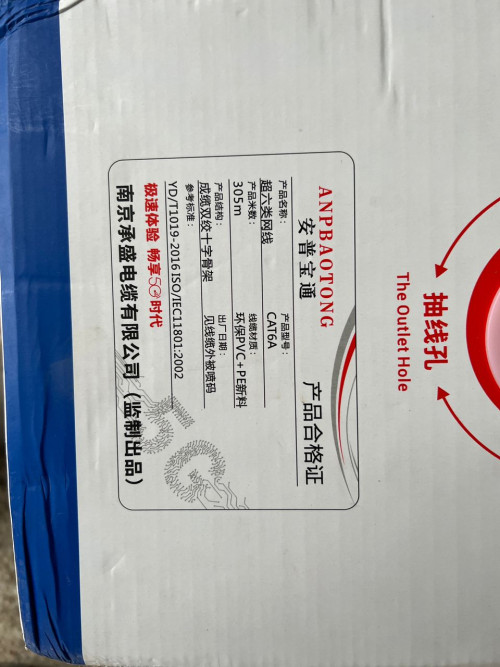
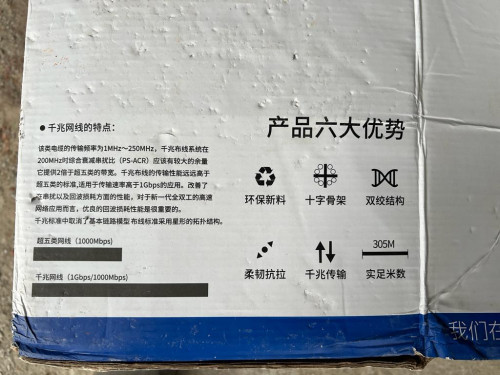
Just be careful when buying technical stuff on taobao. You need to know what you are buying and the exact details. For example, CAT 6A in taobao is called “super six” translated. Proper CAT 6A should be > 250Mhz frequency, lesser than that is “CAT 6 standard”. I bought a CAT 6A with 200Mhz from taobao, at price slightly than branded copper CAT 6 in malaysia. And can terminate with just usual cat 6 RJ45 connectors. Cat 6A (or at least shielded ones) and 7 need thicker ones.

user posted image
user posted image
Jessica JM.
post Jan 2 2023, 10:35 PM

Getting Started
**
Junior Member
122 posts

Joined: Feb 2022
QUOTE(idealhometech @ Jan 2 2023, 03:27 PM)
AP mean Access Point, something like router, for WIFI.
It need connect via LAN Cable to Main Router.
*
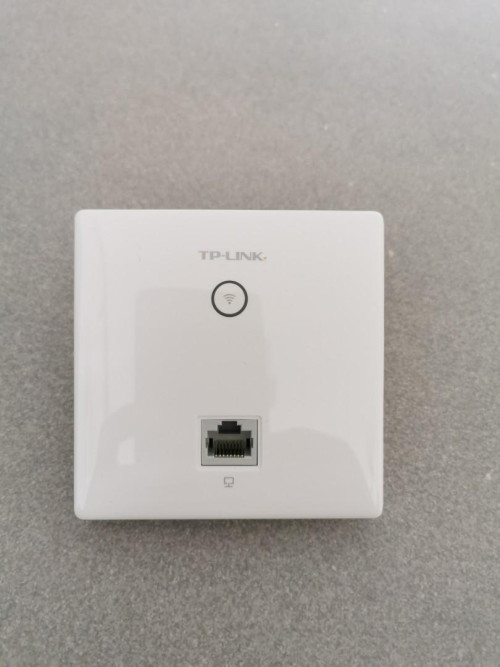
user posted image
Thanks.
Do you mean port like this that attached on wall?
And is that consider a mesh wifi on the photo?
Jessica JM.
post Jan 2 2023, 10:36 PM

Getting Started
**
Junior Member
122 posts

Joined: Feb 2022
QUOTE(Minolta @ Jan 2 2023, 09:41 PM)
Just be careful when buying technical stuff on taobao. You need to know what you are buying and the exact details. For example, CAT 6A in taobao is called “super six” translated. Proper CAT 6A should be > 250Mhz frequency, lesser than that is “CAT 6 standard”. I bought a CAT 6A with 200Mhz from taobao, at price slightly than branded copper CAT 6 in malaysia. And can terminate with just usual cat 6 RJ45 connectors. Cat 6A (or at least shielded ones) and 7 need thicker ones.

user posted image
user posted image
*
Thanks. I'll take note on this.
How much you bought for the cable?
acbc
post Jan 2 2023, 10:50 PM

Look at all my stars!!
*******
Senior Member
9,048 posts

Joined: Jan 2003
LAN points more stable and u can connect all the mesh slaves to it. Faster too. Wireless very unpredictable and unstable depending on the number of obstacles.
teslaman
post Jan 2 2023, 10:51 PM

Regular
******
Senior Member
1,154 posts

Joined: Oct 2021
QUOTE(hendry91 @ Aug 4 2020, 09:46 PM)
I am renovating my double storey house, thinking how to make the wifi full coverage in my house.

Should I pull the LAN(cat 6) cable on each point? Or I should use Mesh network instead of pull cable? Which one is more stable and useful in the future?
*
LAN for speed and low latency
Jessica JM.
post Jan 2 2023, 11:16 PM

Getting Started
**
Junior Member
122 posts

Joined: Feb 2022
QUOTE(acbc @ Jan 2 2023, 10:50 PM)
LAN points more stable and u can connect all the mesh slaves to it. Faster too. Wireless very unpredictable and unstable depending on the number of obstacles.
*
I’m sorry but could you elaborate more?

Do you mean I should install LAN point at each major area of my house, and install mesh router by using the LAN point?
NO1K
post Jan 2 2023, 11:25 PM

Getting Started
**
Junior Member
68 posts

Joined: Jul 2022
QUOTE(hendry91 @ Aug 4 2020, 10:14 PM)
But Mesh Wifi look so powerful nowadays, it can cover whole house actually.
I can't see why need a LAN if using mesh wifi, anyone?
*
Mesh wifi sounds so geng, but in the end still use wifi.

Wired > wireless

I was using mesh wifi 6, Maxis 300Mbps at first floor (need to be near to router to get full speed)

Mesh to ground floor 130Mbps only.

Now I am planning to pull cat6 cable from first floor to ground floor 2nd router (support easymesh) , PC + tv box + PS4 all connect to 2nd router.

Mesh is overprice for the performance (although might be useful for some who don't want drilling or cables can be seen)
Jessica JM.
post Jan 3 2023, 01:10 AM

Getting Started
**
Junior Member
122 posts

Joined: Feb 2022
QUOTE(NO1K @ Jan 2 2023, 11:25 PM)
Mesh wifi sounds so geng, but in the end still use wifi.

Wired > wireless

I was using mesh wifi 6, Maxis 300Mbps at first floor (need to be near to router to get full speed)

Mesh to ground floor 130Mbps only.

Now I am planning to pull cat6 cable from first floor to ground floor 2nd router (support easymesh) , PC + tv box + PS4 all connect to 2nd router.

Mesh is overprice for the performance (although might be useful for some who don't want drilling or cables can be seen)
*
I’m currently doing renovation for my house and thinking the internet issue.
Can you advise?

My house is corner lot three storey, beside mobile devices, and for sure smart tv and surveillance system will use the internet as well.
what can I do so that I can enjoy the maximum signal around the home (no interruption for video call or survikkeage
stormer.lyn
post Jan 3 2023, 07:31 AM

Regular
******
Senior Member
1,132 posts

Joined: Apr 2014
From: Shah Alam, Selangor
QUOTE(Jessica JM. @ Jan 3 2023, 01:10 AM)
I’m currently doing renovation for my house and thinking the internet issue.
Can you advise?

My house is corner lot three storey, beside mobile devices, and for sure smart tv and surveillance system will use the internet as well.
what can I do so that I can enjoy the maximum signal around the home (no interruption for video call or survikkeage
*
A wired connection is the best connection there is when considering signal strength and integrity. While still on renovations, why not run a set of Cat 6 (or better) from each floor (make sure there is a power socket at this floor location) back to where you are planning your incoming internet termination?
hihihehe
post Jan 3 2023, 09:49 AM

10k Club
********
All Stars
13,789 posts

Joined: Jan 2006
From: stress & confuse world


how about using those power adapter with ethernet port? they are no difference with mesh wifi performance right?
acbc
post Jan 3 2023, 10:01 AM

Look at all my stars!!
*******
Senior Member
9,048 posts

Joined: Jan 2003
QUOTE(Jessica JM. @ Jan 2 2023, 11:16 PM)
I’m sorry but could you elaborate more?

Do you mean I should install LAN point at each major area of my house, and install mesh router by using the LAN point?
*
Every mesh slave units has a LAN port for Ethernet connection.

Mesh is good for people who don't want to renovate but the speed performance depends on the obstructions inside the apartment. If too many walls, the speed to drop.

Since you're renovating, better add a LAN socket for each room or area. That way, u will future proof the property.

Once done, u just connect the slave units to common area LAN sockets like hallways or whichever blind spots.
Jessica JM.
post Jan 3 2023, 12:32 PM

Getting Started
**
Junior Member
122 posts

Joined: Feb 2022
QUOTE(stormer.lyn @ Jan 3 2023, 07:31 AM)
A wired connection is the best connection there is when considering signal strength and integrity. While still on renovations, why not run a set of Cat 6 (or better) from each floor (make sure there is a power socket at this floor location) back to where you are planning your incoming internet termination?
*
QUOTE(hihihehe @ Jan 3 2023, 09:49 AM)
how about using those power adapter with ethernet port? they are no difference with mesh wifi performance right?
*
QUOTE(acbc @ Jan 3 2023, 10:01 AM)
Every mesh slave units has a LAN port for Ethernet connection.

Mesh is good for people who don't want to renovate but the speed performance depends on the obstructions inside the apartment. If too many walls, the speed to drop.

Since you're renovating, better add a LAN socket for each room or area. That way, u will future proof the property.

Once done, u just connect the slave units to common area LAN sockets like hallways or whichever blind spots.
*
Sorry guys, but I'm still don't get it.

There is no problem I can add LAN point for important area at my house since renovation now, but most of our devices using wifi connection (like mobile and iPad).
In that case, what should I do to ensure the entire house have same strength of wifi (let's say to avoid disconnection video call / streaming from living room to kitchen)
acbc
post Jan 3 2023, 12:54 PM

Look at all my stars!!
*******
Senior Member
9,048 posts

Joined: Jan 2003
QUOTE(Jessica JM. @ Jan 3 2023, 12:32 PM)
Sorry guys, but I'm still don't get it.

There is no problem I can add LAN point for important area at my house since renovation now, but most of our devices using wifi connection (like mobile and iPad).
In that case, what should I do to ensure the entire house have same strength of wifi (let's say to avoid disconnection video call / streaming from living room to kitchen)
*
Simple explanation? Just do it!

More technical explanation? The internet performance will be better for both file transfers and Internet connectivity

Just make sure every room has 1 LAN socket. All the sockets will then go to a centralised location (example, the hall next to the fibre socket).

Now, the primary mesh will connect to the fibre modem and 1 cable to the hall LAN socket. The wireless signal is enough to cover the hall, kitchen and common bathrooms.

Next, the slave mesh (2 units) connect to B1 and B2 LAN sockets. This will cover the remaining of the blind spots.

Typically, those for opt for mesh will link both primary and slave via WiFi but the performance varies depending on the property itself. If too many wall, the performance will drop.

When each room has its own LAN sockets, u can move the slave mesh until the performance is satisfactory.

Slave meshes connect via LAN cables will be more stable and less latencies.

Once done, the WiFi signals will be much stronger and seamless when moving from 1 area to another.

bigred
post Jan 3 2023, 02:46 PM

Getting Started
**
Junior Member
210 posts

Joined: Jun 2008
Power over ethernet is still not as fast as LAN and not as stable.

There is also an issue if your house has 3-phase wiring - ifthe electrical wiring is on a different phase, the data can't reach the 2 points


QUOTE(hihihehe @ Jan 3 2023, 09:49 AM)
how about using those power adapter with ethernet port? they are no difference with mesh wifi performance right?
*
bigred
post Jan 3 2023, 02:52 PM

Getting Started
**
Junior Member
210 posts

Joined: Jun 2008
1. Decide where your Unifi / MAXIS modem will be located (usually ground floor)
2. Then decide where you want your Access Point to be (rule of thumb would be 1 floor, 1 Access point). These would usually be in the general area (e.g. Living room, Family room on Level 1, etc)
3. Now add additional devices that might use the LAN point (e.g. SmartTV, AppleTV ,CCTV camera, MFP printers) - at this part add more LAN points to the location
4. Make sure to have sufficient electrical socket at the LAN points (the devices will also need electrical to run them)


QUOTE(Jessica JM. @ Jan 3 2023, 12:32 PM)
Sorry guys, but I'm still don't get it.

There is no problem I can add LAN point for important area at my house since renovation now, but most of our devices using wifi connection (like mobile and iPad).
In that case, what should I do to ensure the entire house have same strength of wifi (let's say to avoid disconnection video call / streaming from living room to kitchen)
*
idealhometech
post Jan 3 2023, 11:12 PM

NCS
*****
Senior Member
949 posts

Joined: Oct 2010
From: Yen Lee NCS Enterprise (Seri Kembangan)
QUOTE(Jessica JM. @ Jan 2 2023, 10:35 PM)
user posted image
Thanks.
Do you mean port like this that attached on wall?
And is that consider a mesh wifi on the photo?
*
This also 1 type AP.
zheilwane
post Jan 4 2023, 05:22 PM

Look at all my stars!!
*******
Senior Member
4,184 posts

Joined: Jan 2008
From: Builders Hardware Enterprise 0362572412
jus to share how i done mine.

3 storey shop, access point downstairs (UNIFI ROUTER) connect to mesh, then lan cable go up 3rd storey and connect into another mesh. LAN to LAN mesh connection i get almost full speed even at 3rd floor. 100mbps as tested speedtest

Using Deco M4 and also tp link tl-sg108

This post has been edited by zheilwane: Jan 4 2023, 05:24 PM
rikiraikonnen
post Jan 25 2023, 12:47 PM

New Member
*
Junior Member
35 posts

Joined: Feb 2010
You need to check if brand support cable backhaul for mesh. I think ASUS aimesh supports cable backhaul. If i’m not mistaken, i stand corrected, for tplink mesh, it has to be wireless backhaul to achieve mesh capability (same ssid), if you use cable backhaul then the 2nd unit will work like a normal AP (different SSID).
ongss
post Jan 26 2023, 03:19 PM

Casual
***
Junior Member
426 posts

Joined: Jun 2008


QUOTE(bigred @ Jan 3 2023, 02:46 PM)
Power over ethernet is still not as fast as LAN and not as stable. 

There is also an issue if your house has 3-phase wiring - ifthe electrical wiring is on a different phase, the data can't reach the 2 points
*
Opp, this is new to me.

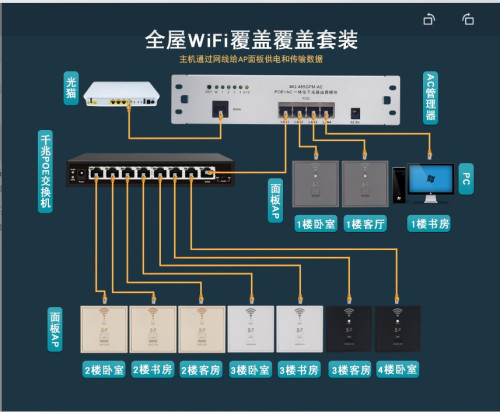
I just bought one POE router, two POE switches and 10 AP (RJ Socket with WIFI and powered by POE) for a 3 storeys house. So, everyone bedrooms and common areas, I will have LAN points for PC and WIFI for other devices. I gave my house layout and the seller suggested the solution to me. He did not tell me 3 phase would impact the network. Next month I will see the result, finger crossed.

user posted image
GOPI56
post Jan 26 2023, 03:23 PM

Regular
******
Senior Member
1,494 posts

Joined: Dec 2012
LAN cables are the best.

Install a router and switch rack too.
Keatsan
post Jan 27 2023, 06:48 PM

If it ain't broke, don't 6ix it
******
Senior Member
1,218 posts

Joined: Jan 2010
From: Today 06.09 am
Perhaps I can add in some info on how I did for my network since I renovated my home.

I had all Cat 6 cables pull all around the house. All cables will route to a location in store room.

Ordered many wall faceplate for the cat 6 with easy plug and play keystone.

Faceplate link - Lazada Link
Keystone Cat 6 - Lazada Link

Keystone jack + faceplate = plug and play.
I have a PoE switch in the store room and it can also power IP Cam as well. You may need to purchase 48v to 12v PoE splitter (waterproof optional) for the CCTV.

Use 3 AP for the whole house, and it's able to cover all the dead spots.
Each room has its own LAN wall socket for full gigabit connectivity.

This post has been edited by Keatsan: Jan 28 2023, 01:56 AM
Minolta
post Jan 27 2023, 08:01 PM

Look at all my stars!!
*******
Senior Member
2,292 posts

Joined: Jan 2003
QUOTE(ongss @ Jan 26 2023, 03:19 PM)
Opp, this is new to me.

I just bought one POE router, two POE switches and 10 AP (RJ Socket with WIFI and powered by POE) for a 3 storeys house. So, everyone bedrooms and common areas, I will have LAN points for PC and WIFI for other devices. I gave my house layout and the seller suggested the solution to me. He did not tell me 3 phase would impact the network. Next month I will see the result, finger crossed.

user posted image
*
I think he meant "powerline ethernet" rather than "power over ethernet" biggrin.gif
stormer.lyn
post Jan 27 2023, 08:16 PM

Regular
******
Senior Member
1,132 posts

Joined: Apr 2014
From: Shah Alam, Selangor
QUOTE(bigred @ Jan 3 2023, 02:46 PM)
Power over ethernet is still not as fast as LAN and not as stable. 

There is also an issue if your house has 3-phase wiring - ifthe electrical wiring is on a different phase, the data can't reach the 2 points
*
Power over ethernet =/= Ethernet over powerline
ongss
post Jan 28 2023, 09:53 PM

Casual
***
Junior Member
426 posts

Joined: Jun 2008


QUOTE(Minolta @ Jan 27 2023, 08:01 PM)
I think he meant "powerline ethernet" rather than "power over ethernet" biggrin.gif
*
Thanks for clarification. I actually contacted the seller and he assured me the AP sockets he sold operate based on DC supplies from teh POE switches and should not be impacted by AC power supplies.


Change to:
| Lo-Fi Version
0.5405sec    0.73    5 queries    GZIP Disabled
Time is now: 10th December 2025 - 04:29 AM