
Welcome Guest ( Log In | Register )

Outline · [ Standard ] · Linear+

Tech Support Unifi not getting full speed 500mbps, DIR-868L slow WAN speed

views
     
TSneato4u
post Jul 27 2020, 03:39 PM, updated 6y ago

Cha La, Head Cha La!
******
Senior Member
1,664 posts

Joined: Jan 2003
From: Ipoh

Hi guys,

I tried searching for a solution for this but could not get any.

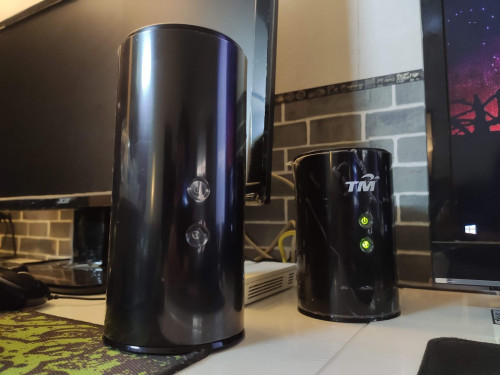
Just bought DIR-868L AC1750 to replace the old stock Unifi DIR-850L AC1200.
FYI running on firmware 1.22SHC
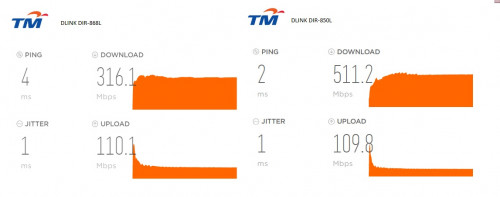
Everything works but I only get maximum 350mbps download on 868L (tested on http://speedtest.tm.com.my)
When tested with DIR-850L I get 500+mbps download.
user posted image

I used Cat5e cable for both WAN and LAN1 to PC.
Tried on another PC, same result.
Have reset router, same result.
Have even swapped this router with another DIR-868L router - that one gave me slower speed around 250mbps (that one running on older 1.09SHC)

Appreciate the advice here, especially from other 868L users if any.
user posted image

This post has been edited by neato4u: Jul 27 2020, 04:39 PM
TSneato4u
post Jul 27 2020, 04:05 PM

Cha La, Head Cha La!
******
Senior Member
1,664 posts

Joined: Jan 2003
From: Ipoh

mpyw I tried Firefox and Chrome, both giving me 350mbps download (chrome is bit slower around 315mbps).

Did a live chat with Dlink Malaysia, they checked my FW which is current 1.22FW and asked me to reset the router. That didn't do anything as well. And the fact this is the 2nd router I had issues with slow WAN speed, really losing hope a bit here. The rep did mentioned router should support 1000mbps WAN.
TSneato4u
post Jul 27 2020, 11:00 PM

Cha La, Head Cha La!
******
Senior Member
1,664 posts

Joined: Jan 2003
From: Ipoh

JohnLai thanks for your input but I dont think it's anything to do with CPU throttling here. I have 2 i5 2400, i7 7700 on 8GB DDR3 and DDR4 respectively + SSD, runs on gigabit LAN and Cat 5e cables.

As soon as I switch back to the old DIR850L I'm getting 500mbps on LAN.

I'm not sure how to find NAT acceleration on 868L, how do you do this?

No QOS enabled as well.
TSneato4u
post Jul 28 2020, 08:07 PM

Cha La, Head Cha La!
******
Senior Member
1,664 posts

Joined: Jan 2003
From: Ipoh

JohnLai well reset didnt help.

I went back to shop and unfortunately they didnt have the means to test this issue. Offered me to replace with another router but I dont want to burn my budget.

Finding friends who have at least 500mbps broadband subscription to try this at their place now and see if I can replicate the issue. Else, I may sell this off as incompatible for my usage. edit: already listed this in garage sale, lazy to troubleshoot aldy

It is a brand new unit with 1 year warranty.

This post has been edited by neato4u: Jul 28 2020, 09:23 PM
TSneato4u
post Jul 28 2020, 09:20 PM

Cha La, Head Cha La!
******
Senior Member
1,664 posts

Joined: Jan 2003
From: Ipoh

QUOTE(ldragon @ Jul 28 2020, 08:15 PM)
test with CAT 6 cable
*
Doubting the Cat5e? Its a gigabit cable, and already proven achieved 500+mbps on the old router smile.gif

Anyway I dont have any Cat6 but plenty of Cat5e and tested with several of them. Theres even a Cat5e cable that comes with the router, tested with that still stuck at 350mbps.

This post has been edited by neato4u: Jul 28 2020, 09:22 PM
TSneato4u
post Jul 29 2020, 07:14 AM

Cha La, Head Cha La!
******
Senior Member
1,664 posts

Joined: Jan 2003
From: Ipoh

QUOTE(ldragon @ Jul 28 2020, 11:51 PM)
Get a certified cable just to eliminate any possible issues. Also check if there is an options to enable hardware accelerated NAT etc
*
Why are you doubting the cable when it can reach 500+mbps on the old router. This alone proves that it is sufficient to handle that transfer speed.

I cant find NAT acceleration on the 868L unfortunately.
TSneato4u
post Aug 3 2020, 10:16 AM

Cha La, Head Cha La!
******
Senior Member
1,664 posts

Joined: Jan 2003
From: Ipoh

Ridiculous CPU and NVME are overrated here.
There is no need for a high spec rig, we are talking about 500mbps not 500MB/s here. One thing for sure you need is a gigabit LAN.

My old i5 2nd gen can achieve 500+mbps without a sweat, it is not a CPU or HDD bottleneck issue here. The router itself have a dual core CPU (if Im not mistaken) to handle the process.

Anyway if anyone lives near PJ with unifi 500mbps above plan do let me know so I can carry router over to test.


Change to:
| Lo-Fi Version
0.0181sec    0.39    6 queries    GZIP Disabled
Time is now: 15th December 2025 - 10:33 AM