

Attached thumbnail(s)

Replacement of Hp omen battery, Having trouble replacing
|
|
 Jul 15 2020, 03:00 AM, updated 6y ago Jul 15 2020, 03:00 AM, updated 6y ago
Show posts by this member only | IPv6 | Post
#1
|
 
Probation
4 posts Joined: Jul 2020 
|
I have a serious problem recently I just change my hp omen dc0094tx battery from SR03XL to a SR04XL, but my laptop does not recognise the battery as compatible why is that?
Attached thumbnail(s)
|
|
|
|
|
|
Jul 15 2020, 07:11 AM
Show posts by this member only | IPv6 | Post
#2
|
|
Junior Member
181 posts Joined: Jul 2019
|
Seems like the battery is not original part, you use 3rd party battery?
It still works, just that quick charge is disabled I think |
|
|
Jul 15 2020, 09:43 AM
Show posts by this member only | Post
#3
|
|
Probation
4 posts Joined: Jul 2020
|
QUOTE(tiggywombat @ Jul 15 2020, 07:11 AM) Seems like the battery is not original part, you use 3rd party battery? It is an original HP battery, I try updating my BIOS and see if it worksIt still works, just that quick charge is disabled I think  |
|
|
Jul 15 2020, 11:03 AM
Show posts by this member only | Post
#4
|

All Stars
14,909 posts Joined: Jul 2005 
|
1. Why did you change from SR03XL to SR04XL?
2. How sure are you that the replacement battery you bought is original from HP? Did you buy it from HP? |
|
|
Jul 15 2020, 12:19 PM
Show posts by this member only | Post
#5
|
|
Senior Member
874 posts Joined: Aug 2006
|
ori HP battery rm500 plus... in the end i just bought OEM fr lazada rm110... so far so good.... hope can last....
|
|
|
Jul 15 2020, 12:47 PM
Show posts by this member only | Post
#6
|

Senior Member
6,733 posts Joined: Jan 2003 From: Zion 
|
YAAAAA!!!!! I kena this before. Exactly HP Gaming laptop. The battery model have to be exact model. Cannot use another model even though the mounting point is same. Confirm OEM battery can use so long model/ part number is same.
This post has been edited by netmatrix: Jul 15 2020, 12:48 PM |
|
|
|
|
|
Jul 15 2020, 03:27 PM
Show posts by this member only | Post
#7
|
|
Probation
4 posts Joined: Jul 2020
|
QUOTE(sHawTY @ Jul 15 2020, 11:03 AM) 1. Why did you change from SR03XL to SR04XL? I look it up and saw that they use the same pin 2. How sure are you that the replacement battery you bought is original from HP? Did you buy it from HP?  , too bad I need to change back la , too bad I need to change back la |
|
|
Jul 15 2020, 03:28 PM
Show posts by this member only | Post
#8
|
|
Probation
4 posts Joined: Jul 2020
|
QUOTE(netmatrix @ Jul 15 2020, 12:47 PM) YAAAAA!!!!! I kena this before. Exactly HP Gaming laptop. The battery model have to be exact model. Cannot use another model even though the mounting point is same. Confirm OEM battery can use so long model/ part number is same. Really?!?! Why la HP this can't they just accomodate a different model. Haiya wasting my time only la |
|
|
Jul 15 2020, 07:28 PM
Show posts by this member only | Post
#9
|
|
Senior Member
6,733 posts Joined: Jan 2003 From: Zion
|
QUOTE(HelloFoxxyMeow @ Jul 15 2020, 03:28 PM) Really?!?! Why la HP this can't they just accomodate a different model. Haiya wasting my time only la I ain't bullshatting. This is what i encountered trying to be smart ass, September last year.  Error after changing to new battery. 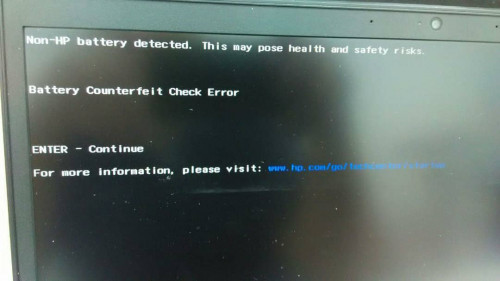 Original in machine battery, but 3 cells below already bulging. 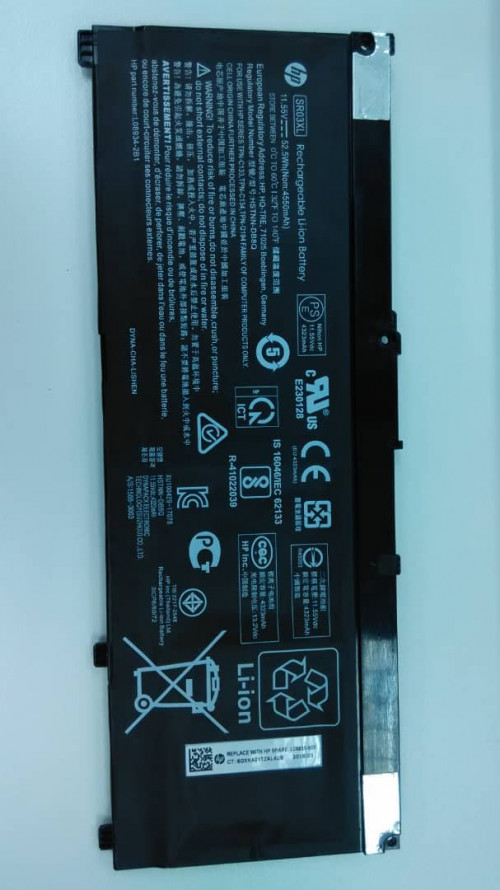 OEM replacement that is not correct model.  I managed to get it replaced with the correct model & solved it though. I tried to check using their battery diagnostics software & calibrating. I forgot to take screen shot of this. Some things pass & some things failed. But every time you bot the laptop, you will get that counterfeit battery message. You can see the built quality of the OEM battery and the original one. (Ignore the models) Ori battery sticker is properly applied flat. The OEM one isn't. The replacement OEM that i got also had badly applied sticker. But it works and the counterfeit message did not appear anymore. This post has been edited by netmatrix: Jul 15 2020, 07:34 PM |
|
|
Jul 17 2020, 10:56 AM
Show posts by this member only | IPv6 | Post
#10
|
|
Junior Member
182 posts Joined: Aug 2017
|
Hi. Can the 'Non-HP Battery detected' message be removed or resolved at the BIOS level (disable it via the BIOS)?
|
|
|
Jul 17 2020, 11:08 AM
|
|
All Stars
14,909 posts Joined: Jul 2005
|
QUOTE(toffy @ Jul 17 2020, 10:56 AM) Hi. Can the 'Non-HP Battery detected' message be removed or resolved at the BIOS level (disable it via the BIOS)? No |
|
|
Jul 17 2020, 11:38 AM
Show posts by this member only | IPv6 | Post
#12
|
|
Junior Member
182 posts Joined: Aug 2017
|
QUOTE(sHawTY @ Jul 17 2020, 11:08 AM) No Oh..... This means if the battery works ok, we just need to live with it (the Non-hp batt message) and ignore the message every time the message appears when the notebook is booted up? |
|
|
Jul 17 2020, 02:39 PM
|
|
All Stars
14,909 posts Joined: Jul 2005
|
QUOTE(toffy @ Jul 17 2020, 11:38 AM) Oh..... This means if the battery works ok, we just need to live with it (the Non-hp batt message) and ignore the message every time the message appears when the notebook is booted up? Yes |
|
|
Jul 17 2020, 03:39 PM
Show posts by this member only | IPv6 | Post
#14
|
|
Junior Member
182 posts Joined: Aug 2017
|
QUOTE(sHawTY @ Jul 17 2020, 02:39 PM) Yes Ok, will do that. Thanks for the advice! |
| Change to: |  0.0240sec 0.0240sec
 0.80 0.80
 6 queries 6 queries
 GZIP Disabled GZIP Disabled
Time is now: 14th December 2025 - 12:12 AM |
 Quote
Quote