Outline ·
[ Standard ] ·
Linear+
akamai.net in win 10, Consuming high data usage
|
TSMrRemz P
|
 Jul 14 2020, 09:45 PM, updated 6y ago Jul 14 2020, 09:45 PM, updated 6y ago
|
New Member


|
I'm using my mobile phone as thetering hotspot for my PC.
Since last week I start noticed that my internet quota empty very2 fast. 1GB can only last for an hour... Even I'm not surfing the internet at all. Just connecting PC to the internet with out doing anything to the PC.
I try downloading something from the internet... Even the file size is just 4MB, download estimated to 2 hours. At the same time I monitor my data consumption from my phone. The indicator indicated a very fast download and meter usage already reach 500MB with in 30 seconds.
After Googling, I've installed GlassWire. It's help me to detect which apps consumed big data from my PC. Then I discovered "akamai.net". It's eat my data packet a lot. I do reinstalling windows, but no luck! I still can get rid of akamai.net. This problem never happen previously. Any one could help me on this? TQ guys.
|
|
|
|
|
|
cassian948
|
Jul 14 2020, 10:01 PM
|
|
|
Akamai also have CDN services, which mean some company use akamai for their software. You can block akamai.net in your "host" file to save your mobile data if you're sure it won't interfere with your productivity.
Eg. Adobe, Ookla, etc.
This post has been edited by cassian948: Jul 14 2020, 10:34 PM
|
|
|
|
|
|
zemega
|
Jul 14 2020, 10:07 PM
|
|
|
You should check your windows 10 setting. Particularly the setting where Microsoft uses your bandwidth to pass update to other computers. It's part of 'volunteers' P2P update system. You just didn't know you 'volunteered'.
|
|
|
|
|
|
abu.shofwan
|
Jul 14 2020, 11:12 PM
|
|
|
After googling, i found this. Attached thumbnail(s)
|
|
|
|
|
|
Ewww!
|
Jul 14 2020, 11:30 PM
|
|
|
QUOTE(zemega @ Jul 14 2020, 10:07 PM) You should check your windows 10 setting. Particularly the setting where Microsoft uses your bandwidth to pass update to other computers. It's part of 'volunteers' P2P update system. You just didn't know you 'volunteered'. Wow! Thank you for this, man I'm gonna have to check mine. |
|
|
|
|
|
TSMrRemz P
|
Jul 15 2020, 01:00 AM
|
New Member
|
QUOTE(cassian948 @ Jul 14 2020, 10:01 PM) Akamai also have CDN services, which mean some company use akamai for their software. You can block akamai.net in your "host" file to save your mobile data if you're sure it won't interfere with your productivity. Eg. Adobe, Ookla, etc. Thanks for your reply. I'll try this first. Then I'll update the result here. |
|
|
|
|
|
1024kbps
|
Jul 15 2020, 01:49 AM
|
|
|
set your network as metered... background service will be limited just like data saver on oyur mobile phone... duh
|
|
|
|
|
|
TSMrRemz P
|
Jul 15 2020, 07:22 AM
|
New Member
|
QUOTE(zemega @ Jul 14 2020, 10:07 PM) You should check your windows 10 setting. Particularly the setting where Microsoft uses your bandwidth to pass update to other computers. It's part of 'volunteers' P2P update system. You just didn't know you 'volunteered'. I did cx everything. After reinstalling Win10 & did a review, it's still there. Then I installed Win7. Problem solve. But I'm facing other problem... Mostly software I use need Win10 to get it's functioning. Then reinstall again Win10. This time I didn't use fast install mode. I use customize install. I do cx and read everything before clicking next button. But in the end... The problem still occurred. |
|
|
|
|
|
cassian948
|
Jul 15 2020, 07:24 AM
|
|
|
QUOTE(MrRemz @ Jul 15 2020, 07:22 AM) I did cx everything. After reinstalling Win10 & did a review, it's still there. Then I installed Win7. Problem solve. But I'm facing other problem... Mostly software I use need Win10 to get it's functioning. Then reinstall again Win10. This time I didn't use fast install mode. I use customize install. I do cx and read everything before clicking next button. But in the end... The problem still occurred. What you could do is pinpoint which application that use akamai.net, use resources monitor to check which application handle url destination for akamai.net and then, if that application access to Internet is safe to be blocked, then just block it. |
|
|
|
|
|
TSMrRemz P
|
Jul 22 2020, 05:15 PM
|
New Member
|
QUOTE(1024kbps @ Jul 15 2020, 01:49 AM) set your network as metered... background service will be limited just like data saver on oyur mobile phone... duh I did this... It's slow down consuming my data for 3 days only. After that it's starting again. It's drained my 1GB data in just 30 seconds. |
|
|
|
|
|
TSMrRemz P
|
Jul 22 2020, 05:18 PM
|
New Member
|
QUOTE(cassian948 @ Jul 15 2020, 07:24 AM) What you could do is pinpoint which application that use akamai.net, use resources monitor to check which application handle url destination for akamai.net and then, if that application access to Internet is safe to be blocked, then just block it. I do monitor. It's a clean windows installation with out any other software installed. Just install windows 10 + my DLink Device for WiFi connection. |
|
|
|
|
|
cassian948
|
Jul 22 2020, 06:36 PM
|
|
|
QUOTE(MrRemz @ Jul 22 2020, 05:18 PM) I do monitor. It's a clean windows installation with out any other software installed. Just install windows 10 + my DLink Device for WiFi connection. The issue is not with Windows 10, but your tethering. You can't tell Windows 10 to selectively connect to internet just because you have mobile data quota, Windows will self decide if any of its application need access to the internet. You said you've installed GlassWire, that application should provide you with enough information on what to do. 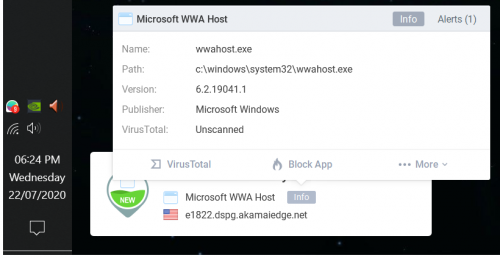 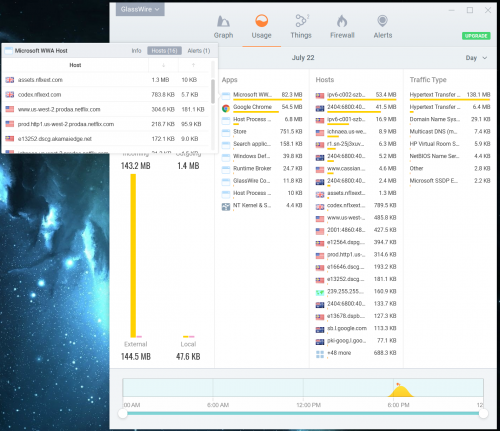 |
|
|
|
|



 Quote
Quote




 0.0161sec
 0.80
0.80
 6 queries
 GZIP Disabled