Outline ·
[ Standard ] ·
Linear+
NZXT H510 Elite case, First time PC builder need help
|
TSuniquexme
|
 Jul 8 2020, 11:42 PM, updated 6y ago Jul 8 2020, 11:42 PM, updated 6y ago
|

|
I am in the process of building my very first PC with MSI B450 Tomahawk Max and NZXT H510 Elite vase and have some issues on connecting the case wiring to Mobo: 1. F. Panel wire socket I use the supplied splitter instead as I am not sure if this Mobo JFP1 connection is the same but somehow it doesn’t have Reset Switch. I check on the F. Panel socket also total 6 wires Power LED, Power Switch and HDD LED. So meaning this case doesn’t comes with Reset switch? 2. Connecting the case fans and LED? The only cable I know how to connect is the SATA power that comes from the case fan/led module, 1 goes to my HDD and another to this case SATA socket. But I still saw 2 sockets hanging loose without connection, 1 seems to be the 4pins socket LED with a cap on and another 3pins socket seems to be the fan. Anyone knows how to connect this to motherboard? Image of this 2 sockets as attached. 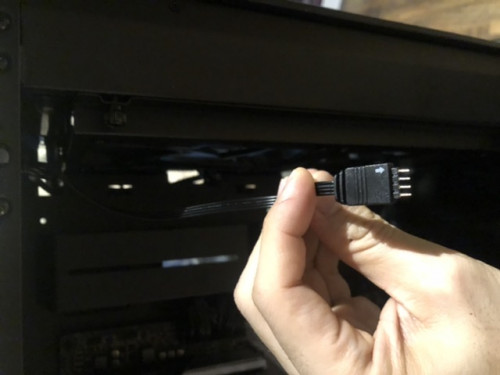 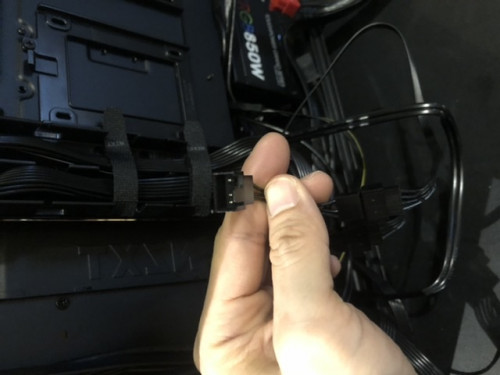 Thanks in advance |
|
|
|
|
|
Jusstatic
|
Nov 18 2020, 06:19 PM
|
Getting Started

|
QUOTE(uniquexme @ Jul 8 2020, 11:42 PM) I am in the process of building my very first PC with MSI B450 Tomahawk Max and NZXT H510 Elite vase and have some issues on connecting the case wiring to Mobo: 1. F. Panel wire socket I use the supplied splitter instead as I am not sure if this Mobo JFP1 connection is the same but somehow it doesn’t have Reset Switch. I check on the F. Panel socket also total 6 wires Power LED, Power Switch and HDD LED. So meaning this case doesn’t comes with Reset switch? 2. Connecting the case fans and LED? The only cable I know how to connect is the SATA power that comes from the case fan/led module, 1 goes to my HDD and another to this case SATA socket. But I still saw 2 sockets hanging loose without connection, 1 seems to be the 4pins socket LED with a cap on and another 3pins socket seems to be the fan. Anyone knows how to connect this to motherboard? Image of this 2 sockets as attached. Thanks in advance The case has no reset button, hence no reset switch. Hold the power button for 3s or more to reset. Its a pain I know  |
|
|
|
|
|
TSuniquexme
|
Nov 18 2020, 07:07 PM
|
|
|
QUOTE(Jusstatic @ Nov 18 2020, 06:19 PM) The case has no reset button, hence no reset switch. Hold the power button for 3s or more to reset. Its a pain I know Yup  |
|
|
|
|
|
krayden
|
Nov 19 2020, 08:34 AM
|
|
|
Here https://youtu.be/-2LOwV2Aa2UDaisy chain your fans and connect to the controllers 3pin fan input or mobo fan header Controller - >4pin output->mobo argb 4pin header. Plug in usb and sata Something like that. |
|
|
|
|
|
KleoZy
|
Nov 19 2020, 08:53 PM
|
Getting Started
|
QUOTE(uniquexme @ Jul 8 2020, 11:42 PM) I am in the process of building my very first PC with MSI B450 Tomahawk Max and NZXT H510 Elite vase and have some issues on connecting the case wiring to Mobo: 1. F. Panel wire socket I use the supplied splitter instead as I am not sure if this Mobo JFP1 connection is the same but somehow it doesn’t have Reset Switch. I check on the F. Panel socket also total 6 wires Power LED, Power Switch and HDD LED. So meaning this case doesn’t comes with Reset switch? 2. Connecting the case fans and LED? The only cable I know how to connect is the SATA power that comes from the case fan/led module, 1 goes to my HDD and another to this case SATA socket. But I still saw 2 sockets hanging loose without connection, 1 seems to be the 4pins socket LED with a cap on and another 3pins socket seems to be the fan. Anyone knows how to connect this to motherboard? Image of this 2 sockets as attached. Thanks in advance if you are to daisy chain your fans and the leds, please take note of your motherboard specification on how much ampere it can take. fan itself should have the rating of 0.00a and same goes to the LED ampere. if you do not understand what am saying you can always refer to this Fans to be daisy chained. https://youtu.be/BhVfXYeK8m8?t=756ignore about the Uni Fan controller, focus on the ampere of the motherboard against the fans. https://www.youtube.com/watch?v=QQHJUQvKwlY...=youtu.be&t=496 |
|
|
|
|



 Quote
Quote


 0.0155sec
 0.89
0.89
 5 queries
 GZIP Disabled