Outline ·
[ Standard ] ·
Linear+
Huawei WiFi AX3 3000 Mbps router
|
lawolf
|
 Jun 12 2020, 04:48 PM Jun 12 2020, 04:48 PM
|
New Member


|
QUOTE(SilentVampire @ Jun 12 2020, 09:00 AM) I'll answer both of your questions since you both want to know the same thing. Yes, the smart switch can set any VLAN tagging for any router including the China made one. See bro [Blacktubi] excellent tutorial on how to do so here: https://www.blacktubi.com/guide/make-any-ro...-work-on-unifi/. The cheapest smart switch would be the TP-Link TL-SG105E. Kepp in mind though, the China router have no local warranty, and any issues you have will require the router to be sent back to China for warranty claims.  i straight replace tm huawei onu . Currently i using huawei HS8145V , direct setting vlan tagging and straight dial pppoe from this device . No need smart switch . |
|
|
|
|
|
heidarren
|
Jun 12 2020, 05:33 PM
|
Getting Started
|
QUOTE(lawolf @ Jun 12 2020, 04:48 PM) i straight replace tm huawei onu . Currently i using huawei HS8145V , direct setting vlan tagging and straight dial pppoe from this device . No need smart switch . How do you setup this to replace onu? |
|
|
|
|
|
lawolf
|
Jun 16 2020, 11:41 AM
|
New Member
|
QUOTE(heidarren @ Jun 12 2020, 05:33 PM) How do you setup this to replace onu? ONU password you can retrieve from original tm huawei btu Tutorial can refer here : https://www.youtube.com/watch?v=AD2D5it_QIchttps://www.youtube.com/watch?v=4oDWCp0dB2c&t=67sThis post has been edited by lawolf: Jun 16 2020, 11:42 AM |
|
|
|
|
|
thankyou
|
Jun 16 2020, 12:07 PM
|
|
|
QUOTE(lawolf @ Jun 16 2020, 11:41 AM) I wonder is this the newer version of HG8240H where they no longer block the web access? The version I'm having do restrict access to all LAN ports. |
|
|
|
|
|
lawolf
|
Jun 16 2020, 12:11 PM
|
New Member
|
QUOTE(thankyou @ Jun 16 2020, 12:07 PM) I wonder is this the newer version of HG8240H where they no longer block the web access? The version I'm having do restrict access to all LAN ports. after reset you can access to web gui ,then retrieve the serial no and & onu . Then go to huawei hs8145v paste the serial no & onu password . Setup PPPoe and vlan tagging as usual . |
|
|
|
|
|
thankyou
|
Jun 16 2020, 12:14 PM
|
|
|
QUOTE(lawolf @ Jun 16 2020, 12:11 PM) after reset you can access to web gui ,then retrieve the serial no and & onu . Then go to huawei hs8145v paste the serial no & onu password . Setup PPPoe and vlan tagging as usual . Ah okay. after reset! Thank you. |
|
|
|
|
|
angelic88
|
Jun 25 2020, 10:52 PM
|
|
|
I just gotten this router today and setup according to the black tubi method
I got mine from taobao directly, so AX3 pro for just around rm200 ( the pro got better external signal amplifier do choose the pro version)
You will need a manged switch like Tp-link SG105E , or Mercury SG105Pro ( sub brand under Tplink ? look the same even the menu is a carbon copy but cheaper in taobao , around rm50)
following the guide of black tubi to setup the switch, however do note, if you plan to use the switch function, another cable from router need to be connected to the free port. This is due to different VLAN.
So my setup is port 5 to router WAN , port 2/3/4 as switch , port 1 from ONU. I skip IPTV port since i did not use it.
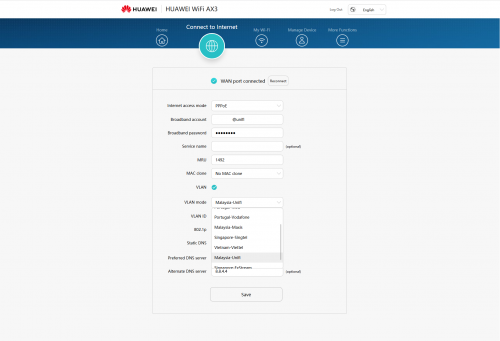
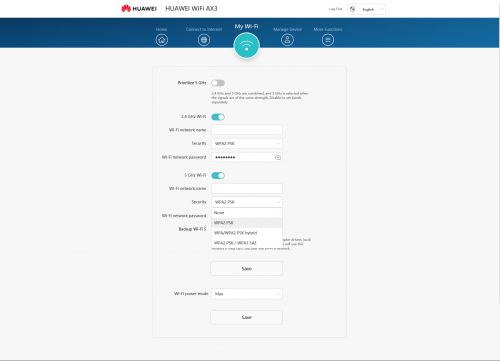
then connect port 1 to router , any port from router to pc , setup PPPoE (unifi acct + password) , setup Wifi as per normal and you are done.
the interface is rather simple , so there are not much mess around with. There are no CPU / temperate / client list like Asus , so its really basic. So I cannot tell how is the performance really like on high load.
You can translate to english after its connected to internet.
PS : there is the "user experience improvement program", like how facebook /google. It however state the data may be provide to government(china) if requested. Make sense in china , not in malaysia , so please turn that off.
This post has been edited by angelic88: Jun 25 2020, 11:00 PM
|
|
|
|
|
|
Morpheus2be
|
Jun 30 2020, 01:45 PM
|
|
|
Apparently OOKAS is bringing this via pre-order and ready for Unifi/Maxis. https://s.lazada.com.my/s.bHoww |
|
|
|
|
|
BenYeeHua
|
Jul 1 2020, 10:24 AM
|
|
|
And also Huawei Vmall. https://shop.huawei.com/my/mid-year-sale.htmlQUOTE HUAWEI Wifi AX3
No Free Gift
299 https://shop.huawei.com/my/notice-1121HUAWEI WIFI AX3 QUAD-CORE (WHITE) https://shop.huawei.com/my/product/huawei-wifi-ax3This post has been edited by BenYeeHua: Jul 1 2020, 10:25 AM |
|
|
|
|
|
SUSipohps3
|
Jul 2 2020, 02:30 AM
|
|
|
QUOTE(lawolf @ Jun 12 2020, 04:48 PM) i straight replace tm huawei onu . Currently i using huawei HS8145V , direct setting vlan tagging and straight dial pppoe from this device . No need smart switch . Good to know that there is actually optical modem and WiFi router 2-in-1 device  . Didn't know that there is such a device. Thought that optical modem is always separated from the router. However, this model don't support WiFi 6. QUOTE(Morpheus2be @ Jun 30 2020, 01:45 PM) Apparently OOKAS is bringing this via pre-order and ready for Unifi/Maxis. https://s.lazada.com.my/s.bHowwQUOTE(BenYeeHua @ Jul 1 2020, 10:24 AM) Interested to know what are the differences in the firmware compared to China version.  |
|
|
|
|
|
BenYeeHua
|
Jul 2 2020, 10:18 AM
|
|
|
QUOTE(ipohps3 @ Jul 2 2020, 02:30 AM) Interested to know what are the differences in the firmware compared to China version. Normally is higher wattage on WiFi and IPTV/VLAN support, with a few feature disable because of Malaysia law or lack of ROM size. The OOKAS is cheaper if you open using Lazada App and pay for the Deposit, which is RM 269. Also if you lucky, topup to Lazada wallet and get RM 77, well.  For Huawei Vmall, only lucky draw and official very fast shipping.  |
|
|
|
|
|
khainiz94
|
Jul 2 2020, 12:36 PM
|
|
|
Anyone here uses the Huawei WS5200 router?
Just want to ask, is the coverage comparable to my old Asus RT-N66U?
Got option to do static routes in the UI?
Want to replace it after using it for 5 years.
This post has been edited by khainiz94: Jul 2 2020, 12:37 PM
|
|
|
|
|
|
Alpha_Tay
|
Jul 2 2020, 08:26 PM
|
|
|
|
|
|
|
|
|
blacktubi
|
Jul 2 2020, 09:01 PM
|
-

|
I will be buying a unit and see how it compare against ASUS and TP-Link entry level Wi-Fi 6 router.
Since this is powered by Huawei's own HiSilicon, it's a totally unknown territory.
I used to try the China model and frankly speaking, it is slow.
|
|
|
|
|
|
Alpha_Tay
|
Jul 2 2020, 10:33 PM
|
|
|
|
|
|
|
|
|
mdzaboy
|
Jul 9 2020, 10:33 PM
|
|
|
|
|
|
|
|
|
TSamir.asyraf
|
Jul 10 2020, 07:08 AM
|
|
|
QUOTE(mdzaboy @ Jul 9 2020, 10:33 PM) Oh that's cool. I'm interested in knowing its sustained speed & heavy load performance. |
|
|
|
|
|
lawolf
|
Jul 10 2020, 09:00 AM
|
New Member
|
QUOTE(mdzaboy @ Jul 9 2020, 10:33 PM) wow global version support vlan tagging , dump your firmware bro . |
|
|
|
|
|
frozzbyte
|
Jul 10 2020, 01:17 PM
|
|
|
Also got the router yesterday. Setting it up was a breeze. Tested in few spot in the house, speed ok lah compared to the old TM router. Now my laptop can achieve max unifi speed on wifi. Before this max only 260 Mbps on wifi. What more you want from that price range kan.
|
|
|
|
|




 Quote
Quote






 0.0261sec
 1.38
1.38
 6 queries
 GZIP Disabled