

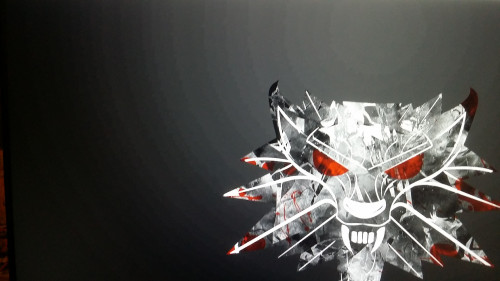
original wallpaper
https://i.imgur.com/UQLONOm.jpg
Monitor Banding Issue, Monitor Banding Issue - dell se2419hr
|
|
 May 4 2020, 04:07 AM, updated 6y ago May 4 2020, 04:07 AM, updated 6y ago
Show posts by this member only | IPv6 | Post
#1
|
 
Junior Member
125 posts Joined: Jun 2012 
|
Hi guys, wanted to ask is it normal to have colour banding like this?
original wallpaper https://i.imgur.com/UQLONOm.jpg |
|
|
|
|
|
May 4 2020, 12:18 PM
Show posts by this member only | IPv6 | Post
#2
|

Senior Member
1,596 posts Joined: Mar 2014 From: 75°26'11.6"S, 136°16'16.0"E 
|
not normal, because i don't see any banding issue from the source wallpaper.
first need to know your specs and stuffs, your monitor, your GPU etc. |
|
|
May 4 2020, 02:30 PM
Show posts by this member only | Post
#3
|
|
Junior Member
125 posts Joined: Jun 2012
|
QUOTE(lolzcalvin @ May 4 2020, 12:18 PM) not normal, because i don't see any banding issue from the source wallpaper. thx for reply. i am using dell se2419hr as a monitor for my acer laptop which has a old gt630m..first need to know your specs and stuffs, your monitor, your GPU etc.  the thing is i do a simple calibrate on lagrom.nl, and then the banding appear, if i use back monitor factory setting, no banding occur.. do u mind to snap a pic for the source viewed on your monitor? This post has been edited by miumiu1234: May 4 2020, 02:31 PM |
|
|
May 4 2020, 10:17 PM
Show posts by this member only | IPv6 | Post
#4
|
|
Senior Member
1,596 posts Joined: Mar 2014 From: 75°26'11.6"S, 136°16'16.0"E
|
QUOTE(miumiu1234 @ May 4 2020, 02:30 PM) thx for reply. i am using dell se2419hr as a monitor for my acer laptop which has a old gt630m.. ehh..i rechecked and found the banding originates from the picture itself. bad compression.the thing is i do a simple calibrate on lagrom.nl, and then the banding appear, if i use back monitor factory setting, no banding occur.. do u mind to snap a pic for the source viewed on your monitor? 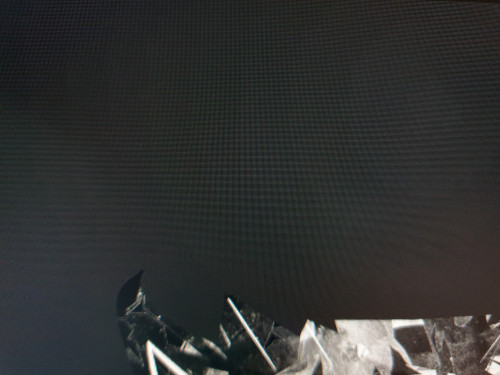 your "banding" issue is most likely incorrectly configured gamma/contrast |
|
|
May 4 2020, 11:29 PM
Show posts by this member only | IPv6 | Post
#5
|
|
Junior Member
125 posts Joined: Jun 2012
|
QUOTE(lolzcalvin @ May 4 2020, 10:17 PM) ehh..i rechecked and found the banding originates from the picture itself. bad compression. thx man, good to hear that, i reset to factory setting, just like yours, there is still a little banding, but the factory setting its way too dark, i guess i should have get a better monitor.. =(your "banding" issue is most likely incorrectly configured gamma/contrast |
|
|
May 11 2020, 09:19 PM
Show posts by this member only | Post
#6
|

Senior Member
2,661 posts Joined: Apr 2007
|
It is normal for lower to budget range TV and Monitor. Don't worry not a defect. Just enjoy using it
This post has been edited by pluginbaby: May 11 2020, 09:20 PM |
|
|
|
|
|
May 11 2020, 10:38 PM
Show posts by this member only | IPv6 | Post
#7
|
|
Junior Member
125 posts Joined: Jun 2012
|
QUOTE(pluginbaby @ May 11 2020, 09:19 PM) It is normal for lower to budget range TV and Monitor. Don't worry not a defect. Just enjoy using it ok man, thanks! |
|
|
May 12 2020, 11:32 PM
Show posts by this member only | IPv6 | Post
#8
|

Senior Member
2,004 posts Joined: Mar 2009 
|
I dont think problem is your monitor
I can see the banding in the wallpaper so the problem is low quality wallpaper. If you still doubt it try eizo monitor test https://www.eizo.be/monitor-test/ do gradient test and choose the steps to be 256 |
|
|
May 13 2020, 12:09 AM
Show posts by this member only | Post
#9
|

Senior Member
6,015 posts Joined: Feb 2007
|
Jpeg will reduce color channel and other filters to reduce the file size, if you want a higher quality wallpaper, search the one with compressed with PNG.
1440p with 89kb of file size from JPEG compression is really low, and JPEG is already 27 years old, its pretty safe to call it an ancient compression methon and guess what no body really cares except Google(webp). |
|
|
May 13 2020, 03:29 PM
|
|
Junior Member
125 posts Joined: Jun 2012
|
i think maybe its time to get a better monitor..
This post has been edited by miumiu1234: May 13 2020, 03:31 PM |
|
|
May 13 2020, 03:29 PM
|
|
Junior Member
125 posts Joined: Jun 2012
|
QUOTE(Patent @ May 12 2020, 11:32 PM) I dont think problem is your monitor I can see the banding in the wallpaper so the problem is low quality wallpaper. If you still doubt it try eizo monitor test https://www.eizo.be/monitor-test/ do gradient test and choose the steps to be 256 QUOTE(1024kbps @ May 13 2020, 12:09 AM) Jpeg will reduce color channel and other filters to reduce the file size, if you want a higher quality wallpaper, search the one with compressed with PNG. ok thx guys noted.1440p with 89kb of file size from JPEG compression is really low, and JPEG is already 27 years old, its pretty safe to call it an ancient compression methon and guess what no body really cares except Google(webp). |
|
|
May 13 2020, 08:28 PM
|
|
Senior Member
6,015 posts Joined: Feb 2007
|
QUOTE(miumiu1234 @ May 13 2020, 03:29 PM) i think maybe its time to get a better monitor.. Because of badly compressed wallpaper?  There are better way to differentiate a badly compressed wallpaper and a bad quality LCD. Dell is well known for its quality display. |
|
|
May 13 2020, 09:02 PM
Show posts by this member only | IPv6 | Post
#13
|
|
Junior Member
125 posts Joined: Jun 2012
|
QUOTE(1024kbps @ May 13 2020, 08:28 PM) Because of badly compressed wallpaper? of coz no man.. i always wanted to get a good monitor, not becoz of the banding, now don really have much banding now anyways.. =) There are better way to differentiate a badly compressed wallpaper and a bad quality LCD. Dell is well known for its quality display. |
| Change to: |  0.0179sec 0.0179sec
 0.71 0.71
 5 queries 5 queries
 GZIP Disabled GZIP Disabled
Time is now: 21st December 2025 - 04:04 PM |
 Quote
Quote