Outline ·
[ Standard ] ·
Linear+
Wise (Transferwise) Malaysia Discussion, v1.0
|
mushigen
|
 Sep 23 2023, 10:50 AM Sep 23 2023, 10:50 AM
|

|
Dear all, I signed up for Wise yesterday. Been a long time user of Bigpay but recent changes make it necessary to switch to Wise.
1) With the physical card, I chose my name to be written as Tan Ah Beng (example), but the digital card is written as Ah Beng Tan by default.
I can't find any way to change it to Tan Ah Beng. Is this the default and not customisable?
2) if I intend to link my Wise to say, Paypal, or shop at overseas online stores, which card should I use - digital or physical or it doesn't matter? I'm currently using Bigpay and it only has one card so this digital vs physical cards is something new to me.
3) If I intend to use the physical card for my holiday, say in Japan, do I need to convert to Yen or I can just top up with RM and it will auto convert when debiting my account?
4) assume I have RM5000 and 10,000 Yen in my account after partially converting some Yen. When I use the card in Japan to pay 9000 Yen, then another 2000 Yen in separate transactions, will it deduct the first 9k yen in my yen balance first, then another 1k yen+ RM for the second transaction?
TIA. I will still read through this thread for better understanding.
This post has been edited by mushigen: Sep 23 2023, 11:32 AM
|
|
|
|
|
|
mushigen
|
Sep 24 2023, 10:42 AM
|
|
|
QUOTE(BetterCallSaul @ Sep 23 2023, 11:47 AM) For 1) I believe you can't customise the digital card name as it is auto generated by Wise without input from the user. Or at least, that's my findings. For 2) I prefer to use digital for all online purchases, so that in the event the card details gets leaked, you can easily freeze / delete that digital card without compromising your physical card (you can still make physical purchases no worries). Furthermore, Wise allows you to create up to 3 digital cards, so you can create another digital card - suppose to pay for goods on an overseas online store - and delete the digital card after without affecting your regular e-commerce websites with your existing digital card. BigPay also supports what they call a virtual card, which is the same concept as Wise's digital card, with similar functions. For 3) No, you do not need to convert ahead of time and you can let it auto convert from RM to Yen. For me, I sometimes convert ahead of time for the purpose of budgeting, or if the currency I'm converting to is on the rise and want to lock in the "good rate" ahead of time. Thank you for taking the time to reply. Your reasonings for choosing digital card in Q2 certainly makes a lot of sense. If you don't mind my further asking, let's say I managed to lock in a good rate, say I converted 100,000 yen. Now, if I swipe the card in Jpn, will it automatically deduct from the Yen balance first, or Ringgit balance first? The reason for converting is getting a good rate, but it defeats the purpose if the Yen is not utilised first imo. |
|
|
|
|
|
mushigen
|
Sep 24 2023, 11:39 AM
|
|
|
QUOTE(BetterCallSaul @ Sep 24 2023, 11:05 AM) Yes, it will always use the Yen currency first. You may refer to the following image and the bullet points.  Thank you so much. I'll really need to read the FAQs first. |
|
|
|
|
|
mushigen
|
Sep 28 2023, 03:23 PM
|
|
|
Dear all,
I am new to Wise.
I had RM200+ and SGD10 in my WISE account. I used the virtual card to pay for a USD27 online transaction.
I realised WISE debited SGD10 and RM90+ to pay for this USD27 transaction. The SGD was in the form of (SGD0.50 in normal account and SGD9.50 in jar or vice-versa).
I expected WISE to deduct whatever RM balance first by default before touching the SGD since the transaction wasn't even in SGD in the first place?
Is this normal and is there any way I can set it to deduct RM first before touching other currency?
|
|
|
|
|
|
mushigen
|
Sep 28 2023, 07:29 PM
|
|
|
QUOTE(BetterCallSaul @ Sep 28 2023, 04:44 PM) As mentioned before, this image will answer your question. Basically it will automatically determine which is the best currency to convert from your available balances to help you save (In this case SGD rate to convert to USD is better than MYR). Subsequently, also mentioned in the image, you cannot set a preferred balance to deduct from. If you want to avoid this in the future, you have to convert to that targeted balance using your currency of choosing (MYR for example) before making the purchase. Thank you for your patience and reply. My bad. I thought the previous point was for physically swiping the card in say Jpn and so it deducts the Yen balance first, and not also for using the card online. Again I assumed it will always deduct my "home currency". This is because I learned from some forumners here about using Wise to "hedge" a currency. For example, Yen is low now and I intend to save up in Yen for my travel to Jpn next year. Kind of hard to do if Wise chooses by itself which currency to deduct first. |
|
|
|
|
|
mushigen
|
Sep 28 2023, 09:33 PM
|
|
|
QUOTE(Medufsaid @ Sep 28 2023, 08:00 PM) the answer is in black and white on wise website itself You can’t set a default or preferred balance to convert from.Thanks for the confirmation. Looks like I have to look for another way to store forex. |
|
|
|
|
|
mushigen
|
Sep 28 2023, 09:35 PM
|
|
|
QUOTE(ericlaiys @ Sep 28 2023, 07:32 PM) u keep all yen and no rm when using it. problem solved Need to pay conversion fee twice? RM to Yen, then Yen to settle amount that I spend? |
|
|
|
|
|
mushigen
|
May 23 2024, 03:09 PM
|
|
|
Dear All,
Anyone knows whether it's possible to open two WISE accounts (using dual apps in phone) per person?
Reason for doing so is:
I have a few monthly online transactions in USD and SGD through WISE. At the moment, WISE auto converts the transaction amounts to RM, which suits me well due to accounting purpose (I don't keep USD and SGD in this account as I don't want it to deduct these currencies first which makes accountability a headache).
However, I would like to have a second account just for forex "tikam game" - change MYR to SGD when SGD drops and change back this SGD to MYR if SGD strenghtens. Hence, it's important that these SGD or USD jars don't get spent automatically whenever I have an SGD or USD online transactions.
|
|
|
|
|
|
mushigen
|
May 23 2024, 03:31 PM
|
|
|
QUOTE(Medufsaid @ May 23 2024, 03:12 PM) mushigen if you put money into JARS, it won't be spent by accident. you have to withdraw from Jars to use. you can put some USD into 1 jar, and SGD into a 2nd jar. those will be locked up until you release them https://wise.com/help/articles/2978074/what...w-do-i-use-them Hi, thank you for your reply. I don't think it works like that, or at least this was what I experienced: if my online transaction is in SGD, for example, it will deduct from the SGD jar first and if it is not enough, it will convert the balance from MYR. That was how my SGD jar balance became zero the first time I tried topping up some SGD inside the SGD jar. |
|
|
|
|
|
mushigen
|
May 23 2024, 05:06 PM
|
|
|
QUOTE(Medufsaid @ May 23 2024, 03:39 PM) mushigen you mean this? 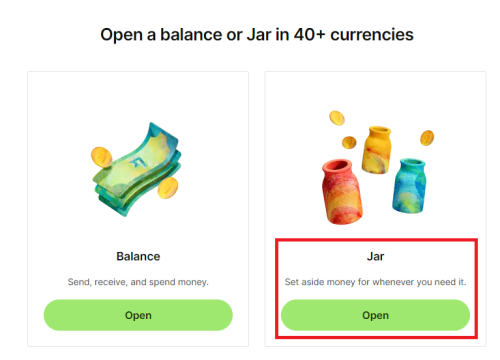 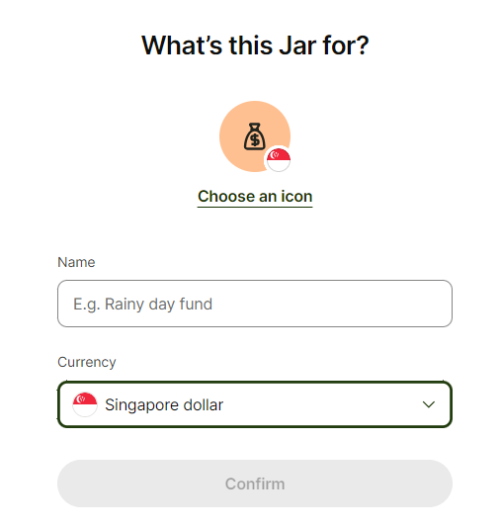 i used Jar before. in fact, it's too effective as sometimes I'll wonder why i have insufficient funds. our debit/credit card systems aren't designed to alert us if we have locked up money in Jars. it's a Wise feature 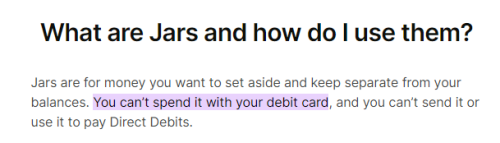 I had a look at my account and there are indeed two SGD accounts, one of it being jar. I think the money that was deducted in the past should be in the SGD account and not jar. I've put in some money in this jar and I'll see if it gets deducted first when my SGD online payment is made. Thank you once again. |
|
|
|
|



 Quote
Quote

 0.0707sec
 1.01
1.01
 7 queries
 GZIP Disabled