Welcome Guest ( Log In | Register )

Outline · [ Standard ] · Linear+

 Wise (Transferwise) Malaysia Discussion, v1.0

views
     
BetterCallSaul
post Nov 30 2022, 09:57 PM

Getting Started
**
Junior Member
114 posts

Joined: Aug 2022
Has anyone used Wise to send funds to your friends/family overseas recently? I need to make a transfer (RM4k) to the Philippines, but looking at replies on Wise's recent tweets has me worried. People are complaining that their recepient isn't receiving the money, accusing Wise of theft, not responding to issues, etc. I see that Wise is one of the best rates, unless fellow forumers have other suggestions? I have also not used BigPay for remittance, any pros and cons?
BetterCallSaul
post Dec 10 2022, 03:36 PM

Getting Started
**
Junior Member
114 posts

Joined: Aug 2022
QUOTE(elea88 @ Dec 10 2022, 06:24 AM)
contactless cannot use in Msia or Singapore too. tested.
need use pin
*
For me it works both in Malaysia and Singapore thru contactless. In MY I've used it in convenience stores such as FamilyMart, MyNews and in SG I used it on the MRT, restaurants, supermarkets and convenience store, all works well.
BetterCallSaul
post Dec 13 2022, 06:06 PM

Getting Started
**
Junior Member
114 posts

Joined: Aug 2022
QUOTE(elea88 @ Dec 13 2022, 10:36 AM)
what setting you do that i did wrong?

Singapore.. if cannot wave.. cashier will get angry with me.
*
Everything is on it's default setting. One thing you can try is to change the spending limit to maximum under Manage > Account Limits > Contactless (this flow is for iOS) and maybe that might trigger the system to allow contactless. It's also worth noting my card is new, I am new to Wise and received my card in November. If all else fails, maybe can try contacting their support team and tell them that the contactless on the card is faulty.

user posted image

user posted image

Here are a couple of screenshots to show my payment success via contactless in MY and SG.
BetterCallSaul
post Dec 17 2022, 01:41 PM

Getting Started
**
Junior Member
114 posts

Joined: Aug 2022
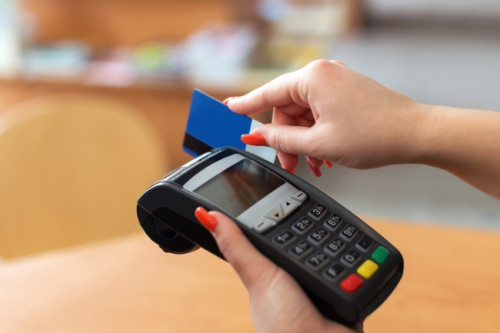
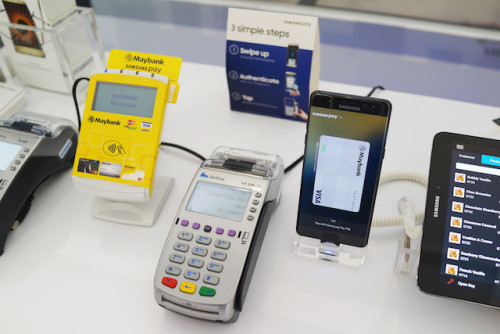
So I did some testing with the contactless, and if my assumption is right, it might be down to the actual card terminal (or bank acceptance?). I tried at 2 places recently, one at KK Supermart and another one in the same FamilyMart as my previous post. KK was using a Public Bank terminal which looks like this.

user posted image

While FamilyMart's terminal is like this (machine with keypad, issued by Maybank).

user posted image

I have not tried at any other places, or ones with more modern terminals (touch screen and e-wallet compatible). When I tried at KK, contactless did indeed fail, however at FamilyMart it was a success. Do you guys recall which banks terminal you interfaced with when making payment?
BetterCallSaul
post Dec 17 2022, 02:17 PM

Getting Started
**
Junior Member
114 posts

Joined: Aug 2022
QUOTE(CommodoreAmiga @ Dec 17 2022, 02:06 PM)
Hmm...but shouldnt WAVE be standard? I use SamsungPAY and never have a single problem. I will try use it the next few days.
*
It should be standard, but maybe for whatever reason the Wise card is special. Hopefully Wise will start supporting Apple Pay and Google Pay here soon.
BetterCallSaul
post Dec 17 2022, 04:43 PM

Getting Started
**
Junior Member
114 posts

Joined: Aug 2022
QUOTE(elea88 @ Dec 17 2022, 02:38 PM)
for Malaysia - i tried at Macdonalds and Guardian.
For curiosity sake. i will continue try at other outlet. this time i will take a photo of the terminal.

Singapore tried to wave 3 times.. cannot.
Waive at entry point of MRT can.. but cannot exit.
then the counter just charge the fare ask me pay cash.

Then she say so many foreigner try WISE can enter cannot exit.

I told her its because before i use it at entry.. the ticketing office check and say can be used.
*
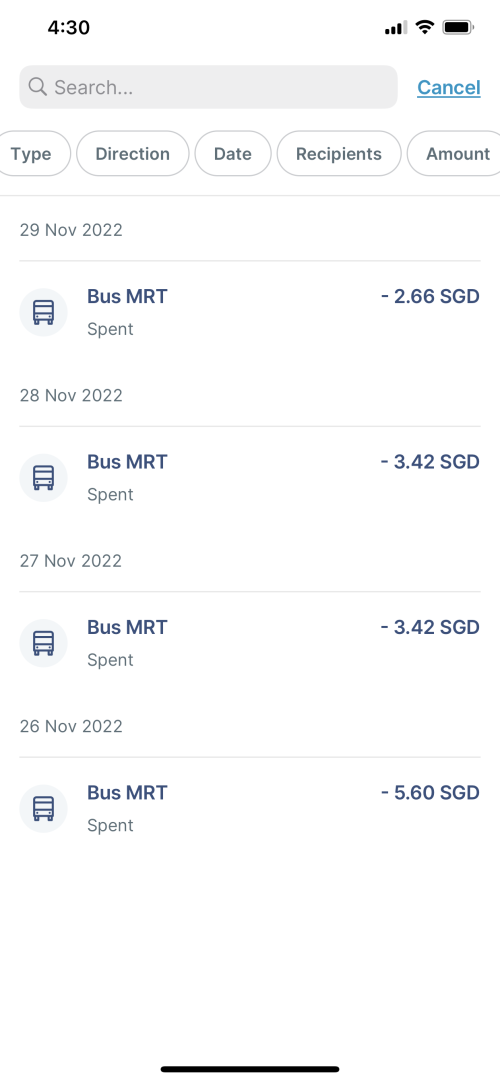
That's really weird that MRT didn't work for you when it did for me. May I know if you had SGD in your Wise account prior to entering the MRT? Or are you only holding MYR and doing on the fly conversion? In my case, I converted my MYR to SGD prior to tapping anywhere. Also, it did a "pre-auth" check (charged SGD 0) when I first tapped my card, then it only charges the amount on the next day. Attached are screenshots of my transactions. Note that I only used the MRT, and don't have experience for bus.
user posted image
BetterCallSaul
post Mar 17 2023, 10:29 PM

Getting Started
**
Junior Member
114 posts

Joined: Aug 2022
I am still able to change the country (dropdown not disabled), both on mobile and on web. Are you guys on the latest v8.1 on iOS? When I did it 2 days ago, I just change country only, and left my address as is.
BetterCallSaul
post Mar 28 2023, 12:25 PM

Getting Started
**
Junior Member
114 posts

Joined: Aug 2022
QUOTE(mr_robot @ Mar 28 2023, 11:12 AM)
need help!
is it really take so long to delivery the wise card? The apps shows get by 27/4 if i apply now. I need to travel on 23/4  cry.gif
*
It really depends on your luck and hope for no delays as they send it by normal mail untracked. Last time mine took about 3 and a half weeks to arrive. I believe they do have expedited delivery, but I'm not too sure on the cost. Otherwise you may try the country switch "workaround" to get the digital card added into your Apple Pay / Google Pay, assuming the country you are going to accepts contactless at most places.
BetterCallSaul
post Apr 1 2023, 11:04 PM

Getting Started
**
Junior Member
114 posts

Joined: Aug 2022
QUOTE(Koranshita @ Apr 1 2023, 10:49 PM)
Ha? So if I go to euro.. I need to make sure my rm is zero so it will use euro?
*
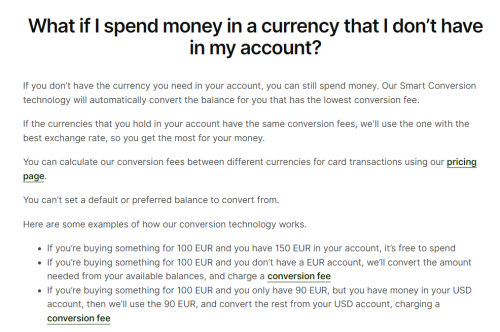
No. As long as you have EUR in your account, it will always deduct from the EUR currency first. Only if you don't have, it will auto convert from any other currency (MYR for example).
Refer to this following image example with the bullet points.

user posted image
BetterCallSaul
post Sep 23 2023, 11:47 AM

Getting Started
**
Junior Member
114 posts

Joined: Aug 2022
QUOTE(mushigen @ Sep 23 2023, 10:50 AM)
Dear all, I signed up for Wise yesterday. Been a long time user of Bigpay but recent changes make it necessary to switch to Wise.

1) With the physical card, I chose my name to be written as Tan Ah Beng (example), but the digital card is written as Ah Beng Tan by default.
I can't find any way to change it to Tan Ah Beng. Is this the default and not customisable?

2) if I intend to link my Wise to say, Paypal, or shop at overseas online stores, which card should I use - digital or physical or it doesn't matter? I'm currently using Bigpay and it only has one card so this  digital vs physical cards is something new to me.

3) If I intend to use the physical card for my holiday, say in Japan, do I need to first top it up with Yen or I can just top up with RM and it will auto convert when debiting my account?

TIA. I will still read through this thread for better understanding.
*
For 1) I believe you can't customise the digital card name as it is auto generated by Wise without input from the user. Or at least, that's my findings.

For 2) I prefer to use digital for all online purchases, so that in the event the card details gets leaked, you can easily freeze / delete that digital card without compromising your physical card (you can still make physical purchases no worries). Furthermore, Wise allows you to create up to 3 digital cards, so you can create another digital card - suppose to pay for goods on an overseas online store - and delete the digital card after without affecting your regular e-commerce websites with your existing digital card. BigPay also supports what they call a virtual card, which is the same concept as Wise's digital card, with similar functions.

For 3) No, you do not need to convert ahead of time and you can let it auto convert from RM to Yen. For me, I sometimes convert ahead of time for the purpose of budgeting, or if the currency I'm converting to is on the rise and want to lock in the "good rate" ahead of time.

BetterCallSaul
post Sep 24 2023, 11:05 AM

Getting Started
**
Junior Member
114 posts

Joined: Aug 2022
QUOTE(mushigen @ Sep 24 2023, 10:42 AM)
Thank you for taking the time to reply. Your reasonings for choosing digital card in Q2 certainly makes a lot of sense.

If you don't mind my further asking, let's say I managed to lock in a good rate, say I converted 100,000 yen. Now, if I swipe the card in Jpn, will it automatically deduct from the Yen balance first, or Ringgit balance first? The reason for converting is getting a good rate, but it defeats the purpose if the Yen is not utilised first imo.
*
Yes, it will always use the Yen currency first. You may refer to the following image and the bullet points.
user posted image
BetterCallSaul
post Sep 28 2023, 04:44 PM

Getting Started
**
Junior Member
114 posts

Joined: Aug 2022
QUOTE(mushigen @ Sep 28 2023, 03:23 PM)
Dear all,
I am new to Wise.

I had RM200+ and SGD10 in my WISE account. I used the virtual card to pay for a USD27 online transaction.

I realised WISE debited SGD10 and RM90+ to pay for this USD27 transaction. The SGD was in the form of (SGD0.50 in normal account and SGD9.50 in jar or vice-versa).

I expected WISE to deduct whatever RM balance first by default before touching the SGD since the transaction wasn't even in SGD in the first place?
Is this normal and is there any way I can set it to deduct RM first before touching other currency?
*
QUOTE(BetterCallSaul @ Sep 24 2023, 11:05 AM)
Yes, it will always use the Yen currency first. You may refer to the following image and the bullet points.
user posted image
*
As mentioned before, this image will answer your question. Basically it will automatically determine which is the best currency to convert from your available balances to help you save (In this case SGD rate to convert to USD is better than MYR). Subsequently, also mentioned in the image, you cannot set a preferred balance to deduct from. If you want to avoid this in the future, you have to convert to that targeted balance using your currency of choosing (MYR for example) before making the purchase.
BetterCallSaul
post Dec 11 2023, 11:06 AM

Getting Started
**
Junior Member
114 posts

Joined: Aug 2022
QUOTE(intothefantasy @ Dec 11 2023, 10:17 AM)
just got the card, need to ask, how to activate it? just go out and buy something with it? such as mcd is sufficient right?
*
Yup, just that first purchase need to use PIN to activate the contactless feature of the card.
BetterCallSaul
post Feb 18 2024, 10:03 PM

Getting Started
**
Junior Member
114 posts

Joined: Aug 2022
QUOTE(Skylinestar @ Feb 18 2024, 09:33 PM)
tried contactless payments at 2 cafe today. transactions went through. however, the wise app says "pending". dunno why.
*
Normal for it to say pending, as the amount is being processed to transfer to merchant's bank account. Usually will clear in 2 days.


Change to:
| Lo-Fi Version
0.0770sec    0.79    7 queries    GZIP Disabled
Time is now: 14th December 2025 - 12:21 AM